-
-
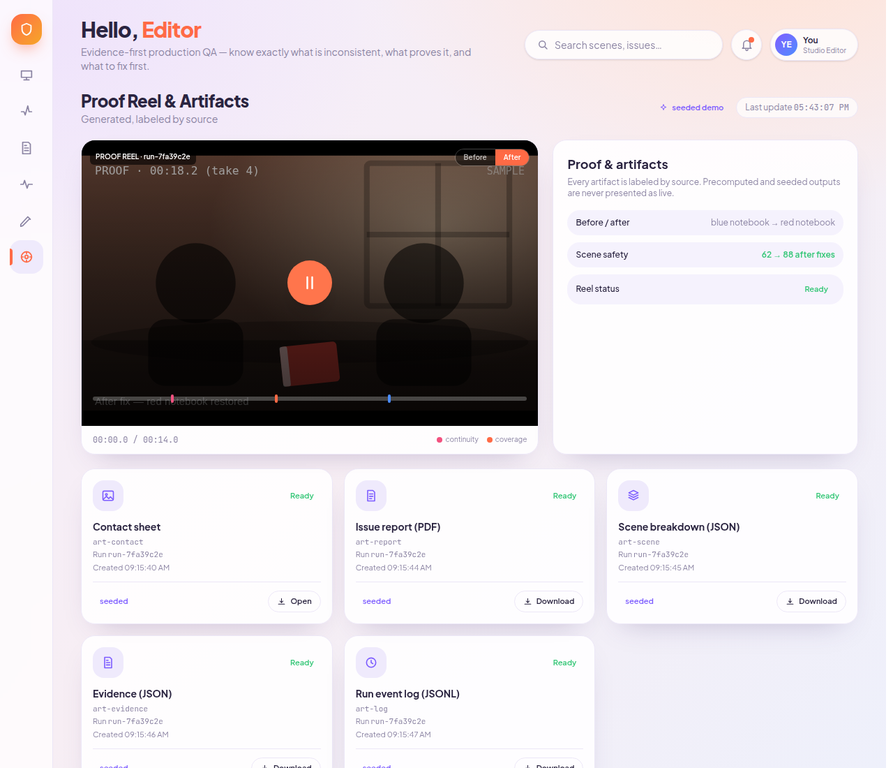
artifacts
-
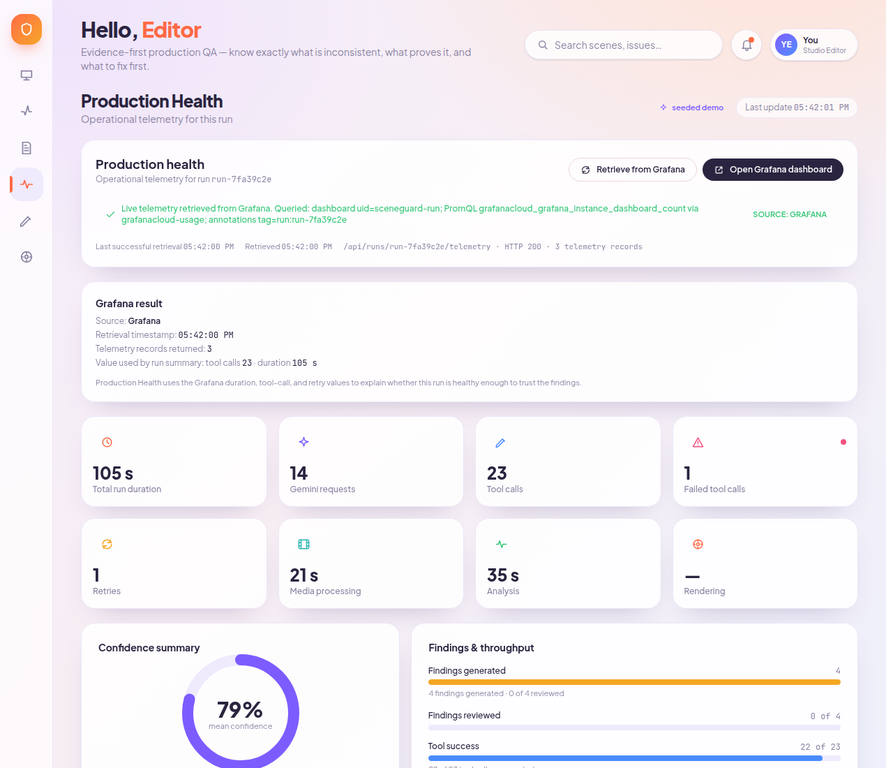
live grafana
-
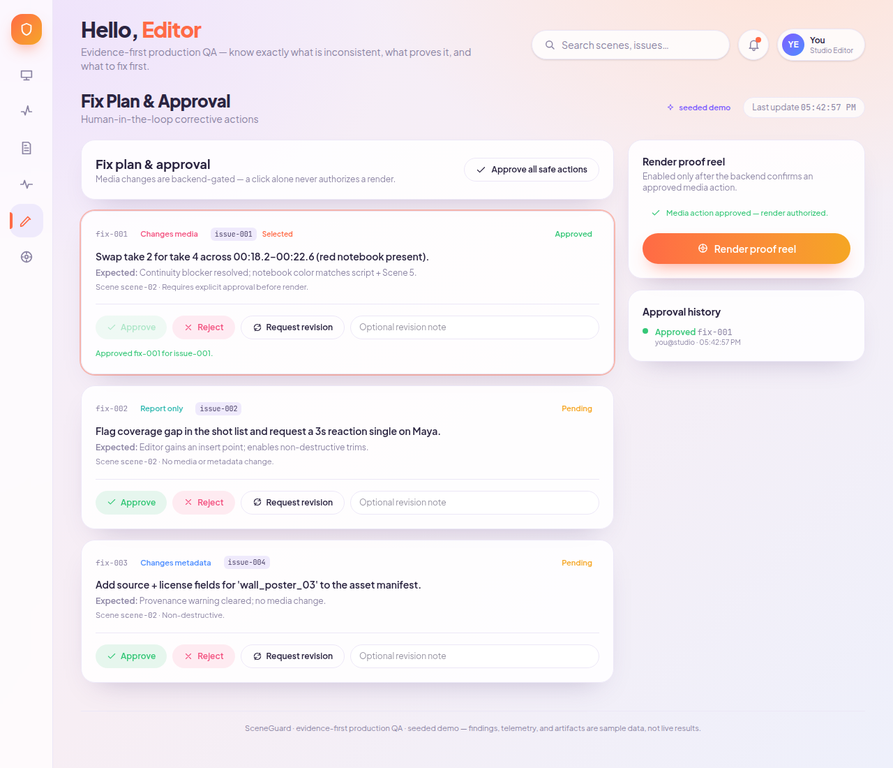
fix plan approval
-
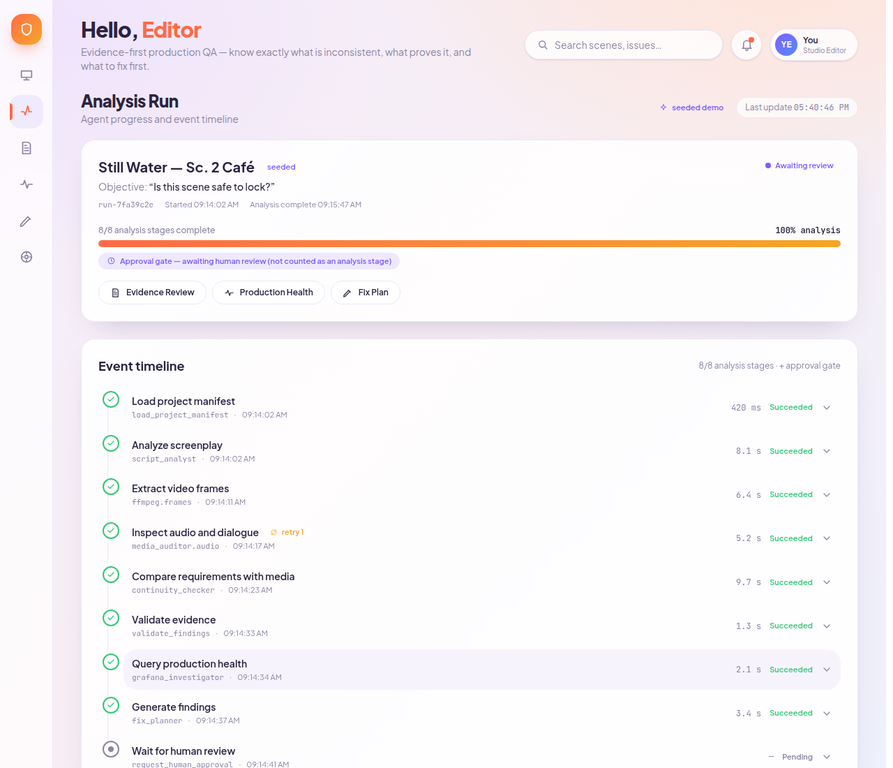
analysis
-

evidence/review

Inspiration
A small continuity mistake can survive several rounds of editing. A prop changes color, a line is shortened, or a shot that seemed usable turns out not to cover an important beat. These problems are easy to miss when the team is working through a large amount of footage.
We wanted to build something that could help an editor answer one practical question before locking a scene: "Is this scene safe to lock?" The idea became SceneGuard, a production quality assistant that checks a scene against the screenplay and shows the evidence behind each finding. We also wanted the system itself to be observable, so the team could see whether the agent was slow, failing, retrying, or producing unreliable results.
What it does
SceneGuard takes a screenplay and a rough-cut scene package, then produces a review of possible continuity, coverage, dialogue, and asset-provenance issues. Every finding is linked to a source, such as a screenplay page, a video timestamp, or a storyboard frame.
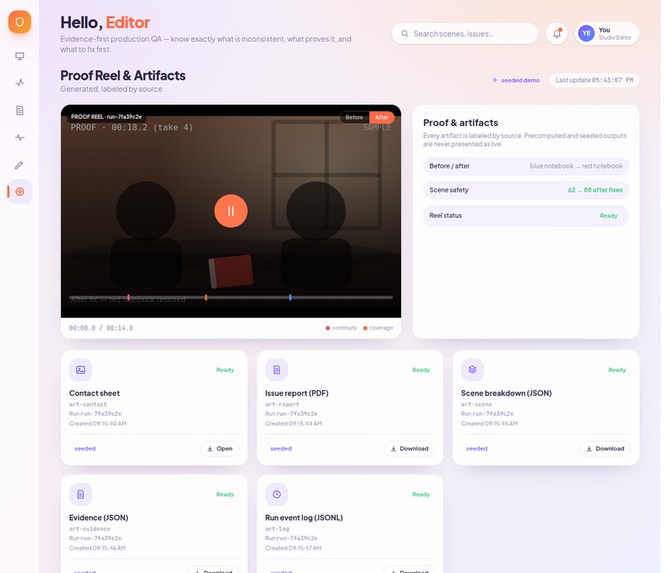
The seeded demonstration uses a short cafe scene. The screenplay says that Maya slides a red notebook across the table, while the selected take shows a blue notebook. SceneGuard brings the two pieces of evidence together, points to page 4 of the screenplay, identifies the affected video range from 00:18.2 to 00:22.6, and recommends replacing the take.
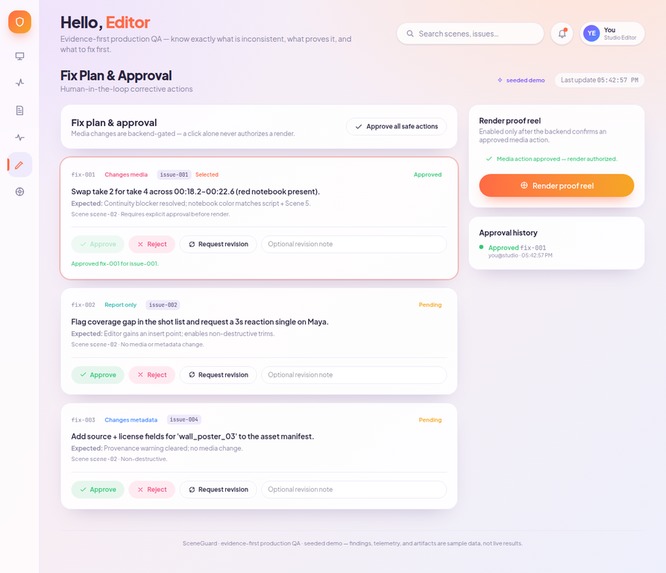
The editor remains in control. SceneGuard does not render a media change immediately. The editor can review the finding, approve or reject the proposed action, and then render a proof reel. The final artifact shows the before and after state and labels whether the result is seeded, precomputed, or live.
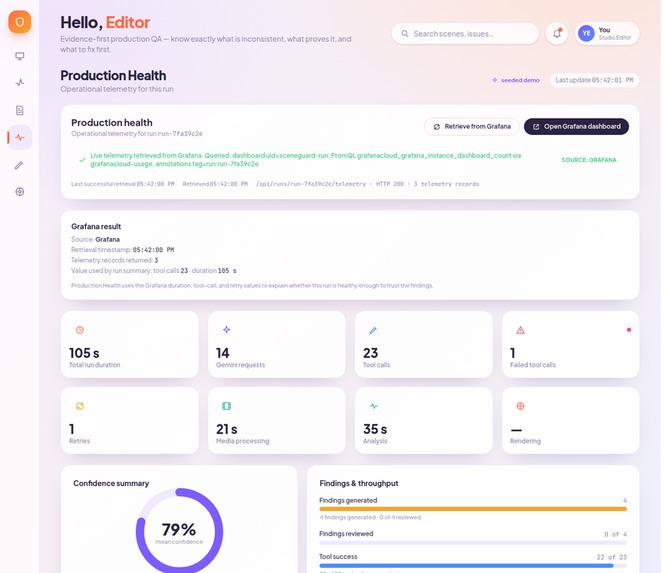
SceneGuard also connects to Grafana. The Production Health view retrieves live run telemetry, including tool calls, duration, retries, failures, the retrieval timestamp, and the source of the data. If Grafana is unavailable, the application clearly displays seeded telemetry instead of pretending that sample values are live.
How we built it
We built the frontend as a React and Vite application and hosted the complete application on Google Cloud Run. The backend is a small Python FastAPI service. The frontend calls the backend for telemetry, approvals, and rendering, while server-side configuration keeps Grafana credentials out of the browser bundle.
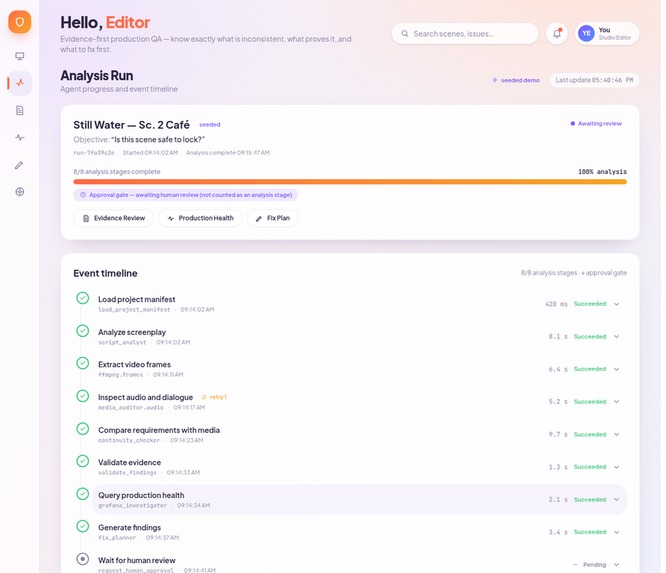
The interface is organized around a single review flow: Run Console, Analysis Run, Evidence Review, Production Health, Fix Plan, and Proof and Artifacts. The Analysis Run view makes the agent workflow visible. It shows eight completed analysis stages and keeps the human approval gate separate from analysis progress.
For observability, the backend connects SceneGuard to Grafana and retrieves live telemetry for the sample run. The dashboard and application show the relationship between the agent run and its operational data. We also added an honest fallback path for environments where Grafana is not configured.
We added current-run search, page-specific script evidence, timestamp navigation, approval history, accessible names for controls, route-specific document titles, live status announcements, responsive checks, and automated tests. The deployed application runs in the sceneguard-agentic-cinema Google Cloud project in the asia-south1 region.
Challenges we ran into
The hardest part was keeping the demo convincing without hiding what was simulated. A seeded scenario makes the demonstration repeatable, but it can also create confusion if the interface presents every value as live. We separated seeded evidence from live Grafana telemetry and added source labels throughout the workflow.
We also had to separate analysis completion from human approval. An agent can finish checking a scene while the editor is still deciding whether to accept a proposed change. Treating those as one progress bar made the state unclear, so we changed the workflow to show eight completed analysis stages followed by a separate approval gate.
Another challenge was connecting a frontend hosted on one origin to a backend on Cloud Run. We restricted CORS to the published SceneGuard origin, kept secrets on the server, and tested the public application instead of relying only on localhost.
Finally, the approval and rendering flow needed to be safe. The proof reel cannot be rendered until a media action is approved. This made the demo slightly longer to build, but it also made the product behavior much easier to explain.
Accomplishments that we're proud of
We are proud that the final demo is a complete workflow rather than a single generated answer. A judge can open the application, start the sample run, search for "notebook," inspect the screenplay and video evidence, view live Grafana telemetry, approve the proposed media action, render the proof reel, and open the final artifact.
We are also proud of the evidence trail. SceneGuard does not only say that a scene has a continuity problem. It shows the screenplay line, the video time range, the conflicting visual evidence, the confidence value, and the recommended action in the same review flow.
The public deployment passed the seeded workflow, frontend tests, end-to-end tests, TypeScript checks, backend tests, and production build checks. The public Cloud Run app also passed a live smoke test for Grafana retrieval, approval gating, proof-reel rendering, artifact display, and playback.
What we learned
We learned that an agent is easier to trust when its work is visible. The names of the analysis stages, the evidence links, the telemetry source, and the approval history all help the editor understand what happened before taking action.
We also learned that observability should be part of the product behavior, not an afterthought. Grafana is useful here because it helps explain whether the agent run itself was healthy enough to trust. A finding with strong evidence is more useful when the team can also see whether the underlying run had failures, retries, or unusual latency.
The most important lesson was to keep the human decision in the loop. SceneGuard can suggest a fix, but the editor decides whether that fix should be applied. That boundary is important when the output affects a real edit.
What's next for SceneGuard
The next step is to move beyond the repeatable seeded scene package. We want to support real screenplay and rough-cut uploads, persistent project storage, and longer scenes with more complex continuity relationships.
We also want to add more production checks, including character blocking, wardrobe and prop continuity across scenes, dialogue variations, shot coverage, and asset licensing. The same evidence-first workflow should apply to each check.
On the infrastructure side, the next improvements are persistent approval and render records, stronger authentication, and richer Grafana dashboards for comparing agent runs over time. The current version gives us a working foundation for testing that workflow with editors and production teams.
Built With
- artifact
- build
- cloud
- fastapi
- grafana
- manager
- mcp
- opentelemetry
- playwright
- python
- react
- registry
- run
- secret
- tailwind
- typescript
- vite
- vitest


Log in or sign up for Devpost to join the conversation.