-
-
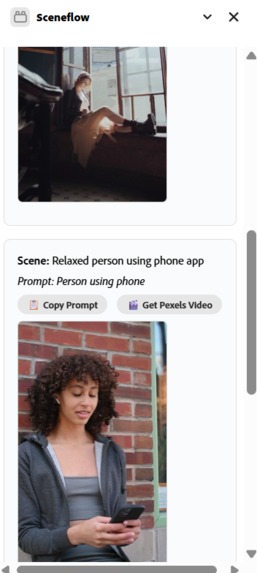
video clips got from pexels api
Inspiration
I’ve always loved the idea of turning a single thought into cinematic storytelling. But creating video content from scratch is hard — especially when it involves writing aesthetic prompts for AI tools like Adobe Firefly.
Most people don’t know how to phrase a good visual prompt, and that creates a creative block. I wanted to eliminate that barrier. That’s what inspired SceneFlow — a tool that takes one idea and turns it into 3–5 ready-to-generate scenes with no extra effort.
I wanted creators to start with a feeling, not a prompt, and still get beautiful B-roll visuals out of it.
What It Does
SceneFlow is a creative Express Add-on that:
- Takes a simple user idea (e.g., “a sunset walk by the beach”).
- Breaks it down into 3–5 cinematic scenes using the Gemini API.
- Auto-generates aesthetic prompts tailored for Firefly or Pexels.
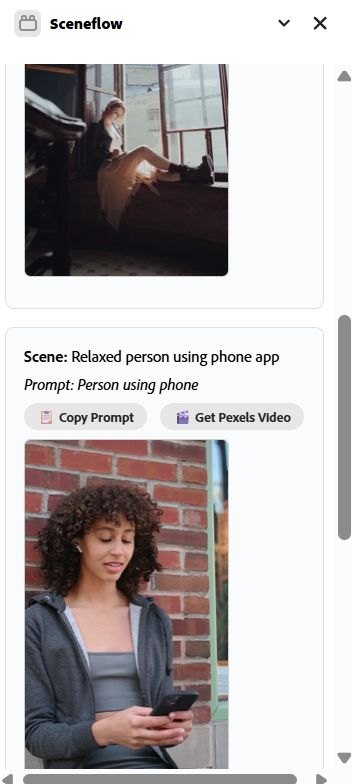
- Returns clip thumbnails and descriptions in a timeline format.
Here’s the cool part: the user doesn’t need to write any prompts. I trained Gemini to understand each scene using structured prompt templates, so one click gives a coherent, cinematic result.
Users can preview the scenes and use them in Adobe Express designs — without ever leaving the platform.
How I Built It
I used the Gemini API to convert abstract ideas into structured scene descriptions.
Each scene is built using predefined prompt scaffolds, like:
Shot Style: Wide cinematic | Mood: nostalgic | Scene: {description}
If Firefly support is unavailable, I fall back on the Pexels API for matching stock clips.
I built the UI using the Adobe Express Add-on SDK, with React and Spectrum components.
This architecture supports:
- Text input from user
- Backend call to Gemini
- Scene outputs with download links
Challenges I Ran Into
- No Firefly API access for video made direct generation difficult, so I simulated clip outputs using fallback sources (Pexels).
- The Express Add-on SDK doesn’t support video injection into timeline, so I designed the output around downloadable or embeddable assets.
- Prompt shaping was tricky Gemini is flexible, but I had to guide it to output scene-level breakdowns instead of just descriptions.
To make it more reliable, I fine-tuned how prompts are constructed using a form of template chaining
Accomplishments I'm Proud Of
- I went from idea to working prototype within days complete with full backend and frontend integration.
- I successfully removed prompt-writing from the user workflow.
- I proved that AI can act as a scene director, not just a tool.
What I Learned
- How to build within the Adobe Express Add-on framework, and navigate its limitations.
- How to translate narrative storytelling into generative prompts effectively.
- That fine prompt scaffolding makes a huge difference in visual output consistency.
What's Next for SceneFlow
- Support editing and reordering scenes inside the panel.
- Extend support to 15s and 30s reel formats.
- If Firefly APIs are released, integrate direct generation of 5s video clips.
SceneFlow will continue to grow into a full “idea to short video” tool — all within Adobe Express. I want creators to storyboard reels or B-rolls instantly, without technical skill or prompt writing.


Log in or sign up for Devpost to join the conversation.