-
-
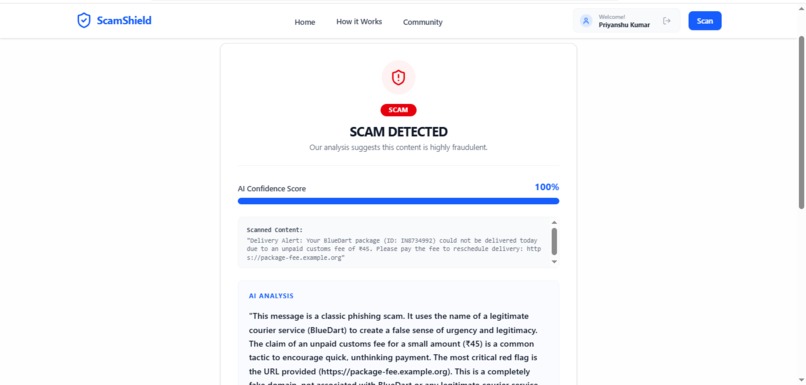
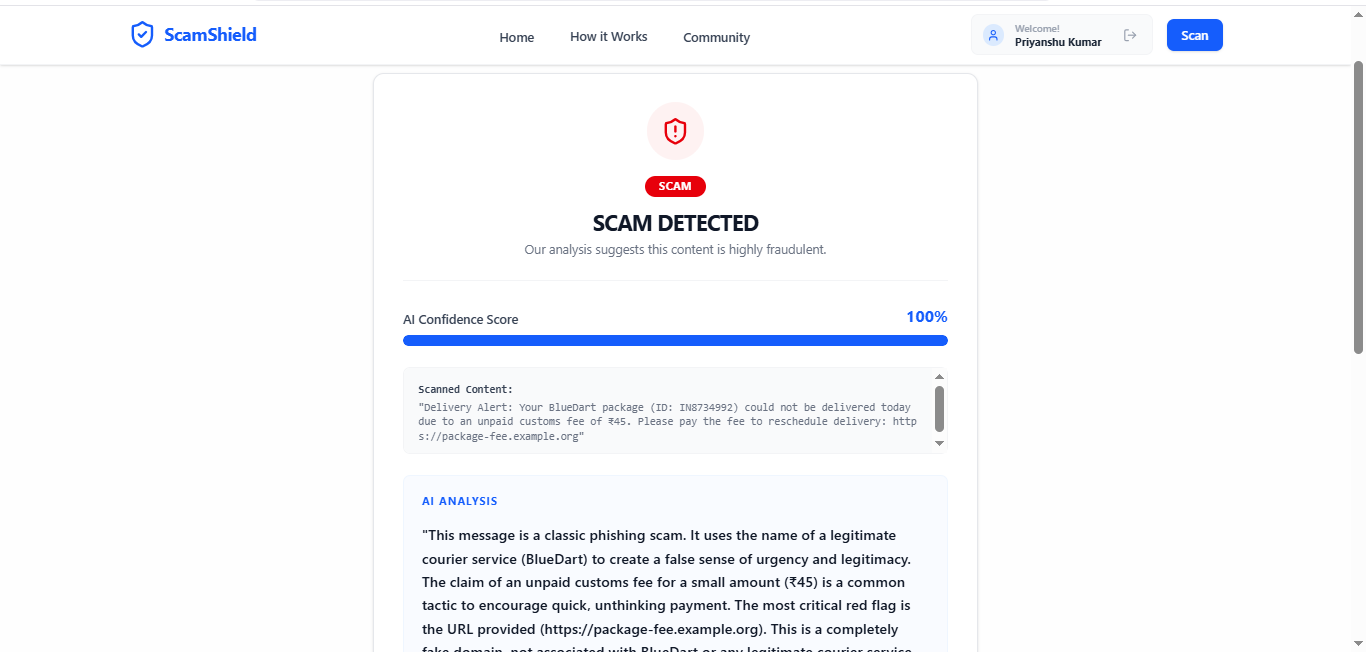
ScamShield — AI-powered scam detector that analyzes text, images & URLs to protect users from digital fraud
Inspiration
Every day, millions of people in India and across the world fall victim to digital scams fake job offers, OTP frauds, phishing links, and WhatsApp traps. India alone lost ₹1.2 lakh crore to digital fraud in 2024. What troubled me most was that most victims simply couldn't tell if a message was a scam especially when it came in regional languages. Existing tools were either too technical, English-only, or required IT knowledge. I wanted to build something that anyone could use paste a message, get an answer in seconds, in their own language.
What it does
ScamShield is an AI-powered scam detection tool that lets users scan text, images, and URLs for scam content instantly.
📝 Text Scan —> Paste any WhatsApp message, SMS, or email and get an AI verdict 🖼️ Image Scan —> Upload a screenshot; AI reads and analyzes it for scam patterns 🔗 URL Scan —> Paste a suspicious link; AI checks domain structure and red flags 📊 Confidence Score —> Every result comes with a confidence % and a red flags breakdown 🌍 10 Languages —> Results explained in Hindi, English, Spanish, Arabic, French, and more 🏘️ Community Feed —> Users can report scams to warn others, building a crowdsourced scam database
The verdict is simple: SAFE ✅ / SUSPICIOUS ⚠️ / SCAM ❌
How we built it
→ Frontend: React.js + Tailwind CSS + Redux Toolkit for a fast, responsive UI → Backend: Node.js + Express.js REST APIs with JWT + Google OAuth 2.0 for secure auth → AI Core: Google Gemini 2.5 Flash via LangChain.js for intelligent scam analysis → Image Storage: ImageKit CDN for handling and delivering uploaded screenshots → Database: MongoDB Atlas to store scan results, user data, and community reports → Deployment: Frontend on Vercel, Backend on Render
The flow is: User input → Express API → ImageKit (if image) → LangChain + Gemini analyzes → verdict + confidence + red flags → saved to MongoDB → shown to user.
Challenges we ran into
→ Getting Gemini to return consistent structured output (verdict, confidence, red flags) across different input types -> text, image, and URL each needed different prompting strategies → Hitting a roadblock with the live deployment. → Building the community feed with relatable/duplicate scam detection so users don't flood the feed with the same scam → Managing image uploads through Multer → ImageKit pipeline while keeping the scan flow fast and seamless → Balancing Google OAuth + JWT auth across frontend and backend securely
Accomplishments that we're proud of
→ Built a fully working full-stack AI product end-to-end from auth to AI to community feed → 10 language support making scam detection accessible to non-English speakers globally → The community crowdsourcing feature that turns every user into a shield for others → Clean, intuitive UI that anyone including non-tech users can use without any guidance → Successfully deployed and live not just a prototype
What we learned
→ How to integrate LangChain.js with Gemini for structured AI outputs in a production backend → Prompt engineering for multimodal inputs (text vs image vs URL require very different approaches) → Importance of UX simplicity when building for non-technical audiences every extra click is a barrier → How to design a crowdsourced data model that scales and avoids spam/duplicates → End-to-end deployment pipeline with Vercel + Render + MongoDB Atlas
What's next for ScamShield — AI-Powered Scam Detector
🔌 Browser Extension :—> Real-time scam detection as you browse 💬 ** WhatsApp Bot** :—> Scan messages directly inside WhatsApp 🎙️ Voice Input :—> For users who prefer speaking over typing 📧 Email Scan :—> Detect phishing emails directly 📱 Mobile App :—> React Native app for on-the-go protection 🧠 Custom ML Model :—> Train on our growing crowdsourced scam dataset 📊 Admin Dashboard :—> Analytics on scam trends by region and category
Built With
- axios
- express.js
- google-gemini-2.5-flash
- google-oauth-2.0
- imagekit
- jwt
- langchain.js
- mongodb-atlas
- mongoose
- multer
- node.js
- react-router
- react.js
- redux-toolkit
- render
- tailwind-css
- vercel


Log in or sign up for Devpost to join the conversation.