-
-

landing
-
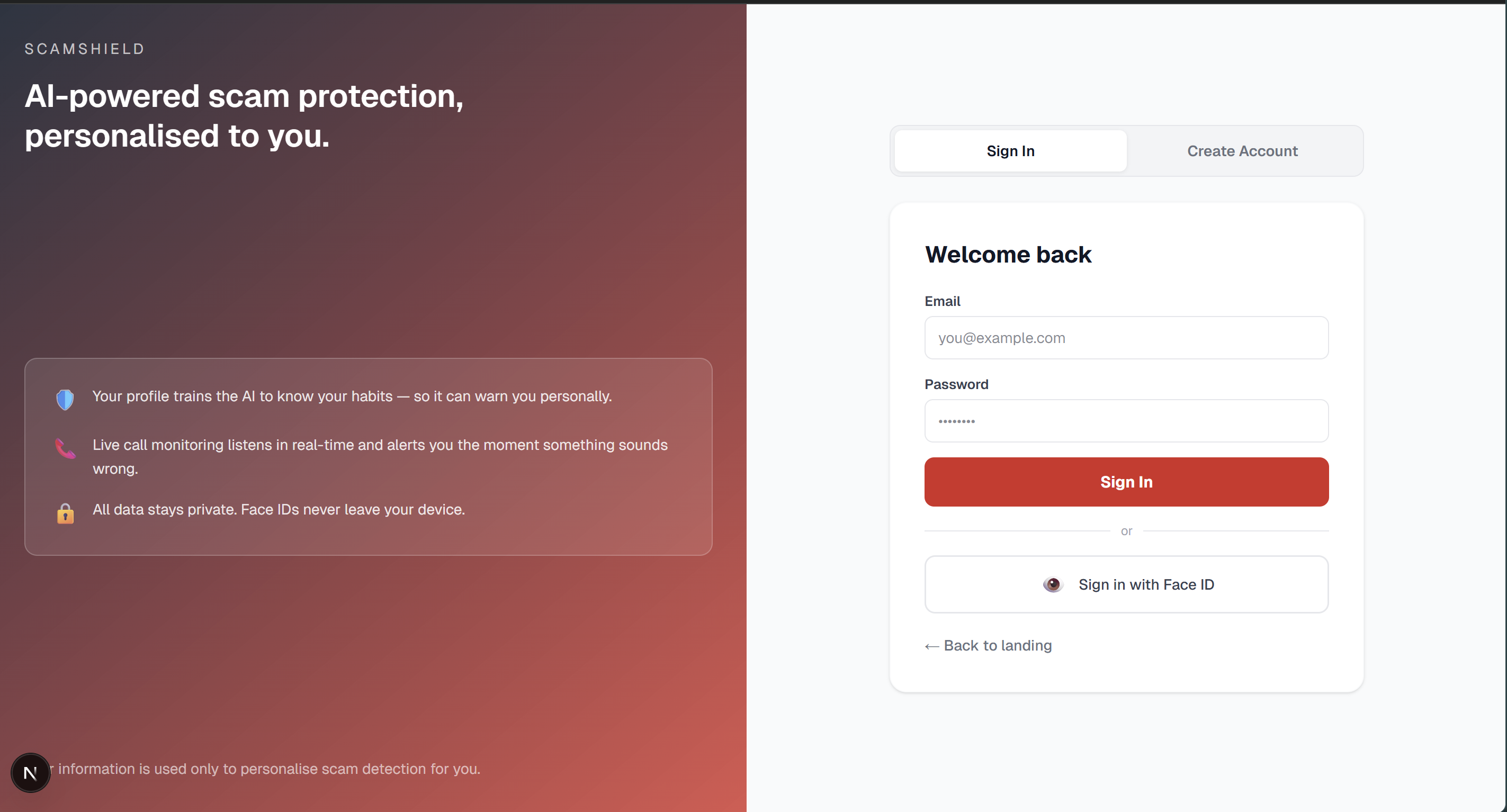
login
-
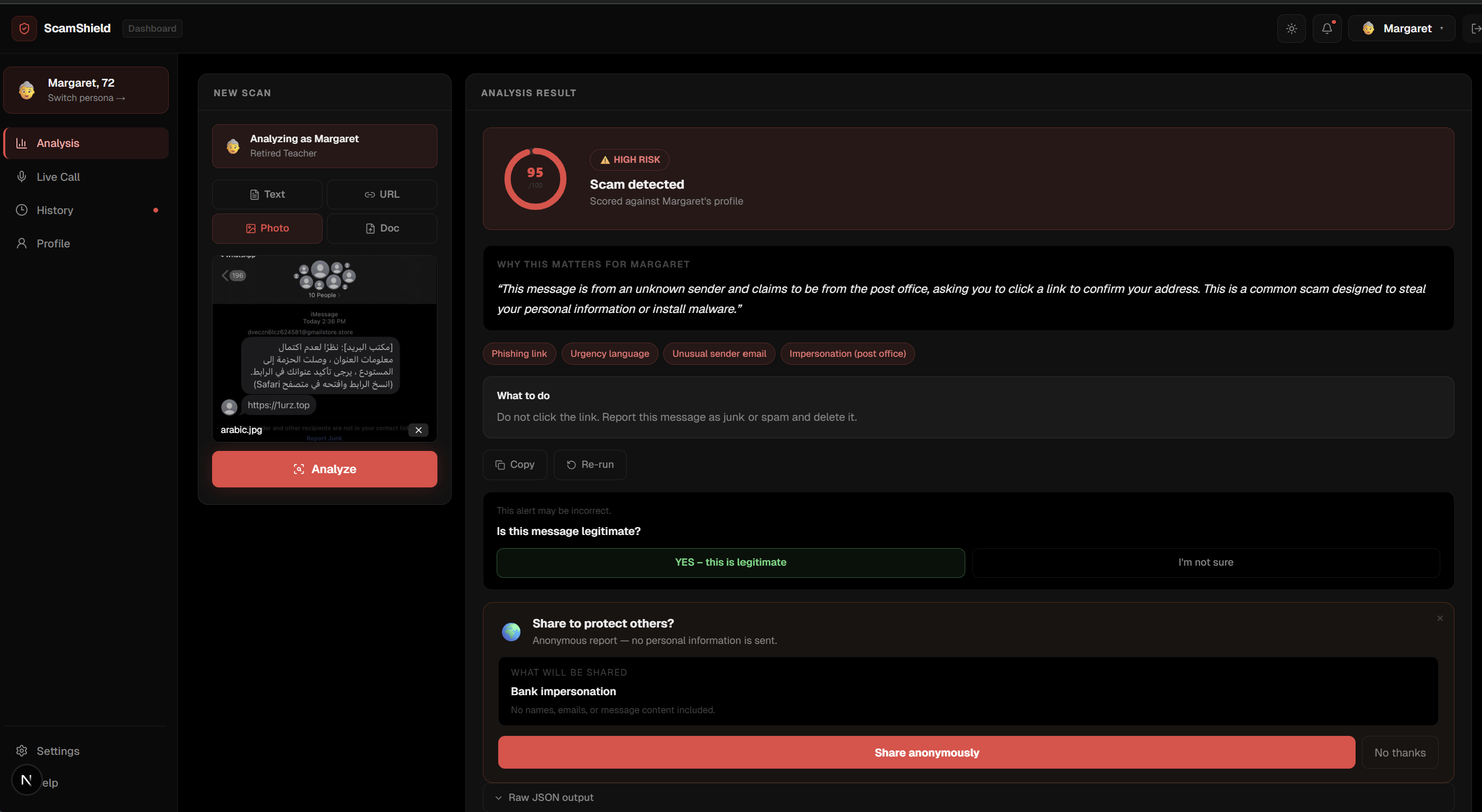
dashboard
-
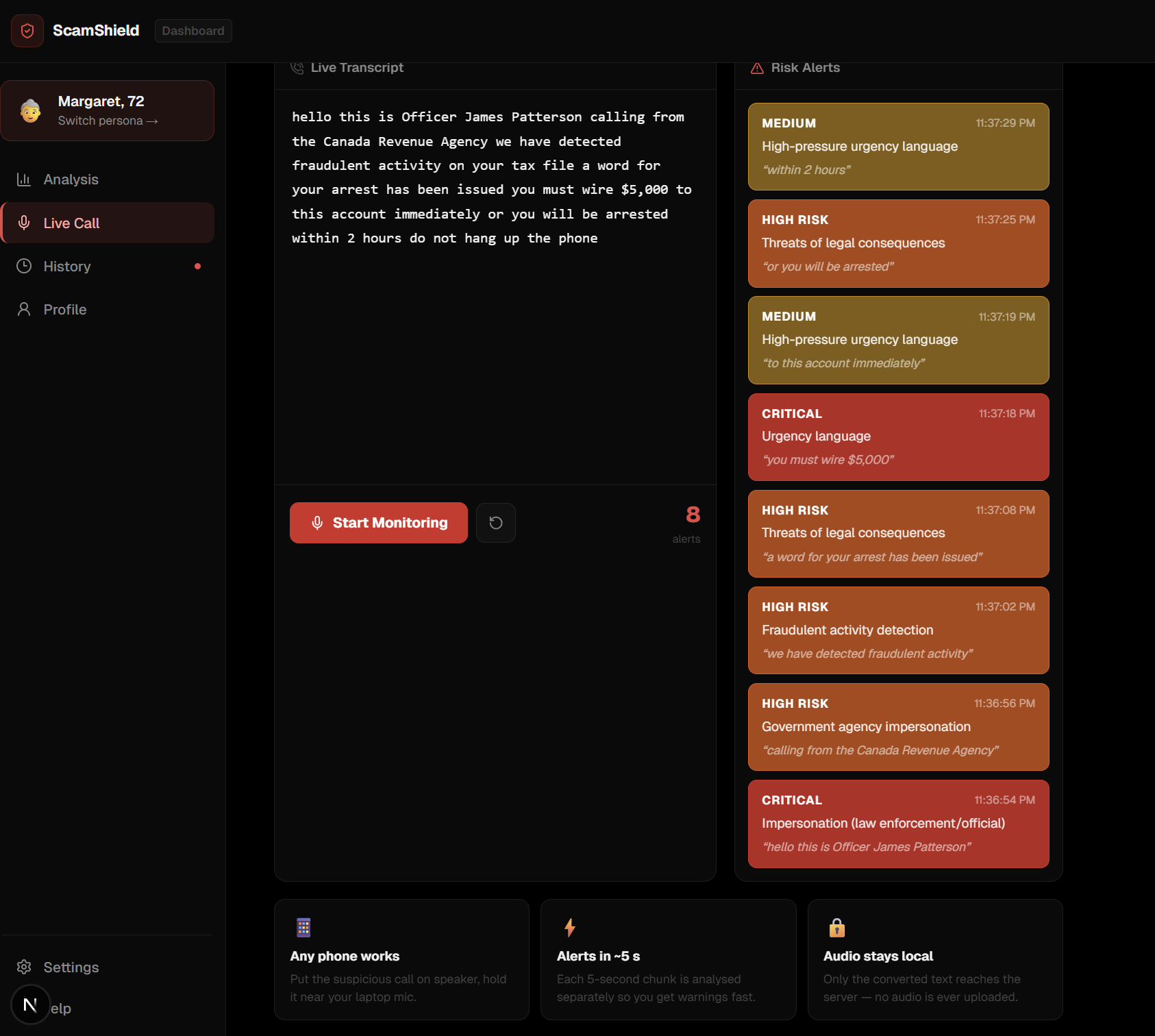
live call demo
-
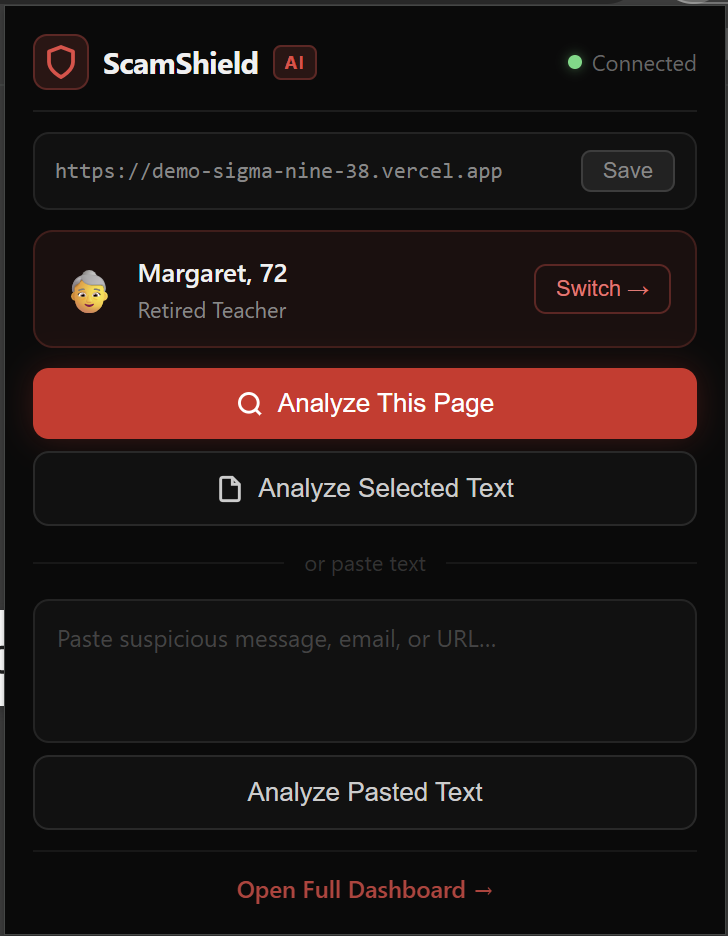
extension

ScamShield: AI Personal Fraud Guardian
Live demo:
https://demo-sigma-nine-38.vercel.app/
Inspiration
Vulnerable communities—seniors, immigrants, students, and first-time internet users—are often the primary targets of online scams. These attacks rely heavily on social engineering, urgency, and impersonation, making them difficult for many users to recognize before damage occurs.
Today, many fraud protection systems focus on detecting suspicious activity after a transaction has already happened or once fraud has already taken place. This creates a major gap: people often have little support while they are interacting with a potential scam.
We wanted to close that gap.
Our goal was to create a live fraud-protection assistant that helps users recognize scams as they happen. Instead of simply blocking suspicious links, ScamShield analyzes messages, websites, and conversations in real time and explains risks in clear, plain language.
By focusing on usability and accessibility, ScamShield acts like a personal fraud guardian—helping users understand what is happening, make safer decisions online, and giving vulnerable communities more confidence when navigating the internet.
What it does
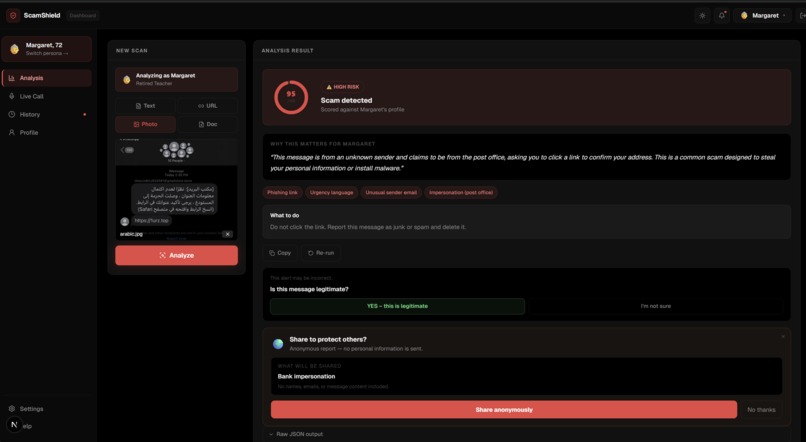
ScamShield analyzes messages, URLs, and soon images, providing users with clear, real-time insight into potential scams before they take action. The system evaluates content and returns:
- Risk level
- Immediate classification of whether content appears safe, suspicious, or high-risk
- Risk score
- A numerical confidence score indicating how likely the content is to be fraudulent
- Reasons for the decision
- Key signals detected by the system such as impersonation patterns, urgency tactics, or suspicious links
- Plain-language explanation
- A simple explanation designed to help everyday users understand why something may be dangerous
- Recommended actions
- Practical guidance such as avoiding links, verifying sources, or reporting suspicious activity
ScamShield uses IBM watsonx.ai as the primary intelligence engine, with the flexibility to integrate other advanced models such as Google Gemini or OpenAI depending on deployment needs.
To reduce false positives and provide more meaningful protection, the system also incorporates user behavioral context. Instead of analyzing messages in isolation, ScamShield considers how each user typically interacts online.
For example:
If a user has never interacted with cryptocurrency, a message asking them to urgently transfer funds to a crypto wallet would be flagged as highly suspicious.
In addition to message analysis, ScamShield performs URL safety checks to detect indicators commonly associated with phishing attacks, including:
- Suspicious or newly registered domains
- Fake login pages designed to capture credentials
- Brand impersonation targeting banks or trusted services
We built a web interface so users can immediately test ScamShield and understand how it works. The same backend architecture will also power additional user-facing tools, including:
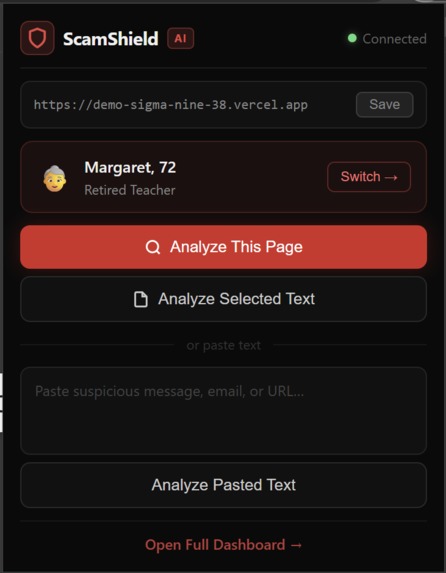
- Chrome extension
- “Analyze this page” for full webpage risk analysis
- “Analyze selected text” for quick message or email verification
- “Analyze this page” for full webpage risk analysis
- User profiles
- Stores trusted websites and frequently visited platforms
- Learns typical online behaviors to improve future detection
- Stores trusted websites and frequently visited platforms
- Report storage
- Saves past AI predictions and explanations
- Allows users to review previous scans and patterns
- Saves past AI predictions and explanations
Users can also mark results as “scam” or “legitimate.” This feedback is securely stored and used to continuously refine the system’s future predictions and reduce incorrect alerts.
Additional accessibility and safety features include:
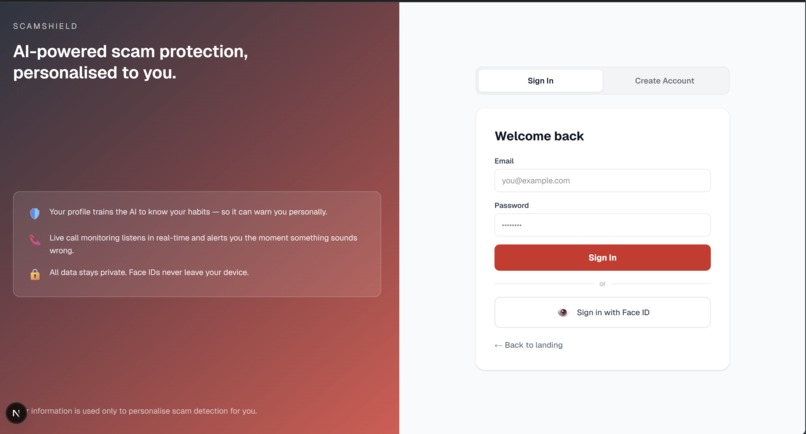
- Face ID authentication
- Enables secure account access
- Runs entirely within the browser so no biometric data leaves the device
- Enables secure account access
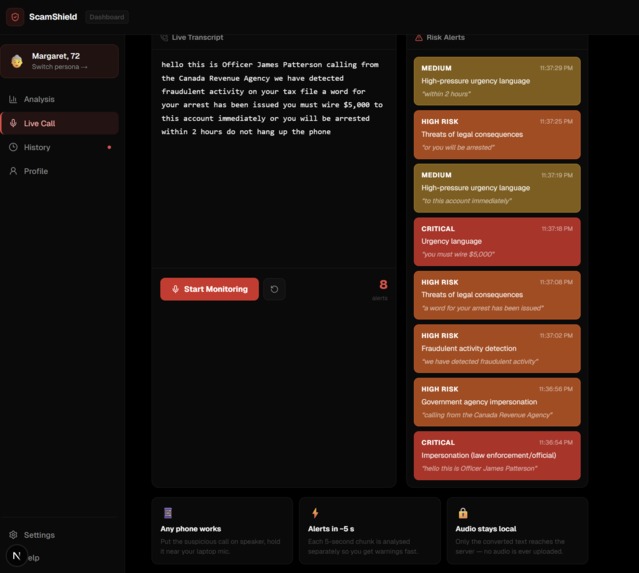
- Live call protection
- The browser transcribes active calls
- ScamShield analyzes the transcript for common scam language and pressure tactics
- The browser transcribes active calls
- Multi-language accessibility
- Planned support for 8 languages
- Designed to help Canada’s diverse immigrant communities navigate scams more safely
- Planned support for 8 languages
How we built it
We built ScamShield using Next.js, allowing the frontend and backend API to run in the same project and deploy together.
The AI layer connects to IBM watsonx.ai, but can also switch to Gemini or OpenAI using an environment variable.
The AI returns a structured response containing:
- Risk level
- Risk score
- Reasons
- Plain-language explanation
- Recommended next steps
We added behavioral context logic that compares incoming messages to known user behaviors. These hints are inserted into the prompt so the AI can explain things like:
“This message may be risky because you typically do not interact with cryptocurrency services.”
We also implemented phishing detection checks that identify:
- Suspicious URLs
- Unusual domain endings
- Fake login pages
- Brand impersonation attempts
If users previously corrected the AI (for example marking something as a scam or legitimate), those corrections are pulled from the database and used as examples so the AI improves over time.
Additional technologies used:
- face-api.js → Face ID authentication (runs entirely in the browser)
- Browser Speech API → Live call transcription
- Supabase → User profiles and report storage
Challenges we ran into
One of the most interesting challenges we encountered was figuring out how to improve a pre-trained AI model using user-specific context.
Pre-trained models are powerful, but they typically analyze inputs in isolation. For ScamShield, we wanted the system to make more personalized and accurate decisions based on how a user normally behaves online.
To address this, we explored techniques such as:
- User context integration
- Incorporating signals such as frequently visited websites, typical online activities, and known trusted platforms
- Few-shot prompting
- Providing the model with examples of previous scam classifications so it can better understand patterns
Through this process, we learned how behavioral context and example-based prompting can significantly improve the usefulness of a pre-trained AI system without retraining the model itself.
Getting watsonx.ai configured correctly required careful setup.
We had to ensure we used:
- The correct Granite model ID
- A full project UUID
Another issue was that the model sometimes returned extra text around the JSON response, so we implemented more robust JSON parsing to reliably extract structured results.
We also faced a deployment issue where the app initially loaded a blank page. This happened because some pages attempted to access the database at startup when Supabase environment variables were missing.
We fixed this by loading database features only when those pages are accessed, ensuring the demo still works even if Supabase is not configured.
Accomplishments that we're proud of
One AI system, three providers
Watsonx, Gemini, and OpenAI can all power the backend with a simple configuration change.Personalized risk detection
The AI analyzes messages based on users’ typical behaviors (for example detecting unusual crypto requests).Learning from mistakes
Users can submit feedback if the model makes a mistake, and this feedback is used to improve future responses.Accessibility features
Live voice call support and multi-language capabilities make the system usable for a wider audience.Privacy-first design
Face ID runs entirely in the browser, and call analysis only processes transcription rather than intercepting calls.
What we learned
We learned that structured prompts and clear API responses make collaboration across frontend, backend, and extension components much easier. Having a consistent response format allowed different parts of the system to communicate reliably and reduced debugging time.
Including behavioral context in prompts significantly improves the AI’s explanations and makes them more understandable for users. Instead of analyzing messages in isolation, the model can consider how a user typically behaves online, which helps it generate more meaningful risk explanations.
We also saw that real user feedback stored in the database can improve model consistency without needing full retraining. By allowing users to mark predictions as correct or incorrect, the system can refine future prompts and reduce repeated mistakes.
Another key lesson was the importance of designing AI systems for accessibility, not just accuracy. Clear explanations and simple language are essential when building tools meant to support vulnerable users such as seniors or first-time internet users.
Finally, we learned that building AI-assisted tools requires careful integration across many components—models, APIs, browser extensions, and user interfaces—all of which must work together smoothly to create a reliable user experience.
What's next for ScamShield
Next steps include:
- Launching the Chrome extension
- Connecting user profiles directly into the analysis workflow
- Expanding report storage and feedback data
- Supporting audio uploads for voice message scam detection
- Supporting image uploads for scam screenshots
Expanding to 8 languages, including:
- Chinese
- Punjabi
- Arabic
- Tagalog
- Chinese
Try it
Demo:
https://demo-sigma-nine-38.vercel.app/
Try the demo by:
- Selecting a persona
- Pasting a message
Using quick test examples such as:
- Crypto scams
- Job offer scams
- Fake bank alerts
- Safe messages
- Crypto scams
Built With
- gemini
- ibm
- next.js
- node.js
- openai
- react
- supabase
- typescript
- watsonx.ai


Log in or sign up for Devpost to join the conversation.