-
-
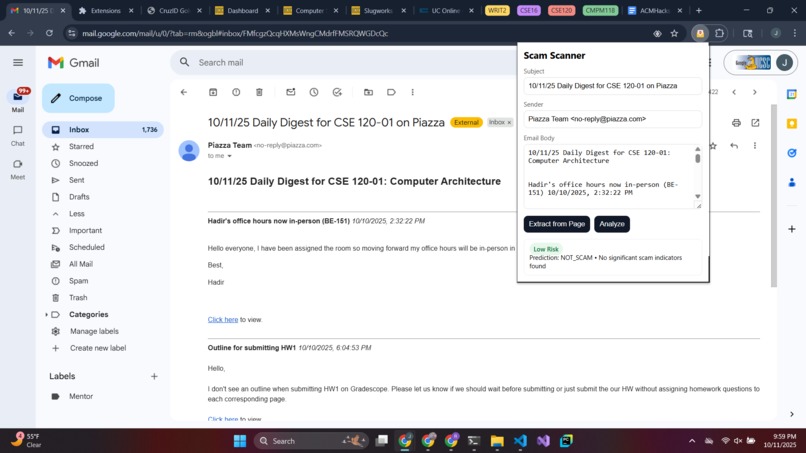
Low Risk Example
-
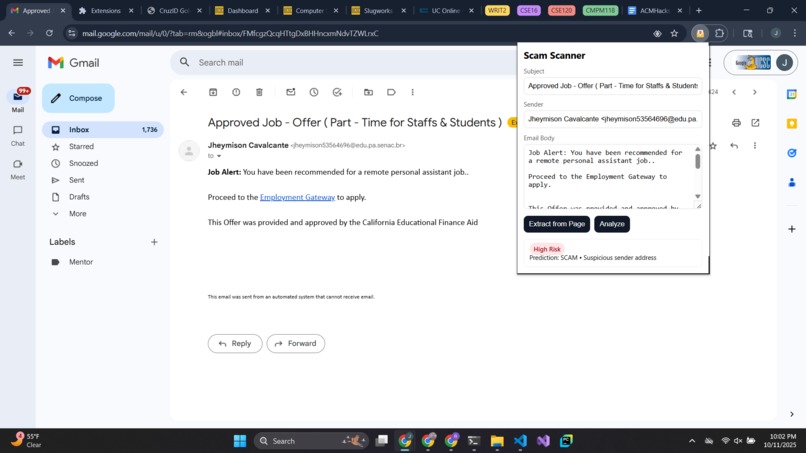
High Risk Example
Inspiration:
According to IEEE, 3 billion phishing emails are sent out every single day, putting users at risk of scams, data breaches, and identity theft. It is also reported that 75% of the cyberattacks start with a phishing email. With the increase in AI-generated messages, detecting the authenticity of the messages has gone beyond human ability.
Our Solution
Our project, Scam Scanner, helps resolve this problem by building a real-time defense system against malicious emails right inside the browser in the form of a Chrome extension that analyzes the email and scans it for signs of a scam attempt. In a matter of seconds, the scam risk level is displayed along with a short explanation, helping the user understand why the email might be unsafe. What makes Scam Scanner unique, along with predicting the validity of the email, is that it also educates users on phishing patterns and helps them see potential red flags on their own. It seamlessly works in the background without slowing down the browsing experience.
Technology Details
The Chrome Extension (& Frontend): To build the frontend, we used HTML, CSS, and JavaScript. The HTML helps display the popup window in the browser when the Chrome Extension is clicked. JavaScript extracts the visible details of the email from the webpage, like subject, sender, text, and the URL count. It only takes what is necessary and doesn’t breach privacy, as the extension requires only minimum permissions in the manifest file. The Scan happens when the user clicks the ‘Extract from Page’ button or inputs the data manually and clicks the ‘Analyze’ button. The email is then scanned, and the result is displayed in different color badges like green for safe, yellow for medium risk, and red for high risk. Chrome’s messaging feature is used to connect to content scripts with the background scripts for handling API requests. Fast API (Backend): Fast API serves as the backbone of the system. It handles the communication between the machine learning model and the Chrome extension. The Chrome extension sends the extracted email information to the Fast API endpoint as a JSON request. Fast API then processes the incoming email data, runs the model prediction, and returns the scam risk results in real time to the frontend, which displays the results in the Chrome extension popup window.
The model: The binary classification model powered the system by labeling emails as 0 (not a scam) or 1 (a scam), given the sender, subject line, body of the email, and the number of URLs. In order for the model to learn and train from the dataset, we needed to convert the text data into numerical data by implementing term frequency-inverse document frequency, or TF-IDF. TF-IDF is a vectorization method that calculates the frequency of words in a document against how frequently they appear in all the documents in the dataset to quantify the importance of those words. For the context of scam emails, we customized the TF-IDF vectorization method by specifying that only the top 200 single words or phrases with 2 consecutive words can be selected as features for the model to train upon. In addition to this, we chose to include the stop_word, min_df, and max_df parameters for the TF-IDF method to ensure that the more relevant words were chosen as features. For the model itself, we used TensorFlow’s Sequential model to create a model composed of a hidden layer, a dropout layer, and an output layer that followed industry standards. However, we edited our hidden layer to include L2 regularization to avoid overfitting the data. Regularization is the process used to balance the weights and generalize the model, and specifically, L2 regularization, also known as Ridge regularization, is the regularization practice that balances the weights of the model by adding penalties to the loss function based on the squared size of the weights. In compiling our binary classification model, we chose to use Binary Cross-Entropy as the loss function and Adam as the optimizer with a learning rate of 0.0001 since our dataset is quite big. After many runs of training, evaluating, and revising our model, we got an accuracy of 95% and started using our model to make predictions. By implementing a threshold of 0.5, we instituted a general rule to categorize the predictions either as 0 or 1.
Challenges and Lessons
Using Fast API for integration: Integrating different components of the project through Fast API was a key challenge. We had to make sure that there was seamless communication between the machine learning model, the backend API, and the Chrome extension components. This process taught us how to design clean and modular endpoints that handle data flow efficiently across different components.
Model Overfitting: Within the first few runs of building and training the model, we recognized that the model overfit the data which in turn became a big challenge for us to remedy. To begin with, our model had two hidden layers and two dropout layers which then had to be simplified into one hidden layer and one dropout layer. Additionally, the number of neurons in the hidden layer had to be reduced as well. Furthermore, we decided to include not just one more dataset to our training data, but four datasets including our own dataset of scam emails. By doing so, our model improved a lot and was no longer overfitting the data. As it took a lot of trial and error to reach the appropriate specifics of our model, we implemented an early stop function in the training of our data, so that if the model was overfitting, we could recognize the model’s behavior and make changes accordingly. In the end, this process of refinement taught us how to explore tools like simplifying model architecture and fine-tuning to create models that not only focus on accuracy within the pre-existing dataset, but also in the real-world.
Cross-platform issues: The team worked on the project on both macOS and Windows, which revealed compatibility differences in paths, dependencies, configurations, etc.
Git conflicts and merges: Collaborating through Git introduced challenges with merge conflicts, especially when multiple members worked on overlapping files. Resolving these issues helped us learn proper version control methods like committing frequently and communicating effectively.
What's Next?
More email data: The more various and diverse email data the model is trained on, the better it can generalize to real-world scenarios. By including emails from different sources, formats, and languages, the model can be made to be more robust to a variety of scam attempts. This protects users from emerging and evolving threats.
Using transformer-based models: Instead of relying on a base machine learning model, using a transformer-based model like BERT could allow the system to better understand the meaning of emails. Transformers can capture context, tone, and other cues that indicate scam attempts, enabling more accurate detections.
Scale and evolve: The Scam Scanner is built with future growth in mind. Its modular architecture allows the same ML pipeline to be extended beyond email, making it possible to detect scams in other communication channels such as SMS, WhatsApp, or corporate messaging platforms. By reusing the core text analysis and feature extraction components, the system can scale to new platforms quickly. This flexibility makes sure that the tool remains relevant as scammers shift to new mediums.
Enable community-powered defense: Every email analyzed by the system can contribute to improving the model. By collecting (anonymized/encrypted) features and outcomes, and further allowing users to submit scam reports, the system can continuously learn from new patterns of scam attempts. Over time, this creates a community-powered defense system where the collective intelligence of users helps strengthen protection for everyone.
Built With
- css
- fastapi
- html
- javascript
- python


Log in or sign up for Devpost to join the conversation.