-
-
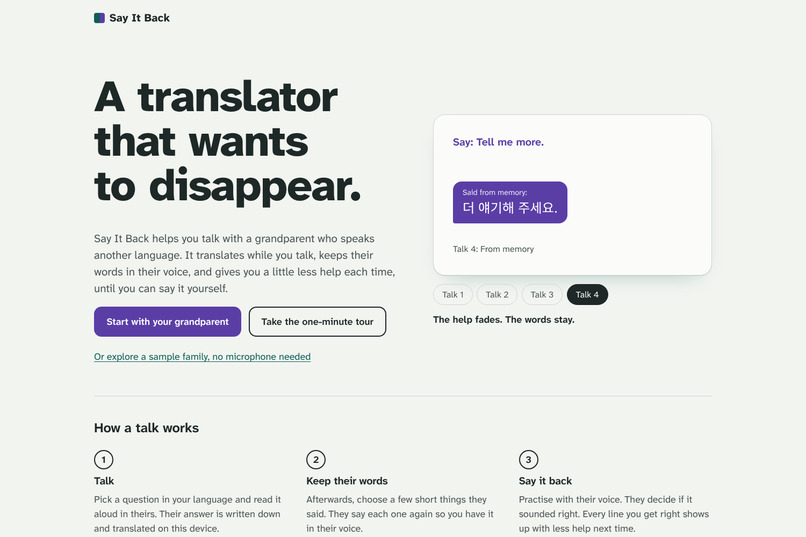
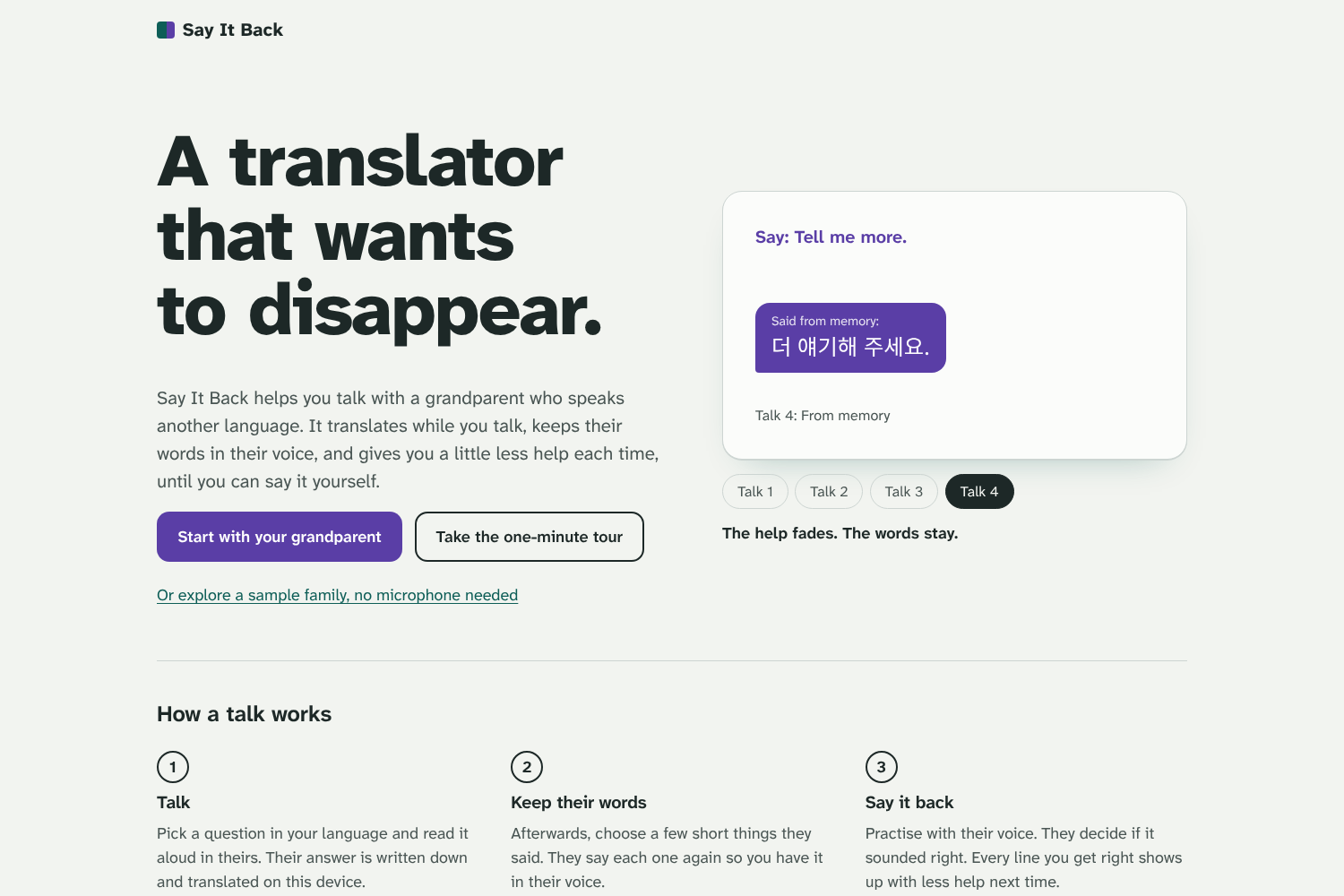
Home: a translator that wants to disappear. The help on one phrase fades over four talks.
-
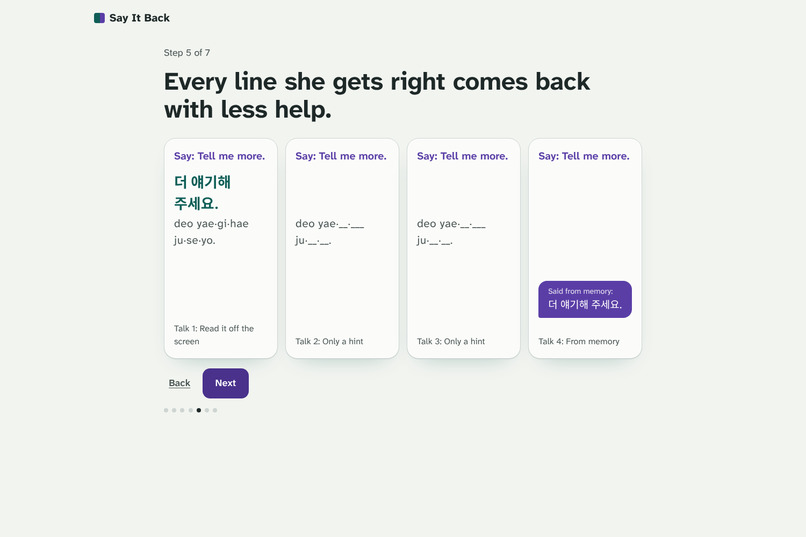
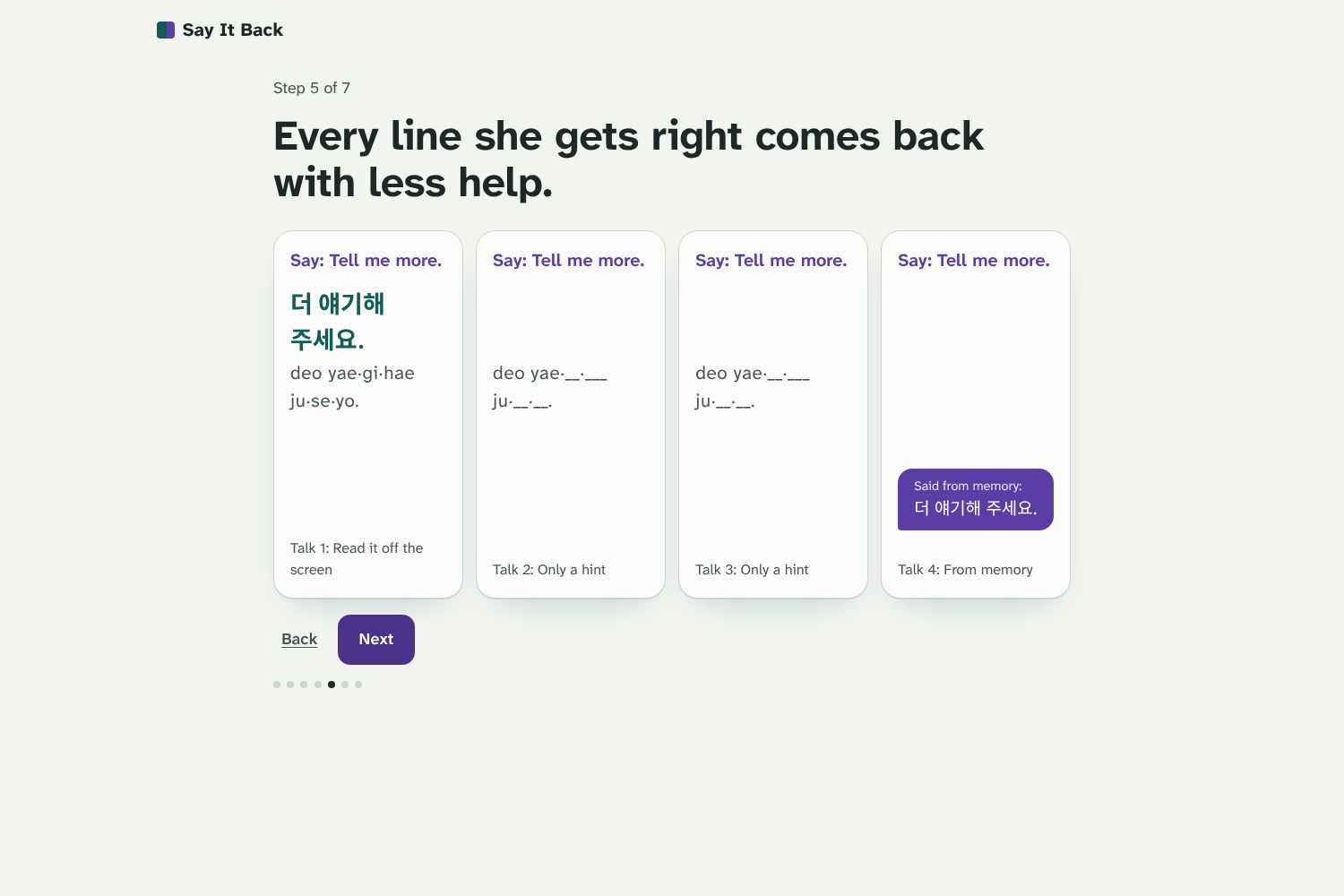
The same line over four talks: the full Korean line, then only a hint, then said from memory.
-
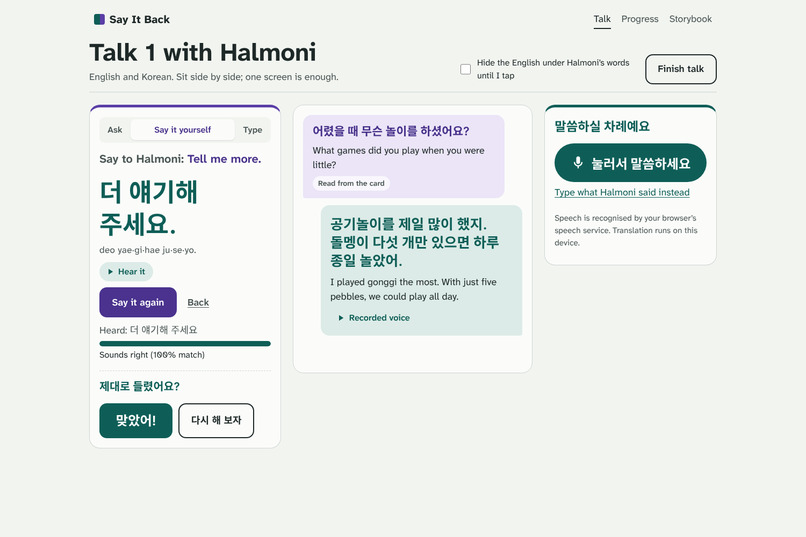
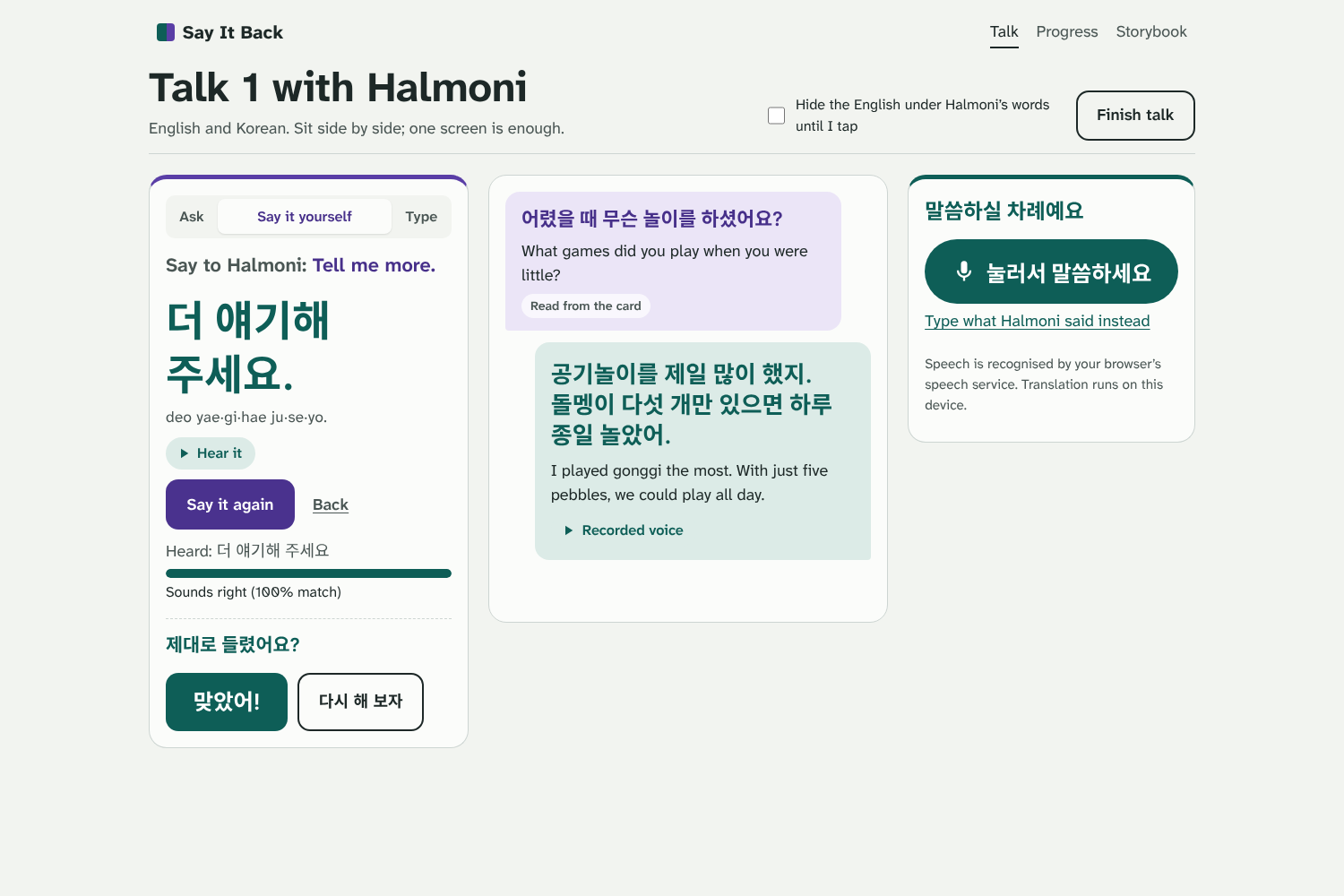
A talk: the answer is translated on the device, and the grandparent decides if the grandchild said it right.
-
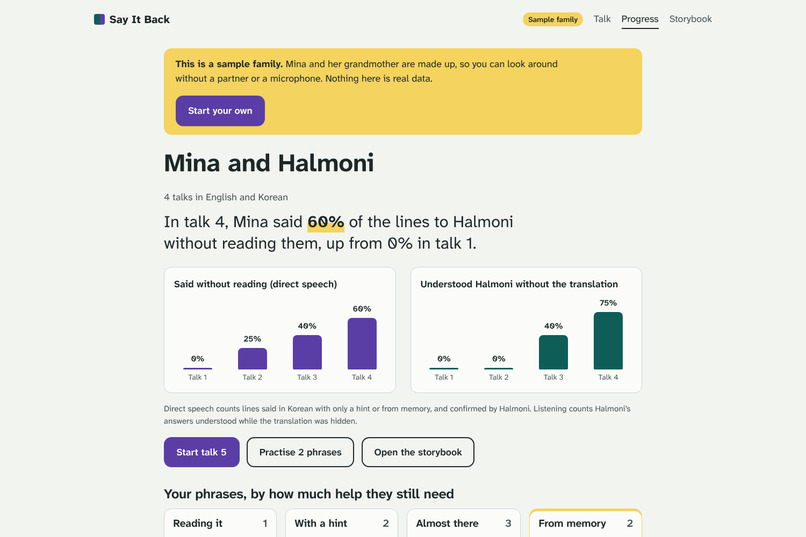
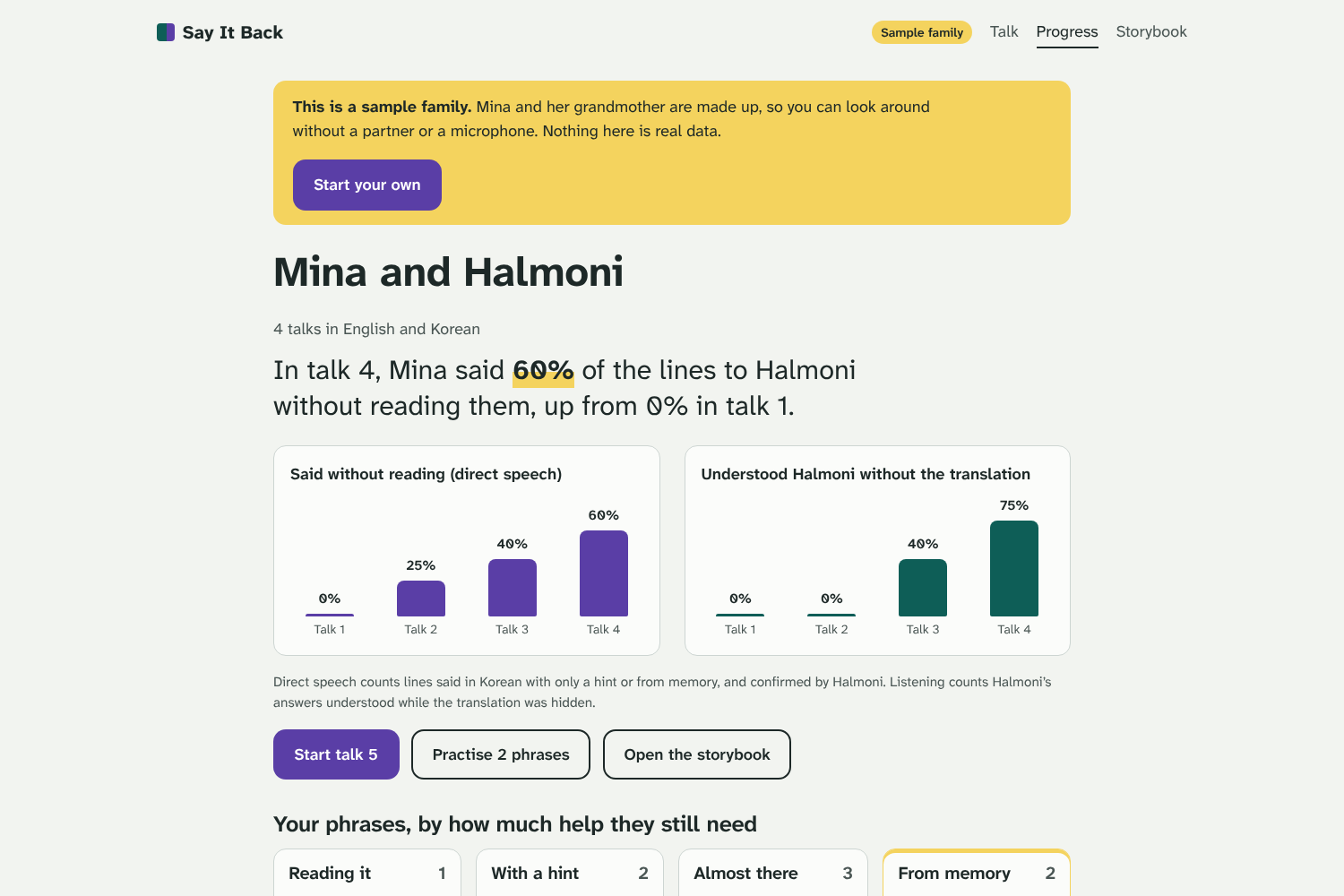
Progress for a fictional sample family: lines said without reading, and answers understood without the translation.
Try it: https://bugeon151.github.io/say-it-back/
Live talks need desktop Chrome 138+ (or Edge 148+) and a microphone. The one-minute tour and the sample family work in any browser, including phones.
Inspiration
One in four children in the United States has at least one immigrant parent. Many of them understand their grandparents' language but cannot speak it. In home workshops with 28 grandparents and grandchildren from immigrant families, researchers saw grandchildren who understood the family language but did not speak it, and grandparents who stopped listening when the children answered only in English (Liaqat, Axtell & Munteanu, CSCW 2021). Older immigrants from countries with a different language and culture are also significantly lonelier (De Jong Gierveld, Van der Pas & Keating, 2015).
Translation apps get a family through one conversation and leave the gap exactly where it was. Good teaching does the opposite: it gives help, then takes it away as the learner needs it less. Teachers call this fading (Wood, Bruner & Ross, 1976). So I built a translator that wants to disappear.
What it does
Say It Back is for a grandchild and a grandparent sitting side by side at one computer.
- Talk. The grandchild picks a question (24 built in, plus follow-ups suggested from the last answer) or types one. It appears in the grandparent's language with pronunciation, and the grandchild reads it aloud. The grandparent presses one big button and answers in their own language. The answer is written down, translated on the device and recorded in their voice.
- Keep their words. After the talk, the app offers short lines the grandparent actually said. The grandparent says each one again, so practice uses their voice.
- Say it back. The grandchild practises. The grandparent, not the computer, decides "Got it!" or "Try again". Every line that is right comes back next time with less help: the full line, then only a hint, then nothing.
| Level | What the grandchild sees | Comes back after |
|---|---|---|
| Reading it | Full line, pronunciation, meaning | next talk |
| With a hint | First sound of each word, meaning | 2 talks |
| Almost there | First sound of each word, meaning | 4 talks |
| From memory | Meaning only | 8 talks |
Two measures show whether the gap is closing:
- Direct speech: the share of the grandchild's lines said in the grandparent's language with only a hint or from memory, and confirmed by the grandparent.
- Listening: the share of the grandparent's answers understood while the translation was hidden.
Everything the grandparent said is kept in a printable storybook, in their words, with the translation and their recorded voice.
Try it without a microphone: the one-minute tour and a sample family (fictional, and labelled as such) work in any browser. Live talks need desktop Chrome 138+ (or Edge 148+) and a microphone.
How I built it
- React, TypeScript and Vite: a static site with no server and no account. Talks, phrases and recordings stay in the browser (IndexedDB).
- Chrome's built-in Translator API translates on the device. Everything the grandchild says by default (24 questions, 12 conversation lines, follow-ups) and the grandparent's buttons are hand-written in English and polite Korean, because machine translation often gets Korean politeness wrong. Other languages are translated on the device.
- Web Speech API for recognition (continuous for long answers, five alternatives for practice) and for reading lines aloud; MediaRecorder for the grandparent's voice.
- A pronunciation score that compares Korean letter by letter (jamo) instead of syllable by syllable, so one small slip is not treated like a wrong word. It is only a suggestion; the grandparent decides.
- A Korean pronunciation guide (Revised Romanization) that follows real sound changes: 맛있어요 → ma·si·sseo·yo, 감사합니다 → gam·sa·ham·ni·da, 같이 → ga·chi.
- A fading schedule based on Leitner boxes: a line moves up at most one level per talk and comes back after 1, 2, 4 or 8 talks.
Testing
- 47 unit tests and 53 end-to-end checks in real Chrome (tour, sample family, a full first and second talk, recording, practice, listening mode, reload, phone layout, a browser whose translation API never answers, and downloading the language pack). They run on every push before the site is deployed.
- The pronunciation score on 664 synthetic Korean text pairs: all 161 correct or one-slip versions accepted, and 0 of 420 different lines accepted. Comparing letters instead of syllables raised acceptance of two-slip attempts from 25 to 60 out of 72. (These are text pairs, not recordings, so they test the scoring, not speech recognition.)
- Anyone can time Chrome's on-device translation on their own computer at
#/benchin the app. - Checked by hand in desktop Chrome 157: after the one-time language pack download,
#/benchtranslated 26 sentences on the device (median 10 ms, slowest 44 ms). Speech recognition, voice recording and reading aloud are available. Full results: docs/bench-chrome-157.md in the repo.
Challenges I ran into
- Korean politeness. A grandparent speaks casually to a grandchild, but the grandchild must answer politely. In Chrome 157, machine translation used 당신 for "you" in 10 of 12 questions and never the honorific verb form, which sounds rude to a grandparent. So the lines the grandchild says are hand-written in the polite form; the grandparent's own casual words are kept as words to echo back, not lines to say to them.
- Who judges pronunciation. Speech recognition is unreliable for learners, so it only suggests a score and the grandparent decides.
- Not skipping the learning. Only the first verdict in a talk moves a line, so nothing jumps from "new" to "from memory" in one evening.
- A browser that never answers. Testing in an embedded Chromium, the Translator API existed but never responded, which froze setup. Every translation call now has a time limit, and the app falls back to typing the meaning.
- One click, one download. Testing in real Chrome 157 showed setup reporting a failed download although both directions were installed: Chrome's
create()uses up the click that allows a download. Setup now starts one download per click and decides from what is installed, with end-to-end checks for both cases. - Honest privacy. Translation is on the device, but Chrome's speech recognition uses Google's servers, and the app says so on screen.
Accomplishments that I'm proud of
- A complete loop that works today: talk, keep their words, practise, and the next talk shows less help.
- Measures that track the relationship (speaking and listening without help) rather than vocabulary counts.
What I learned
- How scaffolding and fading work in teaching, and how to turn them into a concrete schedule.
- Korean sound changes (linking, nasalisation, palatalisation), and why comparing letters is fairer to learners than comparing syllables.
- How far on-device AI in the browser has come, and how to fail gracefully when it is not there.
- Designing one screen for two very different people: a teenager and a grandparent.
What's next
- A video-call mode for grandparents who live far away.
- Sharing the storybook with relatives.
- Hand-written content for Spanish, Chinese, Vietnamese, Hindi and Tagalog, checked by native speakers.
- A study with real immigrant families.
Sources
- Migration Policy Institute, children with immigrant parents (26% of children, 2017 data)
- Liaqat, Axtell & Munteanu (2021), Participatory Design for Intergenerational Culture Exchange in Immigrant Families, Proc. ACM HCI (CSCW)
- De Jong Gierveld, Van der Pas & Keating (2015), Loneliness of Older Immigrant Groups in Canada, Journal of Cross-Cultural Gerontology
- Wood, Bruner & Ross (1976), The role of tutoring in problem solving, Journal of Child Psychology and Psychiatry
Built With
- chrome-built-in-ai
- css3
- github
- github-actions
- html5
- indexeddb
- mediarecorder
- playwright
- react
- speechsynthesis
- translator-api
- typescript
- vite
- vitest
- web-speech-api
