-
-
SAW Bridge
Inspiration
I kept reading the same sentence in every WebMCP write-up: give agents tools, not DOM. I agreed
with it completely. Then I opened a handful of sites I use every day with WebMCP enabled in
Chrome, and every single one of them handed the agent an empty document.modelContext.
That's the whole problem, right there. The standard is good. The tools don't exist yet, because somebody has to sit down and write them for every site, one at a time. So agents are back to guessing from screenshots on 99% of the web while we wait.
I got stuck on a question: why does registerTool exist as a runtime API at all? If tools were
meant to be a fixed list, you'd declare them once at load. But WebMCP lets you register at any
moment, and it ships a toolchange event so listeners find out when the surface changes. Most
people use that for SPA routing.
I wanted to see what happens if you take it literally. What if the agent registers the tools?
What it does
SAW-Bridge gives a page three meta-tools instead of a catalogue:
saw_inspect_page_scope— look at the page and report what it actually exposessaw_suggest_and_register_tool— design a schema and register a real, lasting WebMCP toolsaw_execute_code_mode— write code and run it once, for one-off work
The demo is a dashboard of world happiness and AI readiness data. It has a filter chip for happiness above 7.5. It deliberately has no chip for 7.4, and no tool for it either.
So I asked ChatGPT's in-app browser for 7.4.
It listed the page's tools, called saw_inspect_page_scope, found the site's own
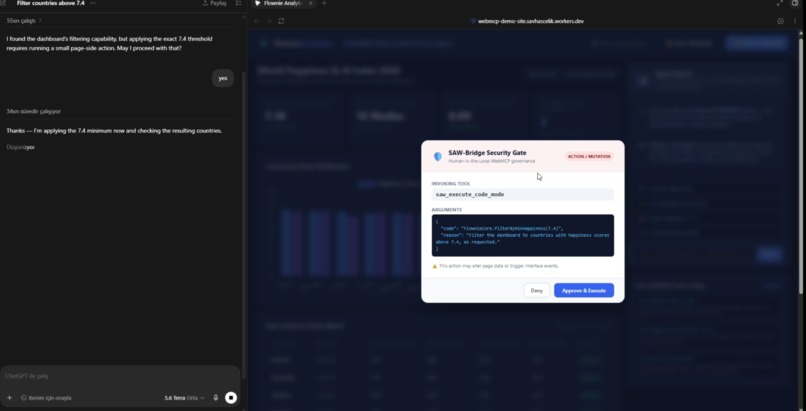
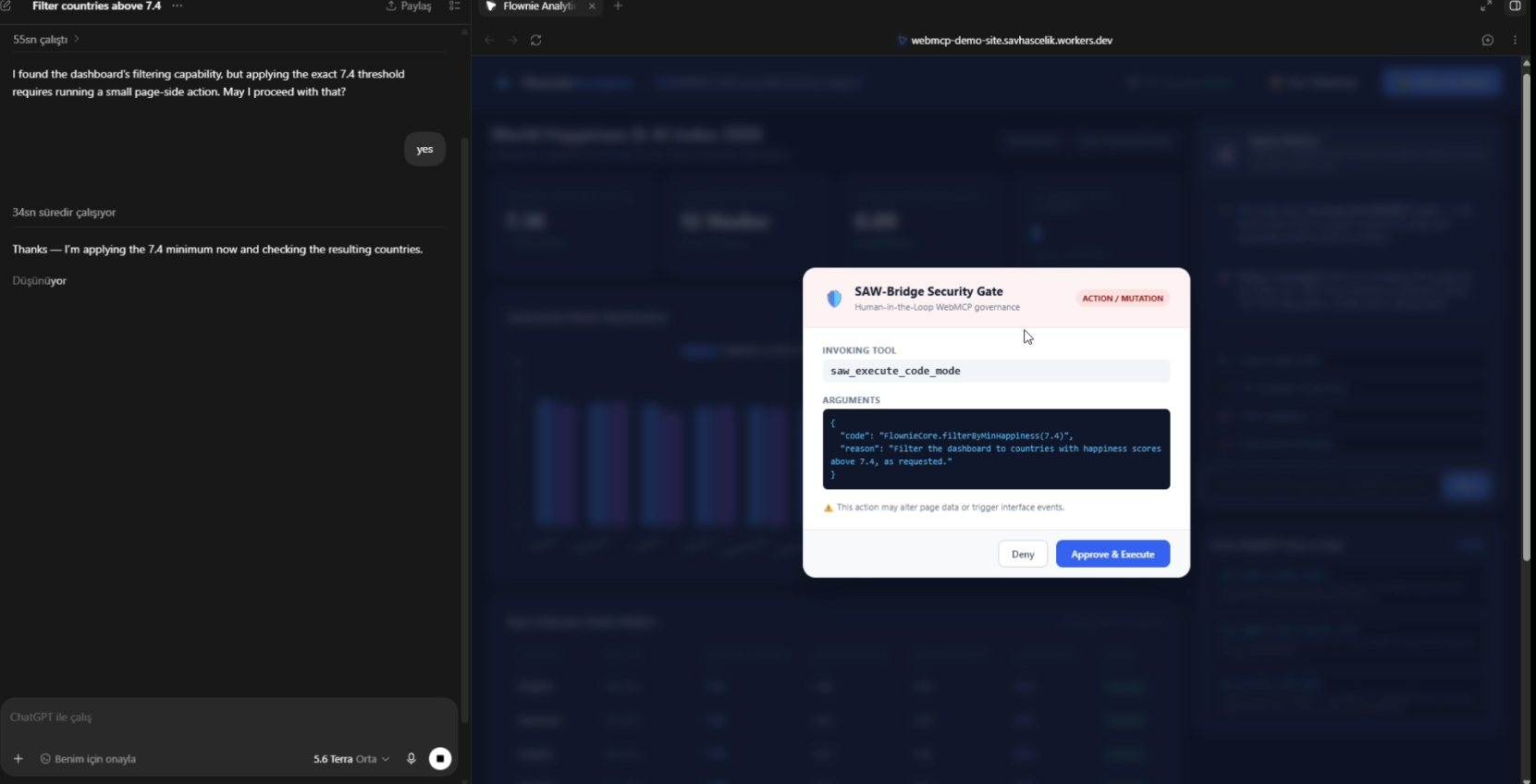
filterByMinHappiness function, and then it stopped and asked me before touching anything. I said
yes. The table dropped from twelve rows to four — Finland 7.82, Denmark 7.64, Iceland 7.56,
Netherlands 7.42. All above 7.4, and the chart re-rendered through the app's own code path, not a
simulated click on something that looked clickable.
The part I didn't expect is that the agent chose between the two strategies. For a one-off threshold it wrote code and ran it once, which is the cheaper call. Ask for something reusable and it takes the other path and registers a lasting tool — and then Chrome's own DevTools WebMCP panel lists that tool and will invoke it with your parameters, because by that point it's an ordinary WebMCP tool. It isn't picking between one blessed tool and scraping the screen. It's deciding how permanent its new capability should be.
Every mutating call goes through an approval dialog first, showing the exact tool and the exact arguments. There's a live audit drawer so you can watch what was discovered, assembled, approved and refused, and why.
There are two delivery surfaces sharing one engine: a single-file SDK a site drops in, and a Chrome extension that injects the same thing into sites that ship nothing.
How we built it
The core is plain WebMCP. Tools register through document.modelContext.registerTool(). Consumers
discover with getTools() and invoke with executeTool(). Registration takes an AbortSignal, so
aborting genuinely unregisters. Assembled tools get untrustedContentHint: true; read-only ones
get readOnlyHint: true.
Two pieces took actual thinking.
Finding what a page exposes. The interesting stuff on a page is buried among roughly a
thousand standard browser globals, and a hand-written denylist rots the moment Chrome ships a new
API. What worked: create a hidden iframe, read Object.getOwnPropertyNames off its contentWindow
to get a reference set of standard globals from the browser itself, then diff the real window
against it. Whatever's left is the page's own surface, and it stays correct as browsers change.
Then rank candidates before truncating — an object with callable methods outranks a bare object, which outranks a loose function. I learned that one the hard way, see below.
Compiling what the agent writes. This lands on the same insight as Cloudflare's
Code Mode: models handle capability better when they can
write code against an API than when they pick from a long list of tool definitions. I want to be
precise about the relationship — I did not use @cloudflare/codemode. Cloudflare runs
model-written code in a server-side Worker isolate. This runs it in the page's own realm, and that
difference is the reason the project exists. The currently applied filter, the selected row, the
chart instance holding the data — none of that exists outside the page. A sandbox elsewhere can't
touch what the user is actually looking at without replicating the whole session.
The token math lands in the same place by a different road. Code Mode collapses N tool definitions into one code tool. Here there's no catalogue to collapse: three meta-tools, and concrete tools show up only when a task calls for one. That's progressive disclosure, which MCP's own client guidance recommends when definitions start eating context — except the tools being disclosed don't have to exist yet.
Challenges we ran into
The demo was completely dead and looked fine. The SDK called init() at the end of its
bootstrap. There was no function called init anywhere in the file. The whole thing threw on the
last line, so the three meta-tools never registered — but the polyfill and the global had already
been assigned, so the page looked healthy and every button failed silently. I only caught it by
building a jsdom harness that clicked the actual buttons on the actual HTML.
My REPL couldn't run its own demo. The code path wrapped snippets in return (...), which
only accepts a single expression. My own demo passed a statement body. It threw a SyntaxError
every time. Now it tries the expression form, falls back to a statement body, and compiles async
so snippets can await.
executeTool doesn't take a tool name. The spec says it takes a RegisteredTool object from
getTools() and resolves with the stringified result. I'd written it to accept a string and
return a plain object. Against my own polyfill it worked perfectly. In a browser with native
WebMCP it would have rejected on the first call — the exact environment judges test in. That was a
genuinely unnerving thing to find.
It worked from file:// and broke as soon as I deployed. WebMCP needs an origin-keyed agent
cluster, which means an Origin-Agent-Cluster: ?1 response header. file:// is exempt, and
localhost is a secure context but is not origin-keyed, so this fails only after hosting, with a
SecurityError and no hint. Both runtimes now check at startup and name what's missing instead of
letting you guess.
The security dialog could be hijacked by the thing it was guarding against. This one bothered
me most. When an agent authors tools, tool metadata becomes untrusted input, and I'd built the
approval dialog with innerHTML. A payload like x</pre><img src=y onerror=...> renders live
markup inside the security gate and can click its own Approve button. I wrote the test first,
watched it fail, then fixed it: closed shadow root, DOM references captured at document_start,
every agent-supplied string inserted as text. Turns out this is a named attack class —
tool surface poisoning — and the spec's own boundary section
is still marked TODO.
I also found window.SAWBridge.setSettings sitting there in public, which meant one line of page
script could switch the approval gate off before an agent did anything.
I spent an evening debugging the wrong browser. I asked ChatGPT's browser plugin which WebMCP tools it could see and got a confident, detailed, completely wrong answer — it listed my UI button labels as if they were tools, and reported the tool counter as "0", which is the value in the static HTML before JavaScript runs. It had fetched my page, not executed it. That plugin surface isn't the WebMCP-enabled in-app browser. Once I tested in the right place, everything worked on the first try.
And the ecosystem was further along than I thought. Somewhere in the middle of this I found
@mcp-b/webmcp-polyfill, the desktop relays, the React hooks — all shipped, all solid. I sat there
for a while genuinely wondering whether I'd built something nobody needed. What snapped me out of
it was noticing what those projects have in common: they all treat the tool surface as trusted
freight to be transported. None of them ask what happens when the freight writes itself.
Accomplishments that we're proud of
The 7.4 moment. Not because it's technically dramatic, but because the page genuinely could not do it before and nobody wrote code for that specific request. It came out of inspection at runtime.
Fixing the injection bug properly instead of quietly. The test with that payload is in the repo and it fails against the old build, which means it measures something real rather than decorating the README.
Being honest in the polyfill. It rejects duplicate names, enforces the spec's 1–128 character name
rules, hides execute from getTools(), and returns a stringified result from executeTool — and
it throws a clear error if you pass a name string, telling you to pass a tool object instead. A
permissive polyfill is worse than none, because it makes broken code look correct until it meets a
real browser.
179 assertions across three jsdom suites: the SDK alone, the real index.html driven through all
four demo steps, and the extension's main-world runtime.
And the small stuff that meant the thing actually worked. Ranking discovered globals before
truncating the list — an unsorted slice(0, 20) was dropping the single most useful namespace on
the page, so the agent's report looked empty on a page full of opportunity. A tool counter that
printed "-3 JIT Tools" because it subtracted a hardcoded 3 before the kernel finished registering.
Probing for unsafe-eval at startup and writing "unavailable on this page" into the affected tool
descriptions, so an agent finds out from the description instead of an EvalError mid-task.
What we learned
Writing a polyfill teaches you a spec in a way reading it doesn't. Every shortcut I took — a convenient signature, a helpful default — turned into a bug the moment native WebMCP showed up.
Governance is the actual hard part, not tool generation. Generating a tool is a small amount of code. Making it safe to allow is where the work is: what happens when the tool name is hostile, when the page tries to switch off the gate, when the user revokes an origin mid-session and the agent still holds tools it registered there.
You can't sandbox code that shares your realm, and pretending otherwise is worse than admitting
it. The Proxy-based scope guard blocks cookie, localStorage, indexedDB and friends, but
anyone determined gets out through document.body.ownerDocument. So it's documented as a guard
rail that makes attempts loud, not as containment. I'd rather a judge trust the honest claim than
catch me on the inflated one.
Test in the environment you're shipping to, early. Both of my worst days were the same mistake in different clothes: my polyfill hid a spec violation, and the wrong browser surface hid a working feature.
Also: finding out someone already built part of your idea is information, not a verdict. It told me where my differentiation actually was, which was somewhere I hadn't been emphasizing.
What's next for SAW-Bridge — Self-Assembling WebMCP Bridge
A fallback for pages with a strict CSP. No unsafe-eval means no runtime code generation, so
JIT assembly can't run. Detection is done, mitigation isn't. The path is deterministic tool
synthesis from forms and semantic markup — no codegen needed, works everywhere, narrower but
honest.
Build-time tools for framework apps. In a bundled React or Vue app there are no custom
globals to discover and the DOM is the wrong abstraction; the semantic action is
dispatch(filter(7.4)), not a click. A build plugin can derive the JSON Schema from TypeScript
types and register a direct function reference. No eval, so the CSP problem disappears at the same
time. Route-scoped registration maps cleanly onto the AbortSignal the spec already gives us.
Interoperate with the existing desktop relays rather than rebuild them. MCP-B and others already carry browser tools out to Claude Desktop and Cursor. What they can't do is invent something to carry when the page exposes nothing. Emitting tools those relays already understand is a much smaller job than writing another relay, and it puts this in the pipeline instead of beside it.
Take the governance layer seriously as its own thing. The approval gate, the origin policy, the redacted audit trail and the revocation-on-policy-change behaviour are useful to anyone building on a dynamic tool surface, not just to me. The spec's boundary section being a TODO is an invitation.
Built With
- chrome
- javascript
- json-schema
- manifest-v3
- webmcp

Log in or sign up for Devpost to join the conversation.