
Satyá: Learning Companion
What is Satyá?
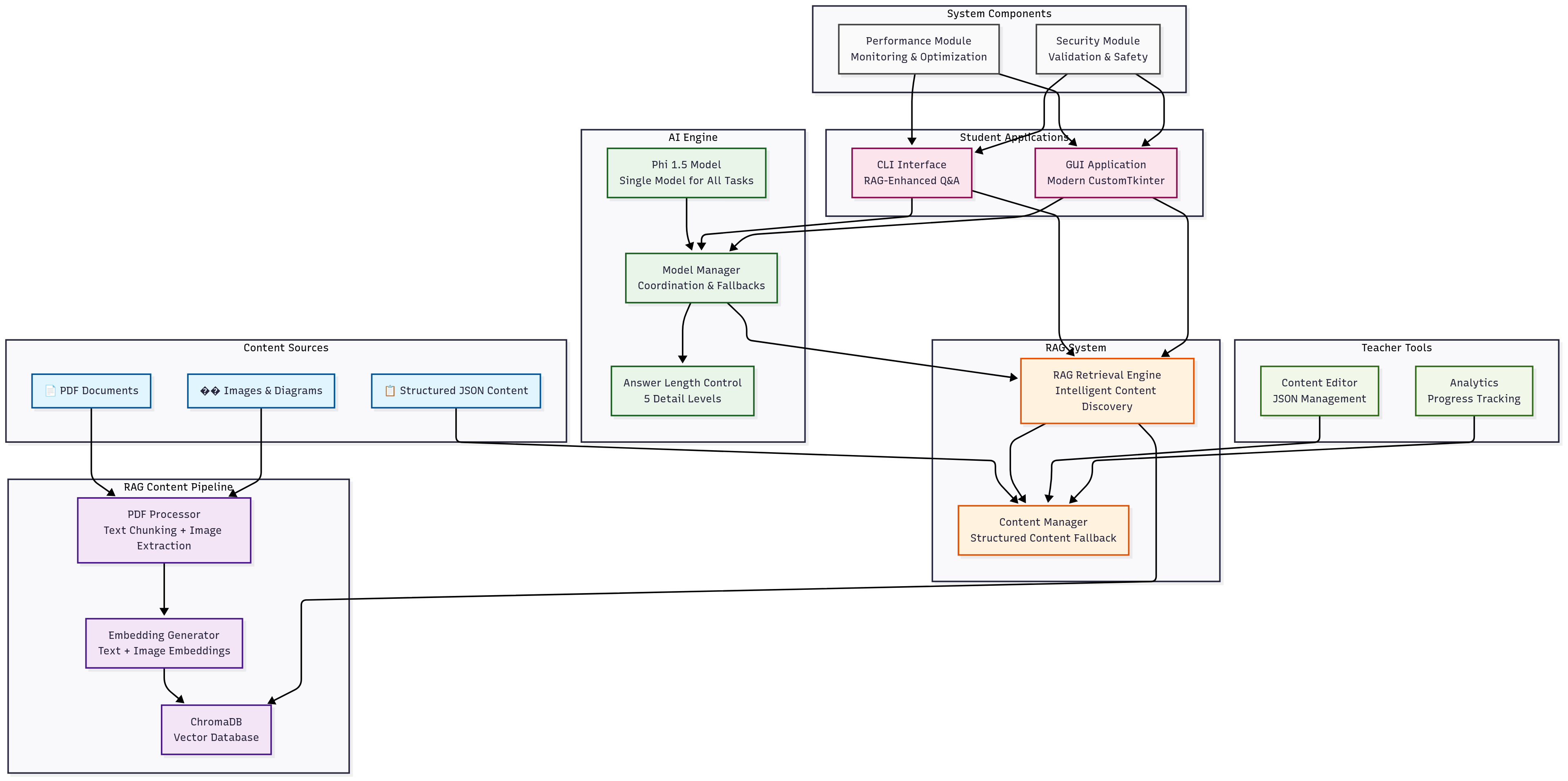
Satyá is an offline-first learning companion that runs entirely on local hardware. The platform uses Retrieval-Augmented Generation (RAG) technology combined with a lightweight Phi 1.5 AI model to provide intelligent tutoring and content discovery for students and teachers.
Purpose
The project directly addresses SDG Goal 4 - Quality Education - by removing technological barriers that prevent equitable access to AI-powered learning. Many students worldwide lack reliable internet access or modern devices, creating an educational divide where advanced learning tools remain inaccessible. Satyá operates on basic hardware and functions offline, ensuring that geographic location and economic circumstances do not limit access to intelligent educational assistance.
How It Addresses the Hackathon Prompt
Satyá tackles the educational accessibility challenge through three core innovations. The RAG system transforms static educational materials into searchable, interactive knowledge bases where students can ask natural language questions and receive contextually relevant answers from their actual course content. The single-model architecture uses one Phi 1.5 model for all AI tasks, drastically reducing computational requirements while maintaining educational quality. The offline-first design ensures 100% local operation, making the platform functional in remote areas, developing regions, and anywhere internet connectivity is unreliable or expensive.
The platform creates measurable educational impact by enabling personalized learning experiences with five different answer detail levels, comprehensive progress tracking, and adaptive learning paths. Teachers receive content management tools and student analytics that provide insights into learning patterns and knowledge gaps.
This combination of accessibility, intelligence, and practicality directly supports inclusive, equitable quality education as outlined in SDG Goal 4.
📋 Table of Contents
- Features
- Technical Architecture
- Project Structure
- Installation
- Usage
- GUI Usage
- AI Models
- RAG System
- Content Management
- OpenAI Proxy Integration (Online Q&A)
- Development
- Contributing
- License
- FAQ
✨ Features
For Students
- 📚 RAG-Enhanced Content Discovery: Intelligent search through study materials
- 🤖 Single AI Model: Phi 1.5 handles Q&A, hints, and content generation
- 🎯 Answer Length Control: Choose from 5 different detail levels (very short to very long)
- 📊 Progress tracking and analytics
- 🔄 100% Offline: No internet required for core functionality
- 🎯 Adaptive learning paths
- 🌐 Search with OpenAI (Online): Ask any question and get an answer from OpenAI (if enabled by your school/teacher)
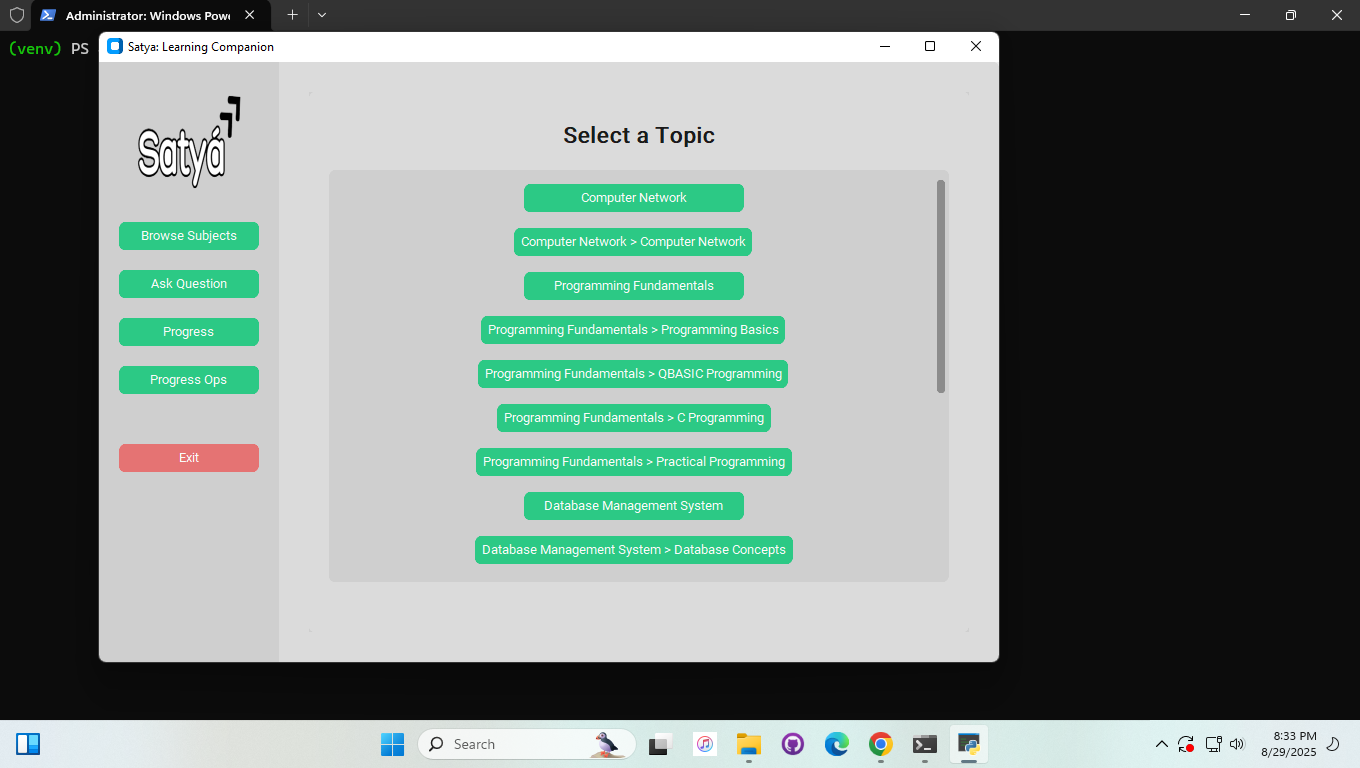
- 🖥️ Modern, responsive GUI: Beautiful customtkinter interface and improved answer display (scrollable, word-wrapped, responsive to long answers)
https://github.com/user-attachments/assets/27e34daf-0919-4393-bb60-50ff6dedc716
For Teachers
- 📝 Content management and editing
- 📊 Student progress analytics
- 🔍 Content validation and quality control
- 📈 Performance monitoring
🏗️ Technical Architecture
Core Components
RAG (Retrieval-Augmented Generation) Engine
- ChromaDB: Local vector database for intelligent content search
- Phi 1.5 Embeddings: Lightweight text embeddings for content discovery
- Smart Content Retrieval: Finds most relevant study materials for any question
- Offline Vector Search: No internet required for content discovery
AI Engine
- Single Phi 1.5 Model: Handles all AI tasks (Q&A, hints, content generation)
- Lightweight GGUF Format: Optimized for low-end hardware
- Answer Length Control: 5 different detail levels for varied learning needs
- Offline Model Inference: No internet required for AI responses
CustomTkinter GUI
- Modern, aesthetic, and responsive interface
- Sidebar navigation, NEBedu logo, loading spinner, and scrollable answer display
- Threaded model inference for UI responsiveness
Data Management
- JSON-based content structure
- Schema validation
- Version control for content
- Data integrity checks
Security Layer
- Input sanitization
- File operation safety
- Access control
- Audit logging
- OpenAI API key never stored on client
📁 Project Structure
Satya/
├── satya_data/                 # Data and models directory
│   ├── models/
│   │   └── phi_1_5/           # Phi 1.5 GGUF model
│   ├── chroma_db/              # RAG vector database
│   └── content/                # Educational content
│
├── scripts/
│   ├── rag_data_preparation/   # RAG content processing
│   │   ├── embedding_generator.py  # Generate embeddings for RAG
│   │   └── pdf_processor.py    # Process PDFs to chunks
│   └── data_collection/        # Content collection tools
│
├── system/
│   ├── rag/                    # RAG system components
│   │   └── rag_retrieval_engine.py  # Intelligent content retrieval
│   ├── data_manager/           # Data handling
│   ├── performance/            # Performance monitoring
│   └── security/               # Security features
│
├── ai_model/
│   ├── model_utils/            # Model helper functions
│   │   ├── phi15_handler.py    # Phi 1.5 model handler
│   │   └── model_handler.py    # Main model manager
│
├── student_app/
│   ├── gui_app/                # Modern GUI (customtkinter)
│   ├── interface/              # CLI interface components
│   ├── learning/               # Learning features
│   └── progress/               # Progress tracking
│
├── teacher_tools/               # Teacher utilities
├── tests/                      # Test suite
└── docs/                       # Documentation
🚀 Installation
Prerequisites
- Python 3.8 or higher
- llama-cpp-python for Phi 1.5 model support
Step-by-Step Installation
Clone the Repository
git clone https://github.com/aa-sikkkk/satya.git
cd Satya
Create Virtual Environment
python -m venv venv
source venv/bin/activate  # Linux/Mac
.\venv\Scripts\activate   # Windows
Install Dependencies
pip install -r requirements.txtDownload Phi 1.5 Model
- Place the Phi 1.5 GGUF model in
satya_data/models/phi_1_5/ - Recommended:
phi-1_5-Q5_K_S.gguf(lightweight, ~1GB)
- Place the Phi 1.5 GGUF model in
💻 Usage
Student Mode (CLI)
python -m student_app.interface.cli_interface
New Features:
- Answer Length Selection: Choose from 5 detail levels
- RAG-Enhanced Q&A: Intelligent content discovery
- Smart Fallbacks: Always get meaningful answers
Teacher Mode
python -m teacher_tools.content_editor.content_editor_cli
🖥️ GUI Usage
Student Mode (GUI)
python -m student_app.gui_app.main_window
- Enjoy a modern, responsive interface with sidebar navigation, Satyá logo, loading spinner, and scrollable answer display.
- All features of the CLI are available in the GUI, including RAG-enhanced Q&A, progress tracking, and adaptive learning.
🤖 AI Models
Phi 1.5 Model
- Single Model Architecture: One model for all tasks (Q&A, hints, content generation)
- Lightweight: GGUF format optimized for low-end hardware
- Offline: 100% local, no internet required
- Smart: Handles text normalization, case sensitivity, and answer validation
Answer Length Control
- Very Short (10-20 words): Quick facts and definitions
- Short (30-50 words): Basic explanations with key points
- Medium (80-120 words): Detailed explanations with examples - Recommended
- Long (150-250 words): Comprehensive coverage with step-by-step breakdown
- Very Long (300-500 words): Extensive coverage with multiple perspectives
🔍 RAG System
What is RAG?
Retrieval-Augmented Generation combines intelligent content search with AI-powered answer generation.
How It Works
- Content Processing: PDFs and documents are chunked and embedded
- Vector Storage: ChromaDB stores text and image embeddings
- Smart Retrieval: Finds most relevant content for any question
- AI Enhancement: Phi 1.5 generates answers using retrieved context
- Fallback System: Multiple fallback levels ensure students always get help
Benefits
- Intelligent Search: Finds relevant content even with vague questions
- Context-Aware: AI understands the context before answering
- Offline: No internet required for content discovery
- Scalable: Easy to add new subjects and content
📚 Content Management
Content Structure
{
  "type": "object",
  "required": ["subject", "grade", "topics"],
  "properties": {
    "subject": {
      "type": "string",
      "enum": ["Computer Science", "Science", "English"]
    },
    "grade": {
      "type": "integer",
      "minimum": 1,
      "maximum": 12
    },
    "topics": {
      "type": "array",
      "items": {
        "type": "object",
        "required": ["name", "subtopics"],
        "properties": {
          "name": {"type": "string"},
          "subtopics": {
            "type": "array",
            "items": {
              "type": "object",
              "required": ["name", "concepts"],
              "properties": {
                "name": {"type": "string"},
                "concepts": {
                  "type": "array",
                  "items": {
                    "type": "object",
                    "required": ["name", "summary", "steps", "questions"],
                    "properties": {
                      "name": {"type": "string"},
                      "summary": {"type": "string"},
                      "steps": {
                        "type": "array",
                        "items": {"type": "string"}
                      },
                      "questions": {
                        "type": "array",
                        "items": {
                          "type": "object",
                          "required": ["question", "acceptable_answers", "hints"],
                          "properties": {
                            "question": {"type": "string"},
                            "acceptable_answers": {
                              "type": "array",
                              "items": {"type": "string"}
                            },
                            "hints": {
                              "type": "array",
                              "items": {"type": "string"}
                            }
                          }
                        }
                      }
                    }
                  }
                }
              }
            }
          }
        }
      }
    }
  }
}
Content Validation
- Schema validation
- Content quality checks
- Duplicate detection
- Reference validation
🛰️ OpenAI Proxy Integration (Online Q&A)
Satyá supports secure, online Q&A using OpenAI models via a proxy server. This allows students to ask any question and get an answer from OpenAI, without ever exposing the OpenAI API key to the user.
How It Works (for Students and Teachers)
- When you use the "Search with OpenAI (Online)" feature in Satyá, your question is securely sent to a server.
- The server gets the answer from OpenAI and sends it back.
- You do not need to set up or configure anything extra.
- All server setup and security is handled by the responsible Stakeholders.
What You Need to Do
- Just use Satyá as normal.
- If online Q&A is enabled, you'll see the "Search with OpenAI (Online)" option in your menu.
- If it's not enabled, you can still use all offline features.
Security & Privacy
- Your questions are sent securely to the server.
- The OpenAI API key is never stored on your computer or shared with you.
- Only the server communicates with OpenAI.
Troubleshooting
- If you see a message like "[OpenAI Proxy Mock] ...", it means the online Q&A feature is not currently available. You can still use all offline features.
🤝 Contributing
- Fork the repository
- Create your feature branch (
git checkout -b feature/new_feature) - Commit your changes (
git commit -m 'Add some new_feature') - Push to the branch (
git push origin feature/new_feature) - Open a Pull Request
See CONTRIBUTING.md for detailed guidelines.
📄 License
This project is licensed under the MIT License - see the LICENSE file for details.
🆕 What's New in This Version
🚀 Major Architecture Changes
- Single AI Model: Replaced multiple models with one efficient Phi 1.5
- RAG System: Added intelligent content discovery and retrieval
- Lightweight: Optimized for low-end hardware
🎯 New Features
- Answer Length Control: 5 different detail levels for varied learning needs
- Smart Text Normalization: Handles uppercase, lowercase, and mixed case input
- RAG-Enhanced Q&A: Intelligent content discovery for better answers
- Robust Fallbacks: Multiple fallback levels ensure students always get help
🔧 Technical Improvements
- Offline-First: 100% local operation, no internet required
- Performance: Faster inference with optimized Phi 1.5 parameters
- Reliability: Better error handling and confidence scoring
- Scalability: Easy to add new subjects and content
Made with ❤️ for students
Built With
- llm
- python
- rag


Log in or sign up for Devpost to join the conversation.