-
-
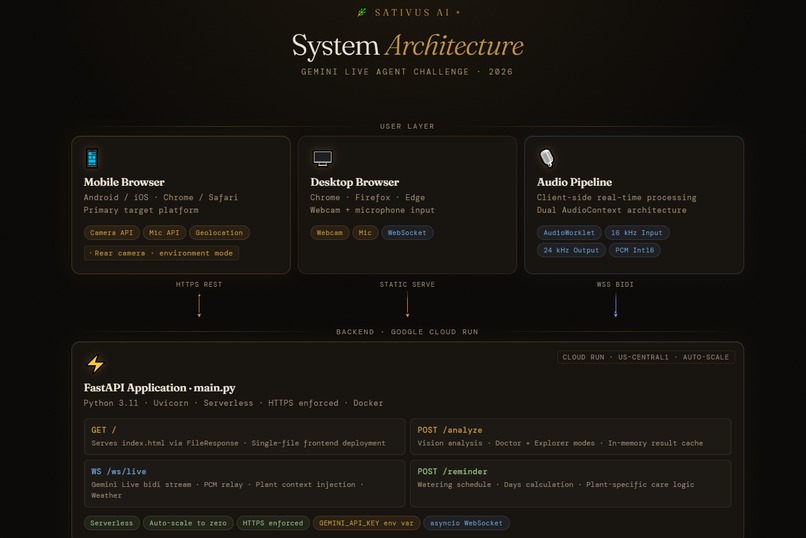
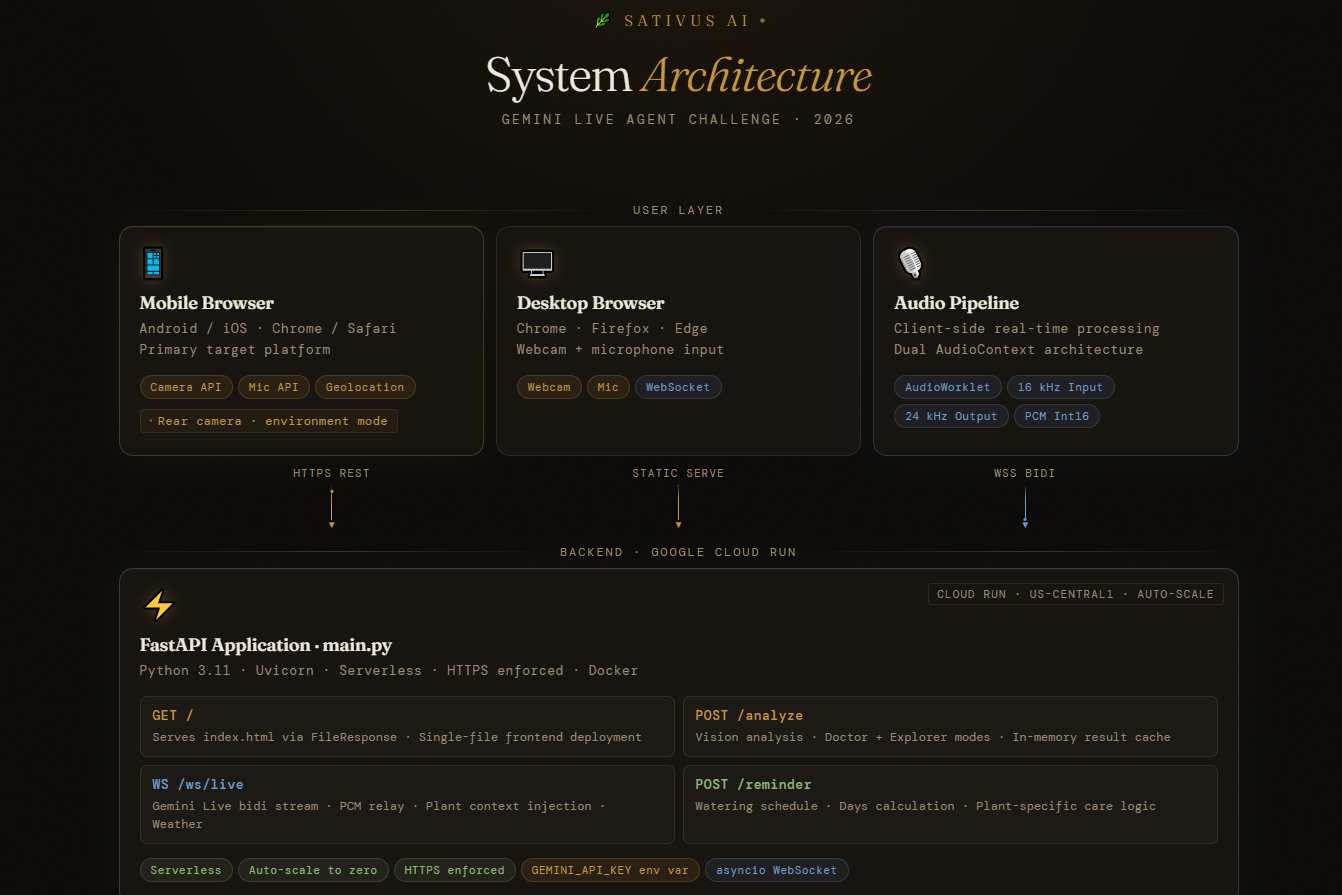
architecture diagram top
-
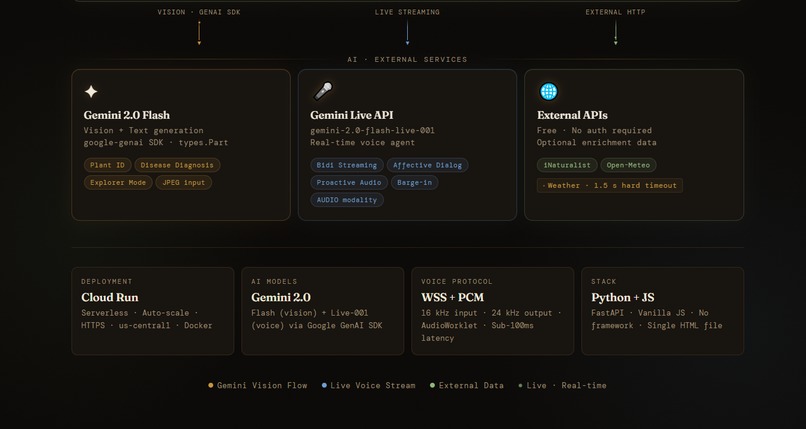
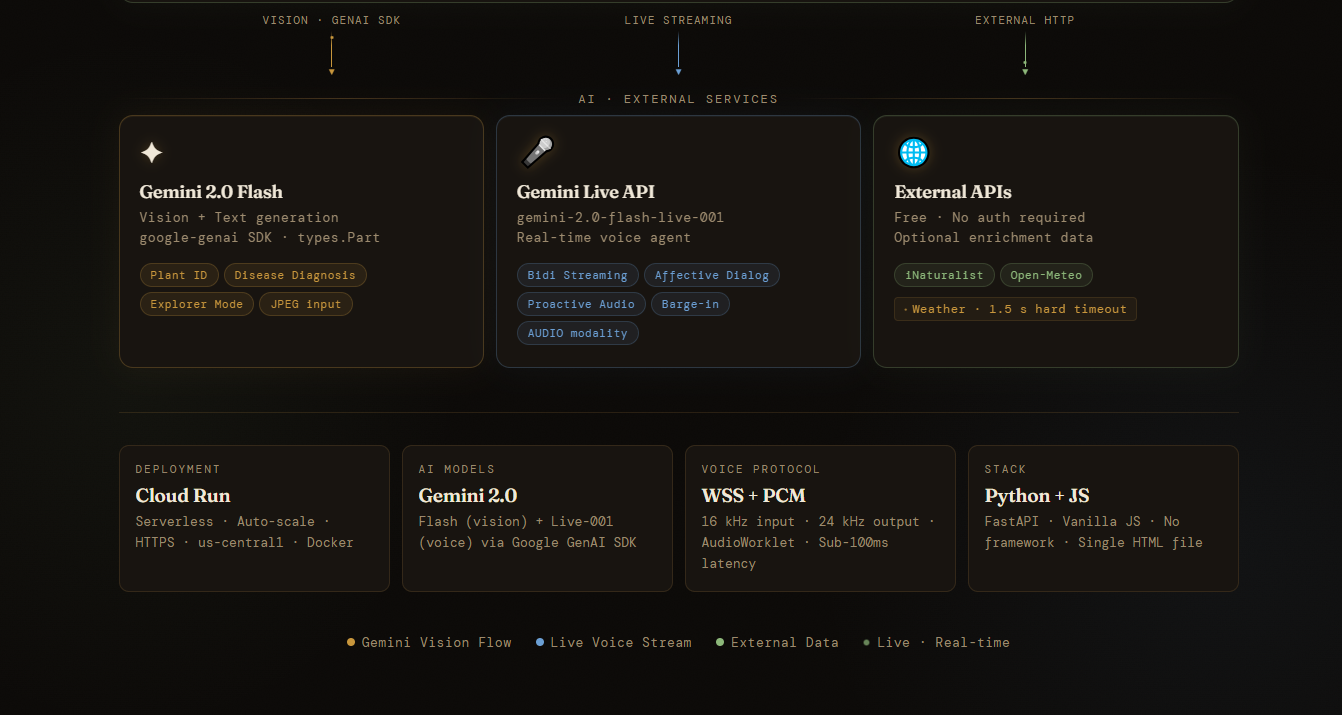
architecture diagram down
-
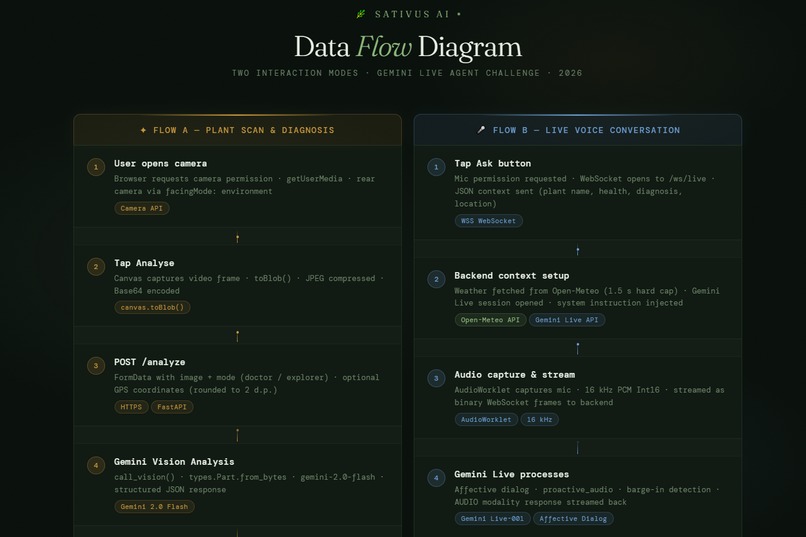
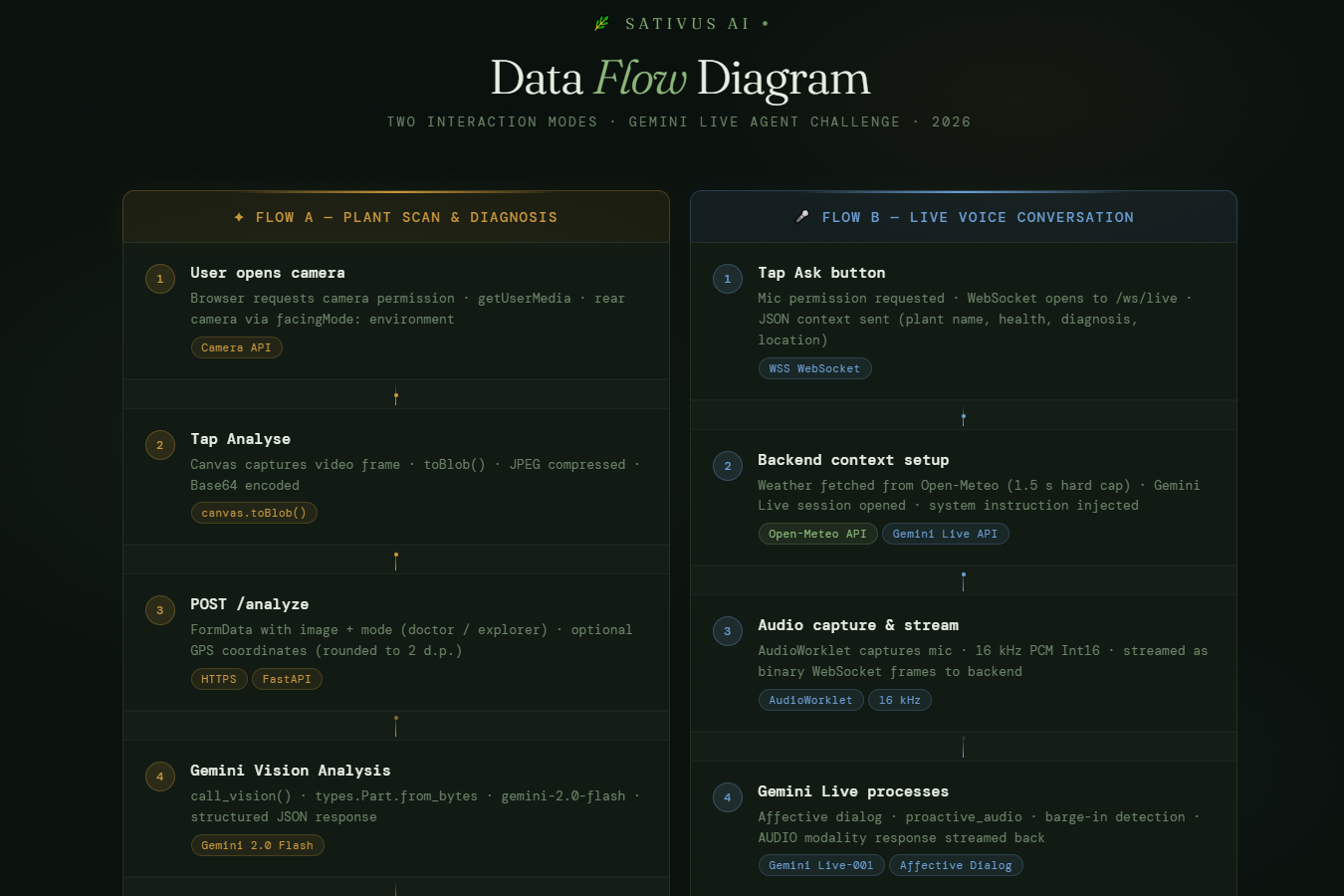
dataflow diagram top
-
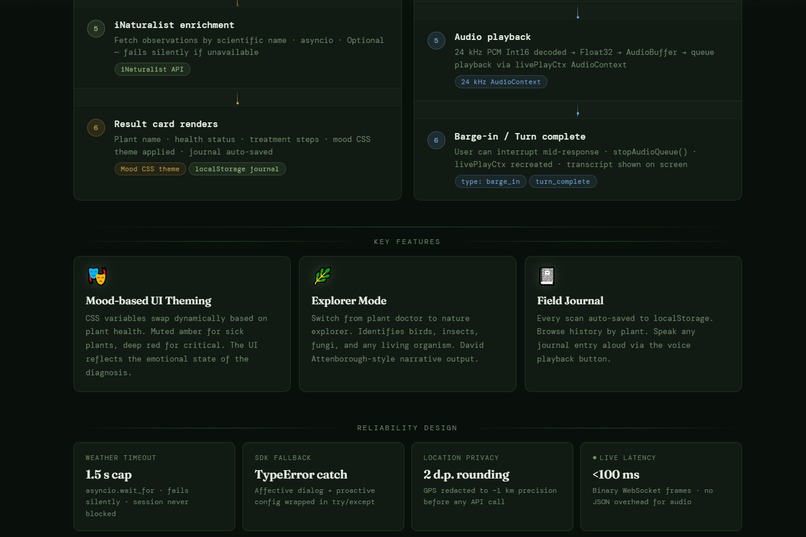
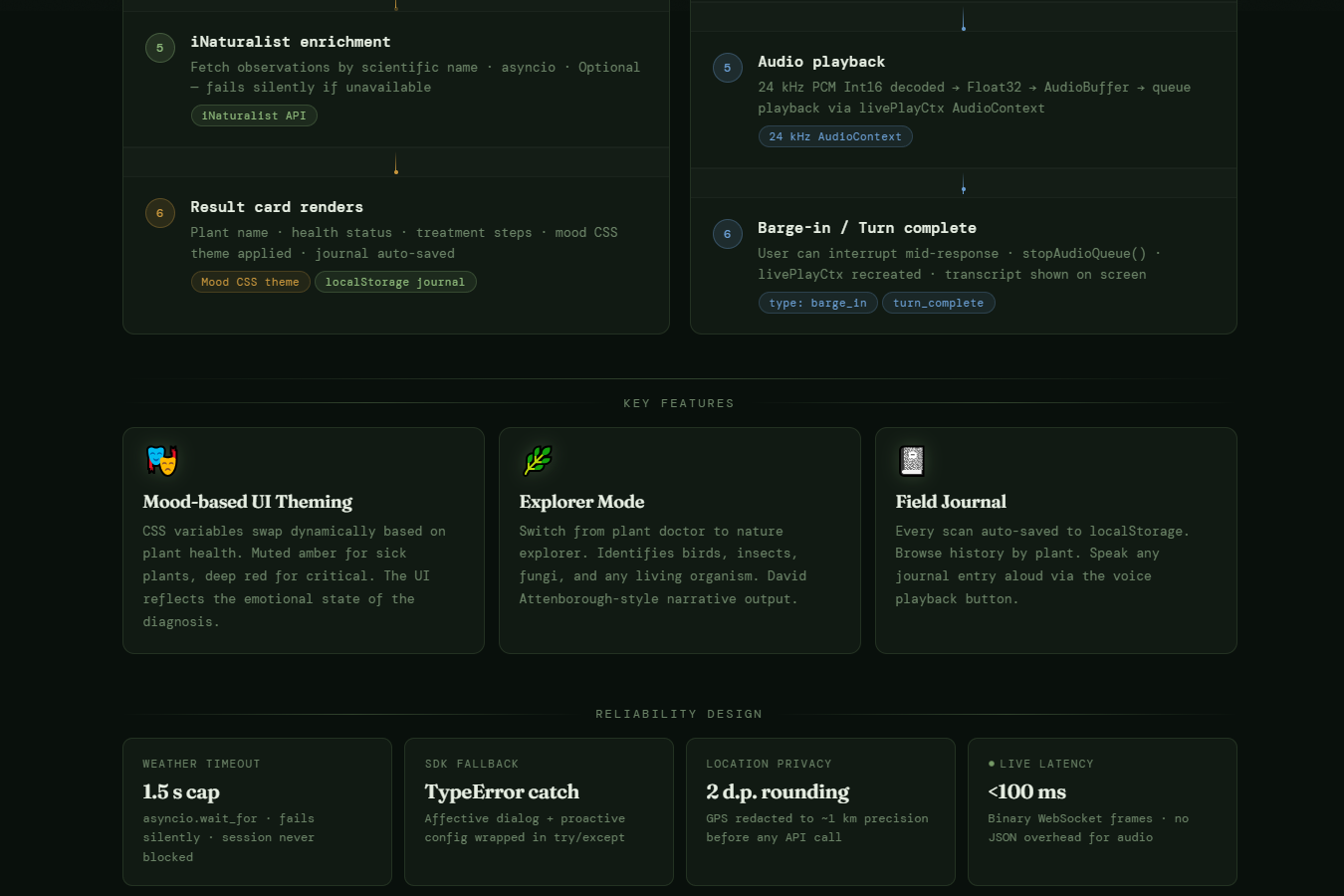
dataflow diagram down
Inspiration
I have a graveyard of houseplants. Genuinely a whole shelf of pots I couldn't save because by the time I figured out what was wrong, it was too late. I'd spend 20 minutes down a Google rabbit hole, end up on some forum from 2009, and still have no real answer. I just wanted to ask something and get a straight answer back.
What it does
Sativus AI is basically a plant doctor that lives in your browser tab. Point your camera at whatever's struggling, hit Analyse, and it'll tell you what's wrong and what to do about it, no scrolling, no second-guessing. The part I'm most proud of though: you can just talk to it. Ask a follow-up question mid-sentence, interrupt it, change your mind.It handles it all in real time, like an actual back-and-forth. Not a chatbot. A conversation. Flip to Explorer mode and it turns into a field guide- point it at a bird, a mushroom, a weird insect and it'll tell you what it is. Every scan gets logged to your personal field journal without you having to do anything.
How I built it
FastAPI backend running on Google Cloud Run. Plant diagnosis goes through Gemini 2.0 Flash with raw image bytes over the Google GenAI SDK,fast and surprisingly accurate. The live voice side runs on the Gemini Live API with bidirectional WebSocket streaming. The browser grabs mic audio at 16kHz via AudioWorklet, ships PCM frames to the backend, which hands them off to Gemini Live and streams the 24kHz audio response straight back. The whole frontend is one HTML file. No framework, no build step. The UI actually shifts mood based on what it finds-muted amber when a plant is stressed, deep red when it's in bad shape.
Challenges I ran into
The audio pipeline nearly broke me. Browser AudioContext is a maze- I ended up running two separate contexts, one at 16kHz for input and one at 24kHz for output, with a ScriptProcessor fallback for older browsers. I also had a subtle bug where weather fetching for location context would stall the entire voice session,fixed it by capping the fetch at 1.5 seconds with asyncio.wait_for. Small fix, huge difference.
Accomplishments that I am proud of
A lot, honestly. How bidirectional streaming actually works under the hood- not the theory, the messy real version. How to handle real-time PCM audio in a browser without reaching for a library. And one config flag that I almost missed: proactive_audio in the Gemini Live setup. It's what makes the AI feel like it's there, it'll actually speak up before you've finished forming a question.
What I learned
I learned that real-time audio in a browser is genuinely hard. Not the kind of hard where you read the docs and figure it out. The kind where you have a 400ms delay and nobody on Stack Overflow has ever seen the same problem. I spent more time debugging AudioWorklet sample rates than I did on the actual AI integration. I also learned that building alone forces you to make decisions fast. There's no one to ask. You either figure it out or the project dies. That pressure actually made me better. And honestly the biggest thing I learned is that the Gemini Live API is unlike anything I've used before. When it responds in your tone, matches your energy, it stops feeling like a tool and starts feeling like something else entirely. I don't have a word for it yet.
What's next for Sativus AI
Persistent plant profiles so it remembers your specific plants across sessions, watering reminders via push notifications, and a shared community journal so explorers can log and compare sightings. The graveyard on my shelf is hopefully going to shrink.
Backend uses Google GenAI SDK (google-genai) to call Gemini 2.0 Flash and Gemini Live API. Dockerfile included for Cloud Run deployment.
Built With
- audioworklet
- fastapi
- gemini-2.0-flash
- gemini-live-api
- google-cloud-run
- google-genai-sdk
- html
- javascript
- python
- websocket


Log in or sign up for Devpost to join the conversation.