Inspiration
An Indian wedding is rarely one event. Sangeet, Mehendi, Haldi, the wedding and the reception can fall in a single week, and each one asks: “What am I wearing?”
SangeetFit helps a wedding guest explore occasion-appropriate looks, add clothes they already own and compare visual previews before deciding what to wear.
What it does
- Explore wedding looks. Browse 26 original AI-generated outfit concepts for women and men, filter by occasion, style and colour, and keep a session shortlist.
- Add your own clothes. Upload a garment photo and enter its details. Adding clothes does not start an AI task; the wardrobe is session-only.
- Request a personal preview. Add a full-body photo, accept the photo notice and press Generate try-on. Alternatively, choose the AI-generated woman or man sample model.
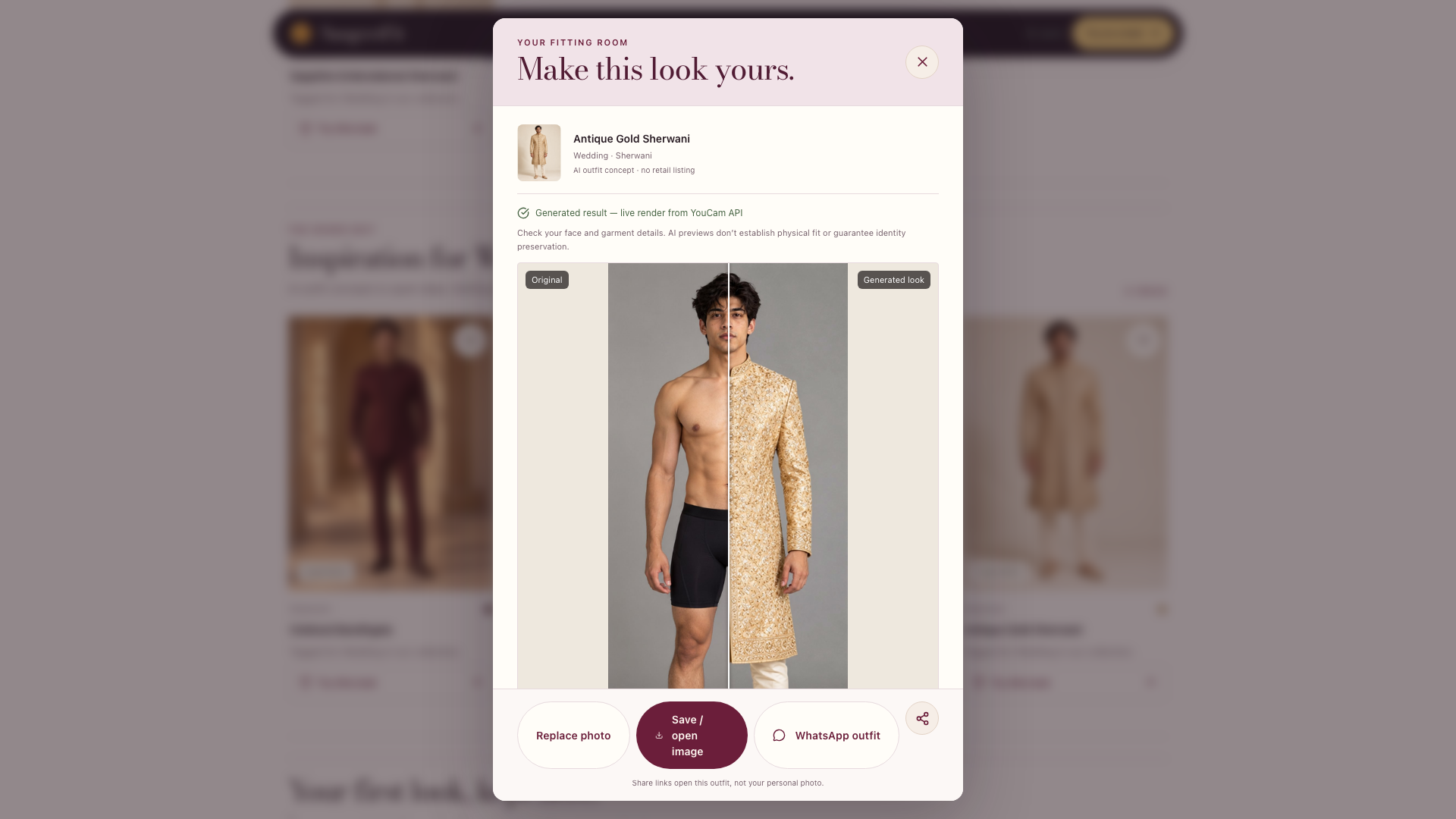
- Compare results. Inspect the original and generated image with a slider, compare recent previews, zoom and save/open an image.
AI-generated inspiration and mock references are labelled separately from live YouCam results.
How we use the YouCam API
SangeetFit integrates YouCam AI Clothes Virtual Try-On, Cloth V4.
The browser prepares the images, and the server validates them, reserves shared allowance, uploads the person and garment through the YouCam File API, submits a cloth-v4 task and polls with back-off until the render completes.
Selected recorded live demo runs took approximately 16–26 seconds from Generate to render. Timings vary. These demonstrations do not establish garment accuracy across every outfit or person.
See the architecture note.
How we built it
Next.js 16, React 19 and TypeScript on Vercel, with Redis for the shared try-on allowance and private result storage.
Allowance is reserved before photos are uploaded. Rate-limit responses stop without automatic retries, and missing live configuration fails closed instead of displaying a mock result as genuine.
The demo has a shared allowance and limits each connection/IP to three live try-ons per 24-hour window. Browsing remains available when generation is unavailable.
Challenges
- Clear AI labelling: distinguishing concept imagery, mock references and genuine live renders.
- Asynchronous rendering: fitting uploads, task submission and polling within serverless request limits.
- Photo handling: requiring an explicit Generate action and applying access controls and expiry to saved results.
In live mode, photos are sent to YouCam only after the photo notice is accepted and Generate is pressed. Successful live results are automatically saved with the person and garment images for 24 hours. Saved looks require a private access link or authenticated administrator access, and users can delete them earlier. YouCam handles its own retention.
Accomplishments
A working browse/add clothes → explicit try-on → compare/save experience, with AI-generated woman and man sample models so visitors can explore without uploading their own photo.
What we learned
A visual preview can help at the moment of indecision. Clear labels and honest limits are essential: AI can alter facial and garment details, and a preview cannot guarantee physical fit.
What's next
- Separate top and bottom combinations.
- A permanent saved wardrobe.
- Optional shopping or rental links for missing pieces.
Try it
- Live app — no account required; generation uses a limited shared allowance.
- Demo video
- Public source repository
Run locally without API keys using Node 22:
npm ci && MOCK_MODE=true npm run dev
AI disclosure
We built SangeetFit with AI coding assistants. The outfit concepts in the collection and the woman and man sample models were generated with AI and are labelled in the app.
Built With
- claude
- codex
- next.js
- react
- redis
- typescript
- vercel
- youcam-api

