This project began as an idea for a live show for Mr Silla and Sam Potter: a long table covered in everyday objects, where moving and arranging them becomes the performance.
What if a plant pot could change the tempo, a line of rubber ducks could become a melody, and moving a beer can could rewrite a drum pattern? I wanted an exploration sandbox that recognised our particular props and connected them to our own sounds.
Working with Codex, that idea developed into a desktop camera and training application, Max for Live devices, and a successful gallery installation.
From a table to eight musical voices
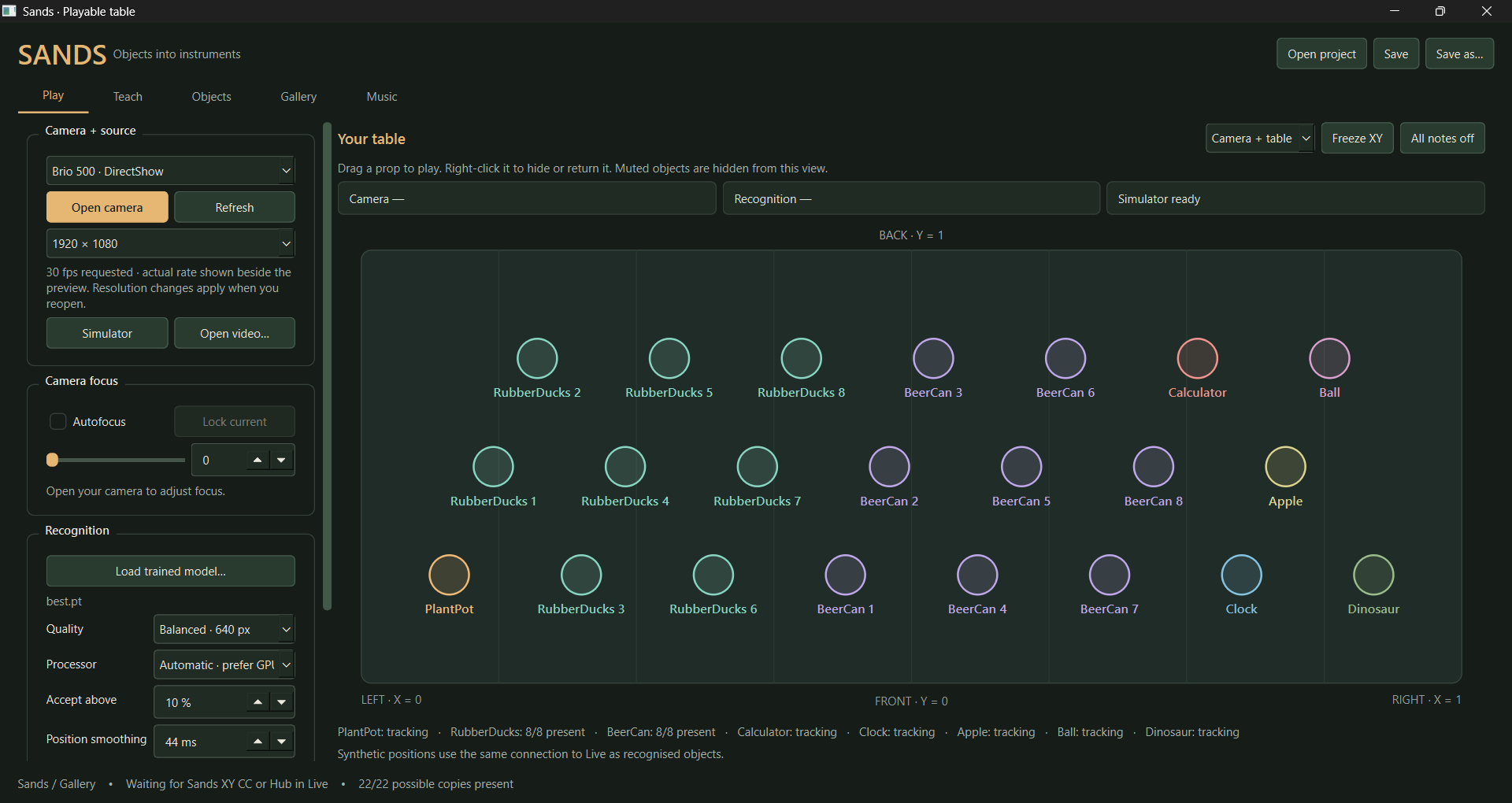
An overhead camera recognises eight object types. Calibration translates their positions into consistent X and Y coordinates, which travel to Ableton Live over a local OSC connection.
The plant pot controls tempo from 70 to 170 BPM and arpeggio complexity. Rubber ducks place melodic notes in a scanning sequence, with pitch spanning two octaves. Beer cans place drum hits, selecting kick, snare or hi-hats through position. A calculator, clock, apple, ball and dinosaur contribute rhythms, accents, chords, repeating melodies and bass.
Each role has its own instrument track. Object positions can also map to Live parameters, opening up effects and sound-design possibilities beyond the preset behaviours.
First milestone: one plant pot
We separated the project into a Python application for vision and Max for Live devices for music. Camera input, recorded video and a draggable simulator share the same interface, letting us develop musical behaviour before training was ready.
The first test sent a plant pot's X and Y as MIDI CC 1 and CC 74. We improved camera discovery for the Logitech Brio 500 and added manual focus controls. When generated CCs proved unsuitable for Live's normal MIDI-mapping workflow, we added direct, persistent parameter mappings instead.
Making training practical
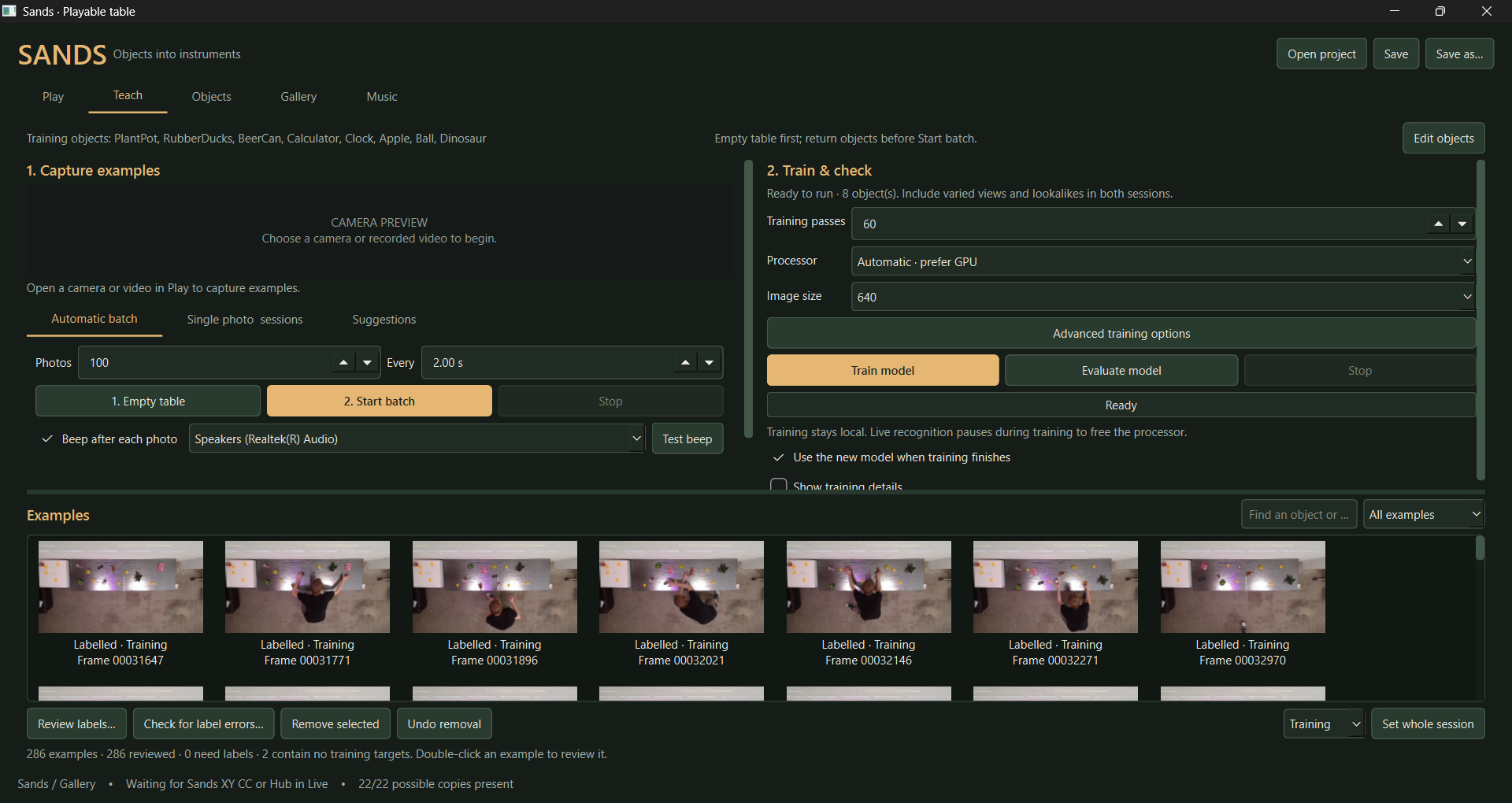
The teaching interface grew through use. I needed editable object lists, removable captures, and the ability to draw a box before choosing its label. Automatic capture batches and a beep for each photograph let me rearrange objects without constantly checking the screen.
For annotation, we added a view zoomed into the table, optional label visibility and conspicuous warnings for unlabelled boxes. Saving an incomplete frame now points directly to the missing label.
We then added suggested boxes and labels using an empty-table reference, confirmed examples and the trained detector. These remained suggestions requiring review. Multiple ducks or cans share an object class but receive separate tracking slots, so each copy can contribute a note.
Learning what good data looks like
An early model recognised a beer can as a plant pot more confidently than it recognised the actual plant pot. That made the limits of a confidence score very clear.
The dataset grew from ten labelled images to 86, then almost 300 images containing more than 3,000 annotated boxes. We varied arrangements, rotations, clutter and partial occlusion. I changed the tablecloth from shiny silver to black and selected separate evaluation sessions reflecting the current setup.
A label-audit tool highlighted possible mistakes, including ducks apparently labelled as beer cans. It showed evidence for review without silently changing annotations.
Protecting the work
After long labelling sessions, reliable saving became essential. We added recovery drafts, atomic saves, annotation history and recoverable deletion. Verified local backups preserved images, labels, calibration and models, with file hashes checked to confirm their contents.
This was a substantial part of making the application usable. The dataset represented hours of arranging, photographing and annotating physical objects.
Fixing performance rather than guessing
The low camera frame rate initially looked like a processing limitation. Investigation found a camera-format configuration problem: settings applied in the wrong order dropped capture to roughly five frames per second. Correcting that restored a measured 25 FPS feed, with recognition later observed around 20 FPS.
Capture, inference and display were separated so old frames would not accumulate. We also found a status threshold shorter than normal processing delay, making healthy detections appear repeatedly lost and regained. Another fix stopped one ambiguous detection from suppressing unrelated copies.
These problems required software corrections; more training alone would not have solved them.
Making it feel musical
Live's transport supplies the clock. Camera frames update positions, while Live schedules notes, keeping established sequences independent of camera-frame arrival.
Ducks and cans trigger as a continuous playhead crosses their positions, without step snapping. Objects aligned horizontally can sound together. Moving behind the playhead waits for the next pass, and an object cannot retrigger twice within one pass.
The plant pot's tempo control rejects small fluctuations and requires sustained movement before easing toward a new BPM. Brief occlusion holds positions for a default 500 milliseconds. Connection-loss handling releases notes, while freeze and all-notes-off controls support performance.
Getting Ableton and the gallery ready
An early generated Ableton file failed to open correctly. We prioritised reusable Max for Live devices that I could place in my own project, then verified a working example by saving and reopening it inside Live. Native tests exposed timing issues that code checks had missed.
A local AbletonOSC and MCP connection supported inspection and setup through APIs. Eight separate instrument tracks let me replace basic audition sounds with chosen keyboards, mallets, drum kits and bass.
For the gallery, I wanted fullscreen webcam footage with overlays. We added trails, presence effects, trigger pulses and a scanning playhead, using actual note feedback from Live.
The exhibition ran successfully. When increasing the beer-can count came up during opening hours, we saved that change for afterwards.
What comes next
After collecting more cans, I asked for 32 at once. The upgrade required changes throughout tracking, messaging and device voice allocation. Isolated Live tests passed for all 46 intended positions: 32 cans, eight ducks and six single props, including simultaneous triggering of all cans.
The software upgrade is implemented and tested; activation and recognition tests with 32 physical cans remain ahead. Crowding, glare and different can designs may require more examples.
What I learned
The training interface is part of the instrument. Hearing a capture, spotting an incomplete annotation and trusting a save all affect the result. Musical stability requires deliberate design beyond recognition accuracy.
I supplied the objects, photographs, annotations, sound choices and practical feedback; Codex helped implement, debug and test. The project developed through that exchange, with each real-world frustration becoming something concrete to improve.
Built with: Python, PySide6, OpenCV, YOLO26, PyTorch, ByteTrack, Ableton Live 12, Max for Live, Gen~, JavaScript, OSC, MCP and Codex.
Created at Constellation Labs, Espronceda institute of art and culture

Log in or sign up for Devpost to join the conversation.