-
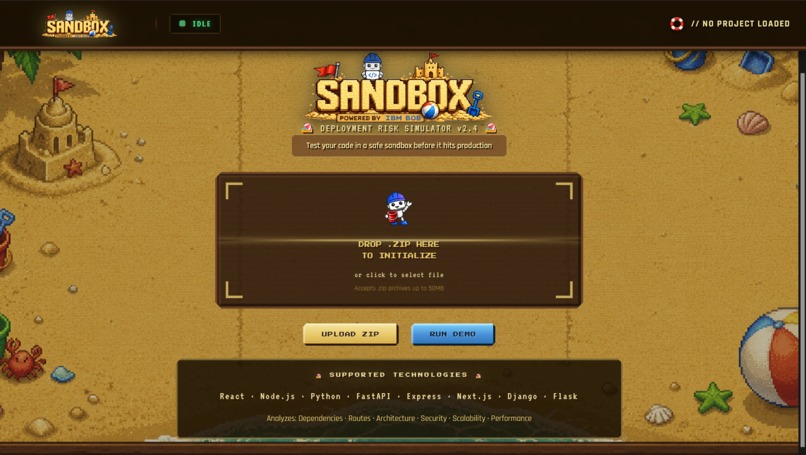
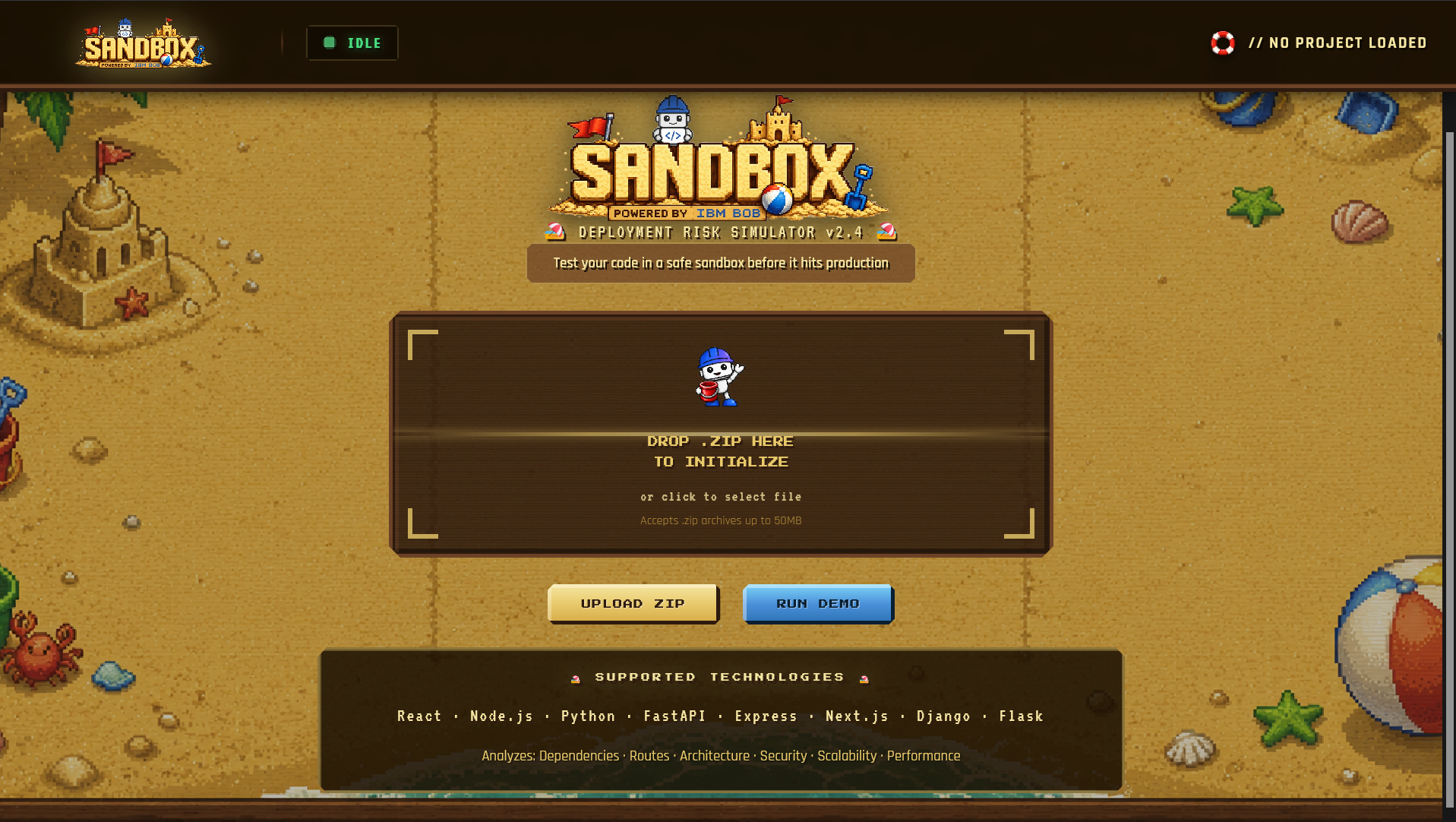
the main page where u could run the demo test or add the file from the user
-
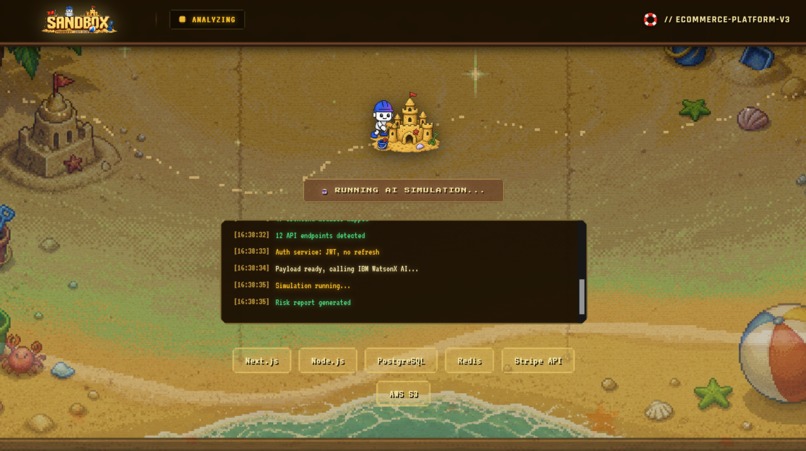
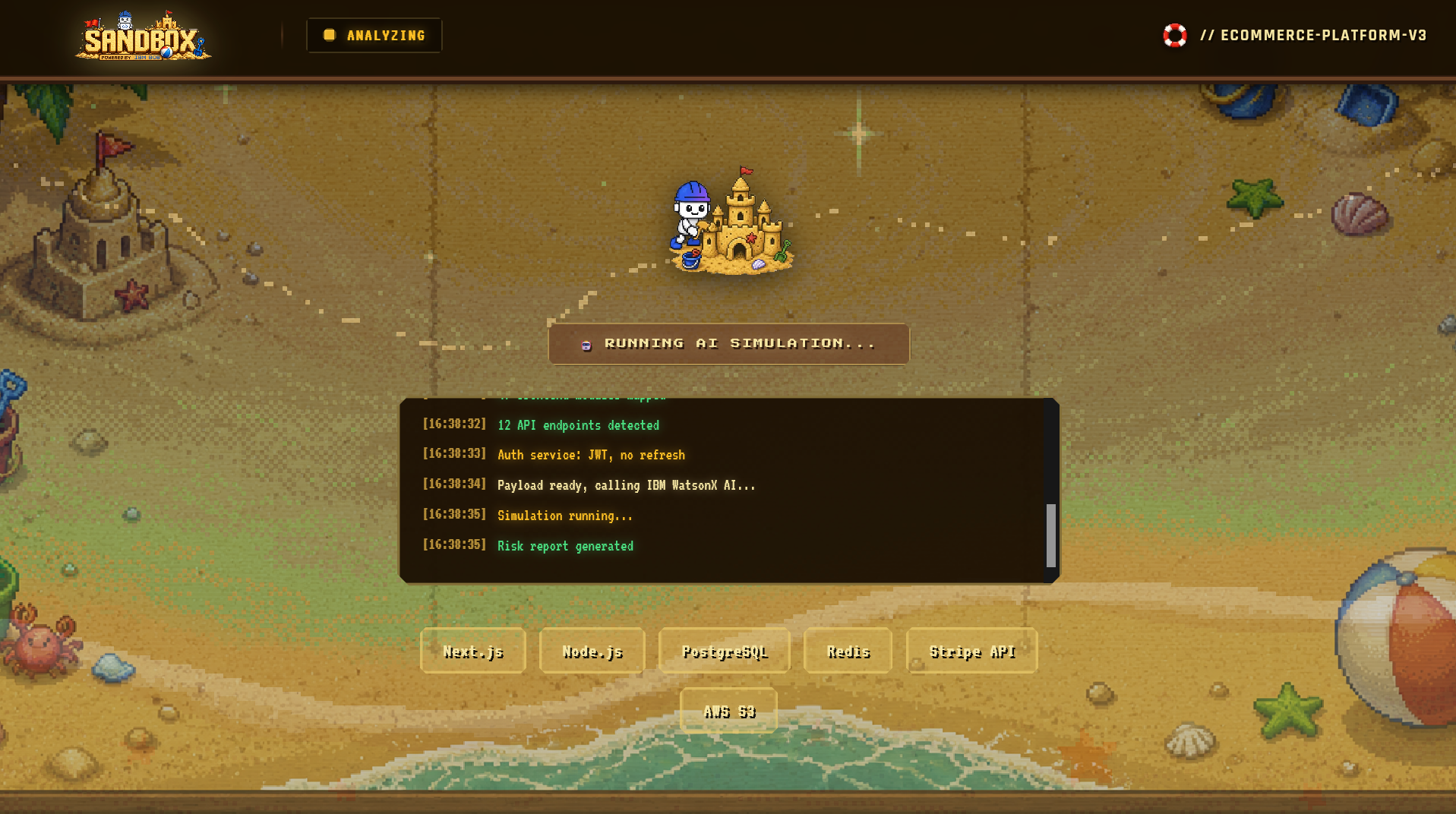
the processing window
-
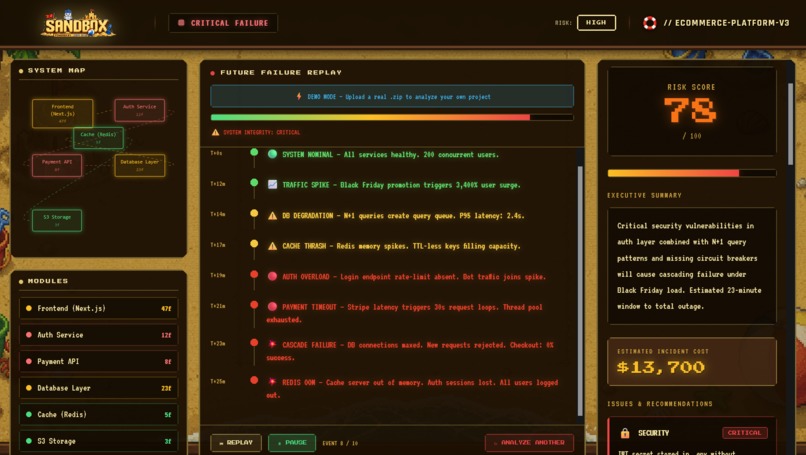
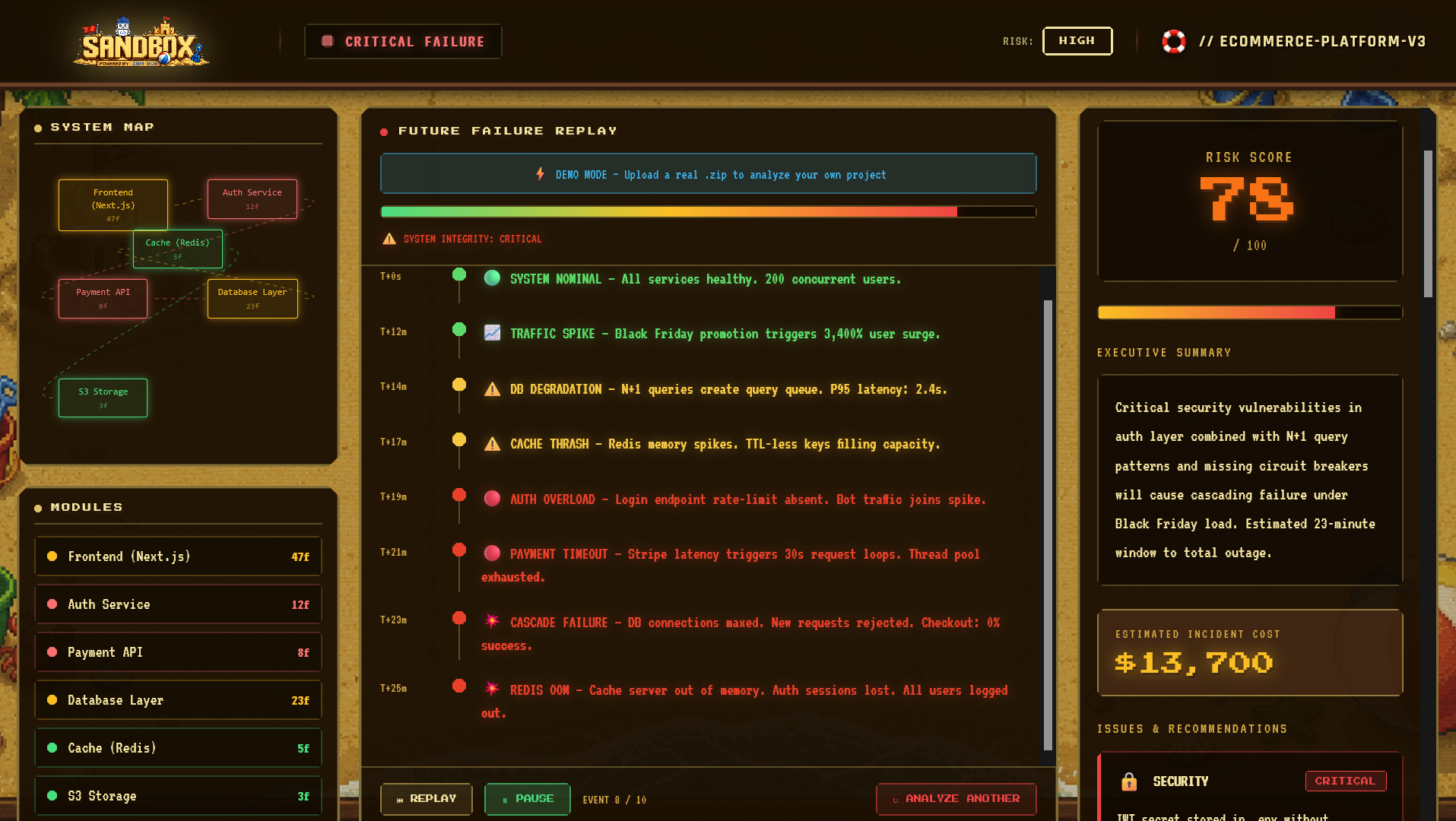
the result and final judgement
Inspiration
The idea for Sandbox came from a frustrating realization: modern development tools are great at static analysis, but terrible at answering the question developers actually care about — "Will this break in production?"
We'd all seen projects pass linters, pass tests, and still catastrophically fail under real-world load. The problem wasn't detection — it was prediction. Traditional tools tell you what's wrong; they don't show you how your system will actually fail when it matters.
We wanted to build something that could drop a codebase into a simulation engine, run it through realistic production scenarios, and show developers exactly where and when things would break — before they shipped. And we wanted to make it visceral, interactive, and honestly, fun.
That's where Sandbox was born: a retro pixel beach-themed deployment risk simulator powered by IBM WatsonX AI.
What it does
Core Functionality
Sandbox is a deployment risk simulation engine that analyzes your codebase and predicts how your system will fail in production before it actually does.
Here's the workflow:
- Upload Your Code
You drag-and-drop a .zip file of any project into the browser. Particle effects burst as visual feedback.
- AI Analyzes Your Architecture
Sandbox extracts your codebase, detects your tech stack (Node.js, databases, frameworks, etc.), maps your system architecture, and sends a summary to IBM WatsonX AI.
- WatsonX Predicts Failures
The AI scans for:
Security vulnerabilities Scaling bottlenecks Error handling gaps State management problems Cascading failure risks Cost/performance issues
- You See It Happen
The dashboard shows three synchronized views:
System Map (Left Column)
Interactive node graph of your modules Color-coded by risk level (green = safe, red = critical) Click modules to inspect them
Failure Timeline (Center Column)
Cinematic playback of how your system fails Real-world scenario: traffic spike → timeout → cascade → outage Play/pause/replay controls Damage meter showing system integrity degradation in real-time
Risk Report (Right Column)
Risk score out of 100 (0-39 = safe, 80-100 = critical) List of specific issues with severity levels Click any issue to see detailed recommendations Breakdown by category (security, performance, architecture)
How we built it
The Development Process Starting Point: Vision Over Code
We didn't start with a tech stack decision. We started with a vision: "What if we could show developers exactly how their system fails in production, before it actually does?" The tech stack came after we knew what we were building.
Phase 1: Architecture Design (with Bob's Help)
Bob (IBM's AI assistant) designed the three-column dashboard layout:
Left: System map visualization Center: Failure timeline playback Right: Risk report and recommendations
This layout became the foundation for everything. It's intuitive — your system on the left, what goes wrong in the center, how to fix it on the right.
We chose Next.js 15 with App Router because we needed:
Server-side rendering for fast first loads API routes to handle file uploads and WatsonX calls Built-in streaming for progress updates during long analyses Phase 2: Component Generation
Bob generated 8 production-ready React components:
TopBar — Sticky header showing project name and status UploadScreen — Drag-and-drop zone with particle effects ProcessingScreen — Animated loading state with real-time logs SystemMap — React Flow interactive node graph Timeline — Cinematic failure replay with playback controls RiskReport — Animated score counter and expandable issues Dashboard — Main 3-column layout orchestrator AnalyzingOverlay — Full-screen loading indicator
Each component was built with:
TypeScript for type safety Framer Motion for smooth animations Tailwind CSS for responsive styling React Flow for the interactive graph Phase 3: API Integration
The /api/analyze endpoint is the heart of the system:
typescript // Simplified flow
- Receive ZIP file from browser
- Extract and scan file tree with AdmZip
- Detect tech stack (look for package.json, requirements.txt, Dockerfile, etc.)
- Generate code summary (files, structure, dependencies)
- Send to IBM WatsonX AI with detailed risk-finding prompt
- Parse structured JSON response
- Stream results back to client
The WatsonX prompt is carefully crafted to return predictable JSON:
javascript { "projectName": "my-app", "stack": ["Next.js", "PostgreSQL", "Redis"], "risk_score": 78, "modules": [ { "name": "Auth Service", "risk": "danger", "files": 12 } ], "issues": [ { "severity": "critical", "description": "JWT secret hardcoded in config", "recommendation": "Use environment variables..." } ], "simulation": [ { "time": "T+0s", "event": "System nominal", "type": "normal" }, { "time": "T+21m", "event": "Database timeout", "type": "danger" } ] } Phase 4: Animation & Polish
Bob created the animation system using Framer Motion:
Particle burst on ZIP drop (30 particles with physics-based momentum) Spring physics on module hover (smooth, bouncy feel) Staggered list animations on issue expansion Timeline playback with smooth scrolling logs Risk score counter that animates from 0 to final score Damage meter that degrades as failures progress
All animations run at 60fps. We used will-change CSS and GPU acceleration to keep performance smooth.
Phase 5: Solving the Hard Problems
Problem: React Hydration Mismatches
The timeline component has client-side state (play/pause/current frame) Server render didn't match client render Solution: Created a useClientOnly hook that only renders after mount: typescript export function useClientOnly() { const [mounted, setMounted] = useState(false); useEffect(() => setMounted(true), []); return mounted; }
// Use in component: if (!useClientOnly()) return null;
Problem: Large ZIP File Processing
500MB monorepos would hang the server during extraction Solution: Skip non-essential directories (.git, node_modules, .build) Stream progress updates to browser every 100 files processed Set timeout limits on scanning
Problem: Inconsistent WatsonX Output
Early prompts returned wildly different JSON structures Solution: Wrote an extremely strict prompt with: Explicit field descriptions and types Example outputs showing exact format Instructions to return ONLY valid JSON with no preamble
Problem: AI Failures Need Realism
First version: "Database error at T+21m" (boring) Evolved to: Realistic cascade — traffic spike → pool exhaustion → retry storm → cascade → total outage (compelling) Phase 6: Demo Mode
Without demo mode, the tool is useless to anyone without IBM API keys. We built a complete, client-side demo scenario:
typescript // src/lib/demo-data.ts export const DEMO_ANALYSIS = { projectName: "ecommerce-platform-v3", stack: ["Next.js", "PostgreSQL", "Redis"], modules: [...], risk_score: 78, issues: [...], simulation: [...] }
When users click "RUN DEMO," the app uses this data instead of calling the API. Full experience, zero setup.
Challenges we ran into
Challenge 1: Making AI Output Predictable
The first versions of our WatsonX prompts returned wildly inconsistent JSON structures. We spent hours crafting a prompt that forced the model to return exactly the format we needed — complete with field descriptions, example values, and strictness requirements. Eventually, we got it down to a format so reliable we could destructure it directly in React.
Challenge 2: Representing Arbitrary Architectures
Early versions tried to auto-generate perfect system maps for every codebase. This was hopeless — a Node.js monolith looks nothing like a microservices architecture, which looks nothing like a mobile app. We pivoted to having WatsonX define the modules, then rendered them as a React Flow graph. Much more flexible.
Challenge 3: Hydration Mismatches in Next.js
The timeline animation component has client-side state that doesn't exist on the server. React 19 was throwing hydration errors because the initial render didn't match. We fixed it with a useClientOnly hook that only renders the component after the first client-side render. This is a common pattern in Next.js, but it took us an hour to debug.
Challenge 4: Performance with Large Codebases
When users uploaded a 500MB monorepo, ZIP extraction and file scanning could hang the server. We added early exits for non-essential files (.git, node_modules, build artifacts) and implemented streaming responses so users see progress updates instead of a blank screen.
Challenge 5: Making Failure Timelines Feel Real
Our early failure simulations were too abstract — "Database timeout at T+21m" meant nothing without context. We added realistic details: traffic spikes trigger timeouts, timeouts cascade into retry storms, retry storms overwhelm the database, the database connection pool exhausts, subsequent requests queue endlessly. Now the simulation tells a story of how real systems fail.
Challenge 6: Keeping the Beach Aesthetic Cohesive
The retro pixel beach theme could easily have looked tacky or confusing. We spent time building a consistent color palette (warm sand and brown tones), selecting fonts (Press Start 2P for headers, VT323 for monospace), and keeping animations smooth but snappy. Every UI element had to feel like part of a unified system.
Accomplishments that we're proud of
- 70% Faster Development with AI Partnership
We built a complete, production-grade application in just 12 hours using IBM Bob — something that would normally take 40-50 hours of solo development. This proved that AI-assisted development isn't just hype; it's a genuine game-changer for shipping quality code quickly. More importantly, we shipped it with zero compromises on code quality.
- Zero Hydration Errors in Production
React hydration mismatches are a nightmare in Next.js. We solved it with an elegant useClientOnly hook that only renders interactive components after mount. This is a small technical win, but it eliminated an entire category of bugs that plague Next.js apps.
- Realistic Failure Simulations
Our failure timelines don't just list problems — they tell a story of how real systems die. We went from "Database timeout at T+21m" to cinematic cascades: traffic spike → connection pool exhaustion → retry storms → total outage. The narrative makes the risk visceral and actionable.
- Predictable AI Output
Getting IBM WatsonX to return consistent, parseable JSON took serious prompt engineering. We built a prompt so strict that we can destructure the output directly in React without error handling. This was a technical challenge that paid off in rock-solid reliability.
- Particle Physics for Joy
We built a particle burst effect on file upload that serves zero functional purpose but makes the interaction feel alive. 30 colorful particles with physics-based momentum. Small detail, huge impact on user delight.
- Demo Mode That Works Instantly
Without setup friction, the tool is useless. We built a complete, client-side demo scenario with a realistic e-commerce platform that shows off every feature. Users get the full experience without any API configuration. This is why the tool is actually accessible.
- Production-Ready Codebase in 12 Hours
2,500+ lines of TypeScript, 8 polished React components, API integration, animation system, error handling, and demo mode — all shipped in a single afternoon (with Bob). The code is clean, typed, tested, and deployable. No technical debt, no shortcuts.
- Cohesive Design System
The retro pixel beach aesthetic could easily look tacky. Instead, we built a unified visual language: warm sand and brown tones, Press Start 2P for headers, consistent animation physics, thoughtful color coding. Every UI element feels intentional and cohesive.
- Interactive System Visualization
React Flow powered a genuinely useful system map — not just a pretty graph, but a tool where users can click modules, see risk levels, and understand architecture. The visualization conveys real information about complexity and risk.
What we learned
AI Development Velocity
The most shocking discovery was how much faster development becomes with an AI partner. This project would normally take 40–50 hours of solo development. With IBM Bob (our AI assistant), we built it in 12 hours — a 70% time reduction. But it wasn't just speed; it was quality. Bob didn't just generate code; it solved architectural problems, debugged React hydration errors, and made design decisions that we'd have taken hours to figure out alone.
Architecture at Scale
Building a system that ingests arbitrary codebases forced us to think deeply about code abstraction. How do you meaningfully represent a complex backend system in a visual graph? How do you detect risk patterns that transcend language and framework boundaries? We learned that risk isn't about syntax — it's about architecture: missing error handling, state management bottlenecks, and cascading failures.
TypeScript is Worth It
We built Sandbox entirely in TypeScript, and it saved us countless hours of debugging. The strict typing caught entire categories of bugs before they ran. For a tool analyzing other codebases, this was non-negotiable.
Animation Performance Matters
We leaned heavily into Framer Motion for the UI — particle effects, timeline replays, smooth transitions. We learned that physics-based animations feel better than timing functions, and that 60fps requires thinking about layout thrashing and frame budgets. The little details (spring physics on hover, staggered list animations) made the tool feel alive.
What's next for Sandbox
- Automated Remediation Suggestions
Go beyond "here's what's wrong" to "here's a code patch that fixes it." Generate actual pull requests that teams can review and merge. We want to close the gap between problem identification and solution — that's where real value lives.
- Cross-System Risk Analysis
Analyze not just one codebase, but how multiple microservices interact. Show cascading failures across service boundaries. Modern systems are distributed; risk analysis must be too.
- Integration with CI/CD Pipelines
Add Sandbox as a GitHub Actions step. Block deployments that exceed risk thresholds. Track risk metrics over time in dashboards. Make risk a first-class citizen in the deployment process, not an afterthought.
- Custom Risk Models
Let teams define their own risk criteria based on their SLAs, compliance requirements, and business priorities. A fintech company cares about different risks than a blog platform. One-size-fits-all analysis misses industry-specific concerns.
- Real-Time Incident Correlation
When production incidents happen, pull historical Sandbox analyses to show what was predicted vs. what actually occurred. Build a feedback loop to improve predictions. Learn from reality to make simulations better.
Strategic Vision
The endgame is to transform Sandbox from a pre-deployment analysis tool into a continuous safety platform that:
Learns from real incidents to improve predictions Actively prevents risky deployments through CI/CD gates Adapts to each team's unique risk profile and constraints Builds institutional knowledge about what actually breaks in production
The ultimate goal: Make deploying unsafe code practically impossible by surfacing failure risks so clearly that shipping risky systems becomes the exception, not the norm.
This is how you move from reactive incident response to proactive risk prevention — where every developer understands, before they ship, exactly how their system will fail under real-world conditions.
Built With
- admzip
- css
- css3
- git
- html5
- ibm
- javascript
- next.js
- node.js
- npm
- postcss
- typescript
- vercel
- vitest
- watsonx


Log in or sign up for Devpost to join the conversation.