
Inspiration
Halal-conscious shoppers turn a packet over and find a list of E-numbers and vague terms: E441, E120, "natural flavourings", "emulsifier". Many of these can come from plant, animal or insect sources, the label rarely says which, and schools of thought differ on some of them. SahihScan reads the label for you and explains, ingredient by ingredient, why a product is halal, doubtful or haram.
What it does
SahihScan is a Flutter app. It is live on Google Play (com.deepfai.sahihscan) and on the App Store.
- Three ways to check a product. Scan a barcode with the camera, which looks the product up in Open Food Facts. Photograph an ingredient label or pick a photo from the gallery. On-device ML Kit text recognition reads Latin-script labels, and an optional server-side vision model can handle labels it cannot read; if that tier is unavailable, the app reports the label as unreadable. Or type or paste an ingredient list.
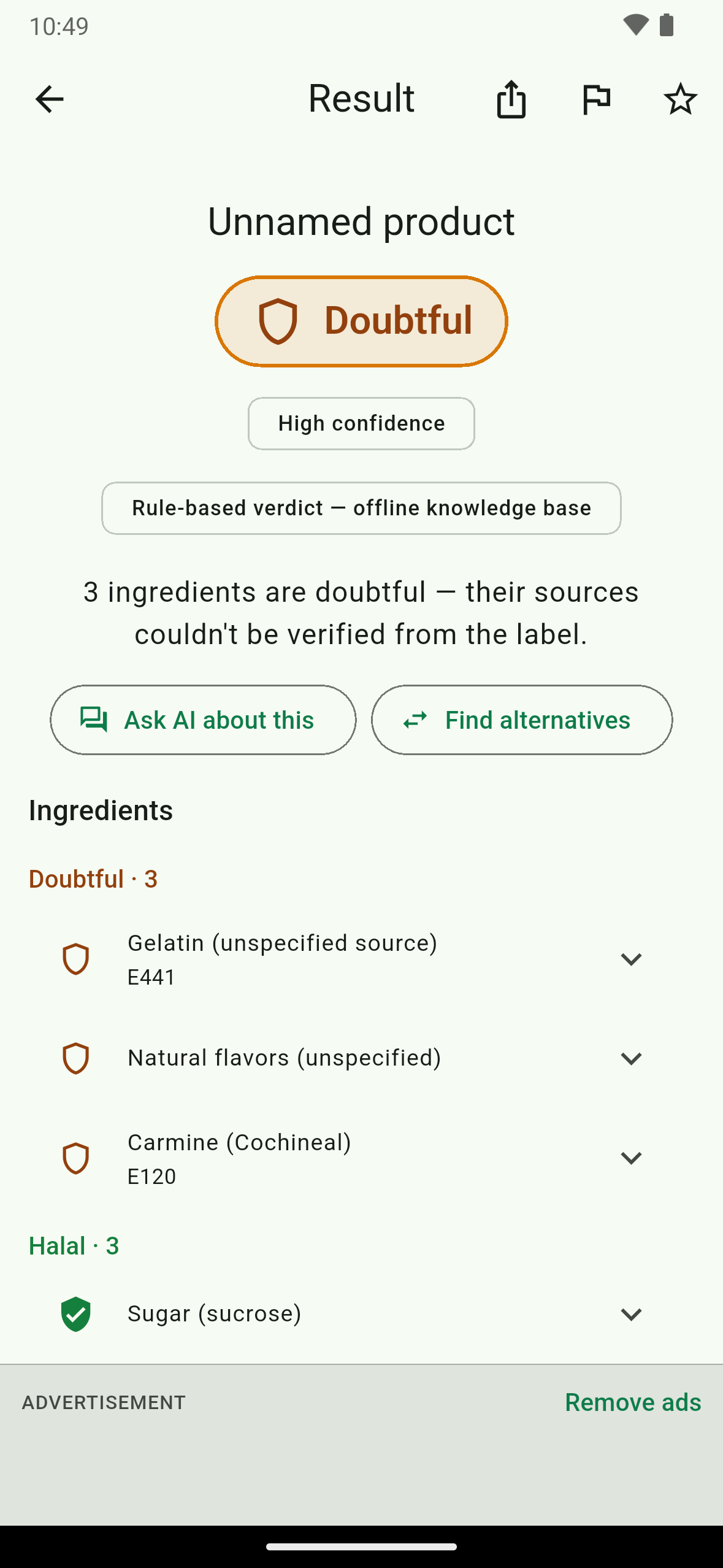
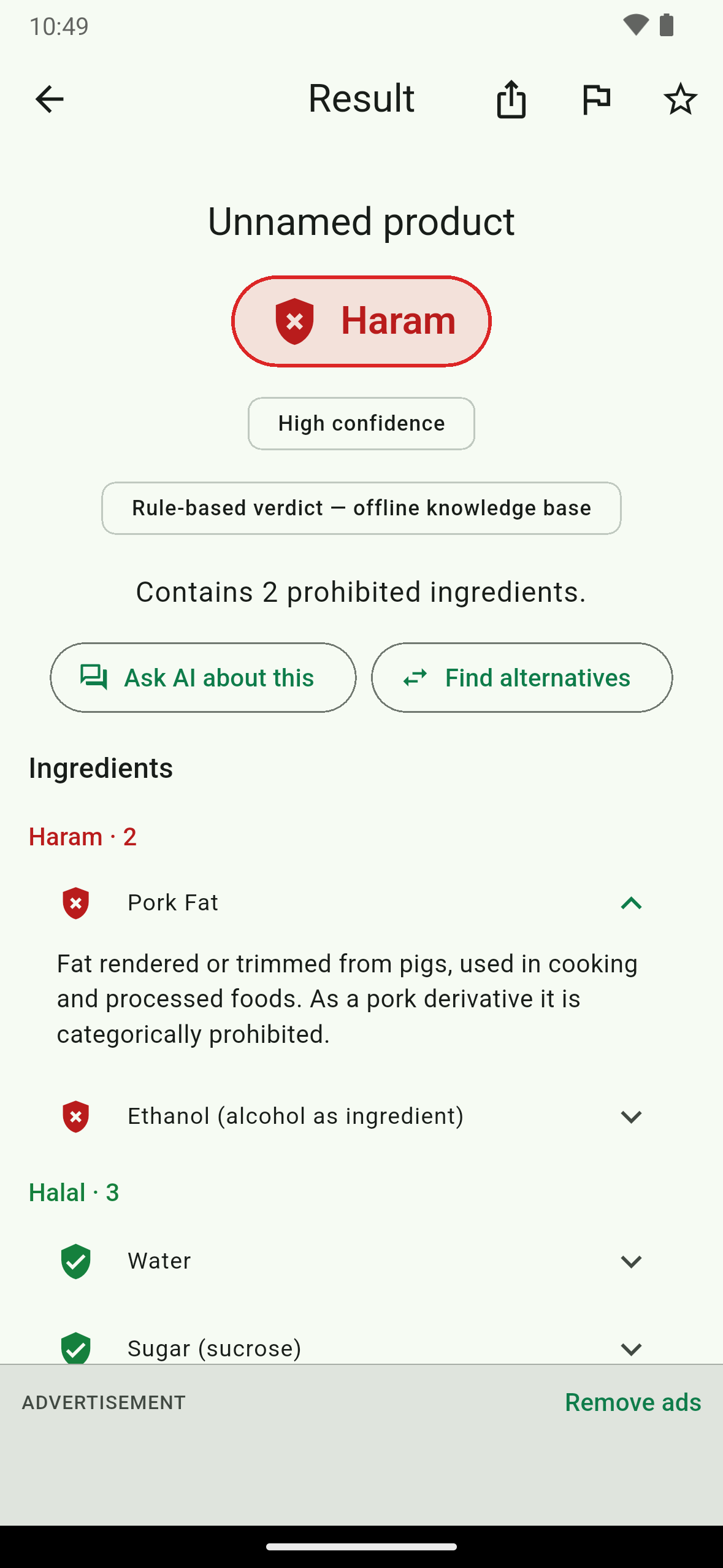
- Four verdicts, with reasons. Every product gets Halal, Doubtful (mashbooh), Haram or Unknown. The overall verdict is the strictest verdict of any ingredient. The result screen groups ingredients by verdict, shows E-numbers, gives a plain-language reason for each one, tags source-dependent ingredients, and lists questions to ask the manufacturer.
- A bundled knowledge base, KB-first. 331 ingredients and additives (145 with E-numbers) ship inside the app, each with a default verdict and a reason. Many entries cite the published positions of halal certification bodies such as IFANCA, HMC and JAKIM, and 16 have school-of-thought overrides. The server's
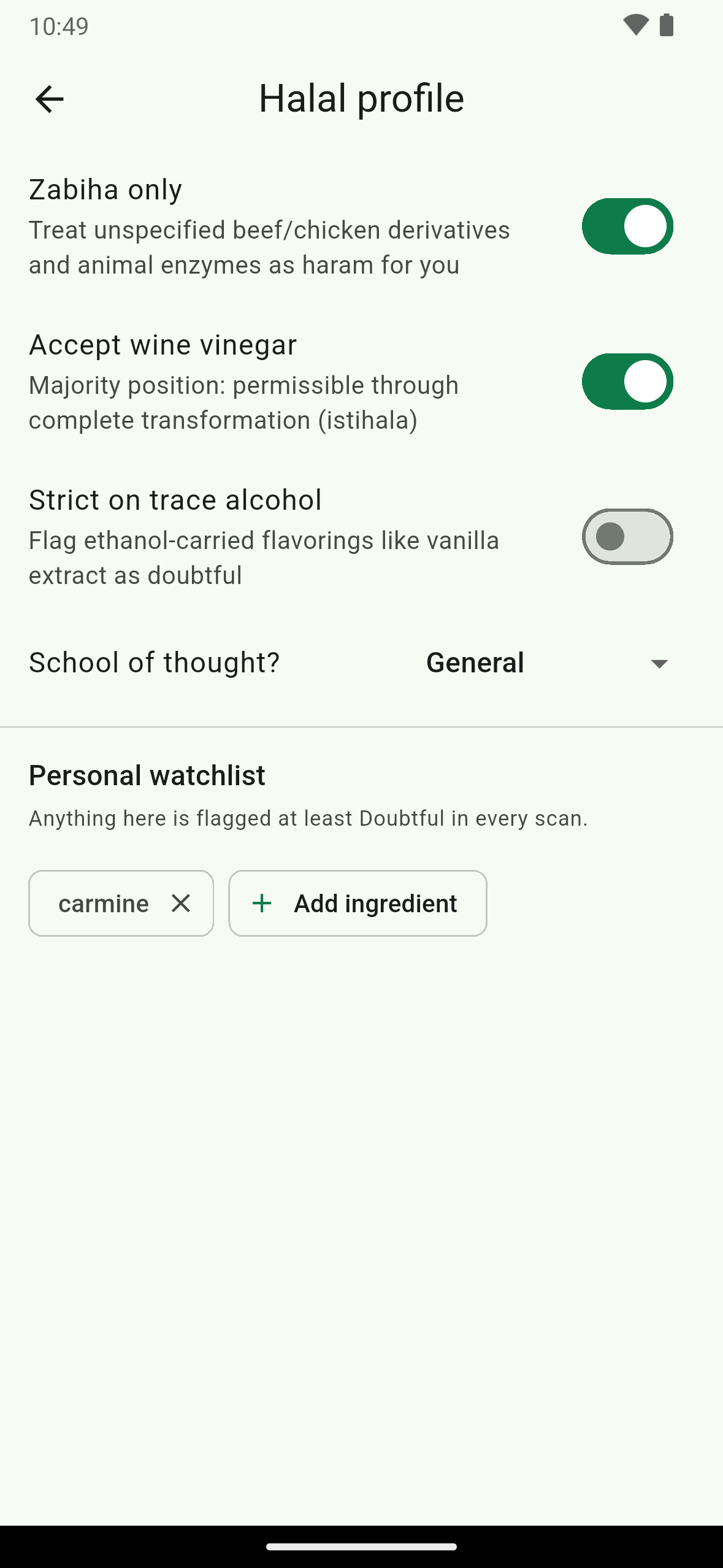
analyzefunction classifies against the same knowledge base first and, when its optional language-model tier is enabled, calls it only for ingredients the knowledge base does not match; otherwise those ingredients stay Unknown. If the server cannot be reached, barcode, label-text and typed scans fall back to the on-device rules engine. Any verdict that comes from the knowledge base alone is labelled "Rule-based verdict". - Your halal profile. A three-question onboarding quiz (meat strictness, ingredients you avoid, school of thought) seeds a profile you can edit in Settings. It covers zabiha only, accepting wine vinegar, strictness on trace alcohol, madhab (General, Hanafi, Shafi'i, Maliki, Hanbali, or prefer not to say) and a personal watchlist. Personalization is applied after the base classification and can only make a verdict stricter.
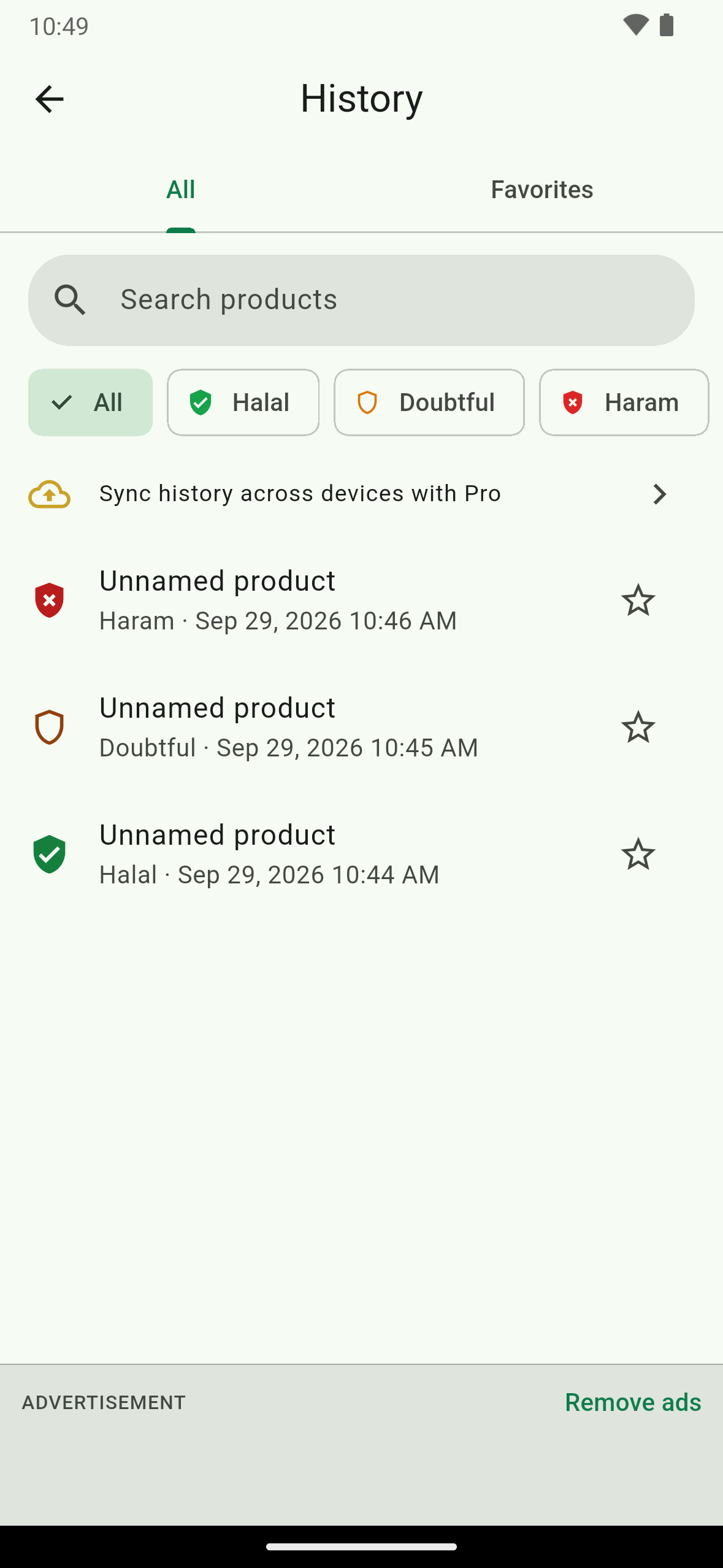
- History. Scans are stored on the device, with search, filter by verdict and favorites. Pro users who sign in can sync history across devices.
- Share and correct. Share a verdict card, or report an incorrect result.
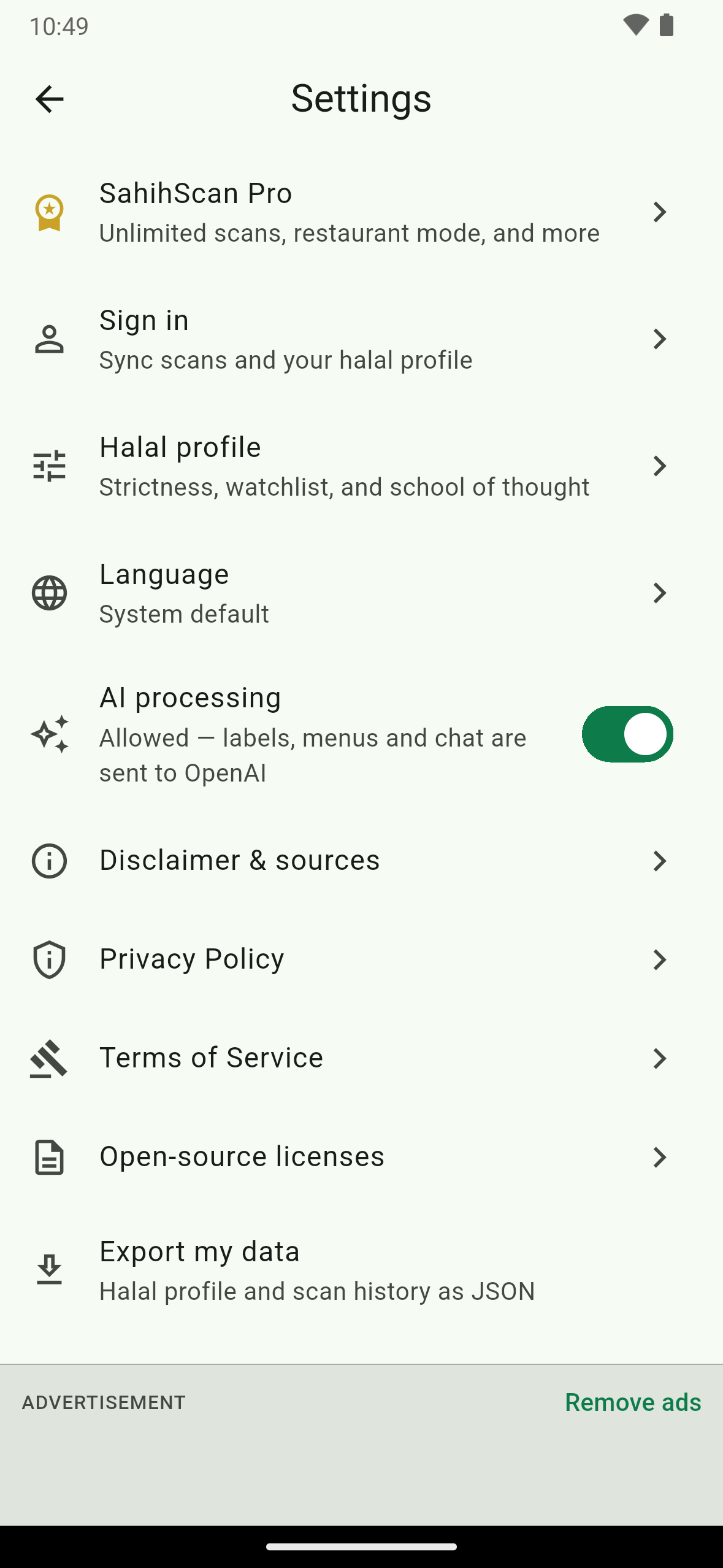
- Privacy and trust. No account is needed. Before a label photo or typed list leaves the device, a consent screen names OpenAI as the AI processor, and there is a switch for it in Settings. The captured label photo is deleted from the device after analysis. Settings also has "Export my data" (profile and history as JSON), and signed-in users can delete their account. Every result screen carries a disclaimer footer that links to the full disclaimer and sources: verdicts are informational, not a fatwa or certification.
- Languages: English, Arabic and Urdu.
How RevenueCat powers it
- SDK:
purchases_flutter10.2.3.BillingService.initialize()callsPurchases.configure(PurchasesConfiguration(key))at startup with the platform's public SDK key, injected at build time. If RevenueCat fails to start, the app still boots in free mode. Guests use RevenueCat's anonymous app user id. Signing in callsPurchases.logIn(<Supabase user id>), and signing out callsPurchases.logOut(). - Entitlement: a single entitlement,
pro. Pro meanscustomerInfo.entitlements.activecontainspro. - Offering, packages and products: the paywall reads
Purchases.getOfferings().current, thedefaultoffering. It has two packages:$rc_weekly(store productsahihscan_pro_weekly) and$rc_annual(store productsahihscan_pro_annual). No product id or price is hard-coded in the app. - Paywall: a custom Flutter screen with one button per package. Each button shows the store's
priceStringplus a billing period taken from the package type. A purchase callsPurchases.purchase(PurchaseParams.package(...))and closes the paywall onceprois active. A free-trial notice appears only when the store reports an introductory offer on one of the packages. The auto-renewal terms and the Terms and Privacy links sit on the paywall, and both documents are bundled so they work offline. If the offering is empty or fails to load, the screen shows "Subscriptions aren't available right now" with a Retry button instead of a dead end. - Where the paywall appears: at the end of onboarding; when the 3 free scans are used up; from the "free scans left" pill; from Pro features such as history sync; from Settings → SahihScan Pro; and from the "Remove ads" link on every ad banner.
- Restore purchases: a button on the paywall calls
Purchases.restorePurchases(). Ifprocomes back it shows "Purchases restored." and closes the paywall. Otherwise it shows "No purchases to restore.", or "Couldn't restore purchases. Please try again." if the store call fails. - Live entitlement state:
watchIsPro()seeds fromPurchases.getCustomerInfo()and subscribes withPurchases.addCustomerInfoUpdateListener. It is exposed as a Riverpod provider, so every gate updates the moment a purchase or restore lands, with no restart. - Where
progates features in the app: the free-scan gate before every scan (3 free scans), the "N free scans left" pill (hidden for Pro), ads (no ads for Pro, and no ad is shown until the entitlement is known), cloud history sync for signed-in Pro users, and the Settings upsell row (hidden for Pro). - Server-side confirmation: a
rc-webhookedge function receives RevenueCat webhooks. It checks a shared-secret Authorization header with a constant-time comparison and ignores sandbox events unless explicitly enabled. It then mirrors theproentitlement (active flag, product id, expiry) into anentitlementstable keyed by the Supabase user id, which theanalyzefunction reads to enforce the free-scan limit for non-Pro users. Anonymous RevenueCat ids are skipped, so server-side Pro applies to signed-in users.
Monetization model
SahihScan is free to download. The free tier includes 3 full scans, and AdMob banner ads appear on the result, history and settings screens. SahihScan Pro is an auto-renewing weekly or annual subscription sold through RevenueCat. It removes ads and, on a signed-in account, unlocks unlimited scans and history sync across devices. The paywall is shown at the natural decision points listed above, and the app never shows prices that did not come from the store.
How we built it
Flutter and Dart with Riverpod, go_router and Drift (SQLite) for on-device history. Google ML Kit text recognition reads labels on the device, and mobile_scanner handles barcodes. Supabase provides Auth, Postgres with row-level security and Deno Edge Functions. OpenAI is called only from the Edge Functions, so no AI key ships in the app. Barcode lookups use the Open Food Facts API. RevenueCat (purchases_flutter) handles subscriptions, Google AdMob with UMP consent serves the free-tier banners, and the app is localized into English, Arabic and Urdu.
Testing instructions for judges
- Install SahihScan from Google Play (https://play.google.com/store/apps/details?id=com.deepfai.sahihscan) or the App Store (https://apps.apple.com/us/app/sahihscan-halal-scanner/id6790466079). No account is needed to start.
- Onboarding shows two intro screens and asks three questions, then shows the Pro paywall. Close it (X) to continue on the free tier.
- The free tier includes 3 scans, with banner ads. Tap Type ingredients and paste a list, for example
Water, Sugar, Gelatin, Carmine (E120), or use Import from gallery or Scan ingredients label on a photo of an ingredient panel, or point the camera at a barcode. The first label or typed scan asks for AI-processing consent. Tap any ingredient to read its reason. - The paywall also opens on the 4th scan, from the "free scans left" pill, from Settings → SahihScan Pro, or from "Remove ads".
- To unlock Pro, subscribe on the paywall through Google Play or the App Store (weekly or annual). There is no promo-code field in the app. The paywall does not hard-code a trial: it shows a free-trial notice only when the store reports an introductory offer on a package, so whether you see a trial depends on the store's offer and your eligibility. Sign in first (Settings → Sign in → "Email me a sign-in code"), then subscribe, or redeem the Google Play promo code supplied with this submission in the Play Store app. The server grants unlimited scans only to a signed-in Pro account, so a guest who subscribes or redeems the code will still see the paywall on the 4th scan. Restore purchases is on the paywall.
- Verdicts are informational and are not a fatwa or certification.
Note on paywall benefits: the paywall also lists Restaurant mode and the Halal Assistant chat. Those depend on a server-side AI service that may be unavailable on the live backend, so they are not part of what this submission claims.

Log in or sign up for Devpost to join the conversation.