-
-
Sahaay
-
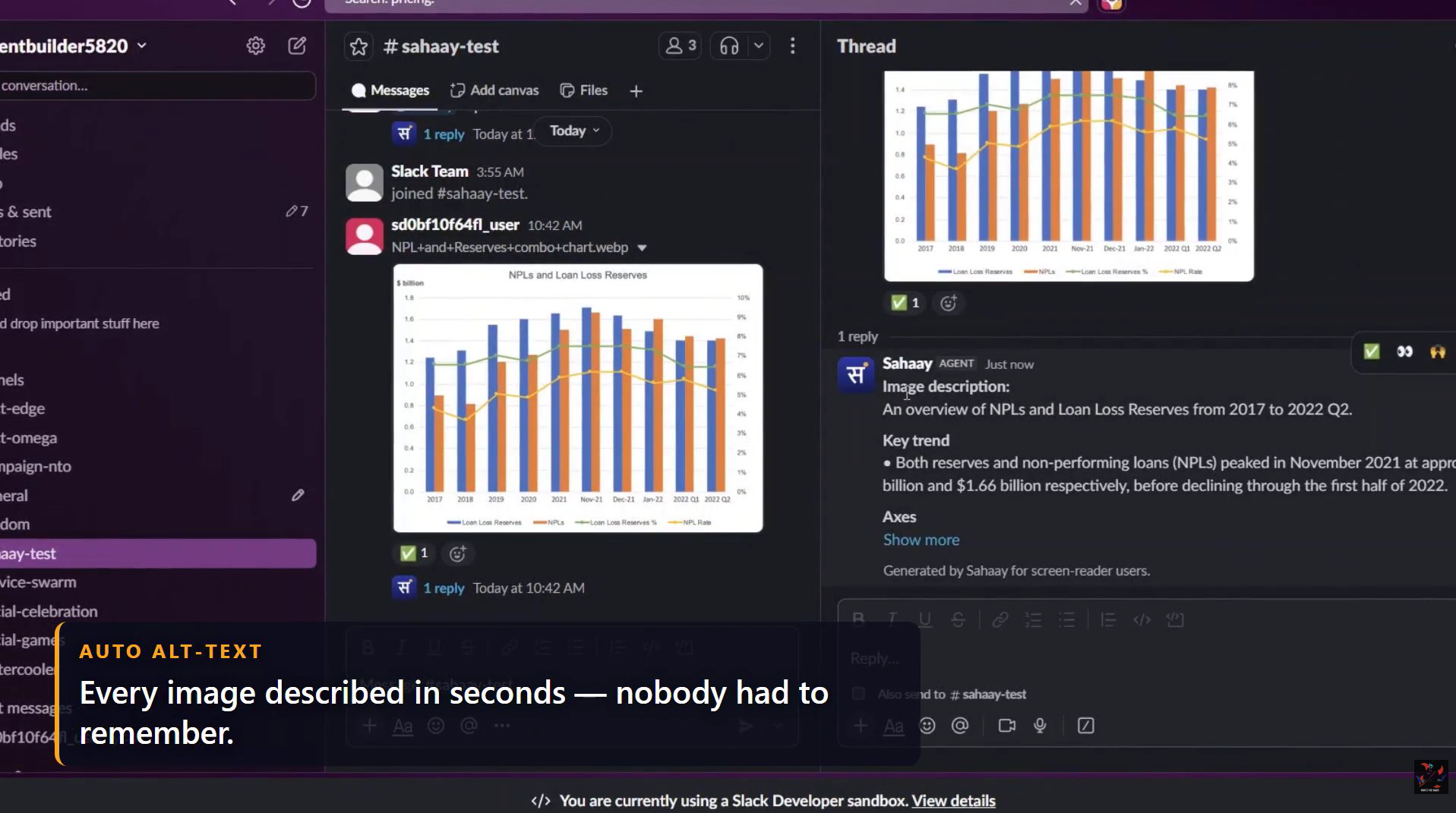
an alt-text thread reply under a chart
-
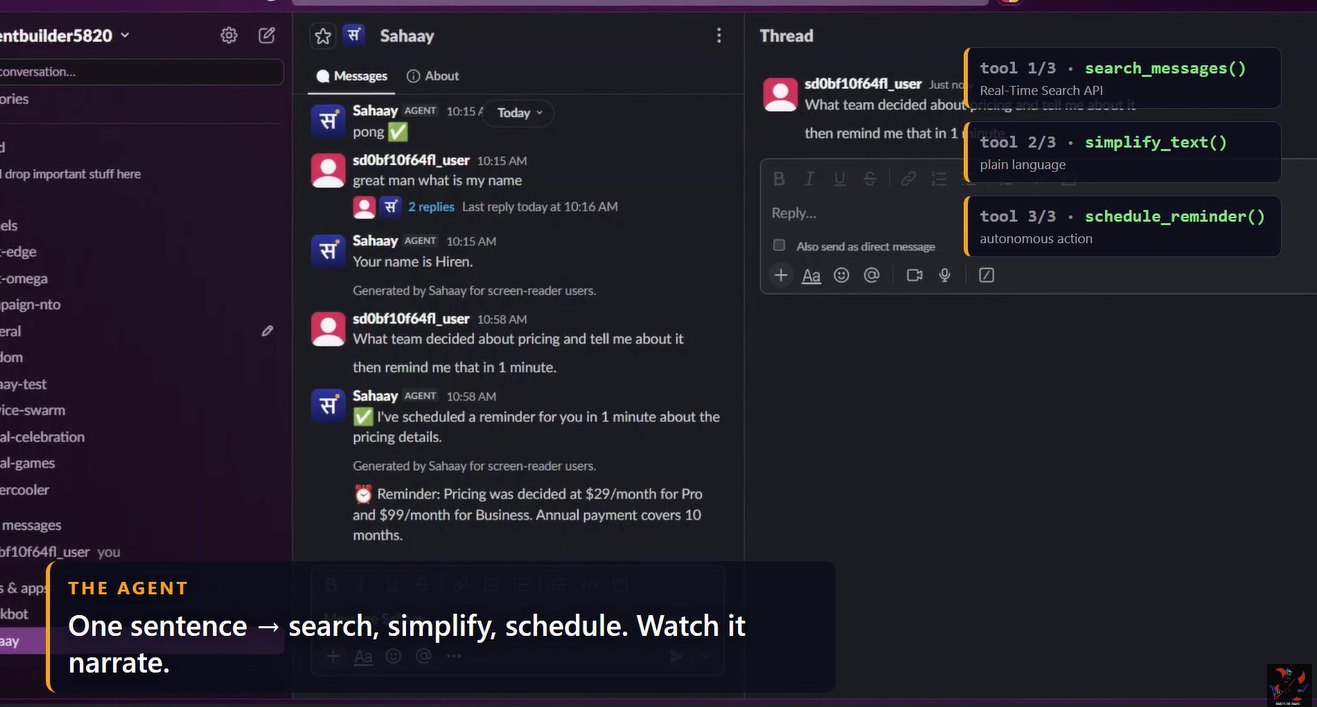
the compound command answer with the AGENT badge
Inspiration
I watched a screen reader try to read a Slack channel. It said: "Image. image dot P-N-G. Audio clip." That's it. That's what a blind professional gets from a chart their team is debating, or a voice note with the meeting time in it. Work moved into Slack — and for hundreds of millions of people with vision or hearing disabilities, images without alt-text and audio without transcripts are a locked door on the workplace itself. Alt-text discipline doesn't scale. An agent does. Sahaay is Hindi for "support."
What it does
Sahaay is an autonomous accessibility agent that makes an entire Slack workspace usable — automatically.
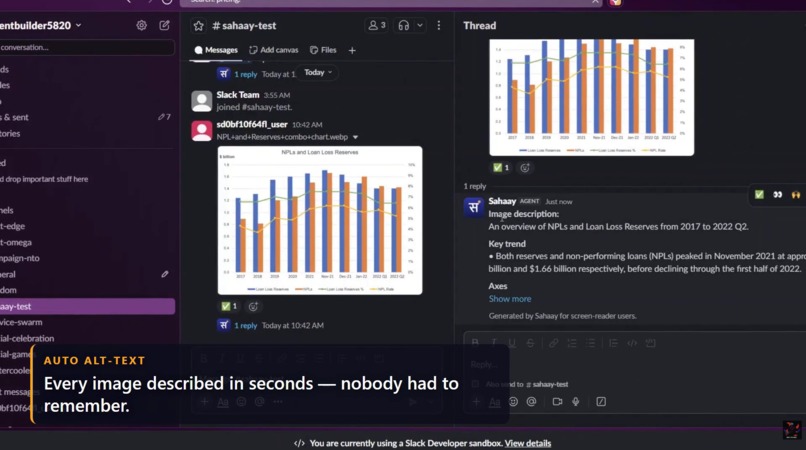
- Auto alt-text: every image posted in any channel gets a screen-reader-optimized description in-thread within seconds — image type, visible text, real numbers from charts. Zero effort from the poster.
- Auto transcription: every voice note and clip gets a verbatim transcript plus a one-line summary, in-thread. Now it's searchable — for everyone.
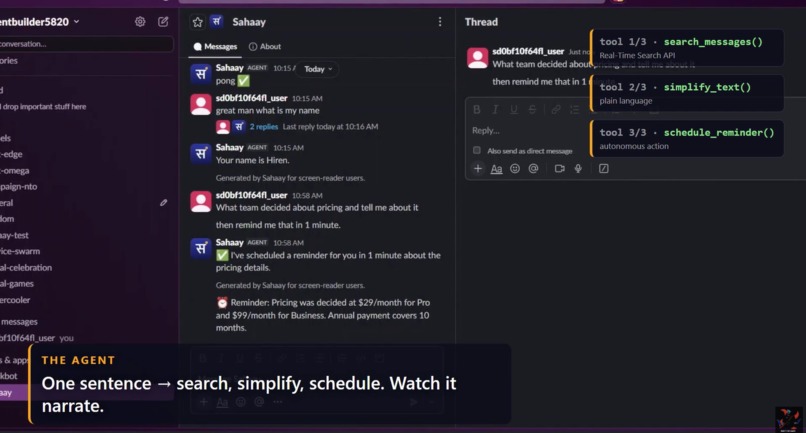
- A real agent, not a chatbot: on Slack's newest Agent messaging surface, one message like "What did the team decide about pricing? Explain it simply and remind me before the meeting" chains search → read → simplify → schedule, narrating each step live via the status indicator.
- Proactive daily briefing: an unprompted morning DM with decisions, action items — and what was inside the images and audio it already processed.
- Personal accessibility profiles: "answer in Hindi, keep it brief" becomes a durable per-user profile applied everywhere. Survives restarts.
- Context awareness: message Sahaay while a channel is open and it knows "this channel" means that one (app_context).
- Accessibility Guardian:
@Sahaay reportposts a per-channel scorecard — images described, clips transcribed, minutes of listening time returned to the team. Impact measured, not claimed.
How I built it
TypeScript + Bolt v4 over Socket Mode, deployed 24/7 on a GCP e2-micro. The core is a Gemini function-calling agent loop over 12 tools that wrap Slack Web API primitives and my media pipelines — one multimodal model family handles vision (alt-text), audio (transcripts), and text (simplify, narrate, digest). Every open-ended question hits Slack's Real-Time Search API (assistant.search.context) first — semantic search with cited results grounding every answer — with a conversations.history aggregation fallback so the experience never breaks. State (reminders, profiles, counters) lives in a single JSON file and survives restarts. Every reply is Block Kit, written screen-reader-first: short sentences, real bullets, no emoji walls.
Challenges I ran into
- Slack file downloads silently return an HTML login page unless every fetch carries the bot token — debugging that at 2 AM builds character.
file_sharedfires multiple times and overlapsmessagefile_share subtypes; deduping by file ID fixed double-processing.- I migrated to the brand-new
agent_viewsurface (released June 30) mid-build. It's an irreversible manifest toggle with a new event model — and I discovered live that replies must be flat in the DM, not threaded, or users never see them. - Gemini 3.x rejects resubmitted function calls without thought signatures the SDK doesn't surface yet — the agent loop runs on a model that does robust multi-turn tool calling, single-shot vision/audio stays on the newest one.
- RTS semantic mode looked empty until I found the documented keyword mode works on any workspace — then it turned out AI search was enabled and returned 17 cited results on the first live query.
Accomplishments I'm proud of
The compound command demo: one dictated sentence → the workspace searched, a decision explained in plain language, a durable reminder scheduled — with the agent narrating each tool call live. For a blind user that's the entire workspace, hands-free and eyes-free. Also: the digest that tells you what was inside the images, in your preferred language.
What I learned
Accessibility isn't a feature you add — it's a default you automate. The curb-cut effect is real: transcripts made audio searchable for everyone in my test workspace, not just deaf users.
What's next
Team-level accessibility analytics, more profile dimensions (dyslexia-friendly formatting, reduced motion), and a Marketplace listing so any workspace can install accessibility as a default. The European Accessibility Act made workplace accessibility the law; Sahaay makes it the default.
Built With
- block-kit
- bolt
- gemini
- google-ai
- google-compute-engine
- node.js
- p-queue
- pm2
- real-time-search-api
- slack
- slack-agent-view
- socket-mode
- typescript


Log in or sign up for Devpost to join the conversation.