-

A new person has entered the office! Let's say hello.
-

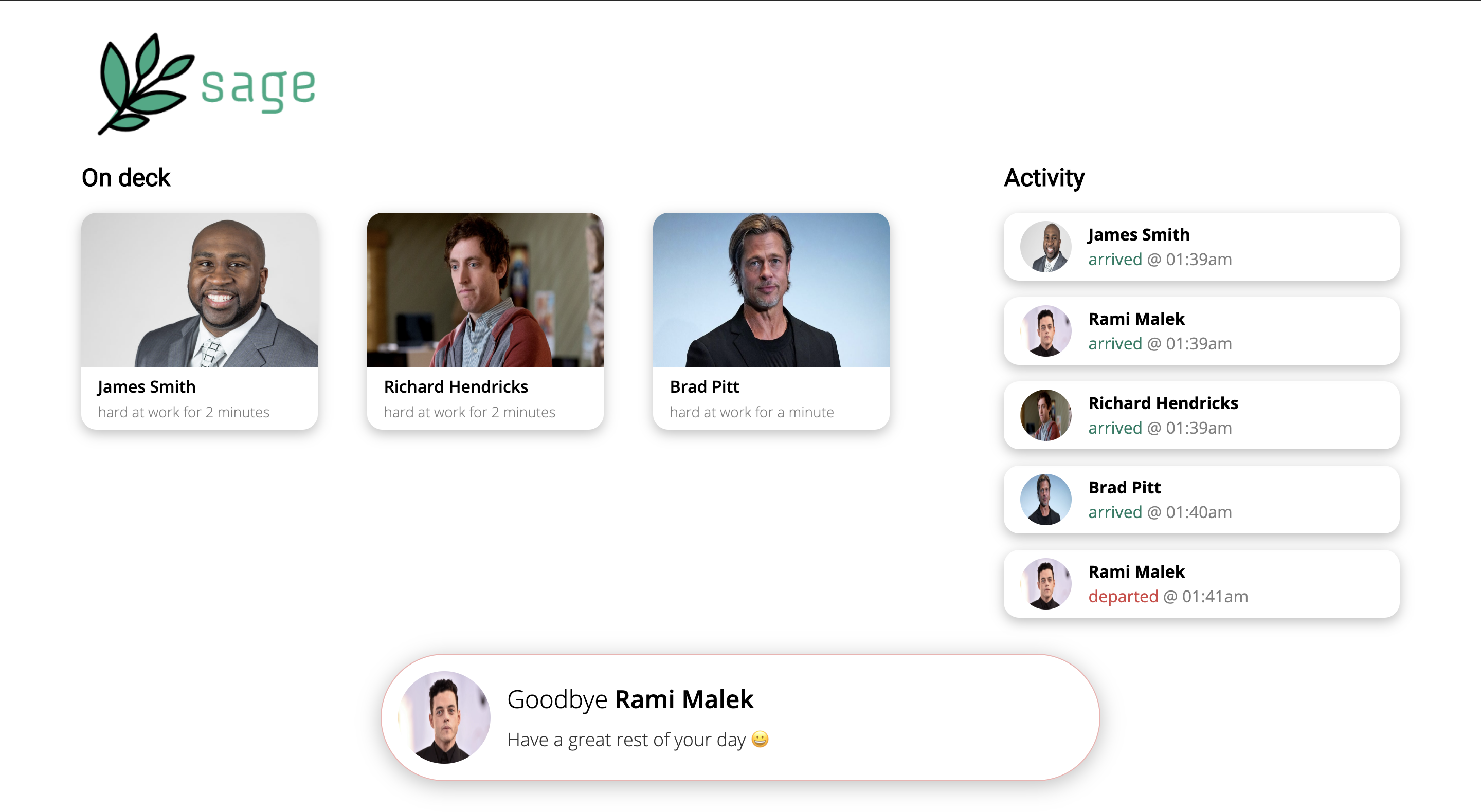
The standard dashboard. "On Deck" shows everyone currently in the office. "Activity" shows all events of people entering and leaving.
-
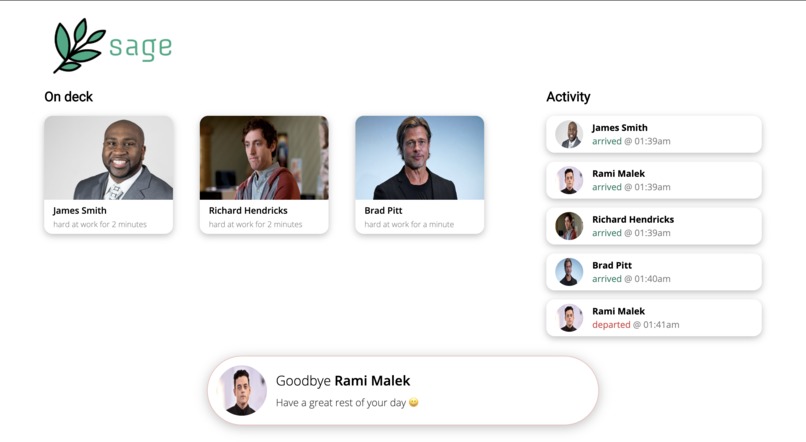
Rami has left the office! Wish him farewell and update the Activity bar.


Inspiration
A company leader losing track of half of his workforce in the office. A software engineer whose boss might as well be a mirage. A graduate student knocking on the door of his advisor's office, only to hear nothing in return, and an intern losing his supervisor on the manufacturing floor. The inspiration for Sage arose from a frustration so small as to be nagging, yet so ubiquitous among our team members--where are our coworkers?
What it does
Sage uses facial recognition to identify people entering and leaving a building or room. It does this by first storing images of an employee on a Google Cloud Storage bucket (i.e., during a company's onboarding process). Then, as a person passes through a doorway, a camera takes an image of them, and classifies the image by name. A name, image, and timestamp are displayed on a web application hosted within a Compute Engine VM instance in the Google Cloud Platform.
How we built it
Sage was built in three parts, seamlessly integrated.
1) Model training with OpenCV We trained a machine learning model with a facial dataset available in Python's OpenCV. Training was done using a Haar classifier cascade1, as it is more computationally efficient than detecting features by means of pixel intensity only2.
2) Image Capture Images of the "onboarding process" were captured using an standard laptop webcam. When an employee walks through a doorway, a camera takes an image of them.
3) Web Application The back-end of the web application was written in node.js with Express. It used web sockets to connect components for real-time communication. We used the front-end framework vue.js to make a clean, fun dashboard to present information to employees.
Challenges we ran into
Our original idea involved developing an HVAC model system that would reduce energy usage/improve comfort by predicting room usage. After pitching to mentors, we quickly realized that although our idea made good business sense, it was difficult to both track the exact number of people in a room and collect enough data to build a predictive model in the Swamphacks 36-hour timeframe.
Following our pivot, we attempted to use a RasPi camera to photograph people and classify images with our trained model. However, after several hours of debugging, we were unable to get Python's OpenCV package to load and work properly on the Raspberry Pi. We decided to use a built-in laptop camera to take our images instead. This demonstrates that our algorithm can operate on any system with Python and imaging capabilities.
Lastly, we struggled to get the web sockets to communicate properly. Switching to node.js from Python's Flask made this much easier.
Accomplishments that we're proud of
We're definitely proud of how well we pivoted to an idea that leveraged all of our skillsets. Despite facing several setbacks such as the Raspberry Pi fiasco, we managed to solve a need that affects the world's entire workforce.
What we learned
We've all learned new things. Evan learned how to setup web sockets with a node.js Express server. Stephen learned the intricacies of machine learning, especially when he was working with Song. Speaking of Song, our machine learning specialist gained experience in adapting algorithms to cloud-based applications. Varun learned how to plan and visualize a project that entailed synchrony between software and hardware.
What's next for Sage
What's next for Sage? Perhaps we'll add more functionality to the web application, and image using a standalone camera. With more cameras, we can determine locality of employees in a large facility, without the need for badges. We foresee applications in headcounting during emergencies, the development of digital twins for improved energy usage, and much, much more. Stay tuned!
1Paul Viola and Michael J. Jones. Rapid Object Detection using a Boosted Cascade of Simple Features. IEEE CVPR, 2001
2Papageorgiou, Oren and Poggio, "A general framework for object detection", International Conference on Computer Vision, 1998.


Log in or sign up for Devpost to join the conversation.