-
-
Cover Image
-
System-Architecture
SafeVoice AI — Project Story
Inspiration
It started with a question none of us could stop thinking about: "What good is a safety app if you can't use it when you're actually in danger?"
Every existing solution has the same fatal flaw — they require you to unlock your phone, find the app, and press buttons. But real danger doesn't give you that luxury. A woman being followed has maybe two seconds to react. We built SafeVoice AI because those two seconds should not be wasted on a UI.
The inspiration was simple and personal: we wanted to build something that could genuinely save a life. Not a prototype. Not a demo. Something a real woman could trust in the worst moment of her life.
What We Built
SafeVoice AI is a voice-triggered emergency response agent for mobile devices. The user says "Help Me" — and the agent does everything else.
Within two seconds of the trigger:
- The Gemini Live API detects the keyword in real time, verifies the user's voice biometrics, and analyzes stress patterns in the audio
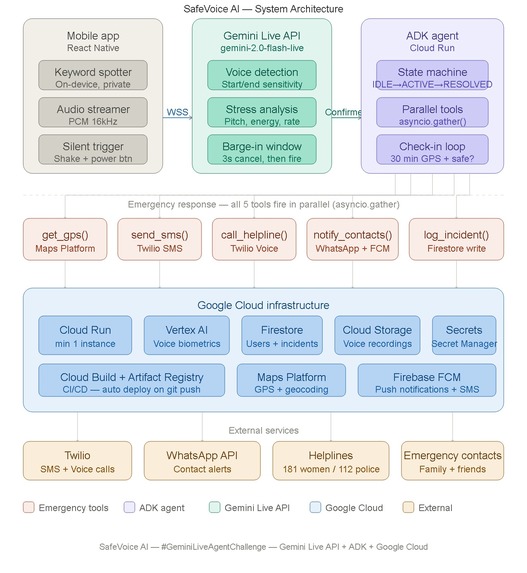
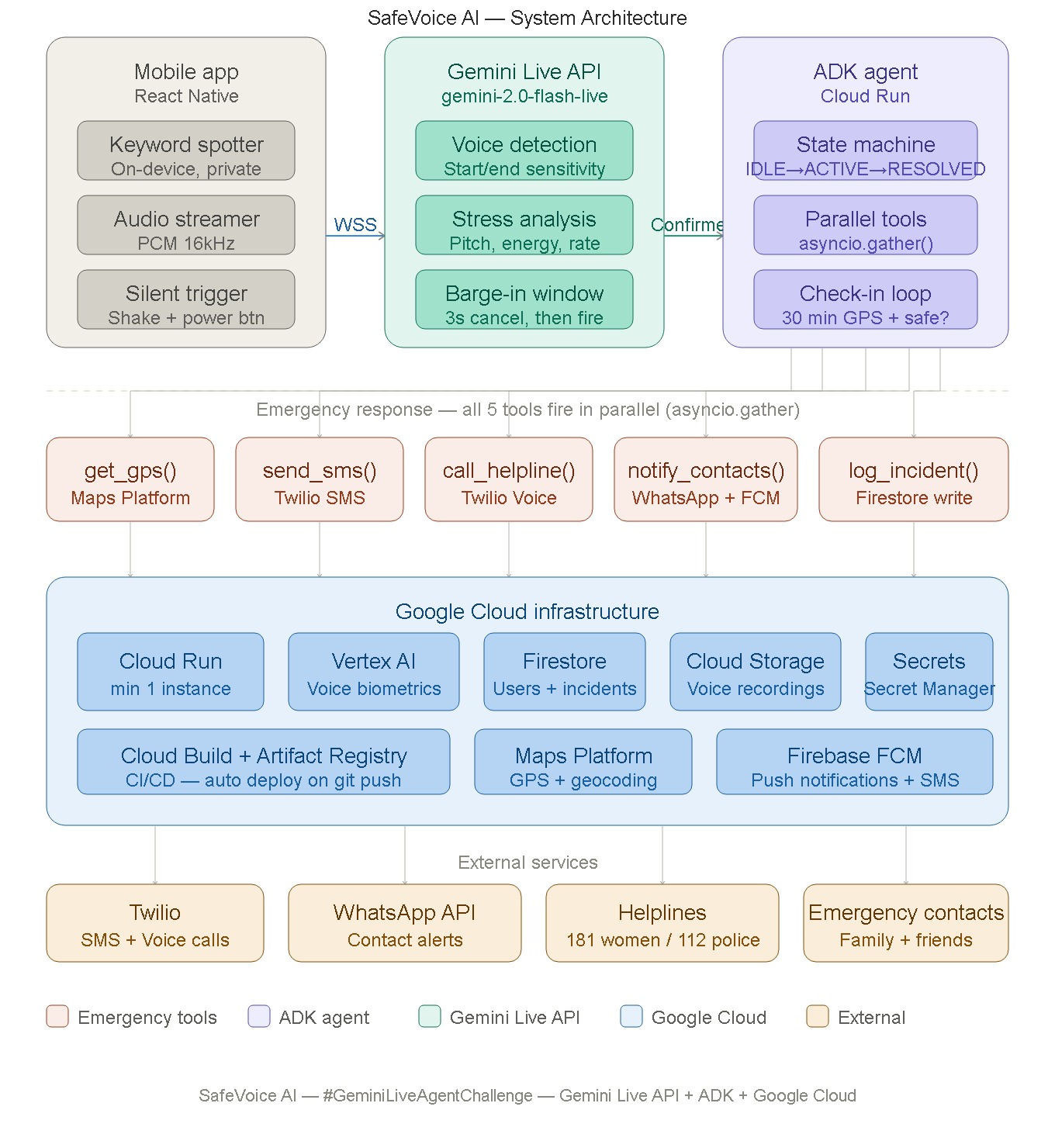
- The ADK Bidi-Streaming agent fires five emergency tools in parallel
using
asyncio.gather()— no sequential waiting - An AI voice call is placed to the women's helpline (181) using the user's own pre-recorded voice — so the call is taken seriously
- SMS and WhatsApp alerts with a live Google Maps link are sent to all verified emergency contacts simultaneously
- Live GPS updates are pushed every 60 seconds until the user confirms they are safe
- If no confirmation arrives in 30 minutes, the agent automatically escalates to emergency services (112)
For situations where speaking is impossible, a triple phone shake or three rapid power button presses triggers the identical response flow — silently, invisibly.
The entire backend runs on Google Cloud Run with a minimum of one always-warm instance, so there are zero cold starts when it matters most.
How We Built It
| Layer | Technology |
|---|---|
| Voice trigger + stress detection | Gemini Live API |
| Agent orchestration | Google ADK Bidi-Streaming |
| Backend hosting | Google Cloud Run |
| Voice biometrics model | Vertex AI |
| User data + incident logs | Firestore |
| Live GPS + address lookup | Google Maps Platform |
| SMS fallback (works on 2G) | Twilio + Firebase FCM |
| Emergency WhatsApp alerts | WhatsApp Business API |
| Infrastructure as Code | Terraform + Cloud Build |
| Mobile app | React Native (iOS + Android) |
The architecture is fully event-driven and serverless. The mobile app
streams raw PCM audio over a persistent WebSocket to the Gemini Live API.
The ADK agent maintains a state machine — IDLE → TRIGGERED → ACTIVE →
RESOLVED — and uses Gemini's native barge-in capability to power the
3-second cancel window that prevents false triggers.
Voice biometrics run on-device during standby, so no audio ever reaches the cloud until the keyword is confirmed. Privacy by design, not by policy.
Challenges We Faced
Keeping the microphone alive in background mode was the hardest
mobile problem. iOS aggressively kills background audio processes.
The solution was the Background Audio entitlement combined with
AVAudioSession set to playAndRecord — the same technique used by
navigation apps to stay alive while the screen is off.
False triggers were our biggest safety concern. We solved this with a two-layer gate: voice biometrics must match the registered user AND acoustic stress analysis must detect genuine distress. A calm voice saying "help me" to a friend does not trigger the agent. Only a stressed, confirmed voice does.
Parallel reliability was non-trivial. Using asyncio.gather() with
return_exceptions=True was critical — it ensures that if one tool
fails (say, WhatsApp is down), the other four still execute. No single
point of failure in the response chain.
SMS as primary channel was a late but important design decision. We originally built around internet-first notifications. Then we asked: what if she's in a basement with no data? Twilio SMS over 2G became the primary alert channel, with internet-based channels as supplements — not the other way around.
The helpline credibility problem surprised us. An AI call to an emergency helpline risks being dismissed. The solution was to play the user's own pre-recorded voice first — her real voice, her real name — before the AI continues the message. A human voice at the start of the call changes everything.
What We Learned
Building for genuine emergencies forces a different standard of engineering. Every design decision gets tested against one question: "Will this work when a woman is too scared to think?"
That question eliminated every unnecessary feature, every extra step, and every single point of failure we had originally accepted.
We learned that the Gemini Live API's barge-in handling is remarkably natural — it made the 3-second cancel window feel fluid rather than mechanical. ADK's bidirectional streaming turned parallel emergency orchestration into clean, readable code. And Google Cloud Run's minimum instance setting is genuinely underrated for latency-sensitive applications.
Most of all, we learned that the best technology is the kind that disappears completely — leaving only the outcome.
One word. One second. She's safe.
Built for the Gemini Live Agent Challenge · #GeminiLiveAgentChallenge
Built With
- ai
- api
- cloud
- docker
- expo.io
- fastapi
- gemini
- javascript
- pytest
- pytest-asyncio
- python
- react-native
- terraform
- twilio
- vertex


Log in or sign up for Devpost to join the conversation.