-
-
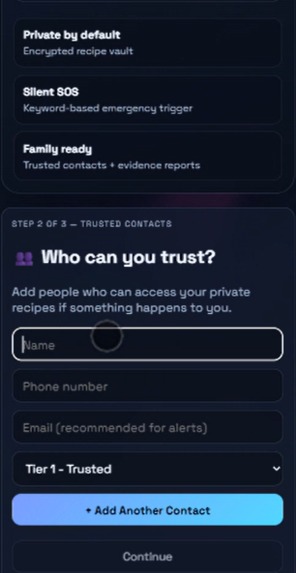
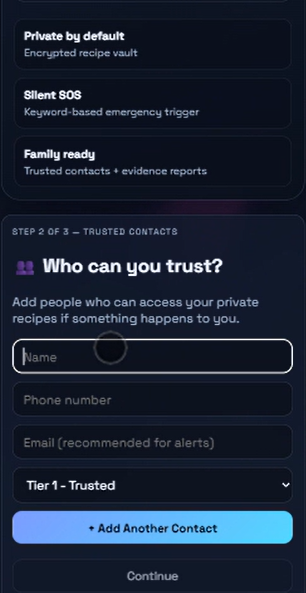
Adding trusted people who will be notified when an emergency occurs
-
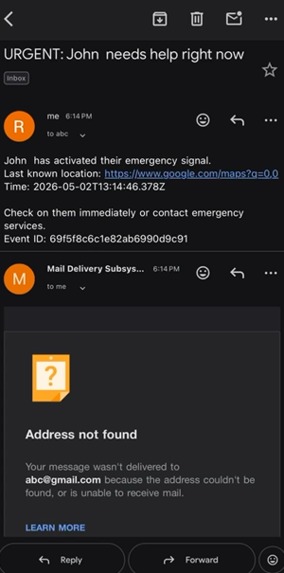
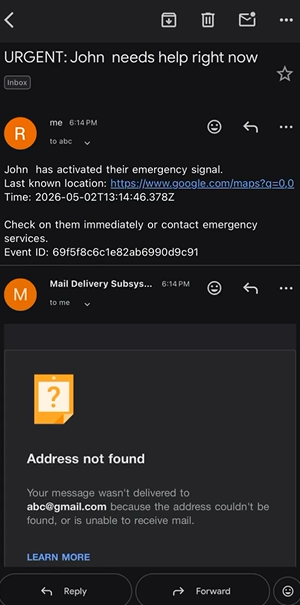
Trusted Users being informed
-
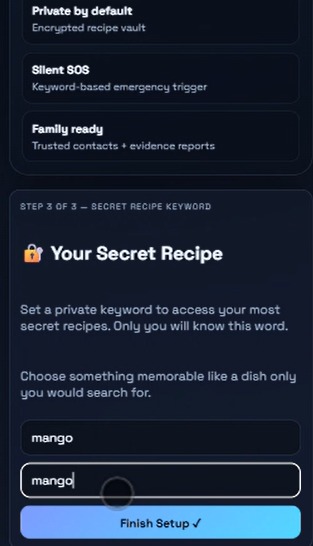
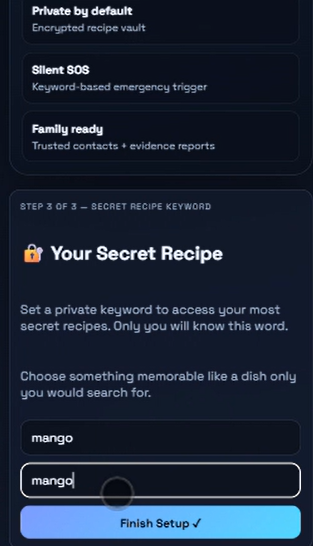
Adding a secret keyword which will trigger alerts
-
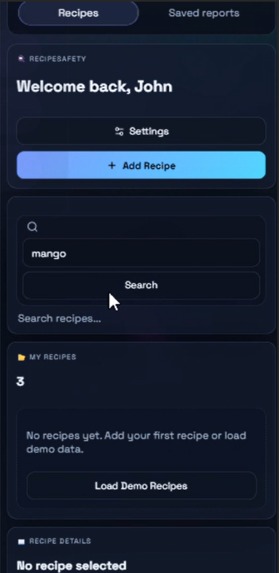
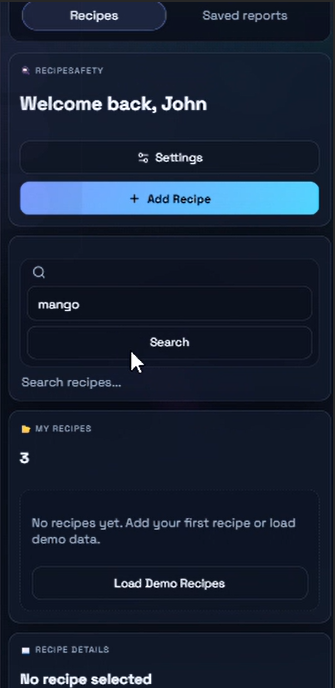
User interface upon login
💡 Inspiration
Most safety tools have a fatal flaw — they look like safety tools.
The moment a victim opens a panic button app, an SOS dialer, or anything with the word "emergency" on the screen, the danger escalates. Abusers are controlling. They check phones. They recognize safety apps. And in that moment of recognition, the tool designed to save a life becomes the reason it ends.
We kept coming back to one question:
What if asking for help looked exactly like searching for a recipe?
1 in 3 women globally experience domestic violence. The majority never call for help — not because help doesn't exist, but because the danger is standing right there, watching the screen.
RecipeSafety was built for them.
🍳 What It Does
RecipeSafety is a fully functional recipe manager that hides a complete emergency response system inside it.
To the outside world — to anyone who picks up your phone, checks your apps, or watches your screen — it is exactly what it claims to be: a private, encrypted place to store your family recipes.
But to someone who needs help:
- ✅ Create an account and set up trusted emergency contacts
- ✅ Save and browse real recipes — the app works completely normally
- ✅ Set a secret keyword — a recipe name only you would search
- ✅ Search that keyword and silently trigger SOS mode
- ✅ Live location shared with trusted contacts instantly
- ✅ Audio recorded and analyzed by AI for threat level
- ✅ Evidence encrypted and stored in a private vault
- ✅ Full SOS history tracked for legal documentation
The screen never changes. It shows pancake recipes. The abuser sees nothing. Help is already on the way.
🛠️ How We Built It
We built RecipeSafety as a full-stack JavaScript application designed to move fast, fail gracefully, and look completely innocent.
Frontend → React + Vite + Tailwind CSS
Backend → Node.js + Express
Database → MongoDB Atlas + Mongoose
AI Layer → Groq Whisper (transcription) + Google Gemini (threat analysis)
Realtime → Socket.io (live location + responder coordination)
Storage → Cloudinary (encrypted evidence vault)
Alerts → Nodemailer (email) + Twilio (SMS)
Deploy → Vercel (frontend) + Render (backend)
Cost → $0
The hardest architectural decision was the AI threat layer — we didn't want a binary panic button. We built a 5-level threat scoring system where Groq Whisper transcribes ambient audio in real time, Gemini analyzes it for aggression, distress keywords, and tone, and the response scales automatically:
| Threat Level | Response |
|---|---|
| 🟢 1–2 | Silent monitoring |
| 🟡 3 | Alert trusted contacts |
| 🔴 4 | Urgent alerts + responders |
| 🚨 5 | Full evidence capture + emergency services |
Every decision was made by asking one question: Would this work for someone whose hands are shaking?
🧱 Challenges We Ran Into
The invisibility problem was the hardest to solve. The app had to feel genuinely normal — not "normal enough." A suspicious UI destroys the entire product. Every button, every label, every onboarding screen had to be something a recipe app would actually say. We rewrote the copy a dozen times.
Proportional AI response required careful prompt engineering. Getting Gemini to return consistent, structured threat assessments across wildly different audio scenarios — silence, shouting, crying, multiple voices — took significant iteration.
Deployment discipline across local, dev, and production environments with multiple third-party services taught us that fallback-first architecture isn't optional — it's survival. Any missing API key had to degrade gracefully, not crash silently.
Designing for stress meant unlearning normal UX instincts. In a crisis, a user has seconds and shaking hands. Every interaction had to be simpler than we thought was necessary.
🏆 Accomplishments We're Proud Of
We didn't build a prototype screen. We built a complete, deployed, working product with a real disguise and a real emergency system underneath it.
- End-to-end flow from onboarding to SOS to evidence vault
- AI threat scoring that responds proportionally, not reactively
- A recipe app cover so convincing it works as a standalone product
- Mobile-friendly interface that works under pressure
- $0 infrastructure — because a life-saving tool should never have a paywall
📚 What We Learned
The most important design decisions in a safety product aren't technical — they're human.
We learned that UX subtlety is a form of engineering. The difference between a tool that saves a life and one that escalates danger is sometimes a single word on a button.
We learned that simplicity under pressure is harder than complexity in comfort. Building for someone in genuine danger forced us to question every assumption we had about good design.
We learned that real-world impact is a better north star than technical complexity. The calculator disguise is not the hardest thing we built. It is the most important.
🚀 What's Next for RecipeSafety
RecipeSafety is designed to be deployed, not shelved.
- 🔐 Encryption at rest + stricter session controls
- 🌍 Multilingual support — this problem exists in every language
- 📱 Native mobile apps with offline-safe emergency behavior
- 👥 Role-based response workflows for contacts and responders
- 🤝 Partnerships with domestic violence NGOs and shelters
- 📋 User testing with real safety organizations
- 🏛️ Submission to Google.org Impact Challenge
We built this in 48 hours. The problem it solves has existed for decades.
RecipeSafety — Because help should never require a sound. 🍳
Built With
- bcryptjs
- express.js
- framermotion
- gemini
- github
- groq
- javascript
- jwt
- leaflet.js
- mongodb
- mongoose
- node.js
- nodemailer
- pdfkit
- react
- react-leaflet
- render
- socket.io
- vercel
- vite

Log in or sign up for Devpost to join the conversation.