Inspiration
Sharing a document often means choosing between speed and privacy. Existing redaction workflows are either manual, destructive, or built around uploading a sensitive file to another service. At the same time, giving an AI agent unrestricted access to document contents creates a new disclosure risk.
SafeShare explores a narrower, more useful contract: the browser handles the private document locally, while WebMCP gives the agent structured access to the redaction workflow. The agent can help manage masks and verify readiness without tool responses containing the document text, file name, image, or detected private values.
What it does
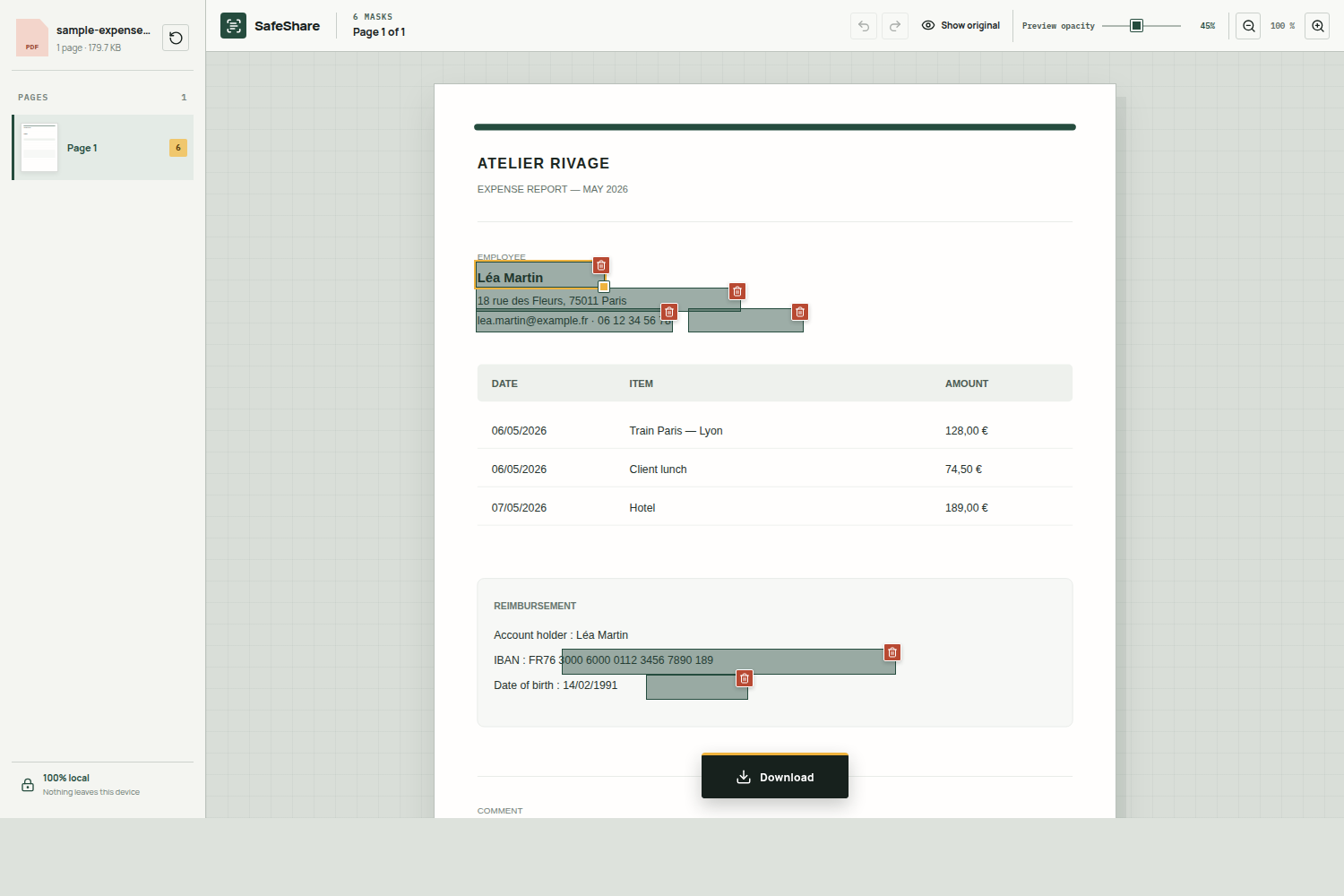
SafeShare opens PDFs and images directly in the browser, detects likely sensitive information, and immediately draws editable masks. People can move, resize, delete, or draw masks directly on the page. Preview opacity can be adjusted without weakening the final redaction.
When the review is finished, SafeShare creates a flattened PDF or PNG in which every visible mask is permanently fused into the pixels. The original file remains unchanged. A supported browser can also hand the finished copy to the operating system's native share sheet, but only after a human click.
Why this is a strong fit for WebMCP
Redaction is not a background automation task; it is a shared visual decision. The person and the agent need the same live page, the same selected mask, and the same reversible history. WebMCP makes that collaboration explicit.
SafeShare exposes nine narrow tools. An agent can read a privacy-filtered editor summary, list safe mask metadata, focus a mask, explain generic detection signals, add or delete a visible mask, undo a change, run the export safety check, and prepare the final download. The agent cannot download or share the file. The final export remains a deliberate human action.
This is substantially better than scraping buttons from the interface: tool inputs are constrained, side effects are described, results are verifiable in the page, and the application can enforce a clear privacy boundary around tool output.
What people and agents can do together
A person can ask the agent to inventory every mask, focus the least confident detection, explain why it was created, make a reversible correction, and verify the final export — while watching each change happen on the document. Before WebMCP, that required fragile visual automation or a separate integration disconnected from the live editing session.
The human contributes contextual judgment and final consent. The agent contributes structured navigation, consistency checks, and reversible execution. Neither replaces the other.
How we built it
SafeShare is a React and TypeScript application built with Vite. PDF.js renders PDFs, Tesseract.js performs local French and English OCR, and deterministic pattern checks detect common personal data. Every detected region is converted to normalized page coordinates so the same geometry works for display, editing, WebMCP actions, and export.
The application feature-detects document.modelContext.registerTool() and registers nine imperative tools from the top-level page. The tools reuse the editor's existing state, validation, undo history, and safety report. Registrations share an AbortSignal for page-lifecycle cleanup.
PDF-lib and Canvas produce the final rasterized document. The opacity slider affects only the editor preview; exported masks are always solid. The Web Share API is progressively enabled only when the browser confirms it can share the generated file.
Challenges we ran into
The main challenge was designing useful agent actions without turning WebMCP into a data-extraction channel. SafeShare's tool results intentionally return categories, IDs, pages, confidence levels and outcomes — not raw values, file names, images, document text, or mask coordinates.
We also had to keep coordinates accurate across PDF text extraction, OCR output, responsive zoom, direct pointer editing and final raster export. A single normalized geometry model now drives all of those paths.
Finally, native file sharing requires a direct human gesture. SafeShare prepares the current flattened file locally after edits so the operating system share sheet can open immediately from the user's click.
Accomplishments that we're proud of
- A complete redaction product rather than a WebMCP proof of concept.
- Nine working tools with visible, reversible effects and privacy-filtered results.
- A human-only final export boundary.
- Local PDF/image processing with no SafeShare application server.
- English and French interfaces selected from the browser language.
- Direct drawing, moving, resizing, deleting, undo/redo, preview opacity and zoom.
- Flattened PDF and PNG output plus progressive native sharing.
- Automated tests for privacy boundaries, geometry, detection, history, localization, file validation and sharing.
What we learned
WebMCP is most powerful when it exposes the semantic operations of a live interface rather than recreating an application's backend API. The best tools are small, observable and honest about side effects. We also learned that privacy is not achieved by calling a tool “read-only”; it comes from deliberately limiting both inputs and outputs and preserving human control over consequential actions.
What's next for SafeShare
Next steps include more OCR languages, stronger local entity detection, reusable redaction presets, better keyboard editing, and an optional fully local model for document-specific suggestions. The core principle will remain unchanged: document processing belongs in the browser, agent actions should be inspectable, and export should stay under human control.
Built With
- canvas-api
- github-actions
- pdf-lib
- pdf.js
- react
- tesseract.js
- typescript
- vite
- vitest
- web-share-api
- webmcp


Log in or sign up for Devpost to join the conversation.