-
-
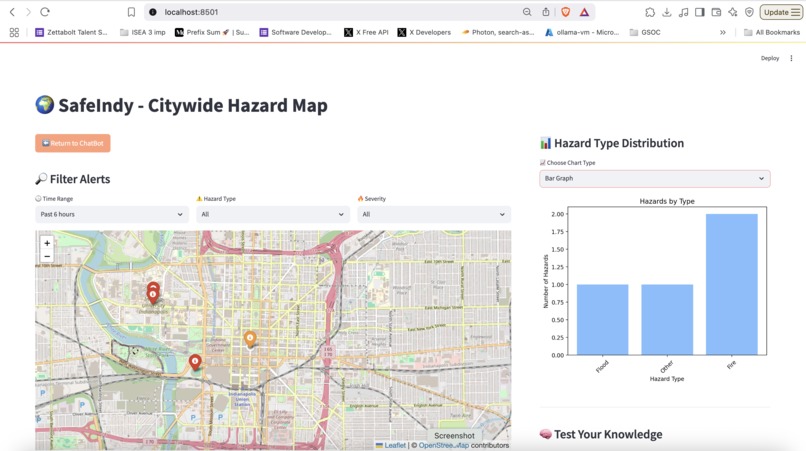
Visualization using maps and data analysis through bar graphs
-
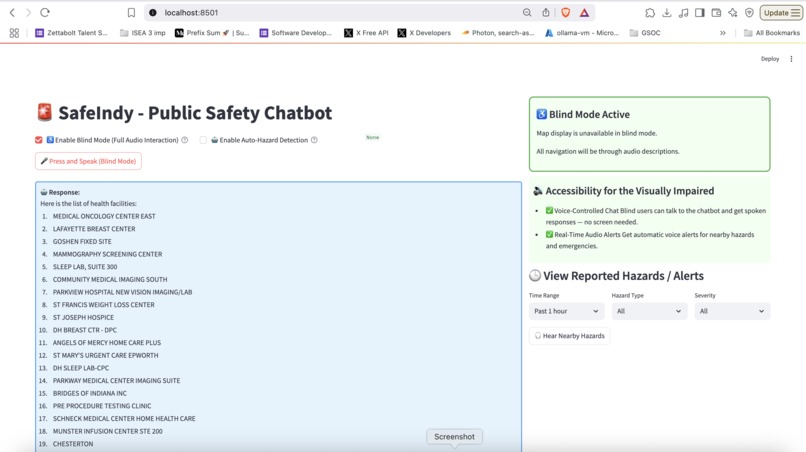
Screen displayed after Accessibility Mode is enabled.
-
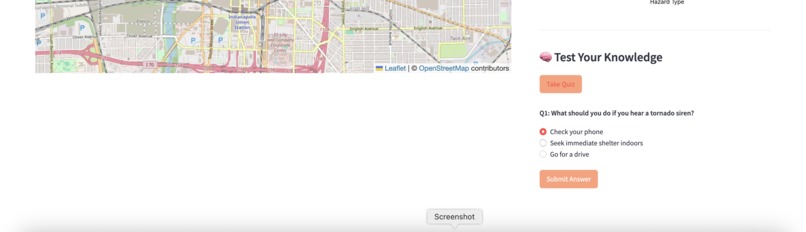
safety knowledge with a quick, interactive quiz — designed to raise awareness and make learning fun.
-
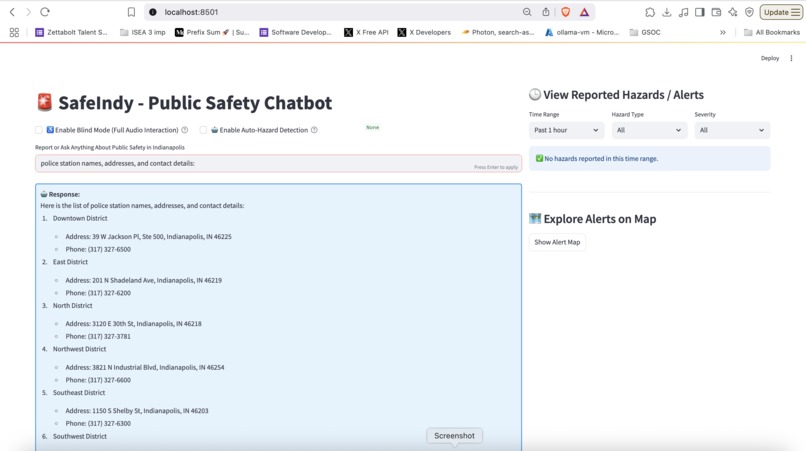
Ask about hospitals, shelters, emergency contacts, safety guidelines, or travel tips for your city.
-
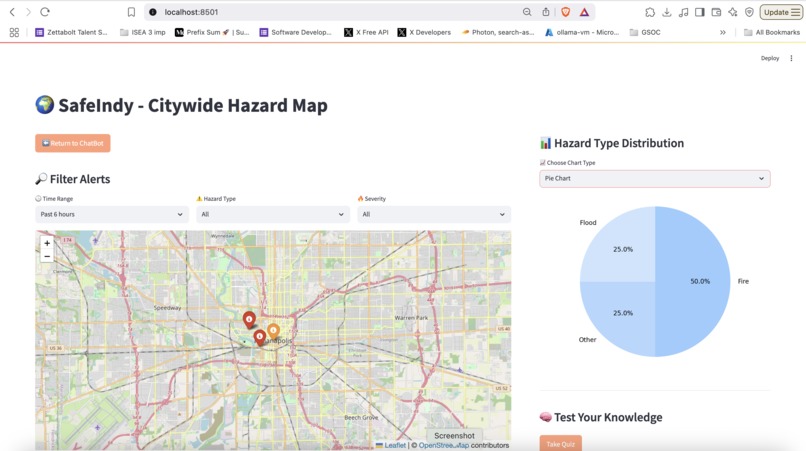
Visualization using maps and data analysis through pie charts
-
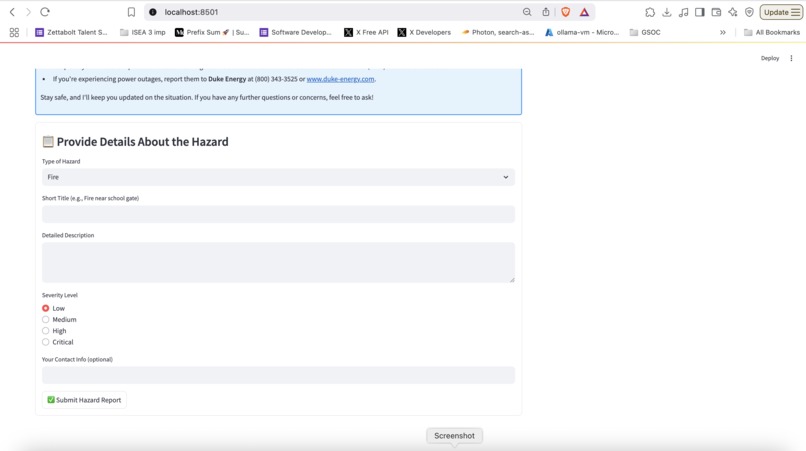
Hazard information submission form.
-
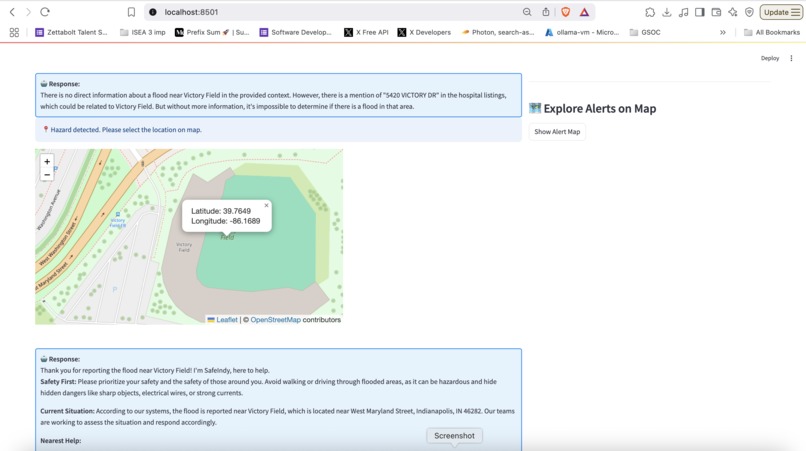
Selecting a location while submitting the hazard form
-
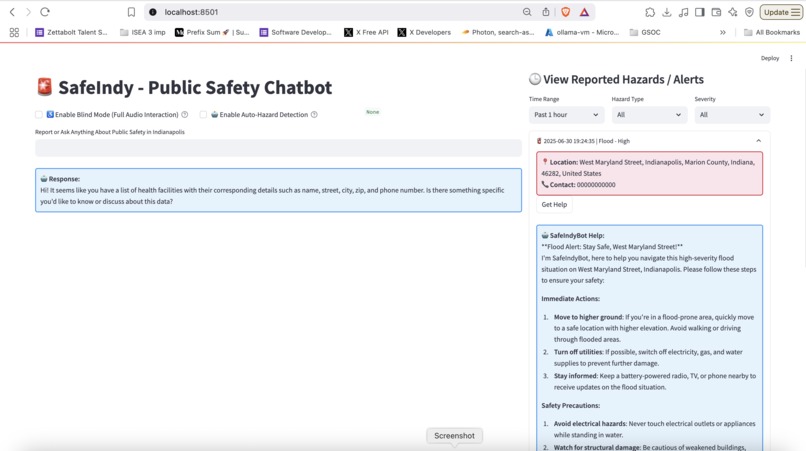
Viewing more information about an existing alert.


Inspiration
Every second counts in an emergency — yet accessing reliable local information is often slow, complex, or not inclusive. We wanted to build a solution that empowers citizens of Indianapolis to stay safe, informed, and connected to help — whether they can see a screen or not. Our goal: build a smart public safety chatbot that’s real-time, accessible by voice, and visually interactive, all in one.
What it does
- Access real-time information like hospital names, police stations, shelters, and emergency contact numbers
- Detect and report hazards, either manually or automatically
- Visualize incidents using an interactive map, pie charts, and bar graphs
- Follow city travel guidelines and safety instructions
- Take a fun safety quiz to test awareness
- Use the app completely hands-free via Blind Mode, designed for visually impaired users to speak and hear everything
How we built it
Streamlit for the front-end and UI
- I used Streamlit to build the entire front-end of SafeIndy. It allowed us to rapidly prototype a responsive, clean, and interactive web application.
RAG (Retrieval-Augmented Generation)
- To give users accurate, grounded answers, I implemented RAG (Retrieval-Augmented Generation).
- Instead of relying solely on the LLM’s trained knowledge, we first retrieve relevant information from our local knowledge base — like city safety guidelines, emergency contacts, and hospital directories — and pass that context to the LLM.
Groq API for Ultra-Fast LLM Responses
- LLM Model: "llama3-70b-8192"
- SafeIndy uses Groq’s API to access lightning-fast large language model responses.
LlamaIndex (formerly GPT Index)
- I used LlamaIndex to organize and query both structured (e.g., hospital CSV files) and unstructured (e.g., PDF safety manuals, city guidelines) data. It allowed us to:
- Build indexes from local files
- Run similarity-based lookups for RAG retrieval
- Serve specific, context-aware responses tailored to Indianapolis
- LlamaIndex acts as the bridge between our raw data and the LLM's ability to answer user questions intelligently.
HuggingFace Embeddings for Semantic Search Embedding Model: "BAAI/bge-small-en"
- I used HuggingFace’s embedding models to convert text into high-dimensional vectors.
- This lets us perform semantic search — meaning the bot can understand the meaning of a query, not just keyword matches.
- For example: if a user says "I need help during floods," the system can match that to content about emergency shelters and flooding guidelines — even if the words don’t directly match.
SpeechRecognition + edge-tts for Full Voice Interaction
- To make SafeIndy accessible for blind or visually impaired users, I added full voice input/output:
- I used the SpeechRecognition library to capture and convert user speech into text.
- I used edge-tts (based on Microsoft Edge's neural TTS) to convert the chatbot’s response back into natural-sounding speech.
Folium, Plotly, and Matplotlib for Visual Hazard Analysis
- Folium to show hazards on an interactive map, allowing users to explore incident locations spatially. Matplotlib and Plotly to generate bar charts and pie charts, helping users visualize hazard categories and frequency.
Modular Services for Scalability
- All components — chatbot logic, voice interface, data retrieval, visualization, and hazard reporting — were built as modular services. This architecture makes it easy to:
- Add new cities
- Integrate external APIs (e.g., live 911 feeds or weather alerts)
- Swap out components (e.g., replace Groq with another LLM if needed)
- Scale horizontally for future expansion
Challenges we ran into
- Getting voice input and output to work seamlessly across browsers was tricky, especially ensuring real-time feedback.
- Designing hazard auto-detection logic required balancing sensitivity (don’t miss hazards) with accuracy (avoid false positives).
- Integrating Groq's LLM speed with conversational memory and RAG flow took a lot of fine-tuning.
- Making the interface truly blind-accessible took testing — just adding audio wasn’t enough; I had to re-think flow and prompts.
Accomplishments that we're proud of
- Built a fully functional, real-time chatbot using RAG and LLMs with the Groq API
- Enabled complete voice-based interaction for both input and output
- Successfully developed Blind Mode to support visually impaired users with audio communication
- Implemented an intelligent hazard detection system that auto-detects incidents based on user input
- Designed interactive maps and visual dashboards to explore reported safety incidents
- Structured the app in a modular way, making it easier to maintain and scale
- Integrated advanced tools like LlamaIndex and HuggingFace embeddings in a real-world public safety use case
What we learned
- How to effectively use RAG with LlamaIndex and Groq for responsive, context-aware answers
- The importance of accessibility-first design — and how real users interact differently with tech
- How to integrate multiple data types (text, voice, map, graph) into one smooth experience
- Speed really matters: LLM latency can break flow, and Groq changed the game here
What's next for SafeIndy: Voice-Enabled Public Safety Chatbot
- Add multilingual voice support for non-English speakers
- Package it as a PWA (Progressive Web App) for offline use
- Partner with local government for community outreach and real-world deployment
- Expand to other cities
Built With
- edge-tts
- folium
- groq
- huggingface-embeddings
- llamaindex
- matplotlib
- plotly
- postgresql
- python
- retrieval-augmented-generation-(rag)
- speechrecognition
- sqlalchemy
- streamlit


Log in or sign up for Devpost to join the conversation.