SafeHer
HerWILL: Tech for Her — Safety & Community Track
- Project Overview
Project Name: SafeHer Track: Safety & Community Project Type: Mobile-friendly Web Application / Working Prototype
One-Sentence Problem Statement
SafeHer helps women feel safer while travelling by providing quick access to emergency contacts, SOS support, journey management, and safety reporting tools in one place.
- The Problem
Women may face uncomfortable or dangerous situations while travelling alone, returning home, using public transportation, or travelling through unfamiliar areas.
During an emergency, a person may not have enough time to search through different applications or find the correct contact.
SafeHer addresses this problem by bringing important safety tools together in one simple, mobile-friendly application.
- Our Solution
SafeHer is a web application designed primarily for use on a smartphone.
Users can open the published website link directly on their phone and interact with the application's main features without needing to install a separate mobile application.
The interface is designed to make important safety actions easy to find and use.
Core idea:
«One place for preparation, communication, and emergency support.»
- Main Features
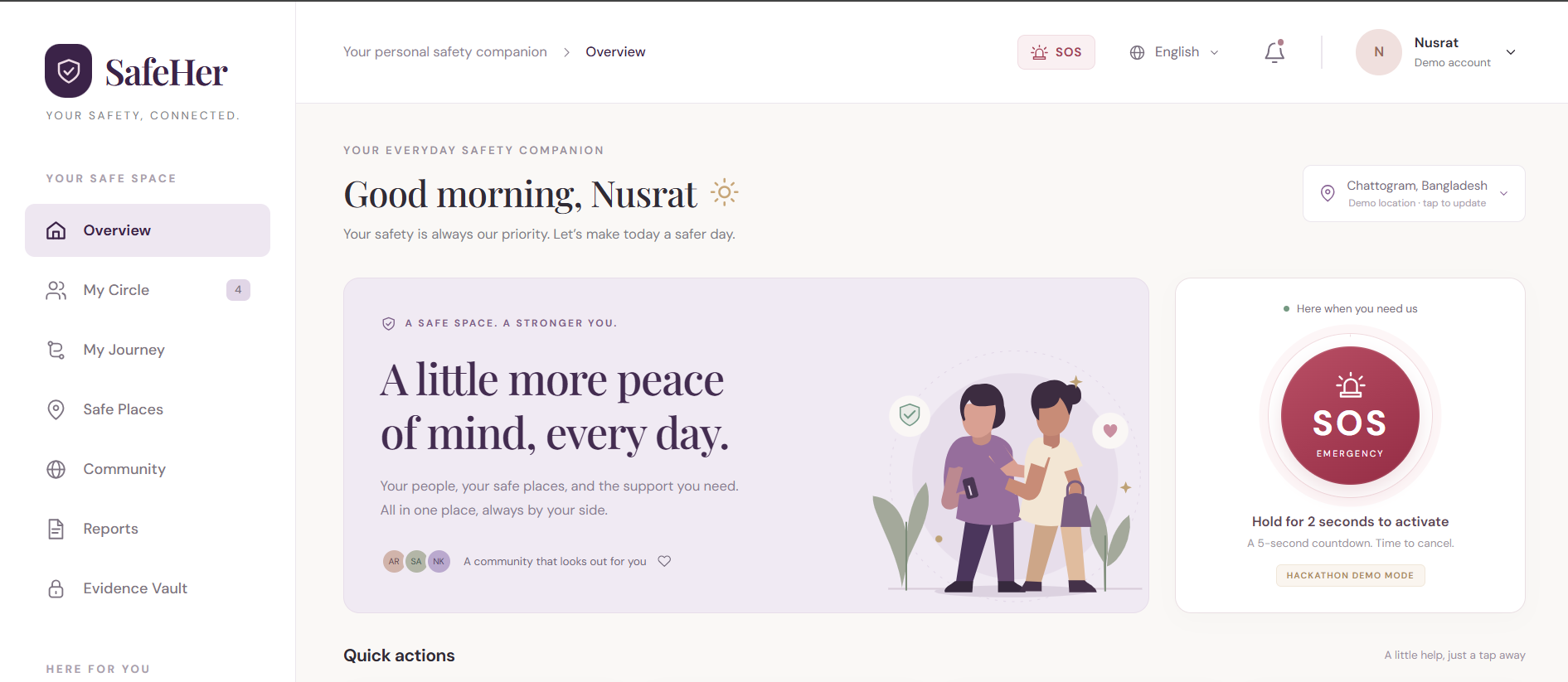
🚨 SOS Emergency Support
The user can access the SOS feature quickly during an emergency.
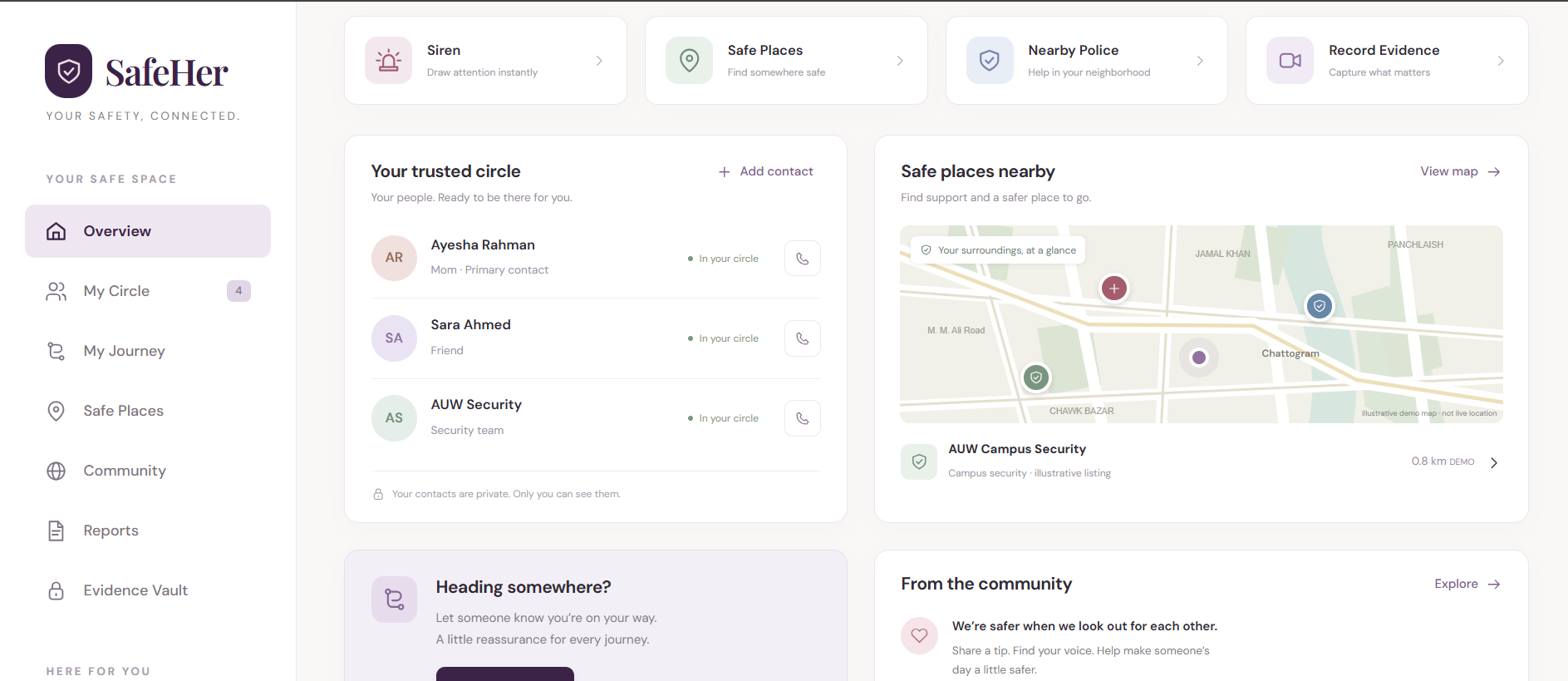
The SOS interface provides access to the user's emergency actions and saved emergency contacts.
👥 Emergency Contacts
Users can add trusted people such as:
Parents Siblings Friends Other trusted contacts
The contact information is stored within the prototype so that users can continue accessing their saved contacts when they return to the application.
📝 Safety Reporting
Users can submit safety-related reports through the application.
The report form allows users to provide relevant information and receive confirmation after submitting the report.
🗺️ Journey Management
Users can start a journey and manage an active journey through the application.
A Cancel Journey option allows the user to stop an active journey.
📞 Emergency Call
The application provides an emergency calling option using the phone's calling functionality.
On a compatible smartphone, the call option can open the phone's calling interface with the selected emergency contact.
💬 Emergency Message
The application provides emergency-message support.
Where browser/device restrictions prevent fully automatic messaging, the application uses the available phone functionality rather than falsely claiming that a message has already been delivered.
↔️ Easy Navigation
Front and Back navigation helps users move between different sections of the application easily.
📱 Mobile-Friendly Design
The website is designed to work well on smartphones.
The published link can be opened directly on a phone, and the user can interact with the application's features through the mobile interface.
The application is also designed to remain usable on larger screens.
- Target Users
SafeHer is primarily designed for:
Female university students Women travelling alone Women returning home late Women using public transportation Women who want quick access to trusted emergency contacts
We focused on situations that can affect women who regularly travel between home, university, work, and other places.
- User Privacy
Because SafeHer deals with safety-related information, privacy is an important part of the design.
The prototype follows these principles:
Only necessary information is requested. Emergency contact information is not publicly displayed. User-created information is handled within the application. The application does not intentionally expose private information. The system does not claim that an external action was completed when it could not actually complete it.
A production version would require stronger security, encrypted storage, secure authentication, and appropriate backend infrastructure.
- Technology Stack
The project uses:
HTML CSS JavaScript Browser Local Storage Responsive Web Design GenSpark ChatGPT
Development Approach
GenSpark was used as the main development platform to build and reshape the application.
ChatGPT was used for brainstorming, feature planning, debugging assistance, technical explanations, and improving the user flow.
The team tested the application through the published link, particularly on mobile devices, because mobile accessibility is important for a safety application.
- AI Usage
AI tools assisted our development process while the team's ideas and decisions remained our own.
GenSpark
GenSpark was used as the primary development platform for:
Building the web application Reshaping generated code Implementing features Fixing interface and functionality issues Preparing the working prototype
ChatGPT
ChatGPT was used for:
Brainstorming Feature planning Debugging assistance Understanding web technologies Improving user experience Preparing documentation and presentation materials
The team reviewed and tested the generated implementation rather than submitting AI-generated work without understanding it.
- Functionality
The current prototype is accessible through a live website link and can be used directly from a smartphone.
The team tested the main user flow on a phone, including:
Open website → Create/use account → Add emergency contact → Start journey → Use safety features → Submit report → Manage/cancel journey
The application is designed to provide a simple experience without requiring the user to install a separate application.
- Current Limitations
SafeHer is a working hackathon prototype, but some functions depend on browser, phone, and external-service capabilities.
For example:
Automatic SMS delivery requires an appropriate messaging service. Actual phone calls depend on the device and browser supporting phone links. Real-time location sharing requires secure location services and backend infrastructure. Reports would require a secure backend to be delivered to an organization or authority. Multi-device synchronization would require a cloud database. A production version would require stronger authentication and security.
These limitations are clearly separated from the features demonstrated by the current prototype.
- Future Improvements
With more development time, we would add:
- Real-time location sharing with trusted contacts.
- Secure cloud storage.
- Real SMS and push-notification services.
- Emergency-service integration.
- Stronger authentication and password recovery.
- A secure reporting dashboard.
- Offline emergency functionality.
- Location-based safety alerts.
- Stronger accessibility features.
- Extensive testing with real users.
- Potential Social Impact
SafeHer aims to make safety-related actions easier to access when a woman is travelling or facing an uncomfortable situation.
By bringing emergency contacts, SOS support, journey management, and reporting into one mobile-friendly application, SafeHer can help users prepare for emergencies and access important actions more quickly.
The project focuses on a practical problem and uses technology to make safety support more accessible.
- Teamwork
The project involved teamwork across:
Idea development Problem identification Feature planning UI/UX design Web development Testing Debugging Presentation Documentation
Each team member contributed to the project and should be able to explain the parts they worked on and the decisions made by the team.
- Conclusion
SafeHer is a mobile-friendly web application created for the HerWILL: Tech for Her — Safety & Community Track.
We identified a practical problem: women may need quick access to trusted people and safety tools while travelling.
Our solution brings emergency contacts, SOS support, journey management, reporting, emergency communication, and simple navigation into one application that can be accessed directly from a smartphone.
The current prototype demonstrates the main concept through a live, usable web application while identifying the additional backend and external services that would be needed for a full production system.
«SafeHer — making safety support easier to access when it matters most.»
