-
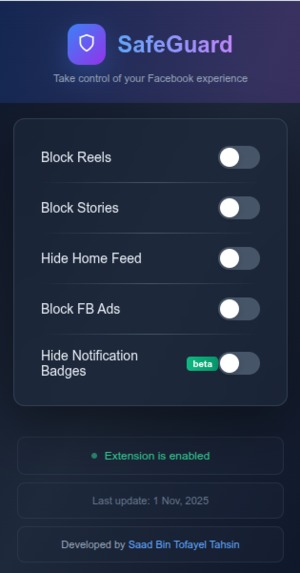
UI(User Inteface) of SafeGuard - Control in FB
🛡️ SafeGuard - No Distraction Facebook
Take control of your Facebook experience by blocking distractions like Reels, Stories, Ads, and more.


Developed by: Saad Bin Tofayel Tahsin
✨ Features
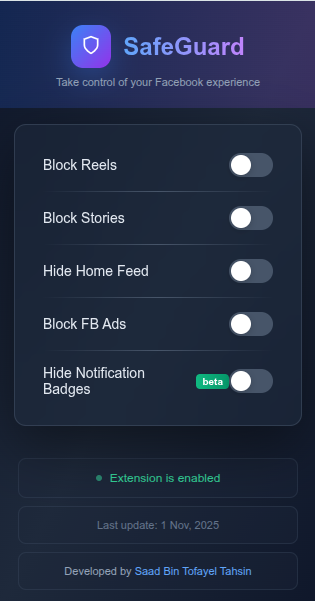
- 🎬 Block Reels - Remove Facebook Reels from your feed
- 📖 Block Stories - Hide the Stories section completely
- 📰 Hide Home Feed - Focus mode - hide news feed entirely
- 🚫 Block FB Ads - Remove all sponsored content and advertisements
- 🔔 Hide Notification Badges (Beta) - Remove distracting red notification dots
🚀 Quick Installation (3 Steps)
Step 1: Download
Click the green "Code" button above → "Download ZIP"
Step 2: Unzip
Extract the downloaded ZIP file to a folder
Step 3: Install in Chrome
- Open Chrome and go to
chrome://extensions/ - Enable "Developer mode" (toggle in top right corner)
- Click "Load unpacked"
- Select the extracted SafeGuard folder
- BOOM! 💥 Extension installed!
🎯 How to Use
- Click the SafeGuard icon 🛡️ in your browser toolbar
- Toggle features on/off as you need
- Settings save automatically
- Refresh Facebook and enjoy distraction-free browsing! ✨
📸 Screenshots
Extension Popup
Coming soon
Before & After
Coming soon
🌐 Browser Support
| Browser | Supported | Instructions |
|---|---|---|
| Chrome | ✅ Yes | Follow steps above |
| Edge | ✅ Yes | Go to edge://extensions/ |
| Brave | ✅ Yes | Go to brave://extensions/ |
| Firefox | ⏳ Coming Soon | - |
📁 File Structure
SafeGuard/
├── manifest.json          # Extension configuration
├── popup.html            # Popup interface
├── popup.css             # Popup styling
├── popup.js              # Popup functionality
├── content.js            # Facebook content blocker
├── content.css           # Content styling
├── icons/                # Extension icons
│   ├── icon16.png
│   ├── icon48.png
│   └── icon128.png
└── README.md             # Documentation
🔧 Troubleshooting
Extension not working?
- ✅ Make sure you're on
facebook.com - ✅ Try refreshing the Facebook page (F5)
- ✅ Check if extension is enabled in
chrome://extensions/
Toggles not saving?
- ✅ Make sure the extension has proper permissions
- ✅ Try disabling and re-enabling the extension
Some elements still showing?
- Facebook updates their code frequently
- The extension may need updates to match new selectors
- Report issues on GitHub!
🔒 Privacy
SafeGuard is 100% privacy-focused:
- ✅ No data collection
- ✅ No tracking
- ✅ No analytics
- ✅ Everything runs locally on your device
- ✅ Settings stored in your browser only
💡 Why SafeGuard?
The Problem
- Facebook is designed to be addictive
- Reels and Stories eat up your time
- Ads and sponsored posts are distracting
- You lose hours scrolling mindlessly
The Solution
SafeGuard lets YOU decide what you see on Facebook. Use it as a tool, not as a distraction!
Perfect for:
- 📚 Students who need to focus on studies
- 💼 Professionals who want to use Facebook for work only
- 🎯 Anyone trying to reduce social media addiction
- 🧘 People practicing digital minimalism
🛠️ Development
Want to contribute or modify the extension?
Clone the repository
git clone https://github.com/Saad200724/SafeGuard-FB.git
cd SafeGuard-FB
Make your changes
Edit the files as needed
Test locally
Load the unpacked extension in Chrome and test
Submit a Pull Request
If you've made improvements, submit a PR!
📝 Changelog
Version 1.0.0 (November 1, 2025)
- 🎉 Initial release
- ✨ Block Reels feature
- ✨ Block Stories feature
- ✨ Hide Home Feed feature
- ✨ Block Ads feature
- ✨ Hide Notification Badges (Beta)
- 🎨 Premium dark theme UI
- 💾 Chrome Storage sync support
🤝 Contributing
Found a bug? Have a feature request? Want to improve SafeGuard?
- Fork the repository
- Create your feature branch (
git checkout -b feature/AmazingFeature) - Commit your changes (
git commit -m 'Add some AmazingFeature') - Push to the branch (
git push origin feature/AmazingFeature) - Open a Pull Request
📧 Contact & Support
- GitHub Issues: Report a bug or request a feature
- Developer: Saad Bin Tofayel Tahsin
⭐ Show Your Support
If SafeGuard helps you stay focused, give it a ⭐ on GitHub!
Share it with friends who might need it too! 🚀
📄 License
This project is licensed under the MIT License - see the LICENSE file for details.
Free to use and modify for personal use.
🙏 Acknowledgments
- Icons from Lucide React
- Inspired by the need for mindful social media usage
- Built with ❤️ for everyone who wants to take back control of their time
**Made with 💙 & ☕︎ by [Saad Bin Tofayel Tahsin](https://github.com/Saad200724)** **Version 1.0.0** | **November 2025** ⭐ Star this repo if you find it useful!

Log in or sign up for Devpost to join the conversation.