-
-
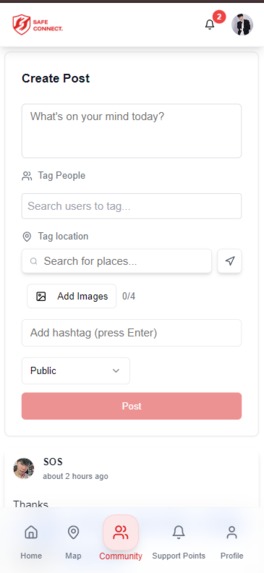
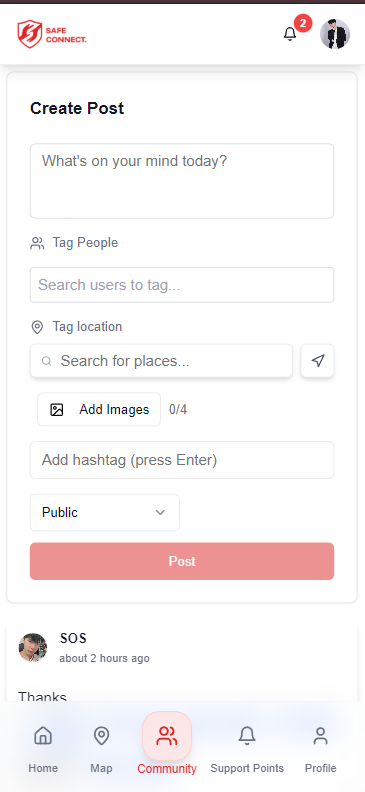
/community
-
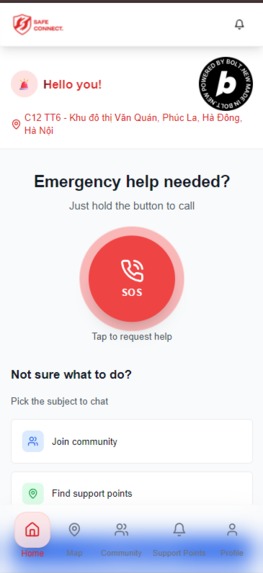
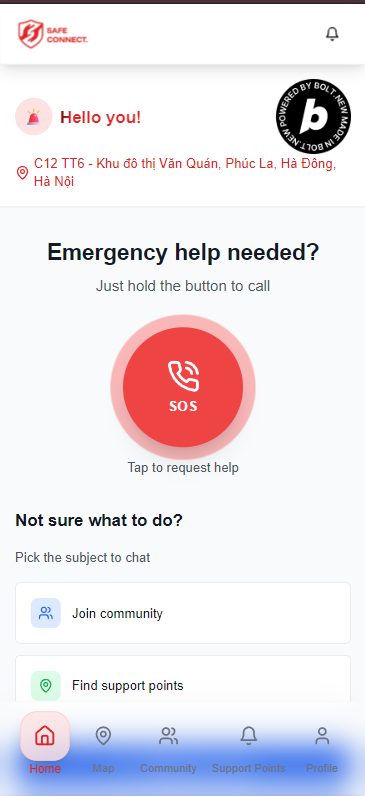
/home
-
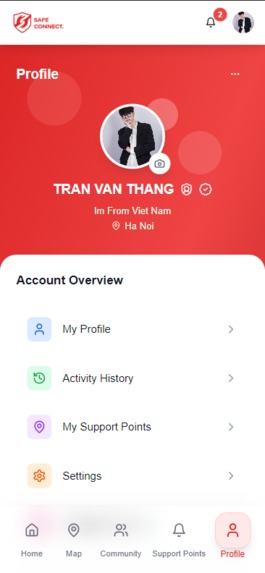
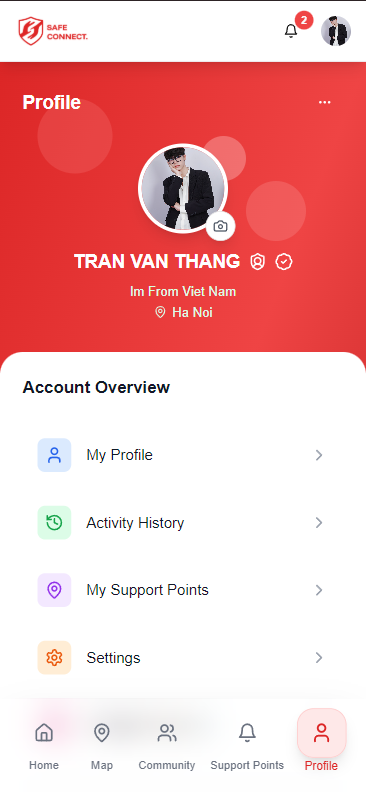
/profile
-
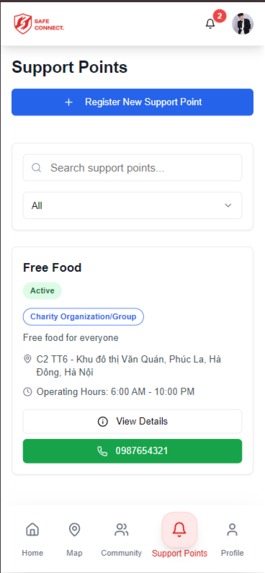
/support-points
-
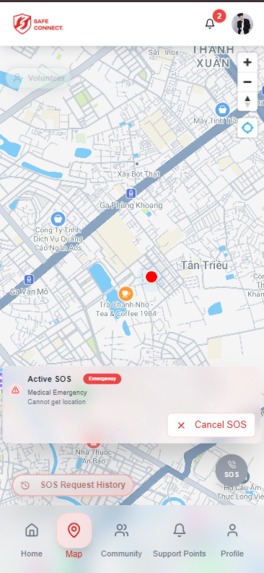
/map
Inspiration
In Vietnam — and many other parts of the world — recent years have seen natural disasters, floods, wildfires, and urban accidents becoming more frequent, more intense, and more unpredictable.
SafeConnect was born from that pain — an application created specifically for the Vietnamese people, designed to connect those in distress with a community ready to help.
In 2024, Typhoon Yagi made landfall — triggering flash floods and landslides, submerging many residential areas across Northern and Central Vietnam.
On that stormy night, thousands of people had no choice but to plead for help on social media — through status updates, comments, and scattered messages sent everywhere.
But among hundreds of thousands of posts, who could hear whom? Many cries for help were lost. No one saw them. No one arrived in time.
That led to a single question: "Why isn’t there one place to update, locate, and coordinate rescue efforts in real time?" That’s how SafeConnect was born. SafeConnect is a platform that connects people in need with the community and rescue teams, sharing real-time information — so no cry for help gets lost in silence. But SafeConnect is not just for natural disasters.
In major cities like Hanoi, Da Nang, and Saigon, thousands of people are on the road every night — delivery riders, students, late-night workers... Emergencies can happen at any moment: a broken vehicle, a minor accident, unexpected danger in the dark. But not everyone knows who to call. And not every passerby is able to help.
Meanwhile, countless volunteer groups like FAS Angel, the Hanoi Free Night Motorbike Rescue Team, and flood-relief teams have been working quietly — but they lack an effective way to connect with those who need them. SafeConnect bridges that gap — faster, and right when it matters most. More importantly, SafeConnect empowers every person in the community.
When you encounter a homeless person shivering in the cold, an elderly person alone and helpless… You can send an SOS request on their behalf, so the community can step in and help. The fear of not knowing who will save you — or wanting to help but not knowing who to help — …is a shared story across the world.
And that’s why SafeConnect doesn’t stop at Vietnam. We believe that, one day soon, it will become a life-saving tool wherever kindness is needed. SafeConnect is not just an app — it’s a network of compassion, built and spread by all of us.
SafeConnect is not a million-dollar project. There’s no dev team. No office. No funding. Just me – and one haunting question: "Why isn’t there a single place to update, locate, and coordinate rescue efforts in real time?"
I’m not a skilled programmer. I didn’t even know where to begin. Let me introduce myself a little. I’m a young man from a poor rural area in Vietnam, and I’ve been passionate about technology since I was a kid. After graduating from high school, I couldn’t afford to go to university. My father passed away before I turned two. My mother raised me alone, and that’s why higher education was out of reach. Since graduating, I’ve worked many jobs. Currently, I work in media and marketing for a fashion company in Hanoi. Outside of work, I keep teaching myself programming and learning everything I’m passionate about. But since I’m self-taught, my skills are still quite basic. Many times, I almost gave up on this idea — simply because I had no one to build it with. Then one day, I stumbled across a competition hosted by Bolt.New. I joined out of curiosity, without expecting much. But what I found surprised me deeply — Bolt was fast, smart, and exactly what I needed.
What it does
Send and receive SOS requests in real time
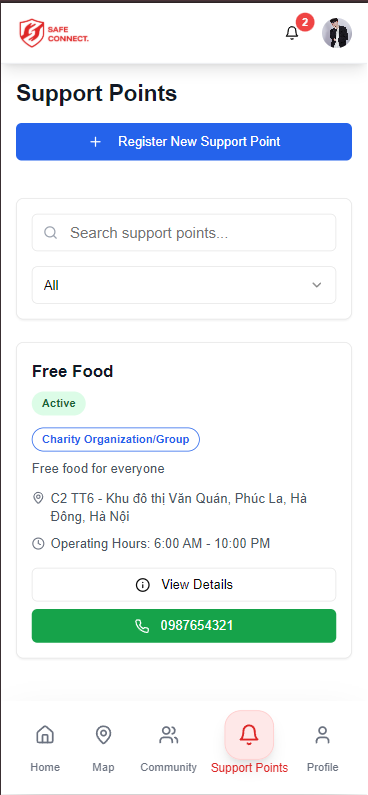
Create fixed support points — places where people can consistently find help
Toggle volunteer mode on or off anytime
Track your SOS and support history
Connect with others through a mini social network: post updates, leave hearts, and comment
Optimized for mobile with a native app-like experience (PWA)
How we built it
Frontend: React + Vite, TailwindCSS, Framer Motion (PWA-ready for mobile)
Backend: Supabase (authentication, database, real-time features)
Map: Goong Maps API (Vietnam-focused map solution)
Messaging & Notifications: Real-time chat system
Deployment: Hosted via Coolify with CI/CD, optimized for mobile-first experience
Built with ❤️ at bolt.new
Challenges we ran into
Keeping UI minimal but effective under stress
Real-time syncing and data integrity
Security concerns with location and personal data
Adapting for mobile-first without compromising features
Creating emotional trust through tech
Accomplishments that we're proud of
Built a fully functional prototype in a short amount of time
Delivered a smooth PWA experience — add to home screen with a single tap, just like a native app
Implemented a real-time SOS and two-way chat system
Introduced “Fixed Support Points” — enabling long-term, location-based community support
What we learned
That in emergencies, simplicity is power — the clearer the interface, the fewer the steps, the greater the chance to be helped.
That technology doesn't have to be complex to touch the heart — it just needs to be there at the right time, in the right place, in the right way.
That kindness always exists — it only takes the right tool, built with care, to awaken and connect it.
Current Features and UI Structure
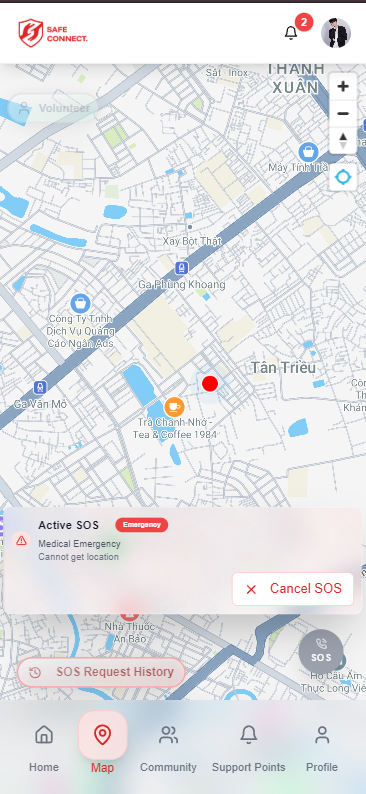
1. 🆘 Real-Time SOS Request System For People in Need: Tap the red SOS button on /home or /map to send a request.
Fill out a simple form:
Type of support (e.g. evacuation)
Detailed address (manual or via GPS)
Description of the situation
Urgency level (Low / Medium / High)
Number of people affected
Upload an on-site photo
Based on urgency:
🟠 Low = Orange dot on map
🟡 Medium = Yellow dot on map
🔴 High = Red dot on map
For Volunteers: Toggle Volunteer Mode ON to receive alerts about nearby SOS cases.
Tap a request on the map and press “Offer Help”.
If Volunteer Mode is OFF, you can still view SOS info but cannot interact.
Help Flow: The person in need will receive a notification with options to accept or reject help.
If accepted:
The map dot changes from red to green
Status updates to "Being helped by [volunteer name]"
Live chat opens for both sides to exchange more info
When the mission is completed, both parties can press “Complete” — the map marker disappears.
2. 📍 Fixed Support Points Users can create long-term support locations visible on /support-points or /map.
Appears as green dots with a heart-handshake icon.
Each support point includes:
Name, status (Active/Closed), support type
Description, working hours
Contact number, full address, coordinates
Distance from current location
Shortcut to open in Google Maps or Apple Maps
3. 🤝 Community & Micro-Social Network The /community page functions like a mini social platform:
Post gratitude messages or share help stories
Like & comment on others’ posts
Post features: Text content
Tag helpers
Attach location
Upload photos
Add hashtags
Choose visibility (Public / Private)
4. 🔔 Smart Notifications In-app alerts for:
New SOS near you
When someone accepts your request
When a help session is completed
(Upcoming: full push notification support for iOS & Android)
5. ⚙️ Settings Panel Available under /settings, includes:
Language: Vietnamese / English
Theme: Light / Dark / System
Toggle app sounds
Enable mock location (for overseas testing)
App info
Terms & conditions
User guide
How to add SafeConnect to home screen (PWA)
6. 👤 User Profile Upload/change avatar
Edit personal info (name, birth year, etc.)
Manage support points
View activity statistics:
SOS requests sent
Times helped others
Change password
Access settings
Log out
7. 🗺️ Interactive Map Interface Accessible via /map, includes:
Toggle volunteer mode
View SOS history
View help history
Small red “Send SOS” button
Map controls (zoom, locate current position)
8.Home Page
🔴 Big Red SOS Button
Always displayed in a prominent position
Directly opens the SOS request form
🟢 Volunteer Mode Toggle
Allows users to switch between "Ready to help" and "Inactive"
Status is synced across the app and reflected on the map
📜 Activity History Section (split into two parts):
Help Requests Sent: shows a list of SOS requests you've submitted
Help Provided: shows a list of cases you've volunteered to support
🛠️ Admin Panel Structure ( /admin ) 📊 Dashboard An overview of key statistics such as the number of users, SOS requests, and active support points. This is where administrators can quickly grasp the overall system status at a glance.
👥 User Management Manage the list of users in the system.
🚨 SOS Requests View and handle emergency SOS requests submitted by users.
🧭 Support Points Manage the list of support locations set up on the map.
💬 Community A space to manage community interactions such as posts and comments.
🛡️ Administrators Manage the list of system administrators.
The admin panel will be further developed in detail in the future.
What's next for SafeConnect
Add push notification for SOS alerts, just like a real mobile app
Build a trust-based verification system for volunteers
Partner with nonprofits, local authorities, and rapid response teams
Officially launch and grow a nationwide kindness network
Develop and publish a dedicated mobile app
And more...
Email used to build the project on Bolt.new : [email protected]
Built With
- bolt.new
- goongmapapi
- netlify
- react
- supabase
- vite


Log in or sign up for Devpost to join the conversation.