-
-
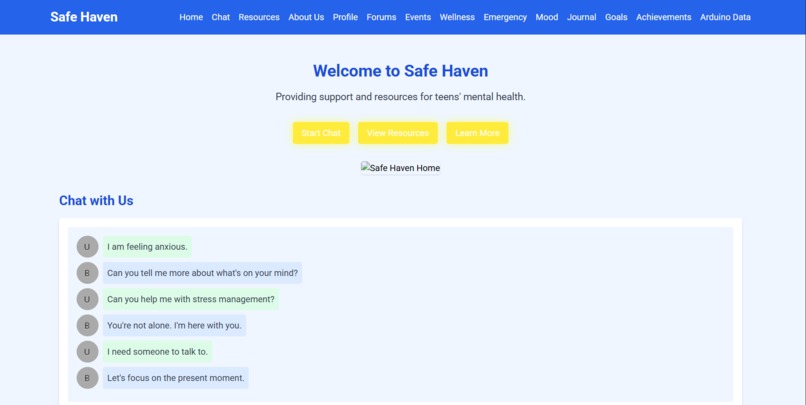
Main Page
-
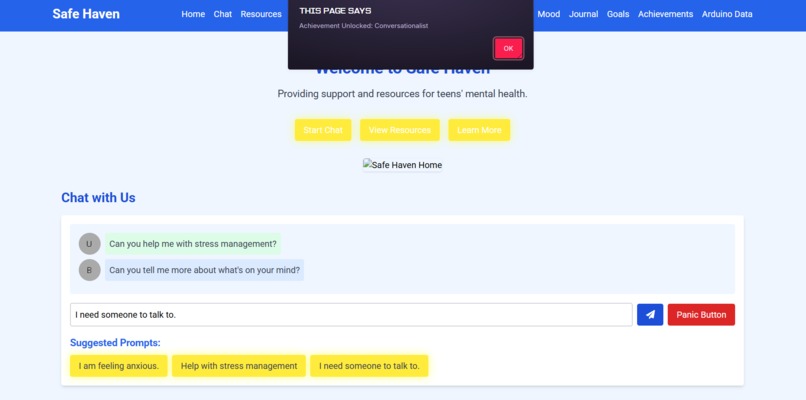
Achievement Integration
Safe Haven
Elevator Pitch:
Safe Haven is a comprehensive mental health app I designed to support teens through interactive AI-driven chat, informative resources, and community engagement. My platform provides immediate assistance, fosters a safe and supportive environment, and empowers users with tools for their mental health journey.
Tagline:
Your Path to a Brighter Tomorrow
About the Project
Inspiration
The rising concerns around teen mental health and the urgent need for accessible support systems inspired me to create Safe Haven. I wanted to develop a solution that offers a safe space for teens to express their thoughts and seek help without any stigma.
What I Learned
Throughout this project, I learned the importance of user-centered design in creating an engaging and supportive environment. I also deepened my understanding of natural language processing and AI-driven chatbots.
Building the Project
I used a combination of HTML/CSS for the frontend and JavaScript for dynamic interactions. The AI chatbot utilizes NLP frameworks to provide empathetic responses. For the design, I focused on calm and reassuring visuals to make users feel safe and supported. You can view my project here.
Challenges Faced
One of the main challenges was ensuring the AI chatbot could understand and respond appropriately to different user emotions. Additionally, integrating all the features within a user-friendly interface while maintaining data privacy and security was a significant hurdle.
Features
- User Registration and Profiles: Secure user registration, customizable profiles, and tracking of mental health progress.
- Advanced Chatbot Features: AI-driven chatbot with emotion detection, voice input, and multi-language support.
- In-App Support and Counseling: Real-time chat with professional counselors and video call capabilities.
- Self-Help Tools: Mood tracking, digital journal, and goal setting with reminders.
- Community Features: Moderated discussion forums, peer support groups, and events calendar.
- Educational Content: Regularly updated articles, interactive courses, and self-assessments.
- Emergency and Crisis Resources: Panic button, location-based services, and automated alerts to emergency contacts.
- Wellness Activities: Guided mindfulness exercises, breathing techniques, and physical health tips.
- Gamification: Achievements, badges, and in-app rewards.
- Accessibility Enhancements: Screen reader compatibility, text-to-speech, and customizable interface.
- Data Privacy and Security: End-to-end encryption, anonymous mode, and regular security audits.
- Notifications and Reminders: Daily check-ins, new resources, and activity reminders.
- Integration with Other Services: Wearable devices, social media, and other self-help apps.
- Analytics and Insights: User data analysis, feedback mechanisms, and personalized insights.
- Content Moderation and Reporting: Abuse reporting, moderation team/AI system.
Code Example
document.getElementById("send-btn").addEventListener("click", function() {
const userMessage = document.getElementById("chat-input").value;
const chatWindow = document.querySelector(".chat-window");
const userChat = <div class="user-message">${userMessage}</div>;
chatWindow.innerHTML += userChat;
const botResponse = `<div class="bot-response">I am here to help. Let's talk more about it.</div>`;
chatWindow.innerHTML += botResponse;
document.getElementById("chat-input").value = ""; // Clear input field
});
Hardware Integration: Arduino Project
To enhance Safe Haven, I integrated hardware components to monitor physiological markers. Using an Arduino, a heart rate sensor, and a Grove GSR sensor, I can gather real-time data to provide personalized feedback and support.
Hardware Setup
- Grove Heart Rate Sensor wired to Analog Pin A0.
- Grove GSR Sensor wired to Analog Pin A1.
- LEDs for visual feedback, connected to Digital Pins 9 and 10.
- Micro SD Card Module for data logging.
Detailed wiring instructions are as follows:
1. Heart Rate Sensor:
- VCC: 5V
- GND: GND
- Signal: A0
2. GSR Sensor:
- VCC: 5V
- GND: GND
- Signal: A1
3. LEDs:
- Heart Rate LED (Pin 9): Anode to pin 9 via 220Ω resistor, cathode to GND
- GSR LED (Pin 10): Anode to pin 10 via 220Ω resistor, cathode to GND
4. Micro SD Card Module:
- VCC: 5V
- GND: GND
- MOSI: Pin 11
- MISO: Pin 12
- SCK: Pin 13
- CS: Pin 4
Here's the code for the Arduino project that reads sensors, logs data, and includes visual feedback through LEDs:
include
include
// Define sensor pins
define HEART_RATE_PIN A0
define GSR_PIN A1
// LED pins
define HEART_RATE_LED_PIN 9
define GSR_LED_PIN 10
// Micro SD card chip select pin
define SD_CS_PIN 4
// Initialize variables to hold sensor readings int heartRateValue = 0; int gsrValue = 0;
// Data logging variable File dataFile;
void setup() { // Start serial communication Serial.begin(9600);
// Initialize LED pins pinMode(HEART_RATE_LED_PIN, OUTPUT); pinMode(GSR_LED_PIN, OUTPUT);
// Initialize micro SD card if (!SD.begin(SD_CS_PIN)) { Serial.println("Micro SD card initialization failed!"); return; } Serial.println("Micro SD card initialized."); dataFile = SD.open("data.txt", FILE_WRITE); }
void loop() { // Read the heart rate sensor value heartRateValue = analogRead(HEART_RATE_PIN);
// Read the GSR sensor value gsrValue = analogRead(GSR_PIN);
// Print the sensor values to the Serial Monitor Serial.print("Heart Rate Sensor Value: "); Serial.println(heartRateValue); Serial.print("GSR Sensor Value: "); Serial.println(gsrValue);
// Log data to Micro SD card if (dataFile) { dataFile.print("Heart Rate: "); dataFile.print(heartRateValue); dataFile.print(", GSR: "); dataFile.println(gsrValue); dataFile.flush(); // Ensure the data is written to the micro SD card }
// Control LEDs based on threshold values if (heartRateValue > 600) { // Example threshold for heart rate digitalWrite(HEART_RATE_LED_PIN, HIGH); } else { digitalWrite(HEART_RATE_LED_PIN, LOW); }
if (gsrValue > 200) { // Example threshold for GSR digitalWrite(GSR_LED_PIN, HIGH); } else { digitalWrite(GSR_LED_PIN, LOW); }
// Add a delay for readability delay(1000); }
With these enhancements, Safe Haven offers a powerful toolkit for teens to manage their mental health both digitally and physically.


Log in or sign up for Devpost to join the conversation.