-
-
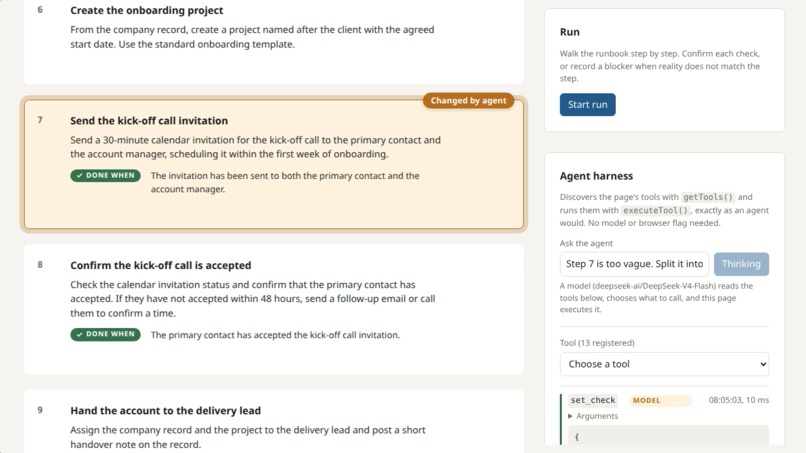
A procedure held as structured data. Each step carries an instruction, a check saying what proof looks like, and an optional condition.
Inspiration
We run a small agency and a SaaS product on our own infrastructure, so we live on written procedures. Onboarding a client, restoring a backup, rotating a credential. They get written once, carefully, and then the software underneath them changes. A tab is renamed, a field moves, a step becomes somebody else's job. Within months a good portion of the document is wrong.
What struck us is why that happens. The moment you discover a procedure is wrong is precisely the moment you cannot fix it. You are mid-task, under time pressure, and correcting the document is somebody else's job. So you work around it silently and move on, and the next person hits the same wall.
WebMCP suggested a way out. If the procedure is something an agent can read and edit while you are standing in front of it, then finding the error and fixing it stop being separate jobs.
What it does
Runbook Studio holds a procedure as structured data rather than prose. Every step has a title, an instruction, an optional check stating what proof looks like, and an optional condition that sends the run to a different step when something is already true.
Because the steps are data, three things become possible in one place.
Write it with the agent. Ask it to split a vague step, add checks, reorder, or add a condition, and watch the document rearrange. Every change the agent makes is marked on the page.
Run it with the agent. A run walks the steps in order, honouring conditions. At each step you confirm the check, or you record a blocker saying what you found instead.
Improve it from the run. The blocker is pinned to the step that failed. Afterwards, the agent reads it and amends that step to match reality.
That loop is the point. Documentation that gets better every time somebody uses it.
The model is domain-neutral. Three examples ship with the app: onboarding a client into a CRM, restoring a database from a backup, and a cooking recipe.
How we built it
Next.js and TypeScript, client-side state, no database, no authentication. Self-hosted on our own infrastructure behind nginx-proxy. The only server-side component is an optional route that proxies to an OpenAI-compatible endpoint for the built-in agent, rate limited and turn capped.
13 tools are registered on document.modelContext, covering the full lifecycle: reading the runbook, editing steps, setting checks and conditions, running, recording blockers, and turning blockers into amendments.
Design decisions worth naming:
Tool descriptions are the interface: they are written for a model to read, not a developer. We tested selection accuracy by giving the raw getTools() output to models with no other context and checking which tools they chose for real instructions. Descriptions were tuned until selection was reliable across independent models. The annotations are used properly. readOnlyHint on read tools, untrustedContentHint wherever user-written content flows back to the model. Chrome's budgets are respected: names under 30 characters, descriptions under 500, parameter descriptions under 150, and an output guard that trims oversized responses with a hint to use a narrower tool instead. Tools stay same-origin. exposedTo is unset, so no cross-origin frame can call them. Registration takes an AbortSignal: the execution-time signal is treated as optional, since it is not supplied in the Chrome build we tested against.
The app also ships with its own agent, so it needs no browser flag and no ChatGPT to try. A built-in harness discovers the page's tools with getTools() and runs them with executeTool(), either manually or by sending a sentence to a model that chooses the tools itself. With no model configured, manual mode still works with zero setup.
Verification was done against Chrome for Testing with native WebMCP, driving executeTool through Playwright and asserting on the resulting DOM, so no tool is reported working on the basis of code inspection alone.
Challenges we ran into
The API is new and the documentation moves. Older material uses navigator.modelContext; current Chrome uses document.modelContext. The API is undefined outside a secure context, which makes several obvious testing approaches fail silently rather than loudly.
Steering a model reliably. Given only tool descriptions, a model would sometimes re-read every step, propose a change instead of making it, or keep editing after finishing. We fixed this with server-side guards rather than by making the tools more forgiving, because the tools have to behave correctly for any agent, not only ours.
We could not test in ChatGPT's in-app browser. Our development machine is old enough that it is capped at a Chrome version predating WebMCP, and it cannot run the ChatGPT desktop app at all. So we never saw our own app inside the environment the judges will use.
We compensated rather than hoped. Every tool was verified against Chrome for Testing 152 with native WebMCP, headless on our server, driving executeTool through Playwright and asserting on the resulting DOM. We separately tested tool-selection accuracy by giving the raw getTools() output to models with no other context, checking they chose the right tools for real instructions before we relied on the descriptions.
The constraint turned out to be productive. Because we could not lean on ChatGPT, we built the app its own agent instead, which means anyone can try it with no browser flag, no desktop app and no API key. That is a better product than the one we would have shipped with easier hardware.
Failure has to be as easy as success. If recording a blocker were harder than confirming a step, people would confirm and move on, and the loop would never close. Both controls sit together, same size, one click apart.
Accomplishments that we're proud of
The loop actually closes. A blocker recorded during a run becomes an amendment to the document, and the procedure is measurably more accurate afterwards than it was before somebody used it.
Every tool was individually verified as firing and changing the page, not assumed correct from reading the code. The whole app is operable by keyboard, agent changes are announced through a live region, and it works with no browser flag at all.
What we learned
Naming is not cosmetic when a model is one of the readers. We renamed "branch" to "condition" throughout the interface, because "branch" is developer language borrowed from version control and told a first-time reader nothing. The tool kept its original name for the model. The two audiences did not want the same word.
We also found that the work we did on semantic structure, accessible names and live-region announcements serves agent legibility as much as assistive technology. Both consume the page as structure rather than pixels. Building well for one turned out to be building well for the other.
What's next for Runbook Studio
Multiple checks per step, richer conditions, and shared runbooks so a blocker recorded by one person amends the procedure for everybody.
Built With
- css
- docker
- javascript
- next.js
- nginx
- playwright
- typescript
- webmcp

Log in or sign up for Devpost to join the conversation.