-
-
Run It Back NYC
-
Run It Back NYC
-
Run It Back NYC
Inspiration
I take the New York City subway every single day. I don't drive — the train is how I get to school, to work, to my friends, to everywhere. So I've spent a lot of hours on platforms, and I know the exact moment I built this for.
The speaker crackles. A conductor says something that's clearly important — a stop is being skipped, a train is rerouted, everybody needs to get off. And then the whole car does the same thing: people look at each other. What did he say? Somebody shrugs. Somebody takes their headphones out two seconds too late. And the train keeps going.
Here's the thing that bothered me most: the conductor isn't mumbling. They're speaking clearly into a handset. The information exists. It's the decades-old speaker system that destroys it — tile echo, clipping amplifiers, worn-out drivers. The message is fine; the delivery is broken.
Now think about who pays the highest price for that. New York City speaks over 200 languages, and roughly 40% of us were born in another country. On any given train there's a tourist who just landed, someone who moved here last month and is still learning English, an elderly rider, someone hard of hearing, someone who can't hear at all. For all of them, a garbled announcement isn't an inconvenience — it's the difference between getting home and being stranded somewhere they don't know at 11pm.
As a young Black man in New York, I've watched who gets left behind by systems that technically "work." The announcement technically played. It just didn't reach anyone. If you live here, or you're visiting here, the city owes you the same information as everybody else, in a form you can actually receive. That's not a luxury feature. That's the baseline.
So I built the thing I wanted to exist on my own commute.
What it does
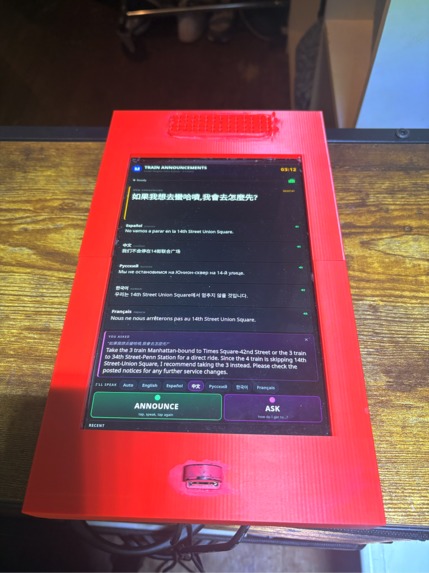
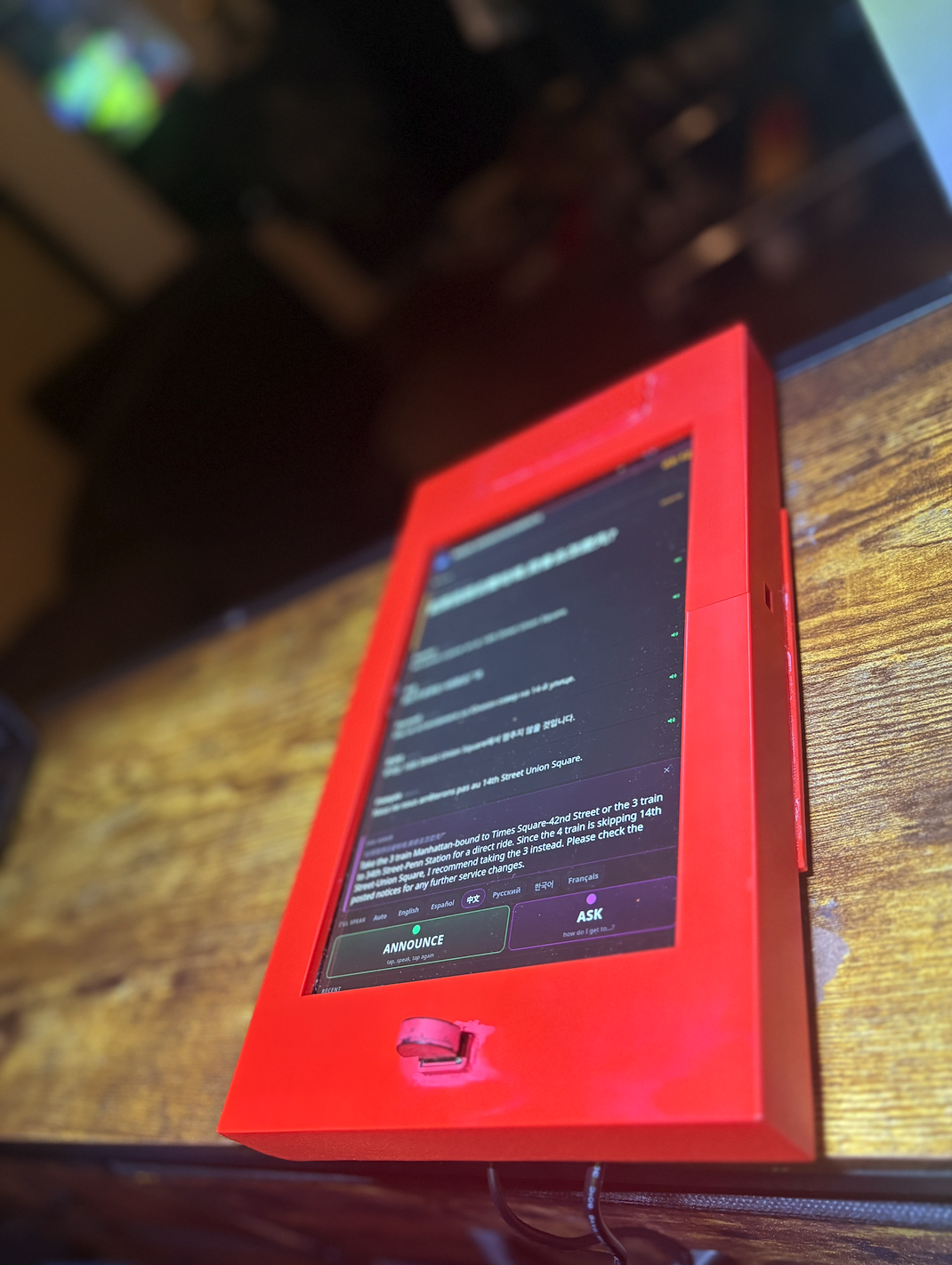
Run It Back NYC listens to a train announcement and makes sure everyone on the platform actually gets it.
- Transcribes the announcement into English text on a large, platform-style display
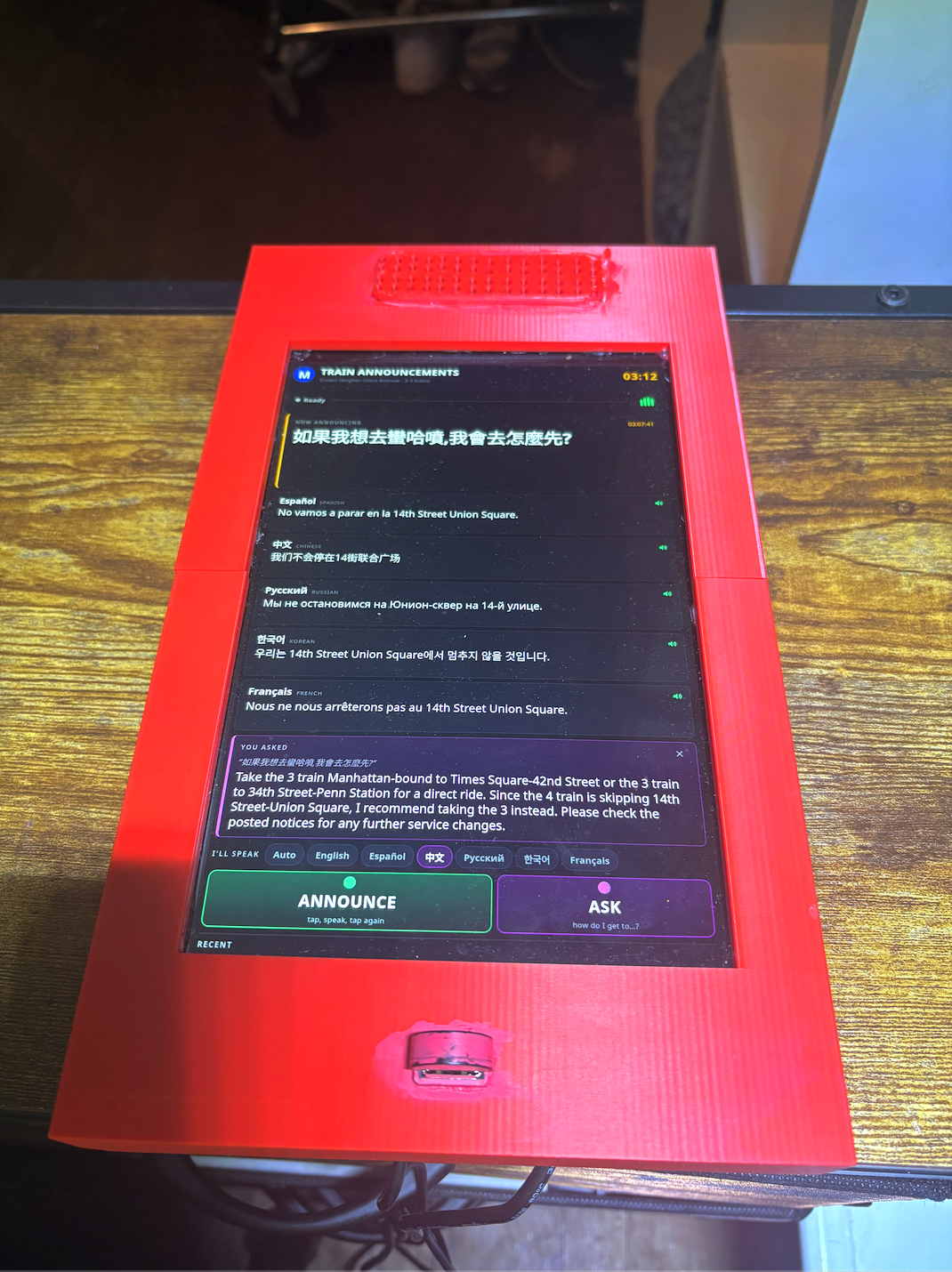
- Translates it into five languages — Spanish, Chinese, Russian, Korean, French — each on its own card
- Speaks it back in clean, clear English through a speaker, for riders who can't read the screen
- Lets you tap any language to hear that translation read aloud in a native voice
- Lets you ask it questions out loud — "We're not stopping at 14th Street, how do I get there?" — and answers you in your own language
Everything except the question-answering runs entirely on the device. That was a hard design constraint, not a nice-to-have: there is no cell signal in a tunnel. Any design that requires the cloud fails exactly where riders need it most.
How we built it
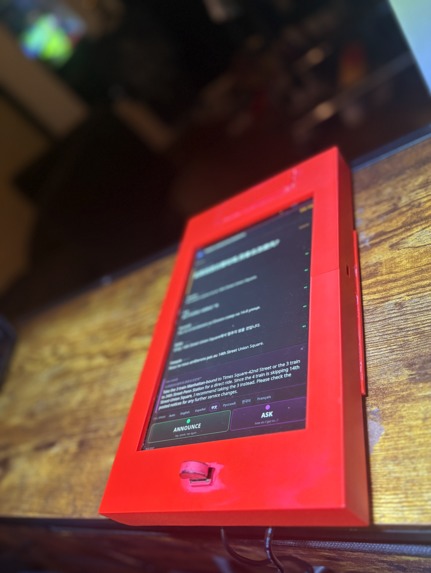
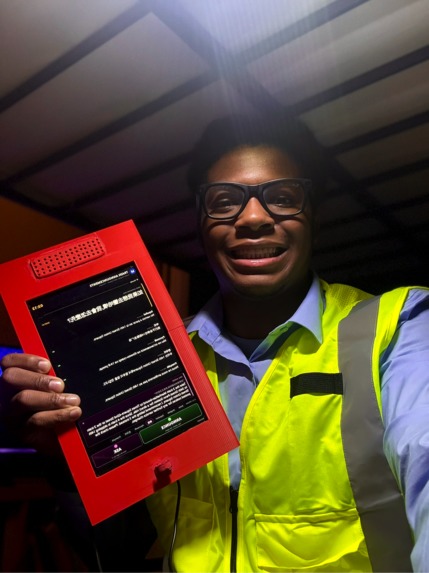
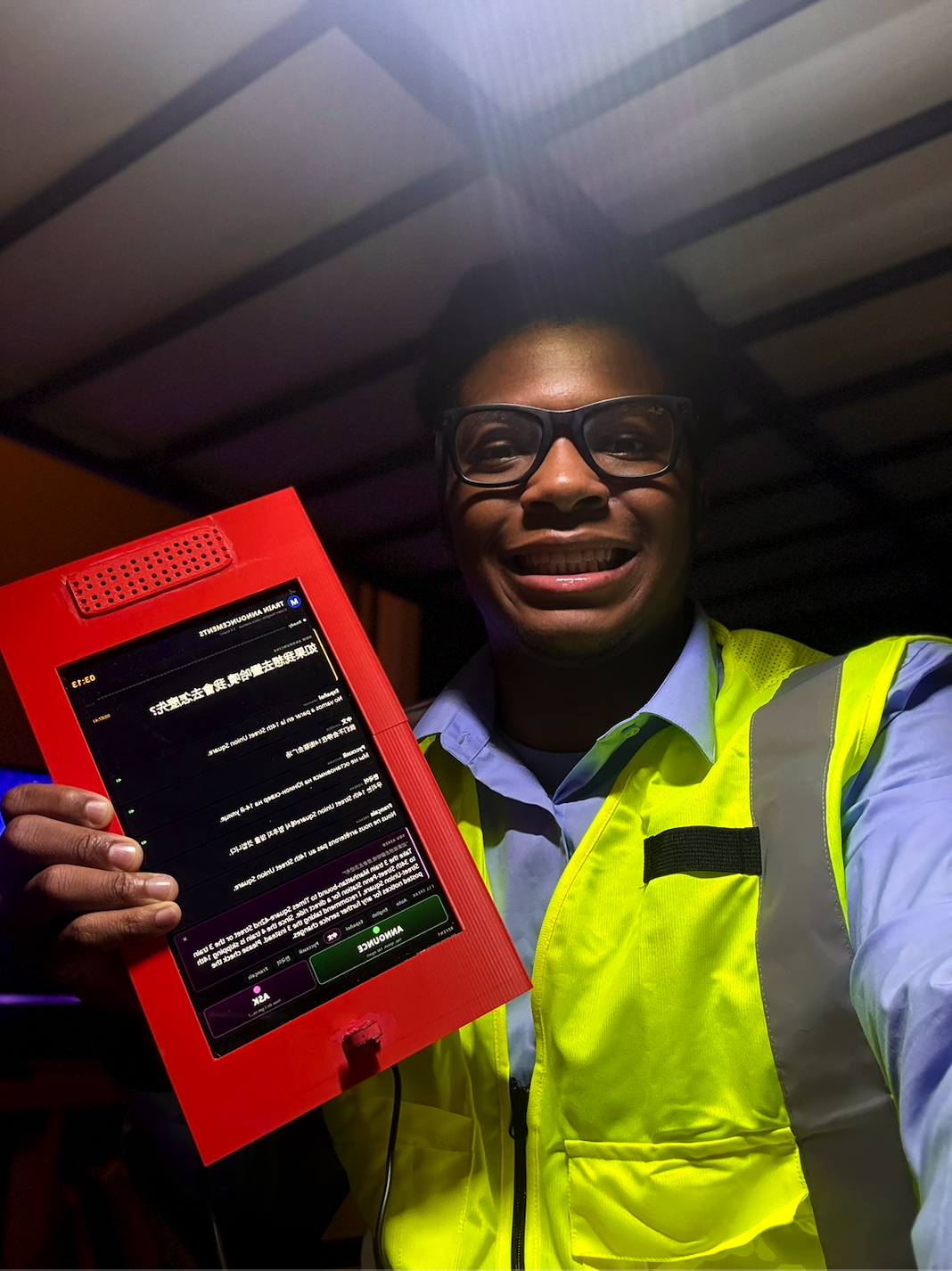
Hardware. A Raspberry Pi 5 (4GB) with the official 10" Touch Display 2, running in portrait at 1200×1920, plus a USB microphone and a USB speaker. I modeled the housing in Onshape and printed it on a Bambu Lab printer. I chose the Pi specifically because it has enough CPU to run real speech and translation models locally — no GPU, no API round-trip.
I designed the screen after the advertisement displays already mounted in subway cars, so it feels like it belongs on the platform instead of like a gadget someone bolted on.
The software pipeline, all Python:
USB mic (48 kHz)
  → resample to 16 kHz
  → voice-activity detection with an adaptive noise gate
  → faster-whisper (speech → English text)
      ├→ argos-translate ×5  → the language cards
      ├→ Piper TTS           → spoken replay in six voices
      └→ Featherless AI      → the "ask a question" feature
The backend is Flask, pushing updates to the browser over Server-Sent Events — no polling, and zero JavaScript libraries, so there's nothing to download at startup and nothing that breaks offline.
The AI component. The Ask feature uses Featherless AI, running google/gemma-4-26B-A4B-it through their OpenAI-compatible endpoint. But the interesting part isn't the API call — it's what I send with it.
A language model on its own is a confident liar about geography. My first version knew it was a subway assistant and nothing else, so when I asked how to reach Times Square it invented a transfer that doesn't exist. The fix was context injection. Before every question, the device assembles:
- Where it is — the station (Crown Heights–Utica Avenue), which lines serve it, the real transfer points, and the actual stop sequence in order
- What it has heard — every announcement made on that platform, newest first, with timestamps
That second half is what makes it genuinely useful. If someone announces "this 4 train is running express, skipping Franklin Avenue," and a rider then asks how to get to Franklin Avenue, the device answers:
"Since this 4 train is running express, it will not be stopping at Franklin Avenue. Please take a Manhattan-bound 3 train instead, or take the 4 to Atlantic Avenue–Barclays Center and transfer to the 2 or 5."
It routes around the announcement and explains why. That only works because the device is listening to its own platform.
Questions can be asked in any of the six languages. Whisper's multilingual model auto-detects which language you spoke, the model replies in that language, and the answer is spoken back in that language's voice — while keeping station names in their English form (Times Square–42nd Street) so you can match them to the signs in front of you.
The AI is optional by design. No API key, no internet, or a failed request, and the Ask button greys out with an honest reason while transcription, translation, and speech keep working exactly as before. The feature degrades; the device never stops working.
Challenges we ran into
The microphone physically refused to work. My USB mic only supports 44.1 and 48 kHz, but Whisper and the voice detector both require 16 kHz. It failed with PaErrorCode -9997, and PortAudio wouldn't let ALSA convert for me. I had to write my own resampler with a proper anti-aliasing filter — a windowed-sinc low-pass, then decimation. I verified it by feeding it a known tone: a 1 kHz signal came back at exactly 1000.0 Hz, and a 10 kHz tone was attenuated by 62.8 dB so it couldn't alias into the speech band.
It could hear, but it never stopped listening. The device transcribed nothing for hours. The cause turned out to be the microphone's Auto Gain Control, which had wound the gain to maximum — so room hiss registered as full-scale audio, and the voice detector classified 133 out of 133 silent frames as speech. An utterance never ended, so nothing was ever sent to the transcriber. It looked like broken software; it was a gain setting.
The real fix was to stop using a fixed threshold. The device now learns the room's noise floor continuously and sets its speech gate relative to it:
$$n_t = 0.97\,n_{t-1} + 0.03\,r_t \qquad\text{where}\qquad r_t = \sqrt{\tfrac{1}{N}\textstyle\sum_i x_i^2}$$
$$\text{gate} = \max\left(f_{\min},\; \alpha \cdot n_t\right), \quad \alpha = 1.6$$
This matters more than it sounds. A threshold tuned in my quiet apartment would be permanently triggered on a real platform, and one tuned for the platform would be deaf at home. The gate has to adapt or the device only works in one place.
A Raspberry Pi tried to download the entire NVIDIA CUDA stack. The translation library depends on a sentence splitter that depends on PyTorch, and on ARM64 the standard PyTorch wheel declares cuDNN, cuBLAS, NCCL and the rest as dependencies — several gigabytes of GPU libraries onto a board with no NVIDIA GPU. I had to pin a CPU-only build from PyTorch's separate index.
Power nearly killed the project. The Pi locked up hard twice — red LED, completely wedged — under the combined load of the browser, the speech model, and two USB audio devices. Measuring the 5V rail showed 4.93V at idle, with the firmware capping total USB current at 600mA because it couldn't detect a 5A-capable supply. That's a hardware lesson I won't forget: I spent an hour debugging software that was never broken.
"Slow translation" wasn't slow translation. Announcements took ~35 seconds to appear, and I assumed the Pi was too weak. I benchmarked it instead of guessing, and found that translating into a language cost 3.6–11.8 seconds the first time and under 0.05 seconds every time after. All of it was one-time model loading. Loading all five at startup took the pipeline from ~35 seconds to about 3.
The transcriber invented announcements. Fed near-silence, Whisper would output text from its own prompt — a phantom "The next stop is Coney Island" when nobody had spoken. I couldn't just blocklist that phrase, because a real announcement might legitimately say it. The fix was to filter on the model's own confidence scores instead.
The device talked to itself. Once I turned the speaker up, the microphone heard the spoken replay and transcribed it as a new announcement. It now goes deaf while its own voice is playing, plus a short tail afterward.
Accomplishments that we're proud of
It actually works, on real hardware, end to end. Not a mockup and not a demo video of a simulation — you speak into it, and a few seconds later six languages are on the screen and coming out of the speaker.
It works with no internet at all. Every core feature — speech recognition, all five translations, and every voice — runs on the SD card. That was the hardest constraint and the one I refused to compromise, because a device that needs signal is useless in the exact place it's needed.
Six languages, each in a real voice. Tapping the Korean card gets you an actual Korean voice, not an English voice mangling Korean phonetics. That detail matters to the person it's for.
I made the AI accurate instead of just fluent. Getting from "confidently invents subway transfers" to "routes around the announcement it just heard, and explains why" was the most satisfying engineering of the whole build — and it came from feeding the model real ground truth, not from better prompting.
I solved the unglamorous problems. A resampler with a verified anti-aliasing response. A noise gate that adapts to the room. A confidence filter that stops phantom announcements. None of that is visible in a demo, and all of it is the difference between something that works on video and something that works on a platform.
I built the whole thing — the enclosure in CAD, the print, the hardware selection, and the software — as someone who just wanted this to exist on his own commute.
What we learned
Measure before you fix. Almost every bug in this project was somewhere other than where it looked. The transcriber wasn't broken — the gain was. Translation wasn't slow — loading was. The software didn't crash — the power supply sagged. Every time I guessed I lost an hour; every time I instrumented first I found it in ten minutes.
The model supplies reasoning; you supply ground truth. This was the biggest lesson of the whole build. Prompting alone gave me answers that were fluent, confident, and wrong. Handing the model the real stop sequence fixed every failing test case at once. AI isn't a substitute for knowing your domain — it's a way of applying knowledge you have to give it.
Constraints make better designs. "There is no signal in a tunnel" forced every core feature onto the device, which means it also works in a blackout, during an outage, or anywhere the network is bad. If I'd had reliable internet I'd have built something more fragile.
Accessibility is a design decision you make early or not at all. Text for people who can't hear the announcement. Spoken replay for people who can't see the screen. Native voices instead of English phonetics. Large type readable from across a platform. None of that was bolted on at the end — it's why the thing exists.
What's next for Run It Back NYC
Right now the station data is hand-written for one platform. The MTA publishes a free GTFS feed with every station, line, and transfer in the system — loading that onto the SD card would make routing exact from any platform while staying fully offline, and would let the device say "the next 3 is in four minutes" instead of just naming the line.
I also want to move the microphone into the conductor's cab so it captures announcements at the source, before the speaker system degrades them. That's the version that scales to a whole train instead of one platform.
And I want to fix a gap I can't ignore: Bengali and Haitian Creole are among the most-spoken languages in New York, and neither has an offline translation model available yet. Right now French and Korean stand in for them. The people those languages would serve are exactly the riders this device was built for, so finding a way to support them is the first thing I want to solve next.
Built With
- 3d-printing
- alsa
- argos-translate
- chromium
- css3
- ctranslate2
- faster-whisper
- featherless-ai
- flask
- gemma
- html5
- javascript
- linux
- numpy
- onnxruntime
- onshape
- piper-tts
- python
- pytorch
- raspberry-pi
- rest-api
- server-sent-events
- webrtcvad
- whisper

Log in or sign up for Devpost to join the conversation.