-
-
Volunteer icons created by Freepik - Flaticon
-
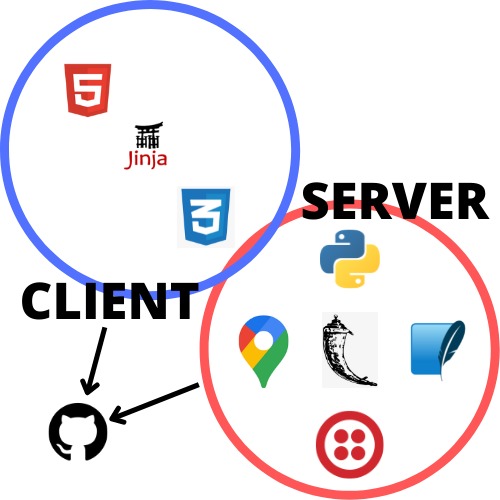
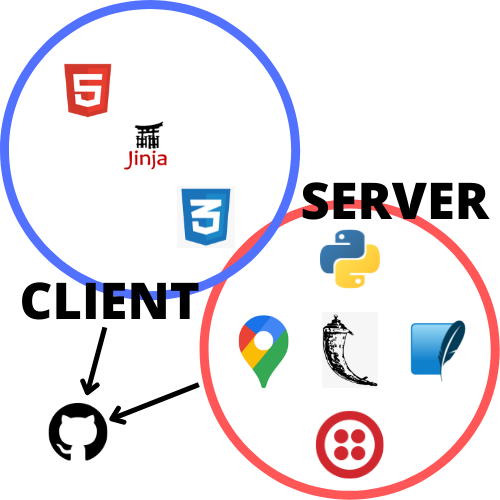
Stack
Inspiration
Our team wanted to create an application that increased the productivity of the volunteering community by creating a site that allowed users to access a single platform to find and host volunteering events.
What it does
It does as previously stated, but also gives a more social media type environment. There's a login page and group chat for every event. You can also find an event by its location and read a lot of information.
How we built it
We built it using the following technologies:

Challenges we ran into
Front-end:
- Figuring out a good style
- Formatting page in an organized manner
- Implementing scrolling functionality for events
Back-end:
- Implementing login functionality; tedious process
- Implementing group chat functionality; stuck many times
Accomplishments that we're proud of
We were able to implement our site's functionality fully!
What we learned
Learned:
- Google Maps API and many location-related techniques (distance, geolocation, etc.)
- Twilio Conversations API (group chat)
- Flexbox
- Utility functions to improve API functionality
- Login system
Improved:
- Requesting API data
- Database integration and use
- Flask servers and templating
What's next for Vevent
Implement the following features:
- Dedicated registration page
- Add images to events
- Make the page more responsive for all devices
- Filter events through categories or any other property
- Only show events based on what is shown on the map
- Dynamically updating group chat
- User settings
- Deploy site
- Create our own logos
- Improve user's current location functionality
- Deletion and update functionality for events, messages, and accounts
- Logout
- Better password protection
- Only accept future dates
- Complete UI
Credit
Volunteer icons created by Freepik - Flaticon


Log in or sign up for Devpost to join the conversation.