-
-
RSS-news summarizer.
Inspiration
The primary inspiration was to combat information overload and the passive consumption of news. We wanted a tool that could actively process large amounts of data from RSS feeds, make it quickly digestible using on-device AI summarization, and make it accessible through audio, all while leveraging the built-in, privacy-focused capabilities of the Chrome browser to ensure simplicity and speed without relying on external servers or paid APIs.
What it does
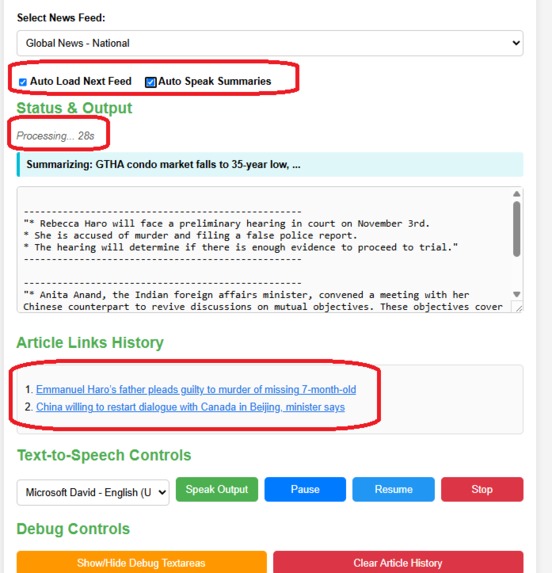
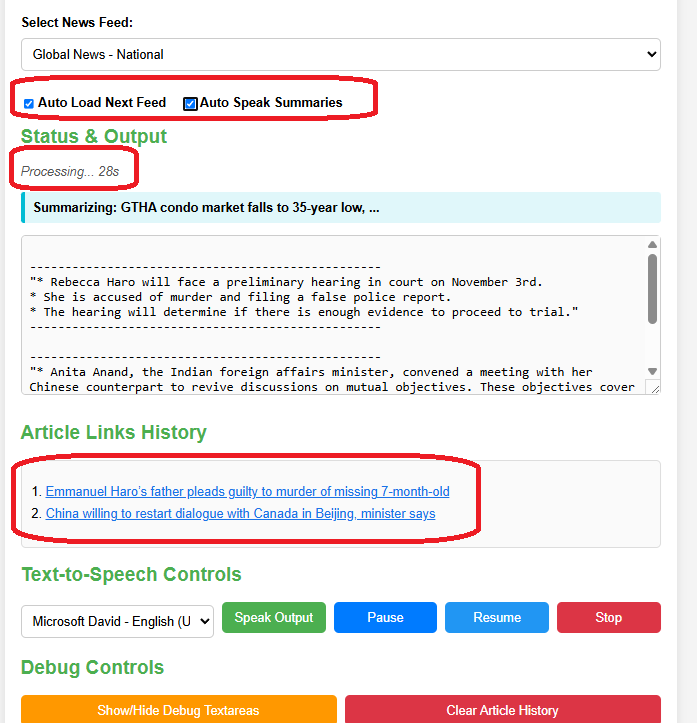
This project acts as an intelligent, client-side news aggregator. It retrieves content from multiple user-defined RSS feeds, uses the local Chrome Built-in AI Summarizer API to generate concise summaries of each article, and then utilizes the browser's native Text-to-Speech (TTS) function to read the summaries aloud. This creates a powerful, self-contained system that allows users to filter, summarize, and audibly consume their news updates without ever leaving the simple web page environment.
Key functionalities include:
- RSS Aggregation: Fetches and parses standard RSS feed XML/JSON data.
- On-Device AI Summarization: Uses the Chrome Built-in AI (e.g.,
ai.summarizer.create()) to process the raw article text and produce titles, concise descriptions, and links. - Audio Accessibility: Utilizes the browser's native SpeechSynthesis API to read the AI-generated summaries aloud.
- Zero-Cost, Client-Side Processing: The entire workflow (fetch, summarize, speak) runs locally in the browser, ensuring maximum data privacy and zero API costs.
How we built it
The application is entirely contained within a single HTML file, adhering to the user's teaching preferences for clarity and simplicity:
- HTML, Simple JavaScript, Inline CSS: Used for the entire front-end structure and minimal styling.
- RSS Fetching: Used standard, simple JavaScript
fetch()API calls to retrieve and parse the XML/JSON data from the RSS feed URLs. - AI Summarization: Implemented a function using modern JavaScript
async/awaitto send the fetched article text to the Chrome Built-in LLM for efficient, on-device summarization. - Verbalization (TTS): Used the browser's native
SpeechSynthesisUtteranceandspeechSynthesis.speak()APIs to convert the AI-generated summaries into spoken audio. - Coding Style Compliance: JavaScript variables and functions followed the preferred descriptive
myCamelCasenaming convention (e.g.,myFetchAndSummarize(),myReadSummaryAloud()).
Challenges we ran into
- AI Access and Reliability: A significant challenge was reliably integrating with the Chrome Built-in AI/LLM features, which are designed for local operation but can require specific browser versions or permissions.
- XML Parsing Robustness: Ensuring the JavaScript parsing logic could handle the highly diverse and often inconsistent XML structures found across various RSS feed formats.
- Asynchronous Coordination: Coordinating the three complex, asynchronous stages (
fetch(),ai.summarize(), andspeechSynthesis.speak()) to ensure a seamless, non-stuttering user experience required careful management of theasync/awaitcontrol flow.
Accomplishments that we're proud of
We are most proud of creating a fully self-contained, intelligent, and private news processing system. The successful, simple integration of the local AI for complex summarization and the native TTS for accessibility, all within a simple, easy-to-teach web page, represents a powerful, private, and zero-cost method for news consumption.
What we learned
We gained a deep understanding of browser-native, cutting-edge features, specifically the capabilities and limitations of the Speech Synthesis API and the architecture for integrating with client-side LLMs. This project reinforces how to write robust, minimal JavaScript code to handle complex, chained asynchronous operations (fetch → summarize → speak) cleanly and efficiently.
What's next for RSS News Feed Chrome Built In Summarizer and Speak
- Sentiment Analysis: Add an optional step to use the built-in AI to perform sentiment analysis on the news article and display a simple icon (e.g., 😊, 😐, 😡) next to the summary.
- Feed Management UI: Implement a cleaner interface for users to easily add, delete, and reorder their RSS feeds, saving the list locally using
localStorage. - Keyword Filtering: Allow the user to input a list of keywords to automatically filter out or prioritize articles before the summarization step, saving processing time and LLM cycles.
- Mobile Optimization: Refine the minimal inline CSS to ensure the tool is highly usable on mobile devices, leveraging the simple design.
Built With
- chrome-built-in-ai
- css
- html
- javascript
- rss

Log in or sign up for Devpost to join the conversation.