Inspiration
I spend most of my day in VS Code with Claude Code, either working on my research or building something. When I started, I was careful: I read every diff and questioned every suggestion. Somewhere along the way, that stopped. I started trusting it a little too much and skimming what it wrote instead of actually reading it.
I learned this the hard way. I ran a few expensive experiments, and only afterwards found out Claude had quietly changed the model name in my experiment config. Everything had to be rerun. That cost me time and money, but mostly it broke my trust, in the tool and honestly in myself. I hadn't been paying attention.
Then I went looking, and it turns out this isn't just me. Research keeps finding the same pattern: the way you use AI matters more than whether you use it. People who blindly delegate learn less and catch fewer mistakes, while people who stay curious do fine.
So I wanted something that would notice when I stop thinking, before it costs me another experiment. And lately I've been seeing a lot of sad, ugly-looking pumpkins around, so the mascot picked itself.
What it does
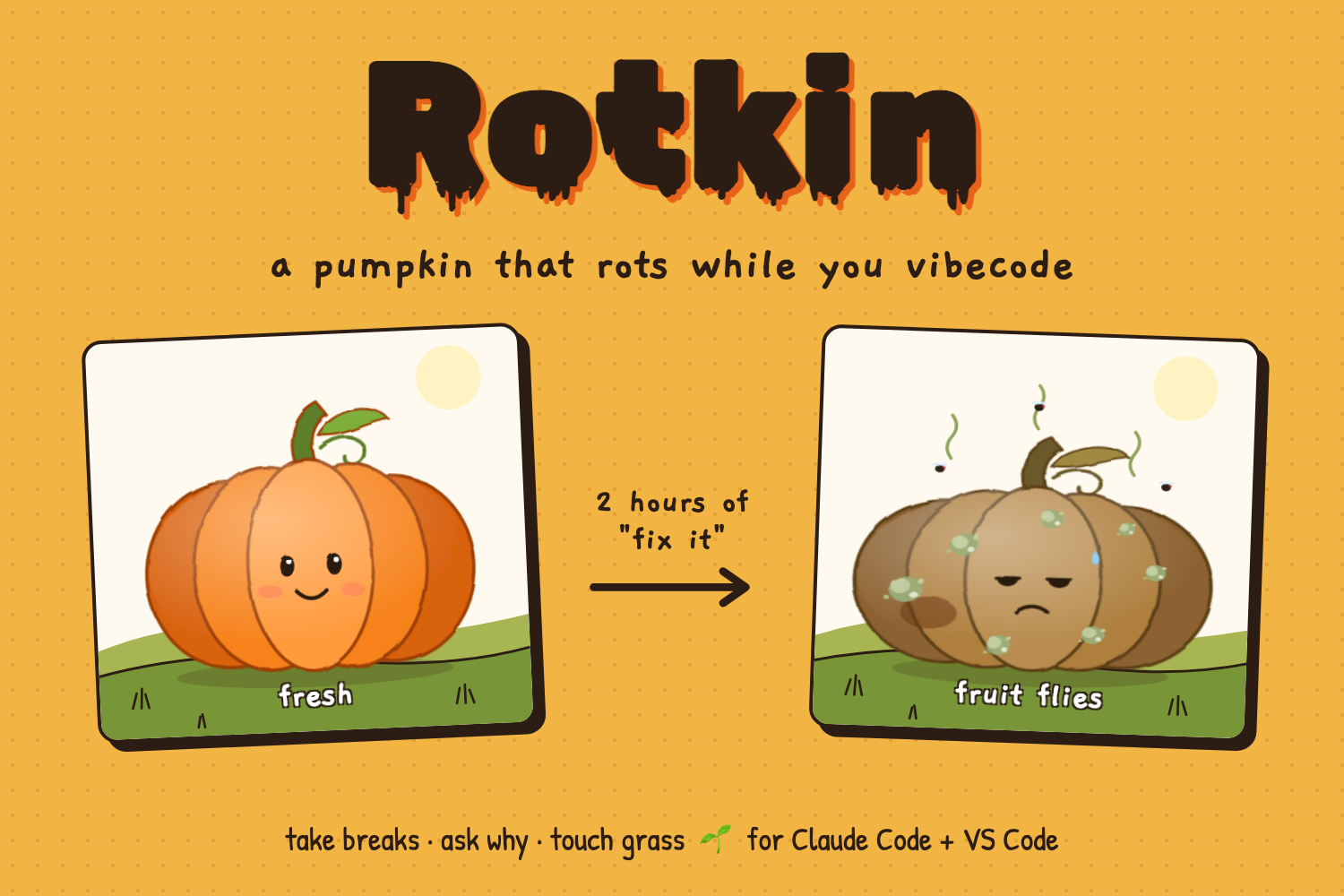
Rotkin is a pumpkin that lives in your VS Code sidebar and rots as you vibecode on autopilot with Claude Code. Let it rot all the way and it dies, and Claude Code stops taking your prompts until you revive it.
The pumpkin goes from Fresh to Soft Spot, Moldy, Fruit Flies, Collapsing, and finally Dead at 100 rot. You can watch it in the sidebar, in the status bar, or on a full dashboard with Touch Grass and Think Mode.
🎥 Demo: https://youtu.be/UZtvtG9tAjE 🎃 Install it: https://marketplace.visualstudio.com/items?itemName=gokila16.rotkin
What makes it rot 🦠
- Long sessions without a real break: +0.5 per minute after 25 minutes. Fatigue builds quietly. 25 minutes is a nod to the Pomodoro technique, not a scientific limit.
- Token burn: +1 per 10,000 tokens Claude writes. Every token Claude writes is code you didn't write and might not have read.
- Doom-prompting: +2 for each "fix it", "still broken", "try again", or "pls" once 4+ land in a row, each within 3 minutes of the last. Rapid retries mean you've stopped diagnosing and started gambling. In Anthropic's study, blind delegation hurt debugging skills the most.
- Brain-to-bot ratio: a [fill in] rot penalty when Claude writes over 1,000 tokens for every word you write. High trust plus low engagement is the pattern linked to less critical thinking.
What heals it 🌱
- Stepping away for 5+ minutes: −2 rot per minute. Even short breaks reduce fatigue.
- A real break of 10+ minutes: −10 extra, and your session timer and token count reset. Longer breaks help more after draining work, so a real break gives you a genuinely fresh start.
- Curious questions like "explain", "why does", "how does", or "walk me through": −3, and your doom streak resets. Developers who asked conceptual questions kept their learning while using AI.
- Think Mode: −[fill in] for explaining what Claude just built in your own words. It's a recall check: if you can't explain the code, you don't own it yet.
- Touch Grass: −[fill in] for holding real grass up to your webcam. Sometimes the fix is going outside. (It knows your keyboard is not grass.)
The nuances
- Short prompts aren't the problem. One quick "fix it" is fine. Doom only counts when it becomes a pattern of 4+ in a row.
- "Why" heals, it doesn't rot. It's the most counterintuitive rule and the most important one: using AI isn't what hurts you, using it without curiosity is.
- You're never punished forever. A real break resets the session clock and token count, so yesterday's marathon doesn't haunt today.
- Dying is the only hard consequence. Everything else is a nudge. The block only kicks in at 100, and any healing action brings you back.
- The numbers are design choices. No study defines a safe dose of vibecoding, so each signal is grounded in research, but the thresholds were tuned by hand until a bad session felt bad.
How I built it
Rotkin plugs into Claude Code's hooks system:
- A
UserPromptSubmithook runs before Claude sees each prompt. It classifies the prompt (doom, curious, or normal), updates the rot score, and exits with code 2 to block the prompt if the pumpkin is dead. - A
Stophook runs after each reply and reads the session transcript to count output tokens.
The core is one Python file using only the standard library: the hook handler, the rot engine, a CLI, and a small local web server. State lives in a JSON file in ~/.rotkin/, and idle healing is calculated whenever the state is read, so the pumpkin recovers during breaks even though nothing is running.
Roughly, each event nudges the score like this:
$$\Delta \text{rot} = 0.5 \cdot \text{minutes past 25} + \frac{\text{tokens}}{10{,}000} + 2 \cdot \text{doom prompts} - \text{healing}$$
The VS Code extension is plain JavaScript. On install, it asks to connect to Claude Code, backs up ~/.claude/settings.json, and adds the two hooks plus a status line without touching your other settings. It starts the dashboard server on its own, polls it, and draws the pumpkin in the sidebar. The dashboard is a single HTML file with a hand-drawn SVG pumpkin, and Touch Grass checks how much of a webcam frame is actually green. Nothing leaves your machine.
Challenges I ran into
- Hooks have sharp edges. Anything the prompt hook prints to stdout gets injected into Claude's context, so one stray debug print would have shown up in every prompt. And exiting with code 2 from the
Stophook doesn't block anything; it makes Claude keep working. I had to be careful about what each hook was allowed to do. - The transcript lags. Claude Code writes the transcript asynchronously, so the newest reply isn't always there when the hook fires. I switched to recounting all tokens each time instead of adding per-turn counts, so anything missed gets caught on the next event.
- Editing someone's settings safely. The extension writes into a file people care about, so it backs it up first, merges instead of overwriting, and a disconnect command removes only Rotkin's entries.
- There's no scientific "safe dose" of vibecoding. No study says how many minutes or tokens is too much. I grounded each signal in real findings, but the exact thresholds are design choices that I tuned with a simulator.
- Webcams don't work inside VS Code webviews, so Touch Grass lives on the dashboard instead of the sidebar.
Accomplishments that I'm proud of
- It's live on the VS Code Marketplace, and setup is one click.
- The pumpkin actually blocks Claude when it dies. It's not just a reminder you can ignore.
- Every rot and heal rule traces back to real research, including the counterintuitive one: asking "why" makes the pumpkin healthier.
- It's small and readable, with no dependencies and code a person can understand in one sitting.
- Holding grass up to a webcam to save a pumpkin is the most fun I've had debugging.
What I learned
- Developers using AI scored 50% vs 67% on a skills quiz, with the biggest gap in debugging, but the ones who asked conceptual questions kept their learning (Anthropic, 2026).
- Experienced developers felt about 20% faster with AI but were actually 19% slower in a controlled study (METR, 2025). You can't trust how productive vibecoding feels, which is exactly why an outside signal helps.
- More confidence in AI was linked to less critical thinking (Microsoft Research & CMU, CHI 2025).
- Short breaks reduce fatigue, and longer ones help more after draining work (PLOS ONE, 2022).
- How Claude Code hooks really work, including the parts the happy path doesn't show you, and how to ship a VS Code extension end to end.
- Personally: I still use Claude all day. I just read the diffs again.
What's next for Rotkin
- Windows support (right now it's macOS and Linux)
- Smarter doom detection that notices when you accept changes without reading them
- A weekly "pumpkin report" showing your patterns over time
- Support for other AI coding tools
- Team mode, where everyone's pumpkins sit in one patch
Built With
- claude
- css
- html
- javascript
- python
