-
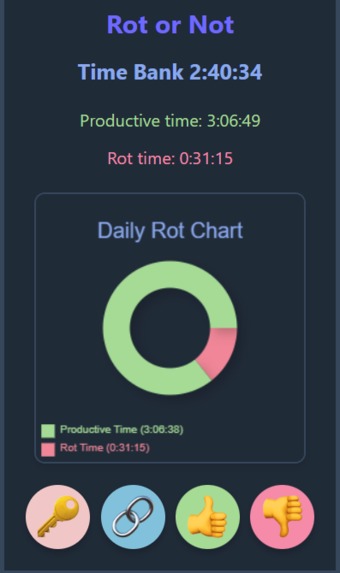
The extension's popup
-
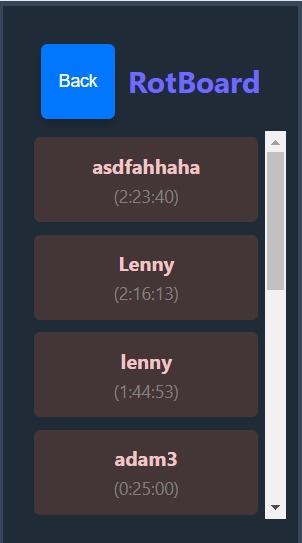
The "RotBoard" leaderboard
Inspiration
We believe that in the modern world, it is all too common for people, especially younger people such as those attending Queen’s, to spend far too much time on unproductive online sites. In fact, the Oxford Word of the Year for 2024 was “brain rot”, a term used to describe the effects of excessive consumption of online media, especially short form content featured on many major websites such as Instagram, TikTok, and YouTube. Noticing this problem, we wanted to create something that encourages people to budget their time in a more responsible manner and achieve all that they are capable of. We created Rot or Not, an extension dedicated to detecting online brain rot and encouraging our users to avoid such content.
What it does
Rot or Not is a productivity tracker chrome extension that tracks what websites you're spending your time on and awards you with time on a timer for visiting productive websites, and penalizes you by taking away time if you spend too long on unproductive "rot" sites. It also automatically redirects you away from a "rot" site if your timer hits zero. We use generative AI to determine whether a site is productive or not, and we also allow the user to manually override this decision if they wish to. It also automatically generates a graph of the amount of time you've spent on productive and unproductive sites on a given day, and allows you to automatically copy it. Finally, it features a leaderboard that allows you to connect with others and compare your productivity.
How we built it
The majority of our codebase is in JavaScript. We have an HTML file that describes the popup that appears when the extension is clicked, and a JavaScript file to go along with it. We also have a background service worker file to handle events, such as the user changing tabs or alarms going off at set intervals. We have a file that exports several functions relating to our timer, which we use to record the amount of time the user spends on good and bad sites. Additionally, we obtained an API Key from the Google Developers Console that allowed us to determine whether a given site is productive or unproductive. We decided to use Python for our backend for the “RotBoard” system as it is an easy to learn and quick language to program in. Python also has many libraries such as Flask which was utilized for our API and a SQLite3 library for our database. The combination of Python’s simplicity and extensive libraries allowed us to build an API in the last hours of the hackathon. Furthermore, the dependency manager poetry was a big save for us to get everyone on our team in the same environment for development.
Challenges we ran into
We ran into many challenges during these last 36 hours. The first big challenge we faced was deciding what project we wanted to design. We wanted to choose an idea that we were all interested in, as well as choose something that we knew we could complete on time. We eventually settled on a project idea that our entire team was happy with. We also ran into a big challenge relating to timers not updating correctly. Once we learned more about how timers worked behind the scenes, we were able to better understand our problems and the path we needed to take to fix them. Overall, one of the biggest hurdles for our progress was that we were not familiar with Chrome extensions, and the different situations in which processes run and terminate and variable values are lost, causing us to start scratching our heads at why our seemingly logical code wasn’t running. We needed to leverage features of Chrome API such as alarms and local storage in order to make our ideas work.
Accomplishments that we're proud of
We are proud of what we were able to accomplish in the short period of time, especially considering the majority of our team members had never done a hackathon before. We were able to successfully develop a chrome extension, integrate it with Gemini’s API, and add many features that made the extension what it is. We are also proud of the way our team was able to work together. We occasionally had different ways of approaching the same problem, but we always reached a consensus and the entire team was satisfied with the solutions we developed to our problems.
What we learned
We all learned some new pieces of technology in order to create Rot or Not. For three of us, it was our first major project using JavaScript, and our first Chrome extension. In particular, we all started off a little confused about the best ways to export and import values from one file to another. We also learned how to create a wrapper for Gemini’s API, allowing us to leverage an extremely useful tool within our project. We also had to familiarize ourselves with Flask, which we used to create an API for our backend.
What's next for Rot or Not
We plan on developing a website that will contain more information than the information contained in the extension panel, such as more graphs. We also plan on gamifying the experience even more to make the user feel good for being productive, thus motivating them to continue with these good habits.
Built With
- chromeapi
- flask
- geminiapi
- github
- javascript
- python
- sqlite

Log in or sign up for Devpost to join the conversation.