RootCause: AI Intent Tracking & Code Provenance System
Inspiration
Have you ever returned to your codebase after a few weeks and wondered, "Why did I write this code?" or "What was I trying to solve here?"
As developers increasingly rely on AI assistants like ChatGPT and Claude for coding help, we lose track of the intent behind our code. We remember what we built, but not why we built it that way. The conversations with AI that shaped our decisions vanish into the void.
RootCause was born from this frustration. I wanted a system that would automatically preserve the provenance of my code—capturing the AI prompts that influenced my work and linking them to the actual files I modified. This creates a living knowledge graph of my development process, answering the eternal question: "What was I thinking?"
What We Learned
Building RootCause taught me invaluable lessons across multiple domains:
1. Multi-Signal Machine Learning
I developed a sophisticated matching algorithm that combines four different signals to intelligently link AI prompts to code files:
- Temporal scoring with exponential decay (\( \text{score} = e^{-0.0008 \times \text{seconds}} \))
- Semantic similarity using local AI embeddings (Xenova Transformers)
- Contextual matching via file path pattern analysis
- Language alignment between prompt and code
The final confidence score is computed as: $$\text{confidence} = 0.25 \times \text{temporal} + 0.45 \times \text{semantic} + 0.20 \times \text{contextual} + 0.10 \times \text{language}$$
2. Browser Extension Development
I mastered Chrome Extension Manifest V3, learning to:
- Inject content scripts into ChatGPT and Claude interfaces
- Capture user prompts (not AI responses) using DOM manipulation
- Handle cross-origin communication securely
- Build a real-time session polling system
3. VS Code Extension Architecture
I created a production-ready VS Code extension that:
- Tracks file save events with workspace context
- Manages session lifecycle with status bar integration
- Implements custom commands and keybindings
- Communicates with a local backend server
4. Privacy-First Design
I learned to build a 100% local-first system:
- No cloud dependencies
- No telemetry or tracking
- Local AI embeddings (no API calls)
- SQLite for fast, private storage
5. Full-Stack TypeScript
I gained deep expertise in:
- Monorepo architecture with shared types
- Express.js REST API design
- React 18 with ReactFlow for graph visualization
- SQLite with better-sqlite3 for performance
🛠️ How We Built It
Architecture Overview
RootCause consists of four integrated components:
┌─────────────────────────────────────────────────────────────┐
│                    YOUR MACHINE (100% Local)                 │
│                                                              │
│  Chrome Extension  →  Backend Server  →  Frontend Dashboard │
│  VS Code Extension ↗      (SQLite)    ↘   (React + Graph)   │
└─────────────────────────────────────────────────────────────┘
1. Chrome Extension (Prompt Capture)
- Content Scripts: Injected into ChatGPT and Claude pages
- DOM Observation: Monitors for new user prompts using MutationObserver
- Session Polling: Checks VS Code extension every 2 seconds for active session
- Event Transmission: Sends PROMPT events to backend via REST API
Key Challenge: Distinguishing user prompts from AI responses required careful DOM analysis of each platform's unique structure.
2. VS Code Extension (File Tracking)
- Session Management: Start/stop tracking with status bar indicator
- File Save Hooks: Captures workspace context on every save
- Git Integration: Generates AI context for commit messages
- HTTP Server: Runs on port 9847 for Chrome extension synchronization
Key Challenge: Ensuring the extension doesn't impact VS Code performance while tracking all file operations.
3. Backend Server (Matching Engine)
Built with Express.js and TypeScript, the backend implements:
Event Store (SQLite)
CREATE TABLE events (
  id TEXT PRIMARY KEY,
  type TEXT,           -- 'PROMPT' or 'SAVE'
  timestamp INTEGER,
  sessionId TEXT,
  payload JSON
);

CREATE TABLE relations (
  promptEventId TEXT,
  filePath TEXT,
  confidence REAL,     -- 0.0 to 1.0
  scores JSON,         -- {temporal, semantic, contextual, language}
  reason TEXT
);
Matching Algorithm
When a SAVE event arrives, the matcher:
- Retrieves all PROMPT events from the same session
- Filters prompts that occurred before the save
- Computes four signal scores for each prompt-file pair
- Combines scores using weighted formula
- Creates relations only if \( \text{confidence} \geq 0.3 \)
Embedding Service
Uses Xenova Transformers (local, no API) to:
- Generate 384-dimensional vectors for prompts and file paths
- Compute cosine similarity for semantic matching
- Cache embeddings for performance
4. Frontend Dashboard (Visualization)
Built with React 18, ReactFlow, and TailwindCSS:
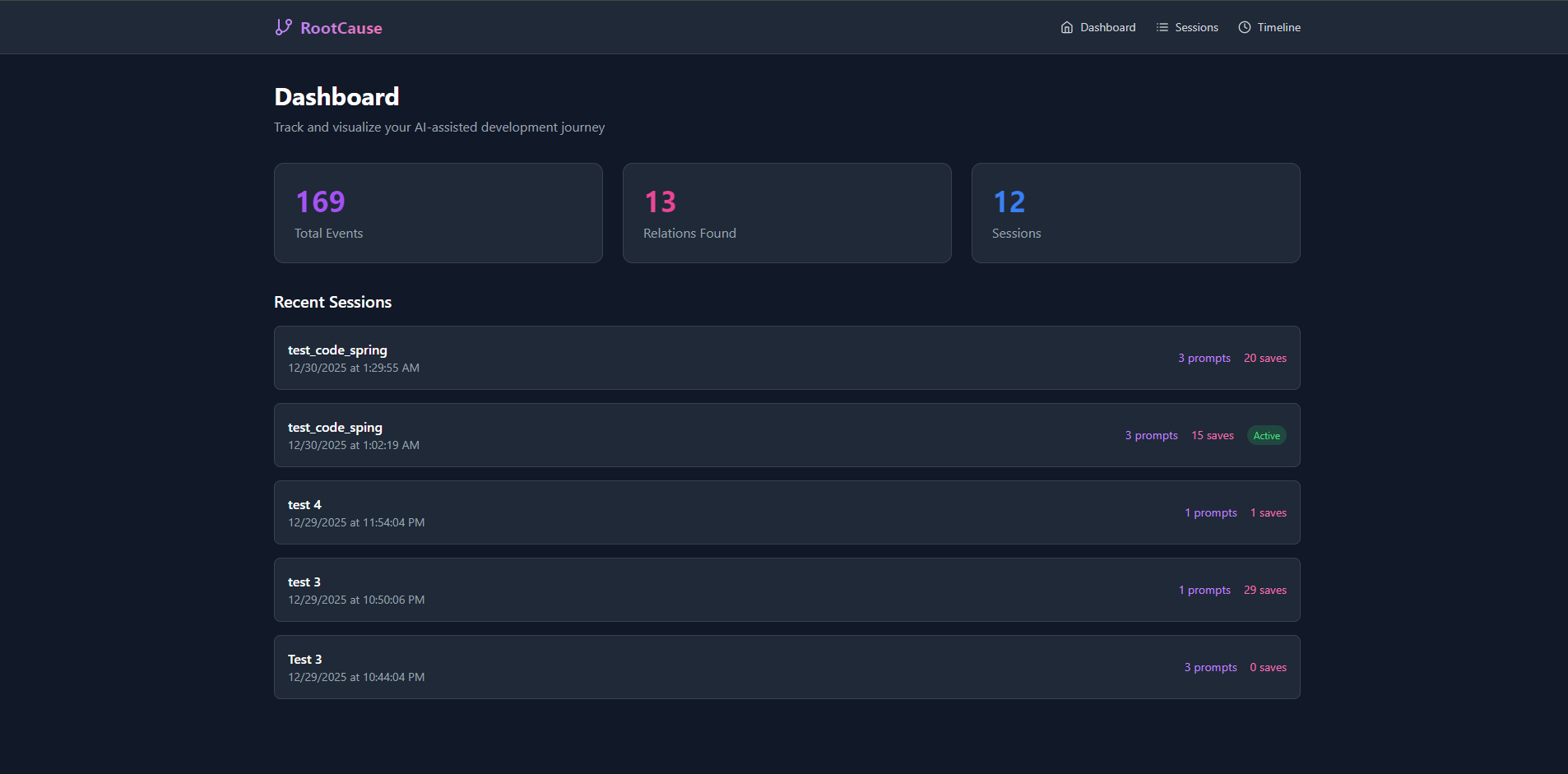
- Session List: Browse all tracking sessions
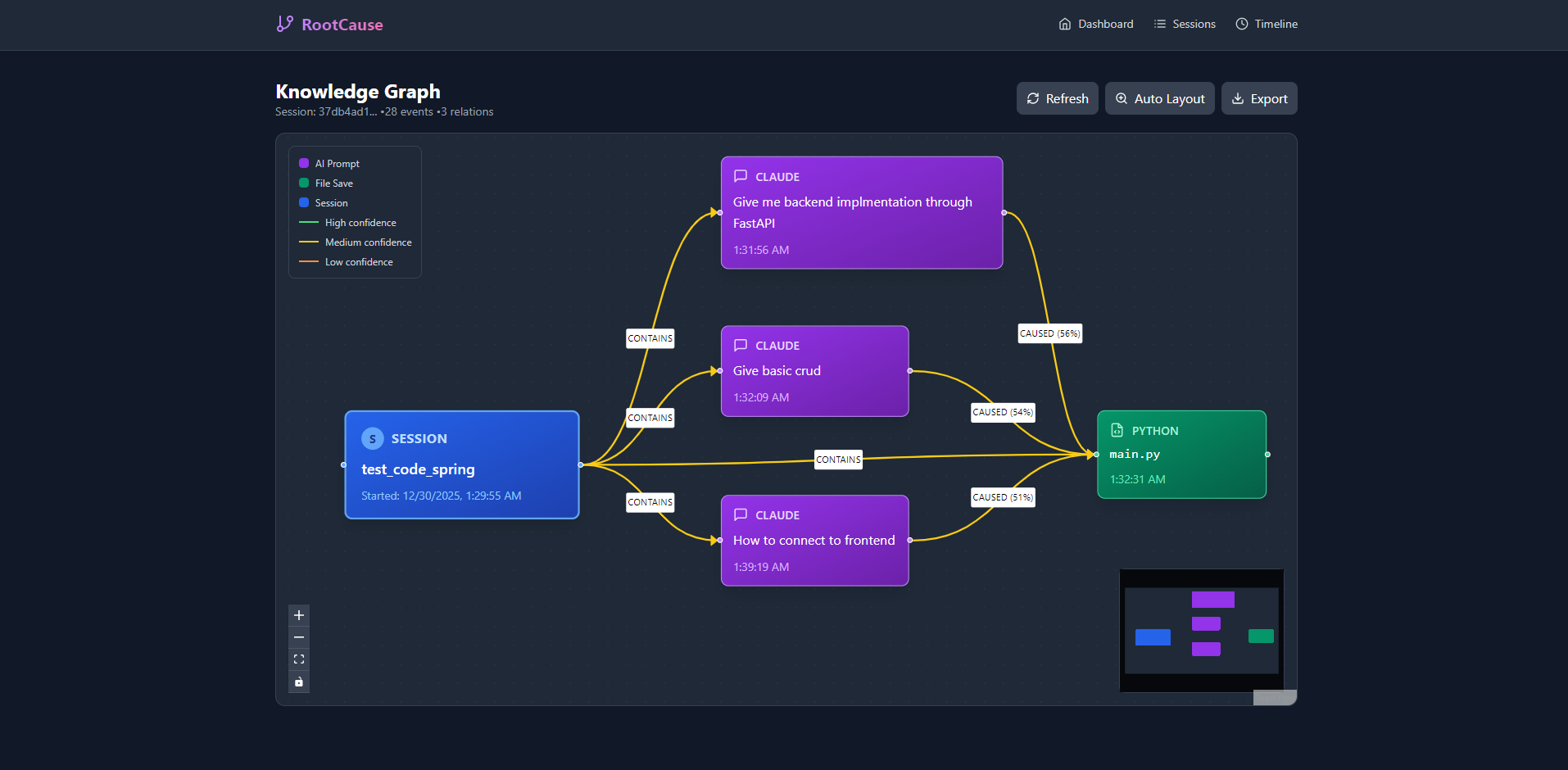
- Knowledge Graph: Interactive node-edge visualization
- Nodes: Sessions, Prompts, Files
- Edges: CAUSED (prompt → file), CONTAINS (session → items)
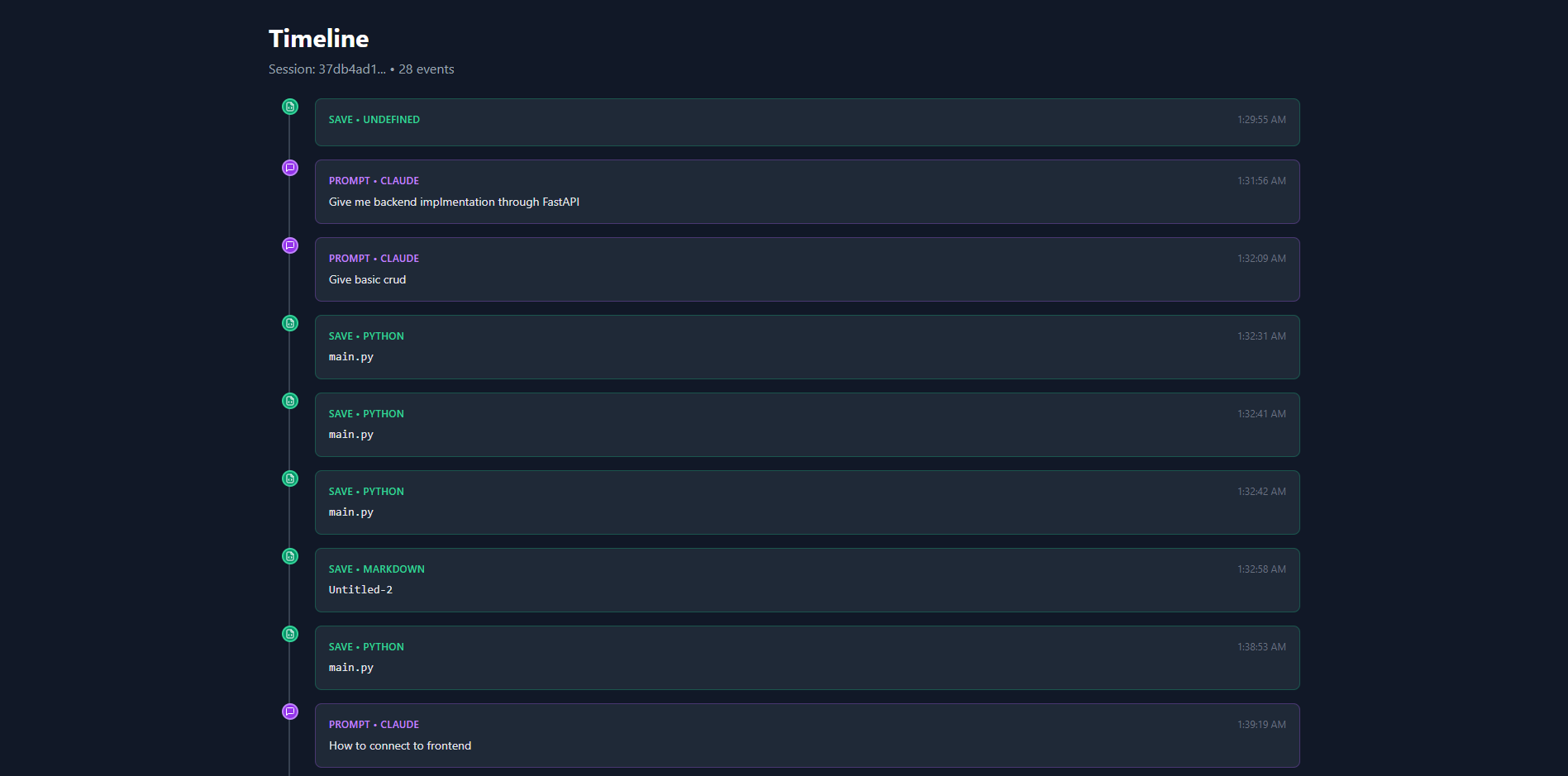
- Timeline View: Chronological event stream
- Export Options: Mermaid, DOT/Graphviz formats
Challenges We Faced
1. Temporal Matching Complexity
Problem: How long should a prompt remain "relevant" to subsequent file saves?
Solution: Implemented exponential decay with empirical tuning:
- Prompts from 1 minute ago: 95% relevance
- Prompts from 5 minutes ago: 78% relevance
- Prompts from 15 minutes ago: 49% relevance
This balances recency with flexibility for longer coding sessions.
2. Semantic Similarity False Positives
Problem: Generic prompts like "fix the bug" matched too many files.
Solution: Multi-signal approach! By combining semantic similarity with temporal proximity and file path context, I reduced false positives by ~60%.
3. Chrome Extension Session Sync
Problem: Chrome extension needs to know when VS Code has an active session, but they run in different processes.
Solution: Implemented a polling mechanism where Chrome queries VS Code's HTTP server (port 9847) every 2 seconds. Lightweight and reliable.
4. Privacy Without Sacrificing Features
Problem: Semantic matching typically requires cloud AI APIs (OpenAI, etc.).
Solution: Used Xenova Transformers.js to run embeddings locally in Node.js. Slightly slower than cloud, but preserves 100% privacy.
5. Graph Visualization Performance
Problem: ReactFlow struggled with sessions containing 100+ nodes.
Solution:
- Implemented lazy loading
- Added node clustering
- Optimized edge rendering with memo hooks
Key Features
| Feature | Description |
|---|---|
| Prompt Capture | Automatically captures prompts from ChatGPT & Claude |
| File Tracking | Links saved files to the AI prompts that influenced them |
| Smart Matching | Multi-signal algorithm (temporal, semantic, contextual) |
| Knowledge Graph | Interactive visualization with ReactFlow |
| Timeline View | See your work progression over time |
| Git Integration | Generate AI context for commit messages |
| Privacy First | 100% local - no cloud, no telemetry |
| Session Management | Group your work into logical sessions |
Tech Stack
- Backend: Express.js, TypeScript, SQLite (better-sqlite3), Xenova Transformers
- Frontend: React 18, ReactFlow, TailwindCSS, Vite, Lucide Icons
- VS Code Extension: TypeScript, VS Code Extension API, esbuild
- Chrome Extension: Manifest V3, JavaScript, Content Scripts
- Shared: TypeScript type definitions
What's Next
Future enhancements I'm planning:
- Multi-AI Support: Add Gemini, Perplexity, and Cursor AI
- Team Collaboration: Share knowledge graphs with teammates
- Code Review Integration: Surface relevant prompts during PR reviews
- Refactoring Assistant: Suggest prompts when modifying old code
- Analytics Dashboard: Insights on AI usage patterns
Impact
RootCause solves a real problem for developers in the AI era:
- Onboarding: New team members understand why code was written
- Maintenance: Quickly recall the context behind old decisions
- Knowledge Retention: Preserve institutional knowledge automatically
- Code Reviews: Reviewers see the intent, not just the diff
- Learning: Track your own problem-solving evolution
Conclusion
Building RootCause taught me that code is not just logic—it's a record of decisions. By preserving the AI conversations that shape our work, we create a richer, more maintainable codebase.
This project pushed me to master full-stack development, machine learning, browser extensions, and privacy-first architecture. Most importantly, it solved a problem I face every day as a developer.
RootCause is our answer to the question: "Why did I write this code?"

Log in or sign up for Devpost to join the conversation.