Inspiration
You drop your bags and join the Wi-Fi. Someone else set up the smart lock, the smoke detector and the camera in the hallway. What can they still see or control?
In a 2025 survey of short-stay guests, 47% said they had found a camera during a stay. One in five of those guests found one in a private space, and 64% of respondents said they didn't know how to check for a camera [IPX1031 survey].
Most tools stop at “Is there a camera on this Wi-Fi?” Renters also need to know what someone else might still control, what the Wi-Fi check actually covered, and what to do next.
Who it's for
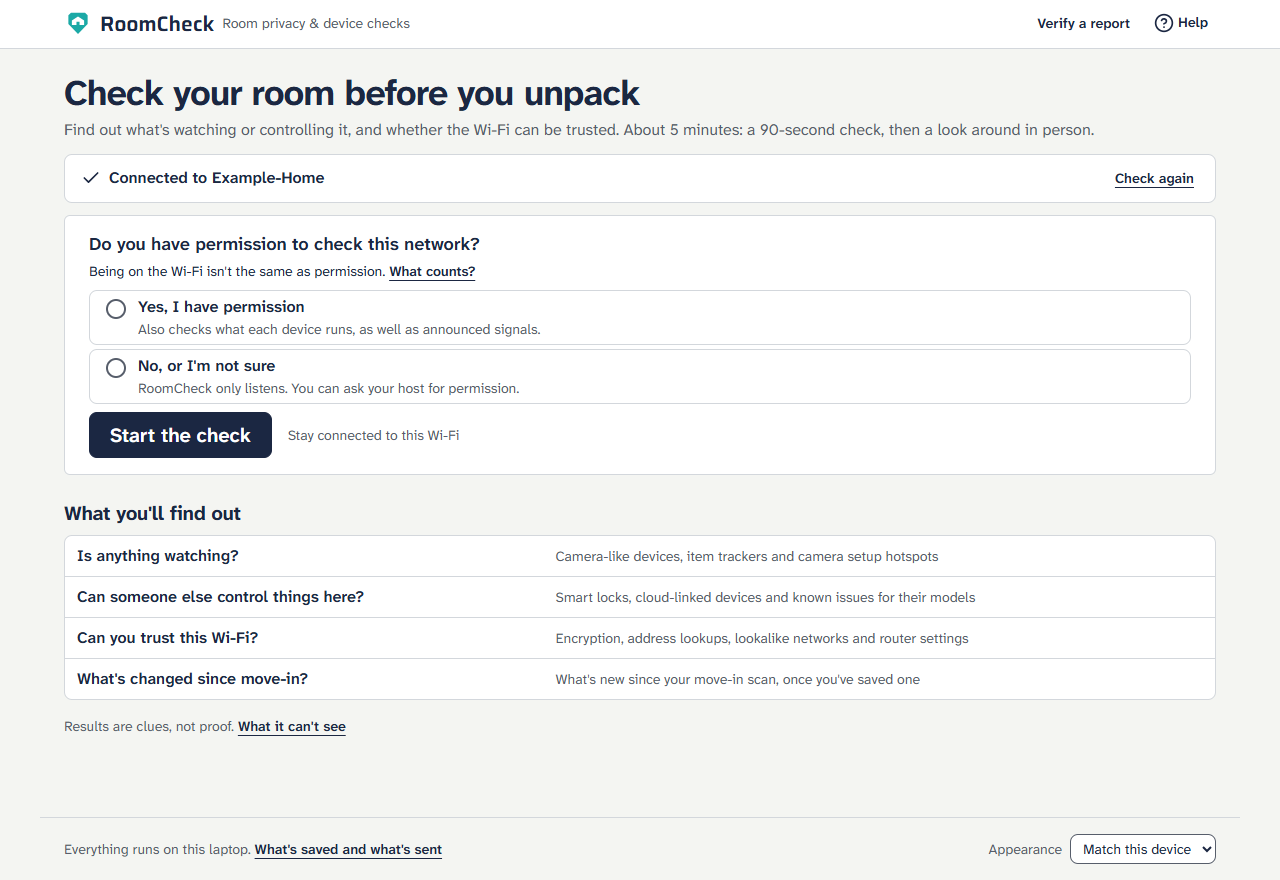
RoomCheck is for people moving into a rented room or checking into a short stay, from an Airbnb to a hostel. It runs on a Windows laptop and requires no extra hardware, technical expertise or router admin access.
In about five minutes, a renter can run a 90-second check, follow a three-minute room walkthrough, and save a dated, tamper-evident report before contacting the host or booking platform.
What it does
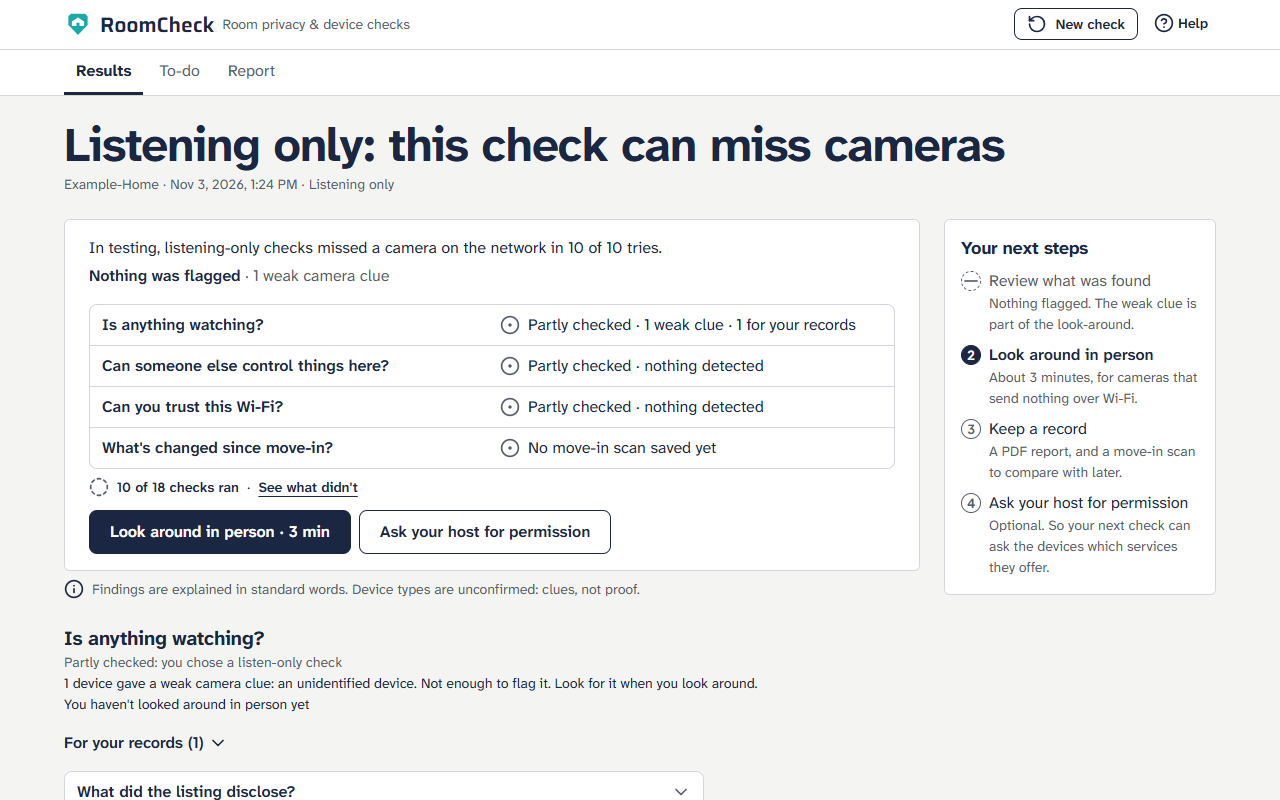
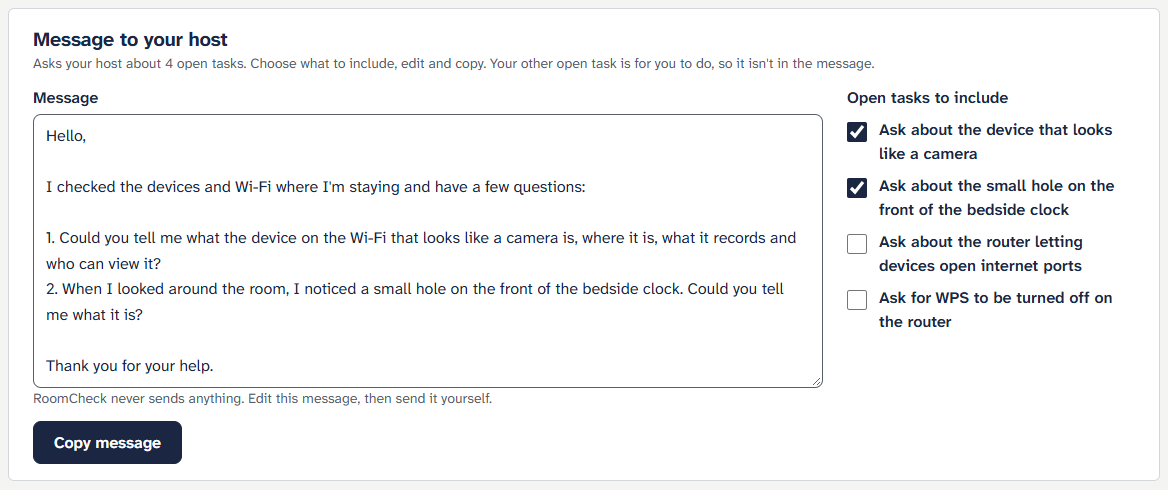
RoomCheck checks for camera-like and remotely controllable devices, router settings, suspicious network activity, lookalike Wi-Fi and nearby trackers. With permission, it asks devices what services they run. If permission is denied or unclear, it listens for broadcasts and can draft a permission request.
Results answer four questions:
| Question | What RoomCheck shows |
|---|---|
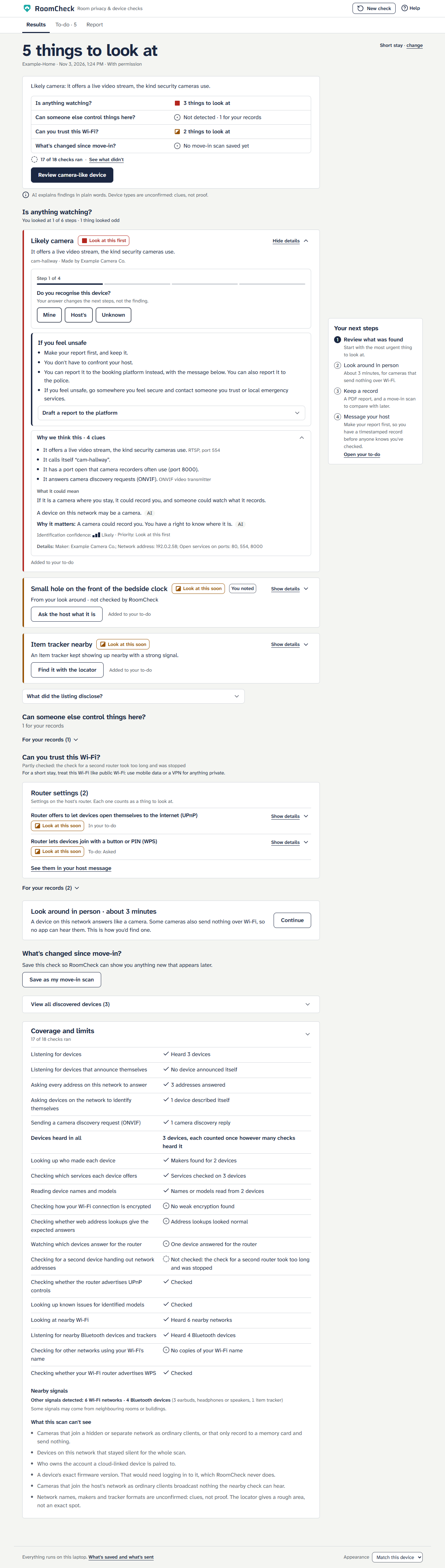
| Is anything watching? | Camera-like devices and setup hotspots, with the clues behind each flag |
| Can someone else control things here? | Clues such as smart locks or devices that may still be linked to someone else's account |
| Can you trust this Wi-Fi? | Router and network findings, plus which checks ran |
| What's changed since move-in? | New findings compared with a saved move-in scan |
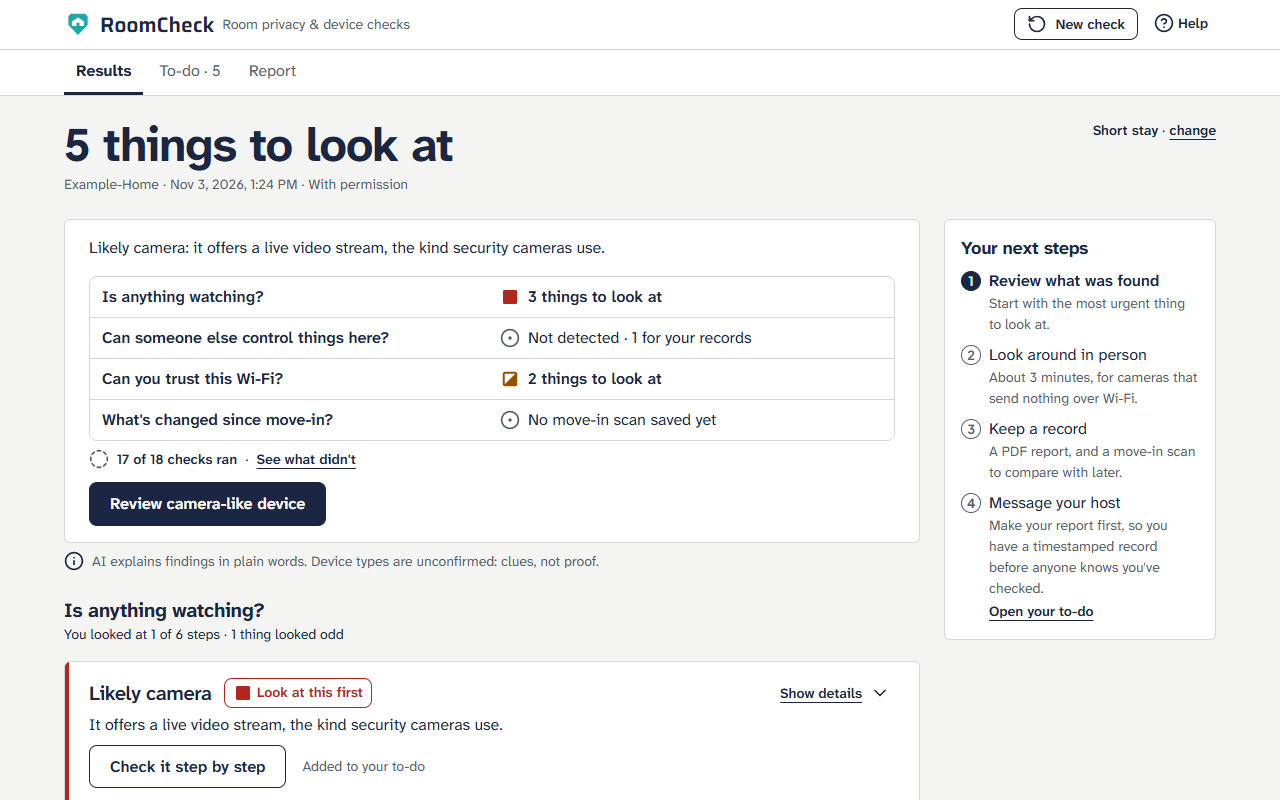
One headline counts the items that need attention, such as “5 things to look at.” Each question has its own count or a status such as Partly checked or Not detected. Context that needs no action goes under For your records.
Review findings → Look around → Keep a record → Contact the host or platform
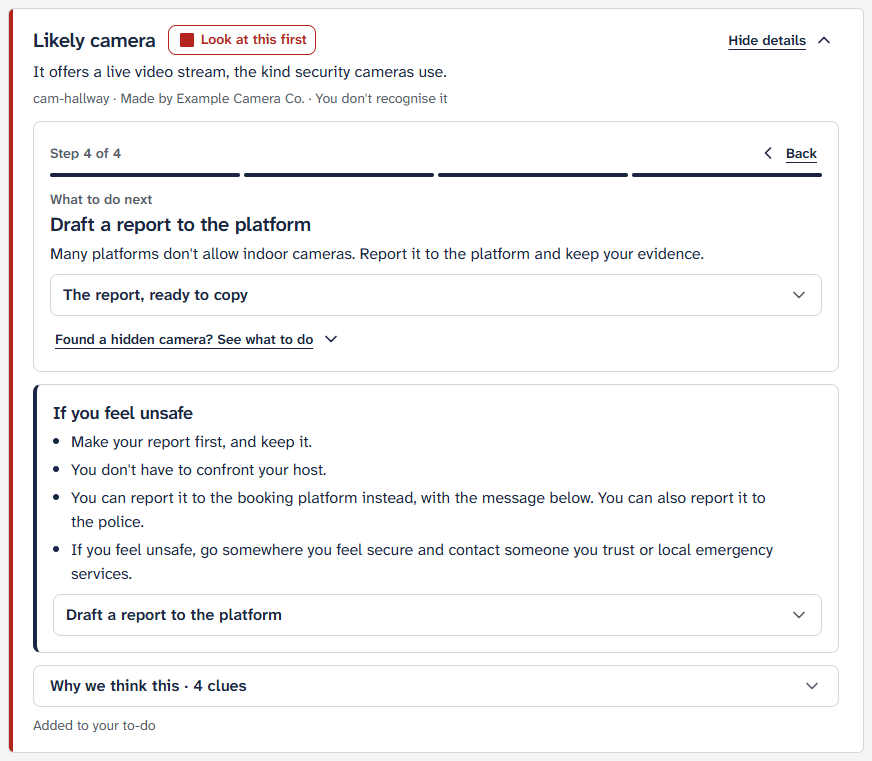
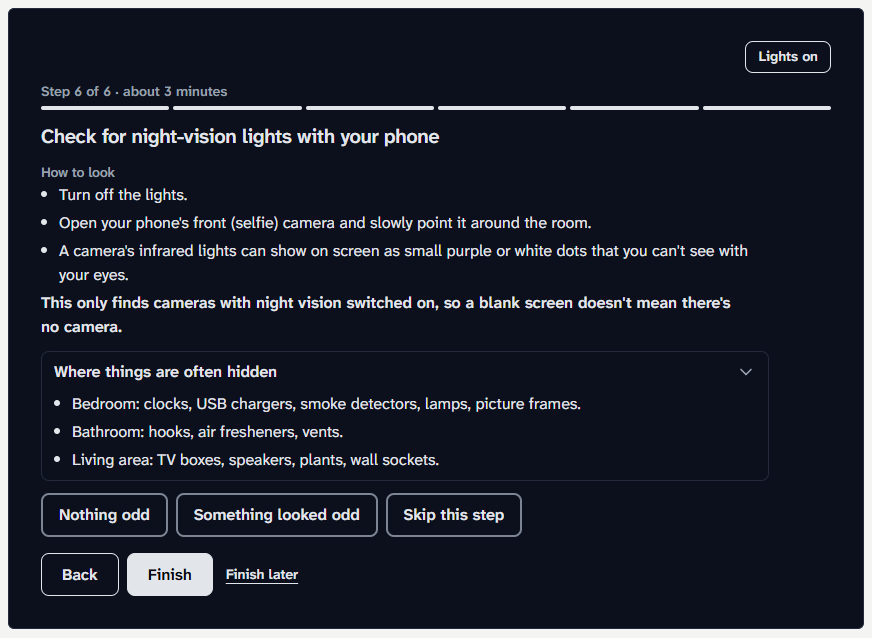
A likely camera opens a four-step guide: recognise the device, find it, identify where it is, and see one recommended action. The six-step room walkthrough covers common hiding places, a torch sweep and a phone selfie-camera check for infrared lights. A camera clue moves chargers, clocks and smoke detectors to the top of the list. Anything unusual can be added as a finding.
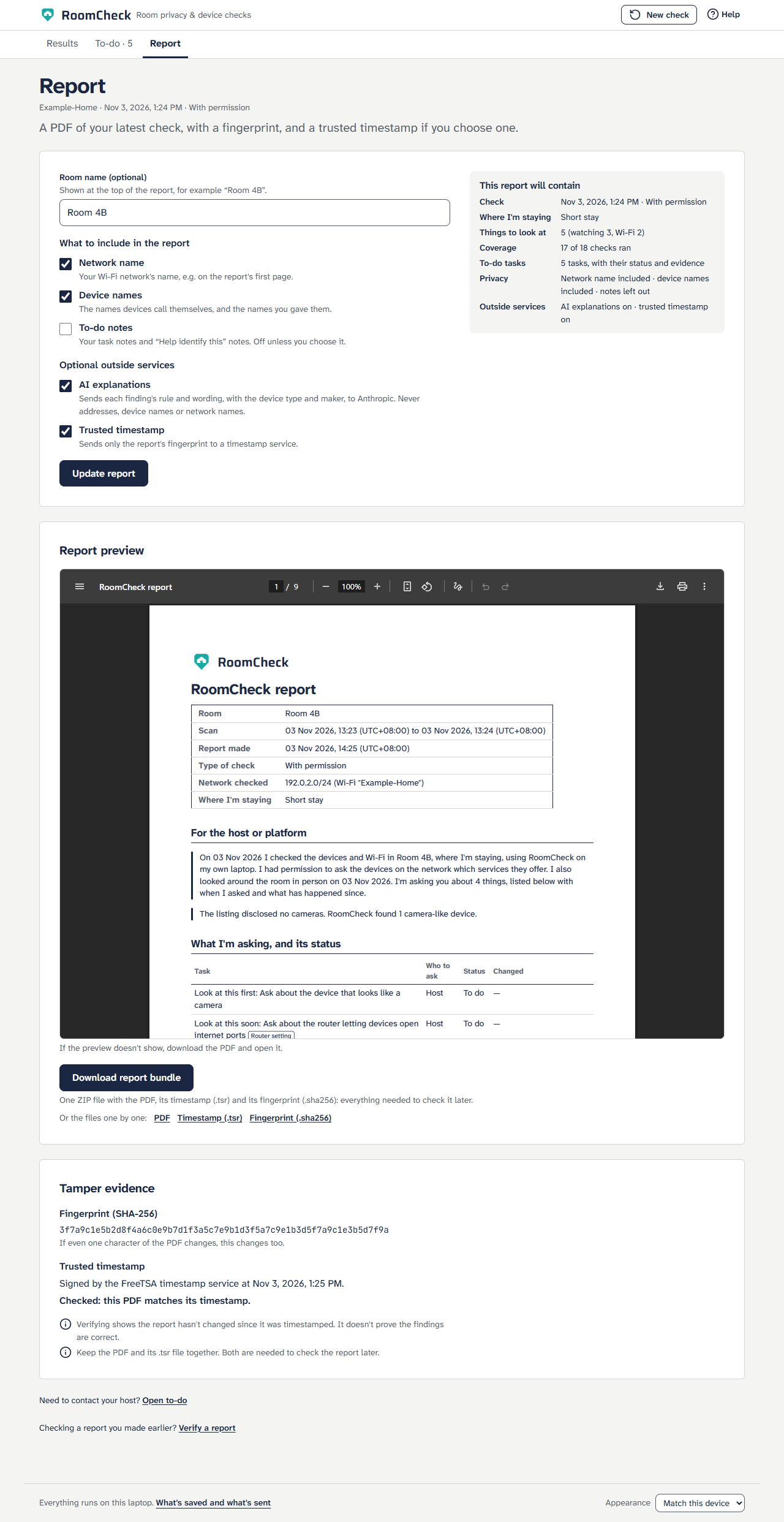
The PDF records the findings and can include what the listing disclosed. RoomCheck sends only the PDF's SHA-256 fingerprint to obtain an independent timestamp, which can be checked on the Verify page. Save the move-in scan to compare against later checks.
Try the offline demo. The README quick start takes about two minutes from a fresh copy. The demo sends nothing and needs neither Npcap nor nmap.
uv run python -m app --demo
A safer outcome
Maya's rental listing mentions no cameras. Before unpacking, she runs RoomCheck. A device called cam-hallway offers a live video stream, so the app flags it Likely camera · Look at this first.
Maya is about to message the host. RoomCheck puts Keep a record first, so she can document what she found before anyone knows she checked. During the walkthrough, her phone's selfie camera picks up a faint purple dot on the bedside clock. She adds the observation and generates a timestamped PDF:
The listing disclosed no cameras. RoomCheck found 1 camera-like device.
She then attaches the PDF to the drafted report and sends it to the booking platform without confronting the host.
How I built it
Permission → Scanner worker → Evidence → Rules engine → Results → To-do
                                              │                      │
                                              └─ Optional AI wording └─ PDF → Timestamp → Verify
The app listens only on 127.0.0.1. A separate scanner worker accepts a fixed list of jobs, and each check can fail independently with a plain-language explanation.
| Layer | How it works |
|---|---|
| Discovery | ARP, mDNS, SSDP and ONVIF find devices. RoomCheck checks the connected Wi-Fi even when Ethernet is plugged in. Built with Scapy, Npcap and sockets. |
| Fingerprinting | A fixed nmap port list, httpx and defusedxml collect clues such as a video stream, a maker or an ONVIF response. |
| Network and nearby checks | Scapy and YAML rules check WPS, UPnP, DNS, DHCP and signs of ARP spoofing. Windows WLAN APIs and bleak support nearby Wi-Fi, tracker detection and the signal locator. |
| Rules and wording | About 20 Python rules determine findings and actions. Optional Claude Haiku 5.5 rewrites explanations, with validation and a fixed-text fallback. |
| Report and storage | Playwright, cryptography and FreeTSA produce the PDF, fingerprint and RFC 3161 timestamp. SQLite and Windows DPAPI store the move-in scan, answers and to-do list encrypted for the user's Windows account. |
| Interface | React, Vite and Tailwind CSS power the results, guided walkthrough and accessible themes. |
Scoring. Each matching clue $i$ has a fixed weight $w_i$. A noisy-OR combines the clues into a device-type score:
$$ S_{\text{type}} = 1 - \prod_i (1 - w_i) $$
A score of 0.5 or higher flags the device. Camera scores between zero and 0.5 still appear as weak clues. Cards show Likely or Possible and explain the evidence in plain language.
The demo runs synthetic inputs through the real rules pipeline. The project has 1,066 Python tests, 568 interface tests and 313 browser tests, including accessibility checks in light, dark and torch themes. Cross-checks catch disagreements between Results, the report, the PDF and the host message.
Responsible design
Rules decide. AI explains. Fixed rules determine device labels, priorities, counts, report contents, reporting routes and the order of next steps. Optional AI, off by default, rewrites explanations and can draft an editable host message. AI explanations are labelled and validated. If validation fails, the app uses fixed wording.
What leaves the laptop
Help and the README document the same four cases, with a test that keeps the wording in sync.
| When | What is sent |
|---|---|
| AI explanations, enabled with an API key | Rule, wording, device type and maker. Device names, network names and addresses are omitted. |
| Known-issue lookup, with permission | Product name goes to NIST's vulnerability database. Matches appear under For your records. |
| Report timestamp | Only the PDF fingerprint goes to FreeTSA. The signed timestamp can be checked on the Verify page. |
| DNS checks on each scan | A few test names under example.com and www.iana.org go to the network's resolver. They contain no room or user details. |
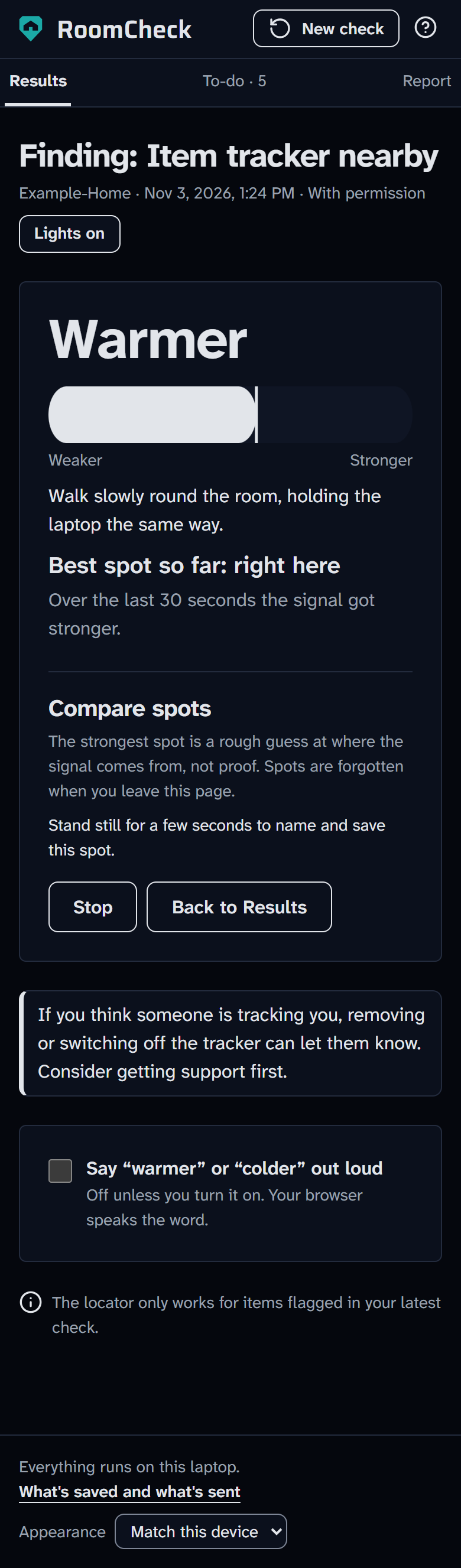
- Evidence before contact. An open camera or tracker finding puts the PDF before the message. Only a generated PDF completes that step. Guests can leave for somewhere they feel secure or report directly to the platform. Tracker cards explain that removing a tracker may alert whoever is tracking it.
- Clear uncertainty. Quiet results say “Not detected by the checks that ran” and list skipped checks. Checkmarks show actions the guest completed. Device labels express confidence, and the app asks where a likely camera is before recommending action. A disclosed outdoor camera prompts a listing check. The PDF uses “camera-like device.”
- Permission and privacy. Listening mode reads broadcasts. The app never logs in or tries passwords. Nearby checks use public broadcasts, and the locator works only on flagged items and keeps no history. MAC addresses are masked, identifiers are salted and hashed, and deleting saved reports requires a separate choice.
- Advice a guest can act on. Short-stay messages lead with the camera question and leave router settings unticked by default. The Wi-Fi advice is simple: treat it like public Wi-Fi.
- Accessibility. WCAG 2.2 AA checks use axe on every screen, with 117 colour pairs checked across light, dark and torch themes. Priority markers use shapes and words alongside colour. Body text uses Atkinson Hyperlegible.
Evaluation
I ran 20 back-to-back checks on my home network against one always-on camera and tested two nearby features live.
| Scan mode | Trials | Camera detected | Camera missed | False alarms |
|---|---|---|---|---|
| With permission | 10 | 10 | 0 | 3 scans, one item each |
| Listening only | 10 | 0 | 10 | 3 scans, four items total |
- With permission: The camera consistently scored 0.82 and appeared as Likely camera · Look at this first. Checks took 75–88 seconds.
- Listening only: The camera didn't announce itself, so all ten scans missed it. The app explains what listening covered, offers a permission-request draft and follows with the room walkthrough.
- False alarms: All came from an intermittent, strong hidden Wi-Fi signal that may have belonged to my router. I couldn't confirm it, so I counted it as an alarm. It now appears under For your records and is excluded from the headline count. The router's WPS advertisement was real and was tracked separately.
- Nearby tests: A phone hotspot named like a new camera triggered Possible camera setup hotspot. The locator helped me find the hidden phone, although fluctuating readings sometimes sent me in the wrong direction.
- Usability: Five non-technical people tried RoomCheck.
Automated tests cover move-in changes, a lookalike network, a clean network, Bluetooth trackers and extended listening. These scenarios still need live trials.
Limitations
RoomCheck is a prototype. Its scan can miss cameras on a separate or hidden network and cameras that only record to a memory card. Listening alone can miss a camera entirely, as it did in my tests.
- Detection: Device types, lookalike networks and trackers are clues. Names, MAC addresses and signal strength can be manipulated. The physical walkthrough can miss a concealed lens, and the selfie-camera check requires active infrared illumination.
- Coverage: I tuned the weights on one always-on, brand-name camera. Disguised mini cameras still need testing, and accuracy is likely to drop in crowded buildings such as condos and hostels.
- Access: RoomCheck can't identify the owner of a cloud-linked account or confirm exact firmware. The locator gives an approximate area and Windows Wi-Fi readings update slowly. On Ethernet alone, Wi-Fi checks are marked Not checked.
- Evidence: The timestamp establishes when the PDF existed. It cannot verify the findings. RoomCheck does not provide a certified inspection or legal advice.
Challenges and what I learned
- Make demo results reproducible. Hand-written fixtures once showed outcomes the app couldn't produce. The demo now uses the real rules, and AI wording is checked against the rule's facts before it appears.
Credits
- Open source: FastAPI, Uvicorn, Scapy (GPL-2.0, with Npcap), nmap, python-nmap, httpx, defusedxml, bleak, Playwright, cryptography, React, Vite, Tailwind CSS and Lucide. Full licences are in the README.
- Data and services: IEEE OUI vendor list, NIST's NVD and FreeTSA.
- Fonts: Plus Jakarta Sans, Atkinson Hyperlegible Next, JetBrains Mono and Saira, under the SIL Open Font License.
- Testing: Live checks were limited to my own network and devices. Demo inputs are synthetic, and real addresses and network names are masked.
What's next
- Test disguised charger, clock and smoke-detector cameras across common companion apps, alongside a clean-network baseline. Use the results to improve fingerprints and confirm setup-hotspot patterns.
- Check whether standard device discovery can improve coverage for guests who can't ask permission, using those trials to guide the decision.
- Add opt-in photos to the report and include them in its fingerprint.
- Recognise the user's own mesh network to cut hidden-network false alarms.
- Ship a single installer, then build a phone companion for the walkthrough and locator with its own privacy design.
- Explore an optional sensor for cameras off the room's network, building on MotionCompass and SNOOPDOG.
Built With
- bleak
- claude-code
- claude-haiku
- cryptography
- fastapi
- freetsa
- httpx
- nist-nvd
- nmap
- npcap
- playwright
- pytest
- python
- react
- rfc-3161
- scapy
- sqlite
- tailwindcss
- typescript
- uvicorn
- vite
- windows-dpapi
