-
-

ICON
-
SCREENSHOT

Inspiration
Becoming a manager often means having conversations you have never had to handle before: giving difficult feedback, setting boundaries with former peers, saying no to unreasonable requests, or addressing conflict on a team.
Knowing what you should do is different from being able to actually do it when someone is frustrated, defensive, emotional, or pushing back.
We realized that communication is an experiential skill. You can read advice about difficult conversations, but confidence comes from actually practicing them.
That's why we built Roleplay: a conversational flight simulator where new managers can safely rehearse difficult workplace conversations, experiment with different approaches, learn from what happened, and try again before the real conversation.
What it does
Roleplay gives users multiple ways to start practicing, whether they want a ready-made scenario or have a real conversation they need to prepare for.
⚡ Quick Roleplays
Users can jump straight into realistic, ready-to-practice situations designed around common challenges new managers face.
Examples include:
- Giving difficult feedback
- Saying no to an unreasonable request
- Managing a former peer
- Handling an employee challenging a decision
- Setting boundaries with a team member
- De-escalating a frustrated colleague
- Addressing underperformance
Each scenario can be practiced immediately through voice or text.
✨ Customize Roleplay
Users can create their own scenario by defining the conversation they want to practice.
- They can customize things like:
- Who they're talking to
- The situation
- Their goal
- The counterpart's personality
- The level of difficulty
Roleplay then turns those inputs into a realistic conversational scenario.
📋 Text → Roleplay
Sometimes the conversation is already happening.
Users can paste or share text from a message, email, Slack conversation, LinkedIn message, or any other source directly into Roleplay in Sharesheet.
The app understands the context and turns the text and Give Quick Conversation Guides and also can be Saved into a structured Roleplay Card.
For example, a user might share:
"I know you said the deadline is Friday, but I've already got three projects going on. Can we push this to next week?"
Roleplay can identify the situation as a potential boundary-setting or negotiation conversation and let the user choose what they want to practice.
The user might choose:
Say No Practice setting a clear boundary.
Negotiate Find a reasonable compromise.
Stay Assertive Respond without becoming defensive.
The result is a personalized scenario built from something relevant to the user's real life.
🎙️ Realistic Voice & Text Roleplay
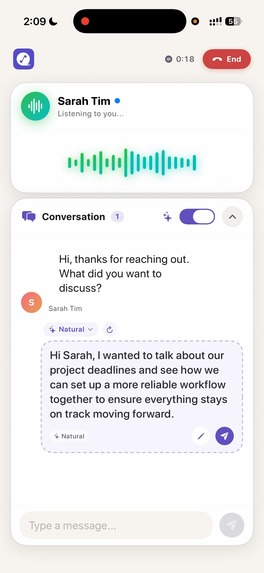
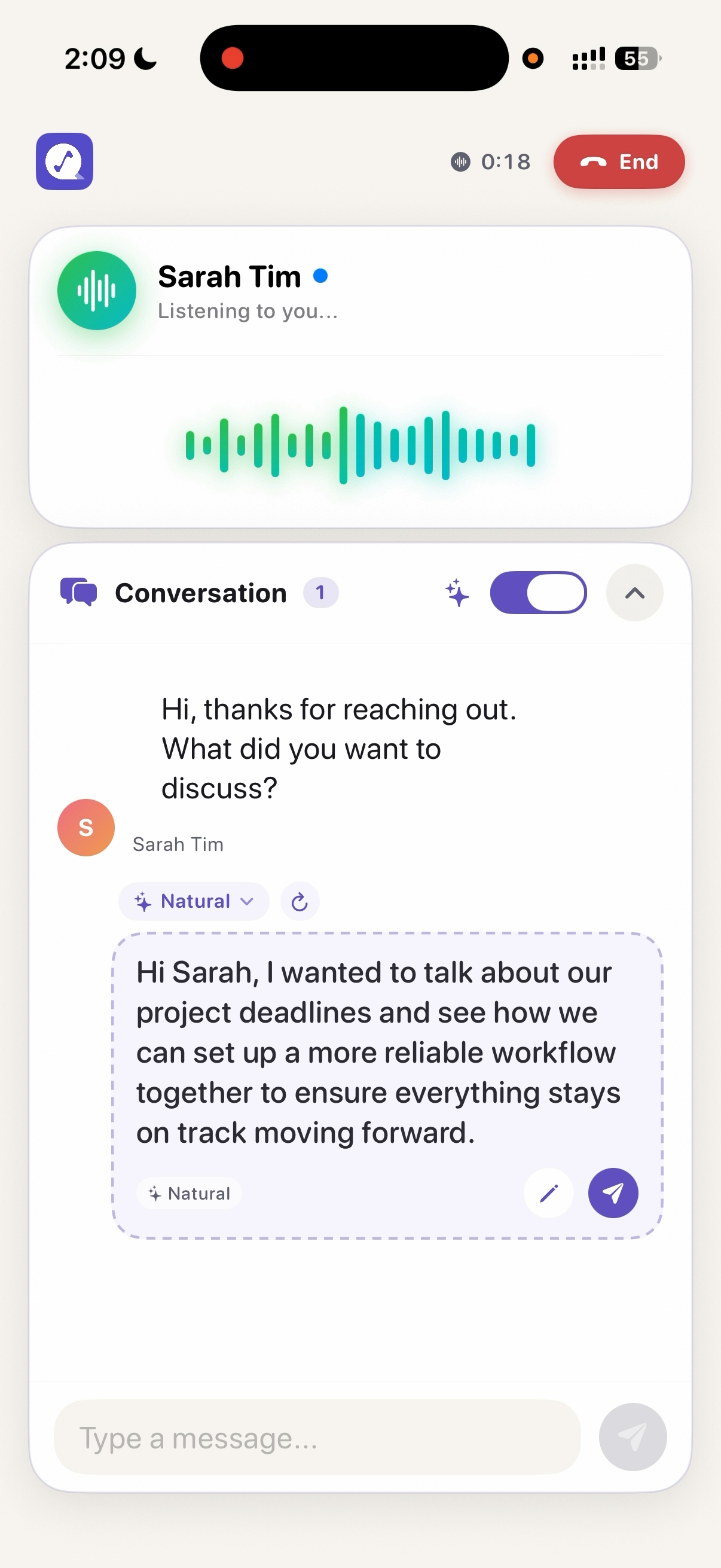
Once a scenario is created, the user enters a live conversation with an adaptive AI counterpart.
The counterpart doesn't simply follow a script. It reacts to what the user actually says, pushes back when appropriate, changes its attitude based on the conversation, and creates realistic conversational pressure.
Users can practice until they feel ready for the real conversation.
💬 Live Coaching & Tone Adaptability
When users get stuck during a conversation, Roleplay can provide optional, real-time coaching without taking control of the conversation.
An in-app AI coach provides context-aware response suggestions based on what is happening in the conversation.
Users can choose the communication approach they want to explore:
- Assertive & Firm
- Empathetic & Warm
- Diplomatic & Tactful
- Calm & De-escalating
- Curious & Probing
- Concise & Direct
Users can move between suggestions and revisit previous suggestions while continuing to control what they actually say.
The purpose isn't to give users a perfect script. It gives them different ways to approach the same moment, so they can choose the response that feels authentic to them.
🔄 Try Again
There is no single perfect response.
After a difficult moment, users can retry the conversation and take a completely different approach. The goal is to help users discover their own authentic way of communicating, rather than memorizing a perfect script.
📊 Actionable Feedback
After each session, Roleplay analyzes the conversation and identifies specific moments that affected the interaction.
Instead of simply saying "be more empathetic," feedback focuses on what actually happened.
What worked You acknowledged their frustration before explaining your decision.
What could improve You started defending the decision before fully understanding their concern.
Try next time Ask one clarifying question before explaining your reasoning.
The goal is improvement through repeated practice, not a score for the sake of a score.
How we built it
- Native iOS Architecture (SwiftUI & SwiftData): Built with 100% native SwiftUI for a fluid 120Hz interface featuring custom audio wave visualizers, dynamic haptic feedback, and responsive auto-scrolling chat layouts. Persistent sessions, key moments, and progress tracking are stored locally using SwiftData.
- Voice Streaming & Real-Time Interaction: Integrated LiveKit and ElevenLabs Conversational AI / Voice SDKs for low-latency, bidirectional audio streaming with natural pauses, emotional inflections, and interruption handling.
- Contextual Intelligence Engine: Powered by OpenAI GPT-4o & GPT-4o-mini, utilizing structured system prompts containing user career profiles, counterpart personality matrices, scenario objectives, and conversation attitude meters.
- Multi-Tone In-Ear Suggestion Engine: A dedicated real-time suggestion module that processes transcripts asynchronously, adapts dynamically to user-selected tones, and manages localized suggestion revision histories.
- Monetization with RevenueCat: Centralized subscription lifecycle management leveraging RevenueCat's modern async/await Swift SDK for in-app purchases and paywall presentations.
Challenges we ran into
- Voice Latency & Natural Conversational Flow: Simulating human dialogue requires near-zero latency. Handling voice activity detection, microphone interruptions, and prompt formatting without noticeable lag required fine-tuning audio session configurations and optimizing WebSocket payload streams.
- Dynamic UI Layout & Smooth Auto-Scrolling: In a mixed voice-and-text interface where AI suggestions can dynamically appear, re-generate, expand in height, or paginate, keeping the ScrollView pinned naturally to the latest bubble required building a dual-phase layout-compensation scrolling pipeline.
Accomplishments that we're proud of
- Lifelike Emotional Realism: The AI personas genuinely resist unreasonable arguments, push back defensively, or soften when approached with empathy, creating real emotional engagement.
- In-the-Moment Tone Shifting: Allowing users to instantly remodel their next sentence across 7 distinct communication styles and navigate previous drafts with a single tap.
- Zero-Friction Voice Experience: Building a cohesive visual audio visualizer with pulsing rings, state transitions, and responsive mute/interrupt triggers.
- Clean, Modular Architecture: Combining SwiftData, modern Swift concurrency (async/await, Task management), and clean separation of AI Engine layers.
What we learned
- Feedback must be actionable and grounded: Users learn significantly faster when feedback is tied to the exact sentence where the counterpart's attitude shifted rather than broad post-session summaries.
- Micro-coaching over script-reading: Users don't want a static script; they want adaptable options that fit their natural speaking style. Providing tone selection increased user agency and confidence during practice.
- Edge-case state management in realtime voice: Managing concurrent asynchronous tasks (audio streaming, speech-to-text, in-ear suggestion generation, timer loops) requires robust cancellation handlers to avoid race conditions.
Built With
- elevenlabs
- swift

Log in or sign up for Devpost to join the conversation.