-
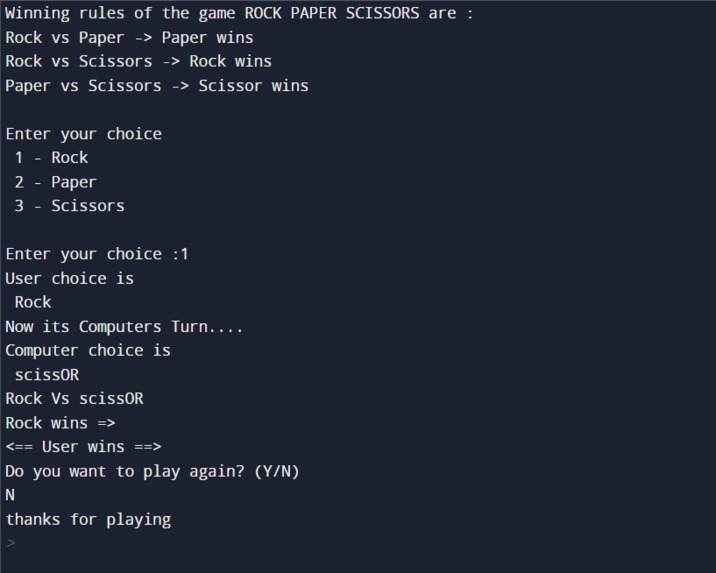
Output(Testing)

Rock, Paper, Scissors Game: A Python Adventure
Inspiration
The inspiration for this project came from my childhood memories of playing Rock, Paper, Scissors with friends during recess. The simplicity of the game and the excitement it generated fascinated me. I wanted to recreate that experience in code and add my twist to it.
Learning Journey
1. Basics of Python
Before diving into the game logic, I revisited the basics of Python: data types, loops, conditionals, and functions. Understanding these fundamentals was crucial for building a robust game.
2. Game Rules
I researched the classic Rock, Paper, Scissors rules:
- Rock crushes Scissors
- Scissors cut Paper
- Paper covers Rock
3. User Input
I learned to capture user input using Python's input() function. This allowed players to choose between Rock, Paper, or Scissors.
4. Randomization
I explored Python's random module to simulate the computer's choice. Generating a random selection for the computer was essential for creating a fair game.
5. Comparing Choices
I wrote code to compare the user's and computer's choices. Determining the winner based on the game rules was both challenging and exciting.
6. Displaying Results
I used simple print statements to announce the winner. The thrill of seeing "Scissors wins =>" or "<== Its a tie ==>" was delightful.
Building the Game
1. Setting Up
I created a new Python file named game.py. The blank canvas awaited my code.
2. User Input
user_choice = input("Choose Rock, Paper, or Scissors: ").lower()
3. Computer's Choice
import random

choices = ["rock", "paper", "scissors"]
computer_choice = random.choice(choices)
4. Comparing Choices
if user_choice == computer_choice:
    print("It's a tie!")
elif (user_choice == "rock" and computer_choice == "scissors") or (user_choice == "scissors" and computer_choice == "paper") or (user_choice == "paper" and computer_choice == "rock"):
    print(f"You win! {user_choice.capitalize()} beats {computer_choice}.")
else:
    print(f"You lose! {computer_choice.capitalize()} beats {user_choice}.")
Challenges Faced
- Edge Cases: Handling unexpected user inputs (typos, invalid choices) required robust error handling.
- Refactoring: Initially, my code was messy. Refactoring was necessary to improve readability and maintainability.
- UI Enhancement: I will consider adding ASCII art for each choice to make the game visually appealing.
Conclusion
Creating this Rock, Paper, Scissors game was a delightful journey. It reminded me that even simple projects can teach valuable lessons. Plus, challenging the computer to a game of wits never gets old!
Feel free to fork my code, add your flair, and challenge your friends to a virtual duel. Happy coding! 🎮🪨📄✂️


Log in or sign up for Devpost to join the conversation.