Task
Completing the GHW Games challenge - Rock, Paper, Scissors
What it does
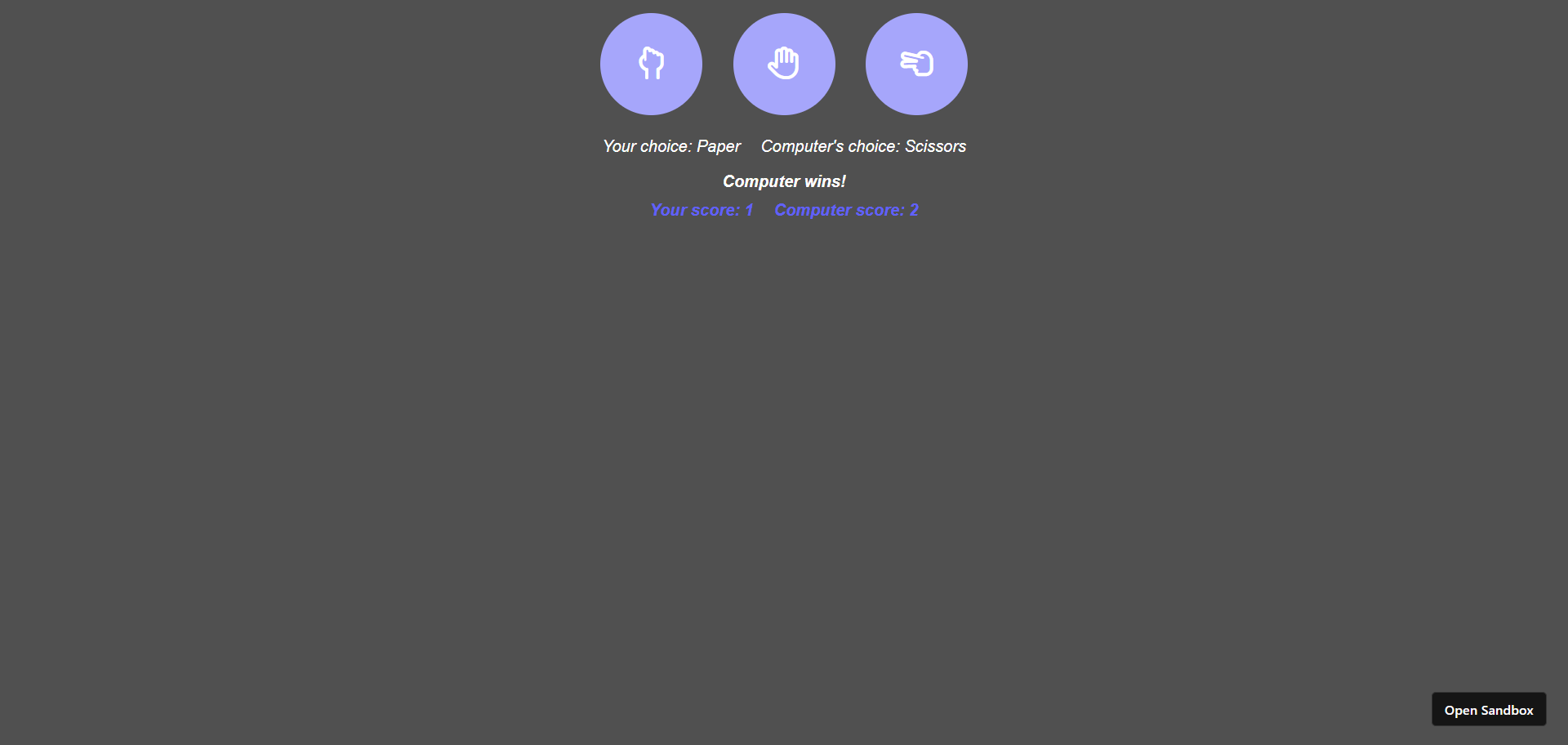
A user can play rock, paper, scissors with his computer on a browser.
Node Dependencies
- react
- react-dom
- react-scripts
How we built it
I've created it on codesandbox.io, using the react.js template. Firstly, import the fontawesome kit script in the /public/index.html as,
<script src="https://kit.fontawesome.com/6f42fc440c.js" crossorigin="anonymous" ></script>
Then in /src/App.js adding the rock, paper, and scissors hand signs icons from fontawesome, each wrapped in a button component,
<div className="buttons">
    <button className="rounded-button" onClick={() => handleTurn("Rock")}>
      <i className="fa-regular fa-hand-back-fist"></i>
    </button>
    <button className="rounded-button" onClick={() => handleTurn("Paper")}>
      <i className="fa-regular fa-hand"></i>
    </button>
    <button className="rounded-button" onClick={() => handleTurn("Scissors")}>
      <i className="fa-regular fa-hand-scissors"></i>
    </button>
</div>
Then make the buttons div as flexbox and horizontally center its children.
.buttons {
  display: flex;
  justify-content: center;
  gap: 20px;
}
Now just make the each button rounded, give them a color, and hover effect.
.rounded-button {
  width: 100px;
  height: 100px;
  border-radius: 50%;
  padding: 10px 20px;
  margin: 5px;
  background-color: rgb(166, 166, 251);
  font-size: 32px;
  color: white;
  border: none;
  cursor: pointer;
}

.rounded-button:hover {
  background-color: rgb(97, 97, 250);
}
Import useState from react, and assign a few state variables such as:
userChoice- to store whatever user choosescomputerChoice- to store whatever computer choosesuserScore,computerScore- to store the scores of eachresult- to store the result of a turn
import React, { useState } from "react";

export default function App() {
  const [userChoice, setUserChoice] = useState("-");
  const [computerChoice, setComputerChoice] = useState("-");
  const [userScore, setUserScore] = useState(0);
  const [computerScore, setComputerScore] = useState(0);
  const [result, setResult] = useState(null);
Create an array with all possible choices: Rock, Paper, and Scissors
const choices = ["Rock", "Paper", "Scissors"];
Now to check who wins in a turn build a handleTurn function which is called from each button as done above, passing a parameter choice which will contain whatever the user chooses.
The computer's choice is randomly generated, and then userChoice and computerChoice state variables are set.
Firstly, check for tie which is as simple as checking if user's choice is same as that of computer's.
For user win, instead of writing three conditions such as:
- user: rock, computer: scissors
- user: paper, computer: rock
- user: scissors, computer: paper
do a check if index of user's choice is equals to index of computer's choice + 1 modulus of 3.
How?
This is our array: ["Rock", "Paper", "Scissors"]
- user: Rock, user index: 0, computer: Scissors, computer index: 2
- user: Paper, user index: 1, computer: Rock, computer index: 0
- user: Scissors, user index: 2, computer: Paper, computer index: 1
In each of these cases, (computer index + 1) mod 3 = user index
And computer's win will be easily checked by the last else block.
When it's a tie just update the result state, when user wins update result state, and increment userScore state, else update result state, and increment computerScore state.
    const handleTurn = (choice) => {
        const randomNum = Math.floor(Math.random() * 3);
        setUserChoice(choice);
        setComputerChoice(choices[randomNum]);
        if (choice === choices[randomNum]) {
            setResult("It's a tie!");
        } else if (choices.indexOf(choice) === (choices.indexOf(choices[randomNum]) + 1) % 3) {
            setUserScore(userScore + 1);
            setResult("You win!");
        } else {
            setComputerScore(computerScore + 1);
            setResult("Computer wins!");
        }
    };
Now to display what the both user and computer's choices were, display the state variables.
<div className="choice-text">
    <p>Your choice: {userChoice}</p>
    <p>Computer's choice: {computerChoice}</p>
</div>
And now the result, and score states are displayed.
 <div className="result-text">
    <div>{result}</div>
</div>
<div className="score-text">
    <div>Your score: {userScore}</div>
    <div>Computer score: {computerScore}</div>
</div>
Giving finishing touch to all the texts on screen.
.choice-text,
.score-text {
  display: flex;
  width: 100%;
  justify-content: center;
  gap: 20px;
  font-style: italic;
}

.result-text {
  text-align: center;
  font-weight: bold;
  font-style: italic;
  margin-bottom: 10px;
}

.score-text {
  color: rgb(97, 97, 250);
  font-weight: bold;
}
Full code:
// App.js
import React, { useState } from "react";
import "./styles.css";

export default function App() {
  const [userChoice, setUserChoice] = useState("-");
  const [computerChoice, setComputerChoice] = useState("-");
  const [userScore, setUserScore] = useState(0);
  const [computerScore, setComputerScore] = useState(0);
  const [result, setResult] = useState(null);
  const choices = ["Rock", "Paper", "Scissors"];

  const handleTurn = (choice) => {
    const randomNum = Math.floor(Math.random() * 3);
    setUserChoice(choice);
    setComputerChoice(choices[randomNum]);
    if (choice === choices[randomNum]) {
      setResult("It's a tie!");
    } else if (
      choices.indexOf(choice) ===
      (choices.indexOf(choices[randomNum]) + 1) % 3
    ) {
      setUserScore(userScore + 1);
      setResult("You win!");
    } else {
      setComputerScore(computerScore + 1);
      setResult("Computer wins!");
    }
  };

  return (
    <div className="App">
      <div className="buttons">
        <button className="rounded-button" onClick={() => handleTurn("Rock")}>
          <i className="fa-regular fa-hand-back-fist"></i>
        </button>
        <button className="rounded-button" onClick={() => handleTurn("Paper")}>
          <i className="fa-regular fa-hand"></i>
        </button>
        <button
          className="rounded-button"
          onClick={() => handleTurn("Scissors")}
        >
          <i className="fa-regular fa-hand-scissors"></i>
        </button>
      </div>

      <div className="choice-text">
        <p>Your choice: {userChoice}</p>
        <p>Computer's choice: {computerChoice}</p>
      </div>
      <div className="result-text">
        <div>{result}</div>
      </div>
      <div className="score-text">
        <div>Your score: {userScore}</div>
        <div>Computer score: {computerScore}</div>
      </div>
    </div>
  );
}
/* style.css */
body {
  background-color: rgb(80, 80, 80);
  color: white;
}

.App {
  font-family: sans-serif;
  text-align: center;
}

.buttons {
  display: flex;
  justify-content: center;
  gap: 20px;
}

.rounded-button {
  width: 100px;
  height: 100px;
  border-radius: 50%;
  padding: 10px 20px;
  margin: 5px;
  background-color: rgb(166, 166, 251);
  font-size: 32px;
  color: white;
  border: none;
  cursor: pointer;
}

.rounded-button:hover {
  background-color: rgb(97, 97, 250);
}

.choice-text,
.score-text {
  display: flex;
  width: 100%;
  justify-content: center;
  gap: 20px;
  font-style: italic;
}

.result-text {
  text-align: center;
  font-weight: bold;
  font-style: italic;
  margin-bottom: 10px;
}

.score-text {
  color: rgb(97, 97, 250);
  font-weight: bold;
}
including the remaining react files such as /public/index.html, /src/index.js, and package.json.
Accomplishments that we're proud of
Finding a way to not use three conditions to check for win/lose :)

Log in or sign up for Devpost to join the conversation.