Inspiration
Chloe has been teaching young children for over three years now, and has noticed that ADHD and dyslexia are more common in children. Their disabilities were impacting their ability to learn, and seeing this, she was eager to create a tool to help them overcome their struggles. While the world relies more heavily on technology day after day, it lacks empathy for people with disabilities. We decided to combine our observations and create this service that will bridge the gap between people with disabilities and standard web experiences, creating a more inclusive internet for everyone.
What it does
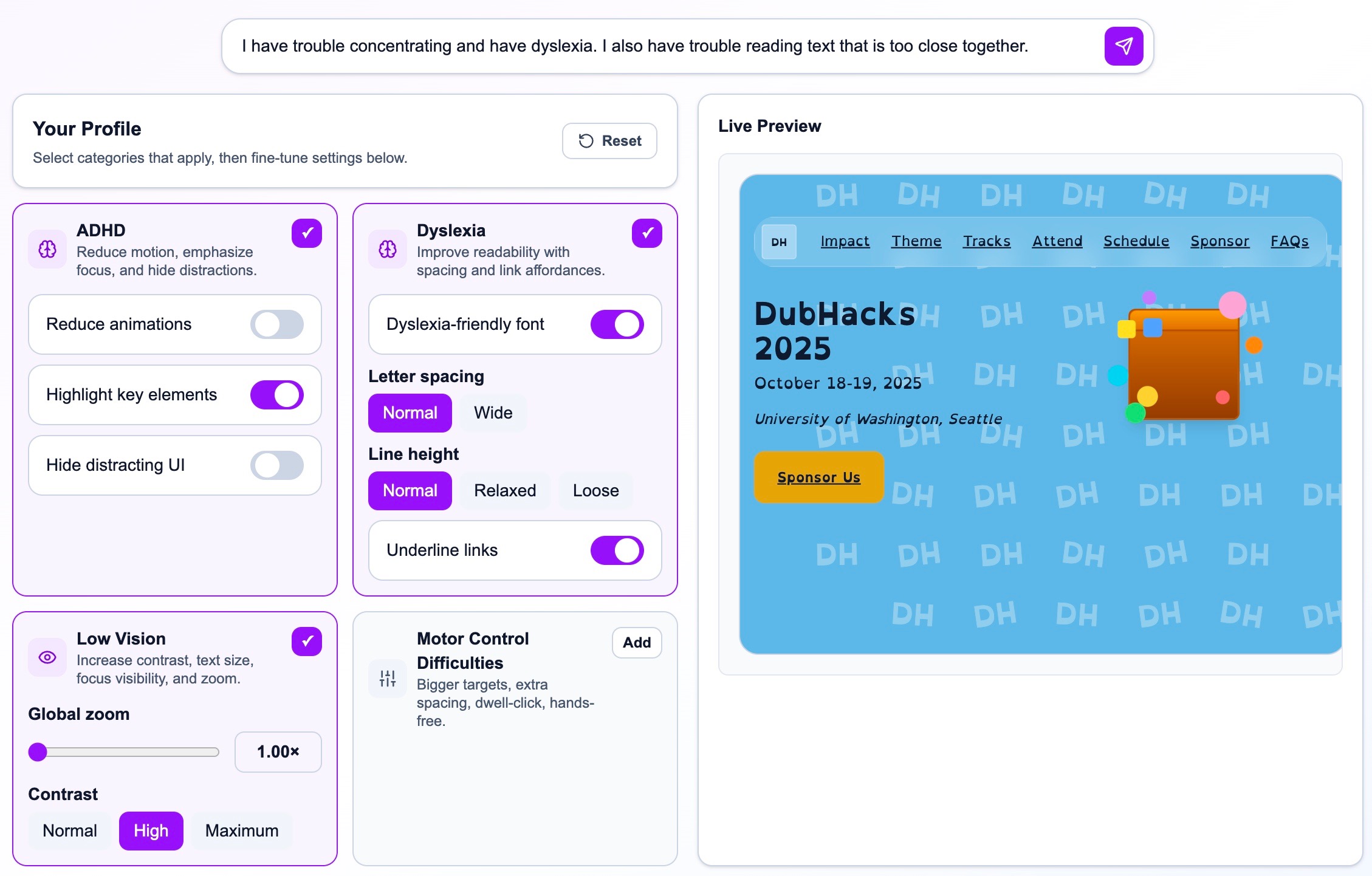
Our chrome extension can detect signs of limited motor control such as repeatedly missing a button and enlarge interactive elements to make them easier to click. Users can also customize accessibility settings based on their disability.
- For ADHD, the extension reduces animations, highlights key elements, and hides distracting UI
- For dyslexia, it improves readability with the OpenDyslexic font, adjusted spacing, and clearer link styling
- For low vision, it increases global zoom and contrast for better visibility, as well as generating alt-text for user-generated content
- For limited motor control, it enlarges buttons, adds spacing, enables dwell click, and offers a hands-free mode using head movements and voice control
Essentially, Chameleon a dynamic accessibility sidekick that adapts web interfaces to each user’s unique needs.
How we built it
We built Chameleon using React for the frontend and the Chrome Extension Developer Kit for seamless browser integration. Gemini 2.5 Flash API allowed us to adapt user experiences to accessibility features that best suit them, as well as generate alt-text for user-generated images.
Our dynamic UI system is powered by Statsig analytics, which helps us analyze user behavior and optimize layouts in real time. We use Statsig in our extension to instrument any website without direct integration and capture interaction telemetry, including click content, near-misses, and hovers.
For the hands-free experience, we used Python, OpenCV, and MediaPipe to enable gesture and head movement control.
Challenges we ran into
Our biggest challenge arose early in the ideation process as we struggled to decide which disabilities to focus on. Bridging the gap between technology and people with disabilities requires deep empathy and extensive research to truly understand users’ needs. Ultimately, our personal experiences helped guide us toward the disabilities that most affect children and the elderly, which are groups we’ve seen struggle most with accessibility in their everyday lives.
Accomplishments that we're proud of
One of our proudest accomplishments is how we were able to tackle such a broad, ambiguous challenge. By addressing the needs of users with a diverse range of disabilities, we’ve built a foundation that can be expanded to support an even wider scope of disabilities in the future.
What we learned
We learned that at the forefront of building for accessibility we would have to put ourselves in the perspectives of others. While we first considered a one-size-fits-all solution, we quickly discovered that every user's needs are unique and sometimes conflicting.
What's next for Chameleon
Our implementation was based on our in-depth secondary research and the experience of the people around us. In the future, we hope to collect first-hand user feedback and fine-tune our approach based on real people's testimonies. We also hope to scale Chameleon to be more accessible for a wider variety of disabilities.


Log in or sign up for Devpost to join the conversation.