Mission
The best way to combat unwanted “robodialed” calls by using existing technology and without implementing Draconian policy measures is to have a device that compares the incoming Caller I.D. information to those in a “Black List”. Simply put, if a number is in that list, the call gets blocked.
This method of blocking incoming calls is already available to the public either via a service provided by the phone company or by purchasing phones that have number blocking capability. However, it is fairly difficult to add a number to these lists. Also, the quantity of numbers that can be stored is more often than not limited to a small set amount which can range from 10 to 20 total numbers. Furthermore, “Unavailable” numbers or numbers with no numeric data cannot be added.
In addition to those outlined by the FTC for this challenge, the following self-imposed criteria have been implemented:
• Blocking calls should be an EXTREMELY simple exercise. It should take the merest moment of time, i.e. less than 5 seconds, to deal with a new unwanted number. • The unit should be simple enough to understand and use with a minimal amount of required learning on the user’s part. • There should be virtually no limit on the amount of stored blocked numbers. • If at all possible, the device should be free to consumers. This would encourage their proliferation so that enough units would be in use so as to cause robodialing and cold calling of any kind to not be a cost effective method of contacting people.
Basic Concept
Since there is nothing particularly revolutionary about the hardware that would enable users to maintain a block list, no actual prototype unit has been constructed. Instead, form and function will be presented in great detail.
Two models will be made available to the public:
- The “RoBlocker Basic:” – This unit will provide simple block list functionality. It would be provided to anyone free of charge.
- The “RoBlocker Pro” – This unit will include several advanced features in addition to those provided by the RoBlocker Basic. It would be intended for those who might wish to take a more active role in robodialer blocking. The sale of these units would help make the goal of free Basic units a reality.
Again, both units work on existing “Black List” methods of call blocking which, while not 100% effective, reduce the number of unwanted calls over time.
Cell Phones
It is assumed that the functionality of hardware based RoBlocker units will be emulated in software as a downloadable “app” for smart phone users. Again, the Basic version should be free while the Pro version might be offered at the popular price point of one dollar.
RoBlocker Is Based On Conventional Caller I.D. Design
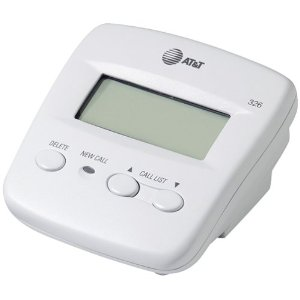
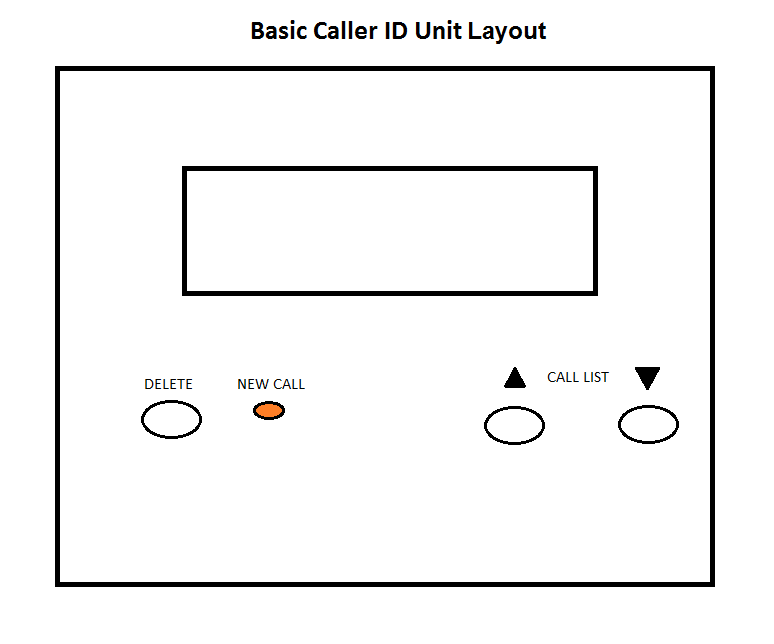
Since many people are familiar with simple add-on Caller I.D. units, the RoBlocker’s design is based on a typical basic Caller I.D. unit. The unit depicted below is used to illustrate how familiar the RoBlocker will be in form and function.
Picture and Diagram of an actual basic Caller ID unit (AT&T)
Features
• The unit’s display lists the current and previous calls that have come in, which a user may scroll through at their leisure and delete. • An amber light is used to indicate when new calls have been received since the last time the unit was accessed. • Connected via two phone jacks: one connected to the phone line from the wall jack and one connected to the user’s home telephone. • The unit is battery powered.
RoBlocker Basic
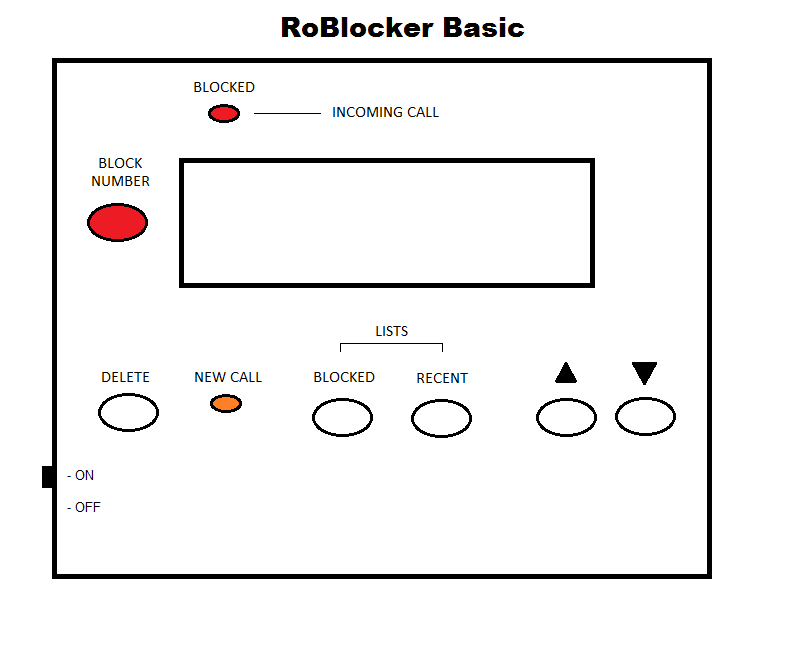
Diagram
The "RoBlocker Basic” is a standalone unit which will allow the user to begin blocking calls as soon as it's added to the Blocked list. By pressing the red Block Number button, whatever number is displayed is added to an internal block list. If the same number tries to call again, the unit will let your phone ring once and flashes a red Blocked light to show that it's doing its job. It will also allow you to block calls that display text only such as “Out Of Area”/”Out Of Area” calls. The user can switch between Recent and Blocked call lists (the unit will default to the Recent list after 5 seconds) and will allow you to delete numbers from either list. Navigation is possible by using the up and down arrow keys much like those on a normal caller ID unit.
Additional Features
• On/Off switch. • By default, the unit will work right out of the box without any configuration at all by blocking all "Unavailable" or similar calls. • Numbers listed in the Blocked list will be in numerical order to allow for easy searching. • Deleting a number while browsing the Blocked list will prevent it from being blocked unless the Block Number button is pressed again while that number is displayed. • Pressing and holding the Delete button for 3 seconds will bring up an option to delete all items in either the Blocked or Recent list. Use the “Up” and “Down” arrow keys to select “Yes” or “No” and then press “Delete” again. The unit will ask you to confirm the delete. • The last 99 calls will be stored in internal memory. • The amount of Blocked numbers will only be limited by the size of the internal memory. While its size has yet to be determined, there is no question if it will be large enough to allow storing vastly many more numbers than current services/devices. • Documentation included with the unit will include information on registering a phone number with the National Do Not Call Registry list. (www.donotcall.gov)
RoBlocker Pro
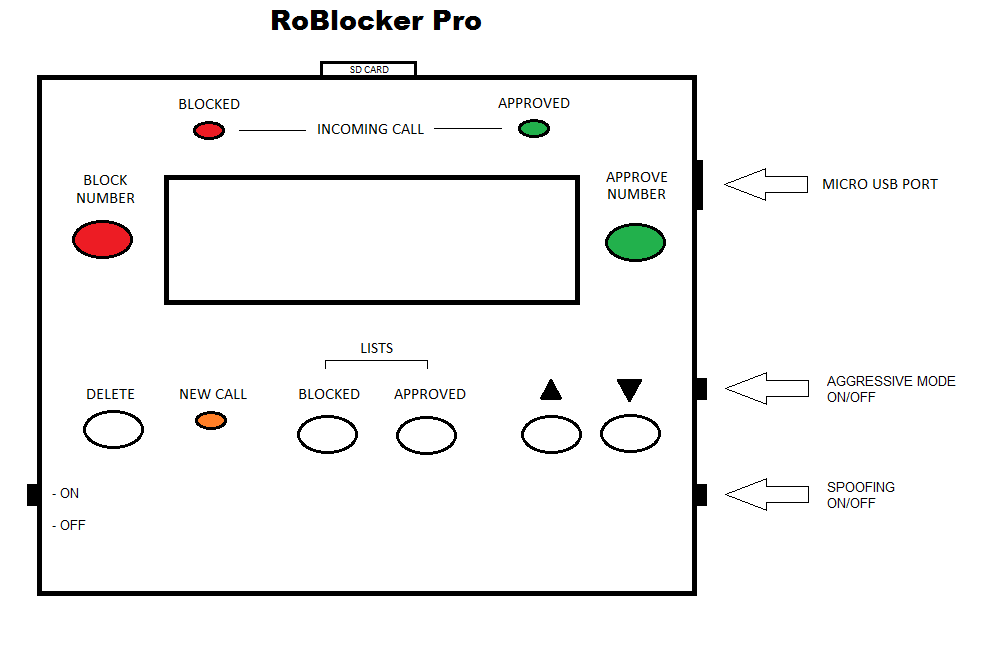
Diagram
The “RoBlocker Pro” is designed for those wishing to have a more involved “hands on” experience with blocking unwanted calls. While the unit functions exactly like the Basic version it has an additional "Approved” list which stores numbers that a user deems legitimate and will thus always be allowed to ring through. Such a list is needed because this unit will be able to download a cloud-based list of numbers from the Internet. It does this by being either permanently or temporarily hooked up to a user’s computer via a micro USB cable (not unlike digital cameras use) and then syncing with an online database much like an anti-virus program does. The Pro will also upload any numbers a user has blocked to the cloud for possible inclusion in the online database based on algorithmic determination routines. Again, any number in the Approved list stored on the unit will take priority over anything downloaded from the cloud. Those numbers will automatically be allowed through while simultaneously a green light flashes to let the user know that the call is legitimate.
Companion software on a user’s computer will allow for easy scanning through the potentially huge amount of stored numbers. All numbers, Recent, Blocked and Approved, are stored on a removable SD memory card which, again, just like those used in many digital cameras, can be accessed via software on a computer with a SD card reader or USB port. The card is useful for those who can’t or don't want to have the unit near their computer. Compared to USB, accessing a SD card read via a reader may also be slightly more secure. This is because while a potentially RoBlocker-hostile virus might know where to look to find a unit which has been connected to a computer via USB, a SD card in a reader slot will always appear as just another disk drive and it would be more difficult if not impossible to create a virus that could find it.
Additional Features
• While the “Delete” key works the same, approving a number in the Blocked list will transfer it to the Approved list. Blocking an Approved number transfers it to the Blocked list. • A side switch will enable an “Aggressive Mode” blocking method that blocks ALL calls unless they are in the Approved list. This is a great option for those expecting an important call from someone specifically in their Approved list and don't wish to be disturbed otherwise. • An additional side switch will engage a “Spoofing” which will simulate the handshake negotiation sound of a FAX machine or modem when a blocked number is detected. This has the benefit of possibly fooling a robodialer into thinking that it has connected to another machine. It also happens to be very unpleasant to hear. • To help reduce manufacturing cost the unit’s shell design is based on the RoBlocker Basic.
A Note on the Limitations of Caller I.D. Technology
Currently, any device that relies on Caller I.D. technology to display incoming call information can only do so after one ring. Even if every undesirable call could be blocked, it is still somewhat of a bother for a user’s telephone to ring even once. While a feature that could disable the first ring of an incoming call could be added to both the RoBlocker Basic and Pro, the drawbacks of the added complexity to the operating instructions and the inconvenience to callers thinking that a dialed number has rung more than it actually has would make such a feature undesirable. Therefore, updating the technology so that the Caller I.D. information could be delivered virtually instantaneously would be extremely beneficial to the success of not only RoBlocker but also other call blocking devices of any kind.
Alternate Naming Convention
As a nod toward American ingenuity, the RoBlocker Basic and Pro could be named the Patriot and the Minuteman respectively.
LCD Display
Diagram
LCD Display Information
• Date. • Total number of calls since the device was last accessed. • Total number of calls blocked since the device was last accessed. • “Aggressive Mode” – displayed when the related switch is engaged. • “Delete All?” – displayed after pressing and holding the Delete button for 3 or more seconds. • “Online Sync?” – displayed immediately after the unit is plugged into a computer via a USB cable. • Low battery indicator. • “Yes”, “No” and selection arrows – displayed when confirmation is required for the “Delete All?” and “Online Sync?” functions. • “Error” – displayed if there is trouble updating the unit from the online database or the SD card cannot be read. • “Blocked” – displayed when the number shown is in the Blocked list. • “Approved” – displayed when the number shown is in the Approved list. • Sequence Number – indicates where a number is positioned in a list whether it be the Recent, Blocked or Approved list.
The Online Database
While the number of users accessing an online database could be quite large, the size of the data is quite small compared to that of multimedia. Therefore, bandwidth will not be a significant issue.
For situations where numbers have been incorrectly flagged as “bad”, a system will have to be put in place which will allow individuals or companies to have their number(s) removed from the list if they feel that it has been logged there in error. Numbers could also have an “expiration date” of sorts where, after a certain amount of time has passed, they are automatically removed.
It is highly possible that maintaining a cloud-based database of known “bad” numbers could be too costly or might create too many issues with numbers being unjustly blocked. However, even without this online functionality, the RoBlocker Pro would still be a highly effective and flexible unit.
In Closing
There is no question that the RoBlocker Basic and Pro will reduce the number of unwanted calls to acceptable levels where even a 70% reduction could be deemed as a success. In fact, when coupled with an answering machine it could even be argued that virtual levels of 100% could be reached. But this is if both the existing Caller I.D. technology and current policies and regulations remain unchanged. While it will be exciting to see what sort of ideas others come up with, putting powerful automated tools like RoBlocker into the hands of citizens everywhere could sufficiently reduce the effectiveness of robodialers to the point where their use, and the practice of cold calling in general, will not be sufficiently effective for companies to justify the cost of maintaining them. And then, once again, the phone lines will belong to real people and those they specifically wish to speak to…

Log in or sign up for Devpost to join the conversation.