-
-
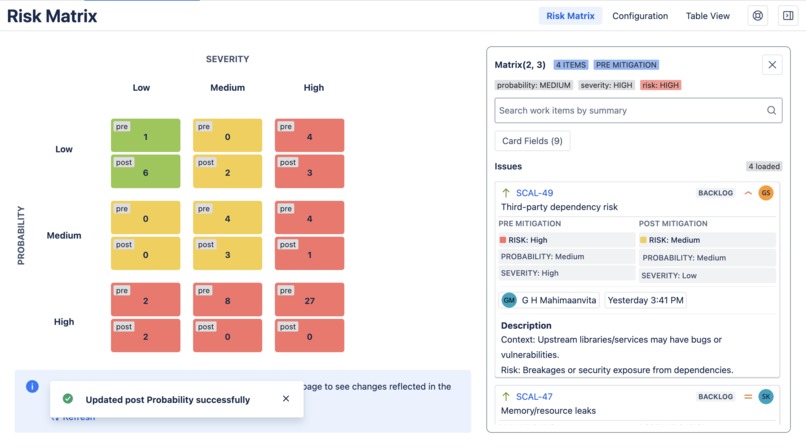
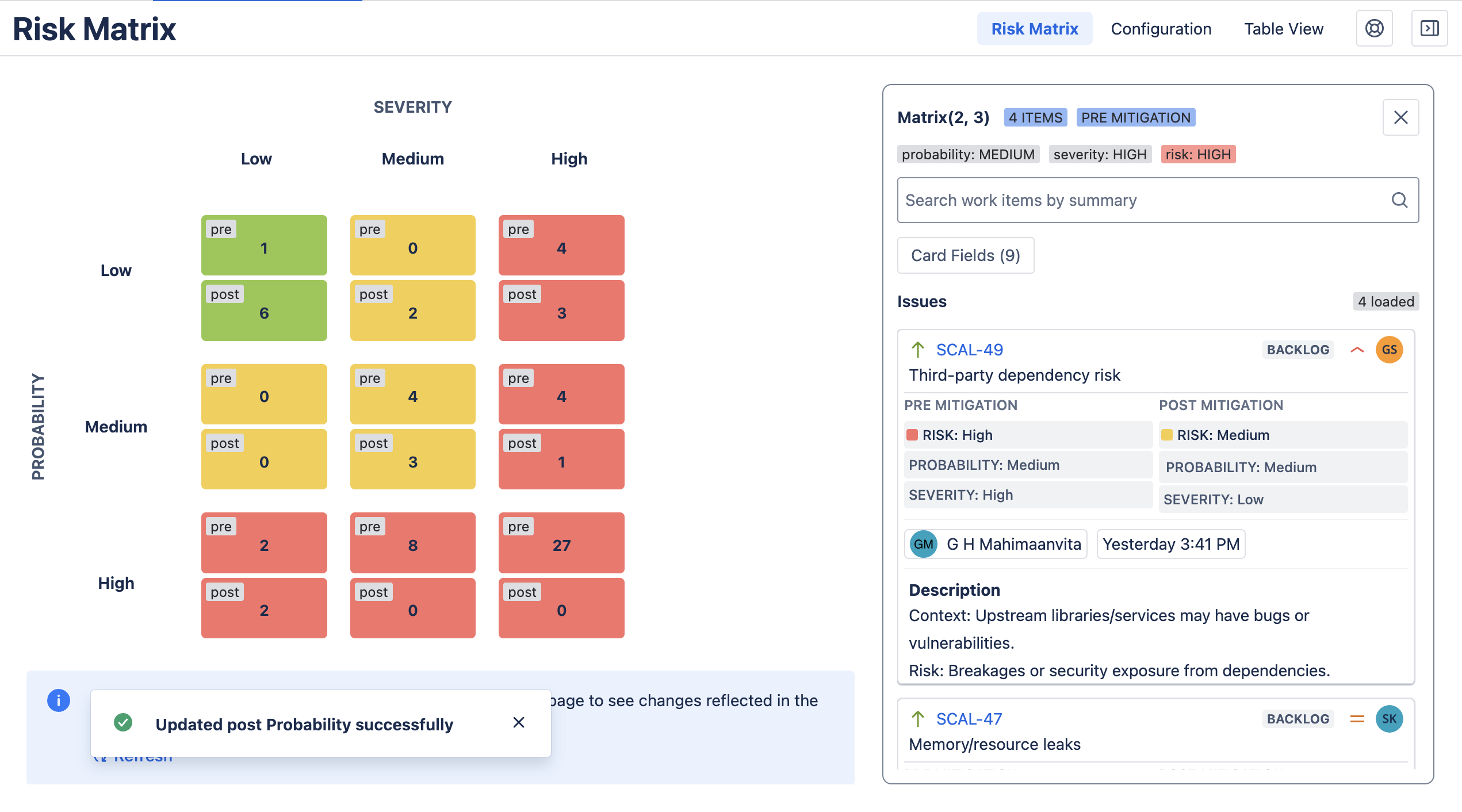
The Risk Matrix View
-
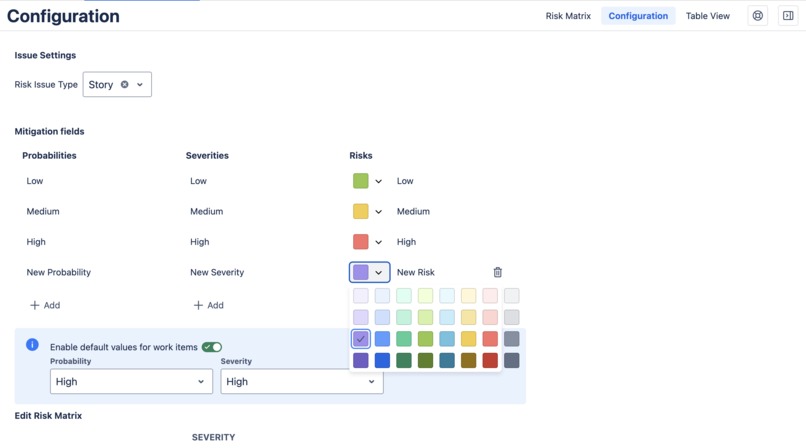
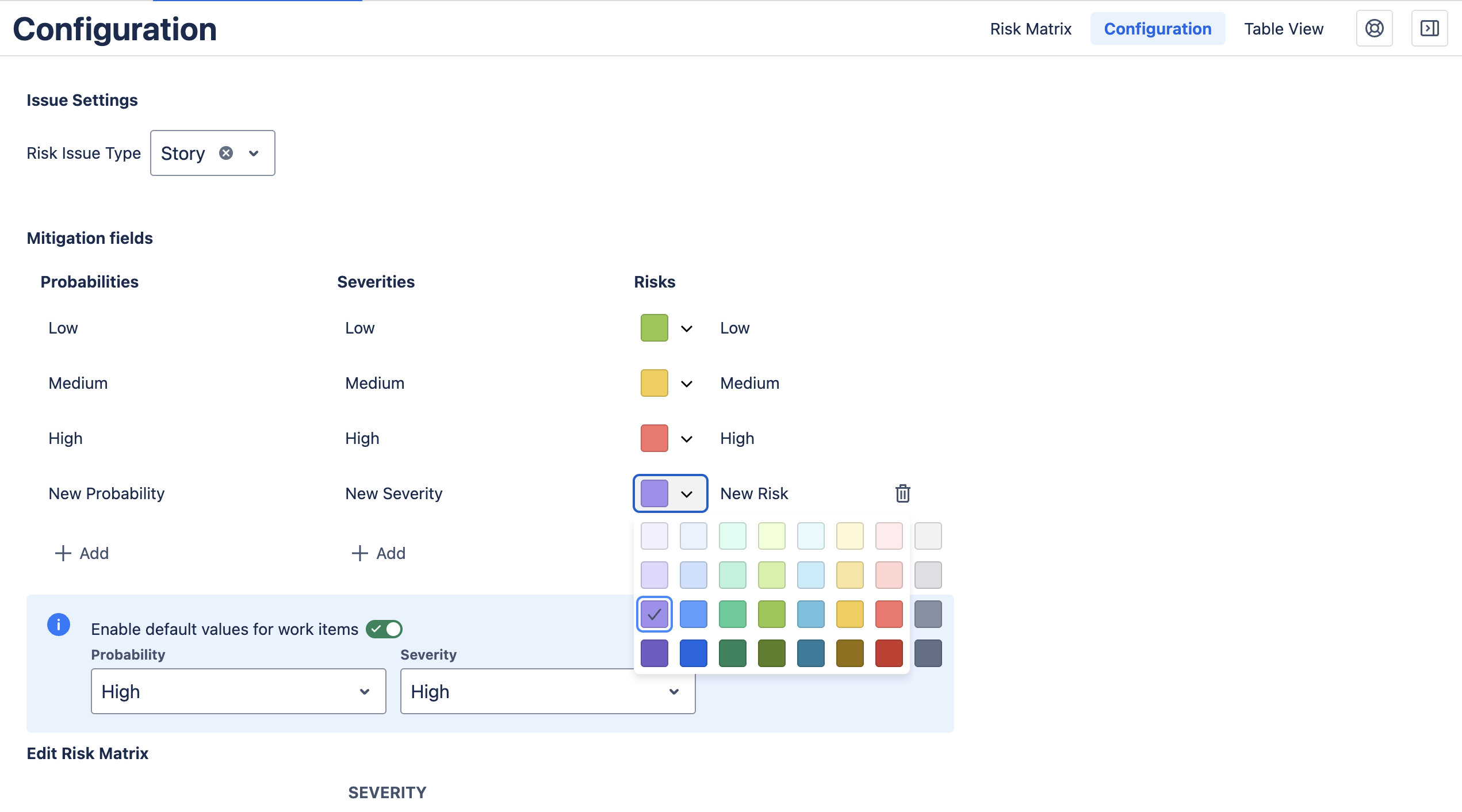
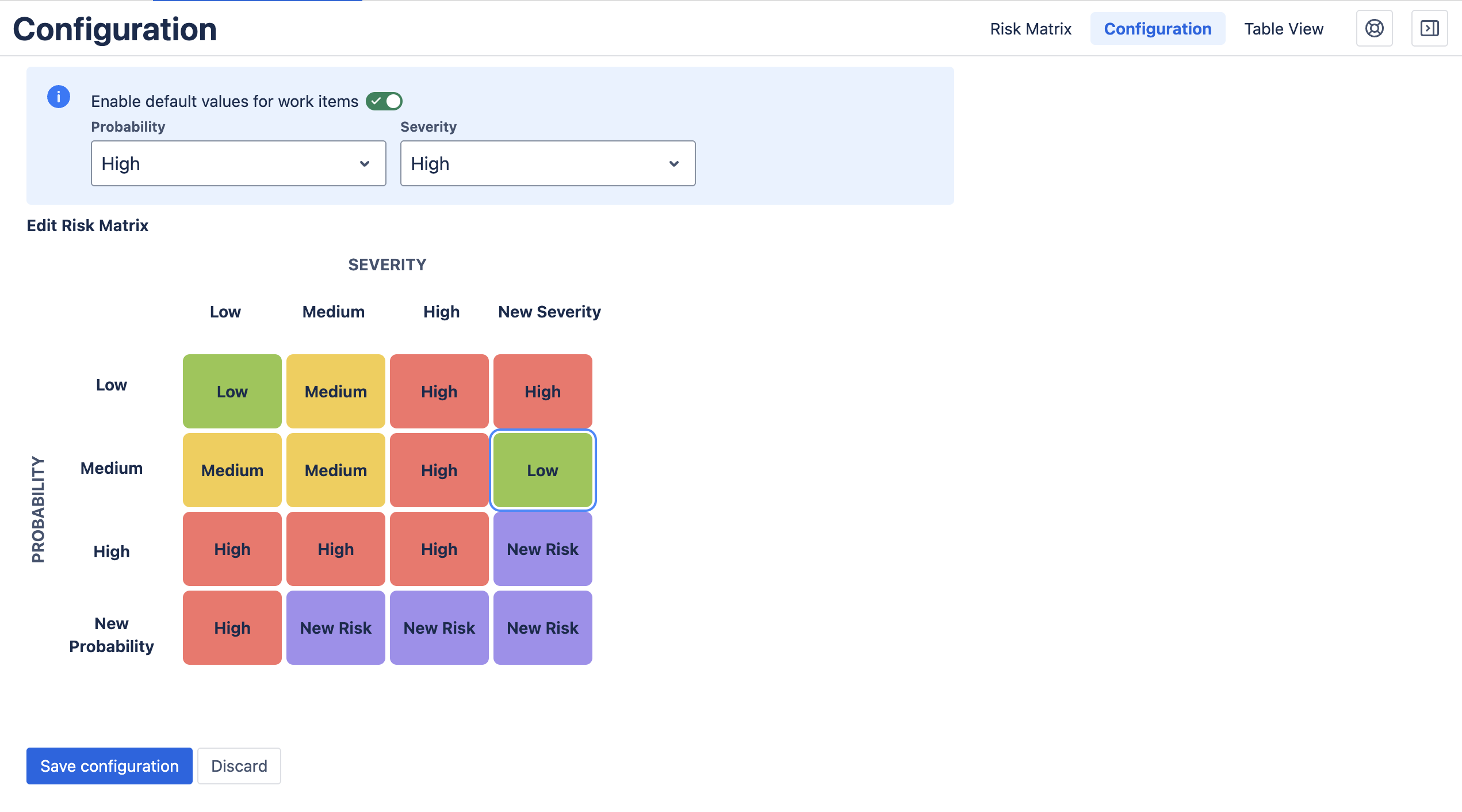
Customizing Risk Options
-
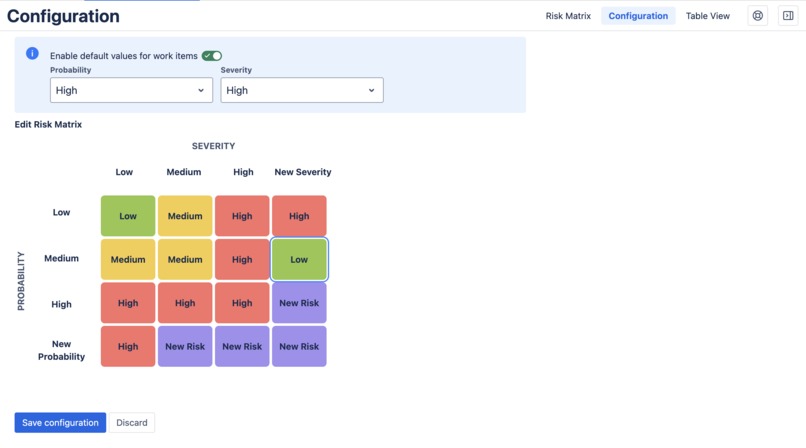
Customizing Risk Mappings
-
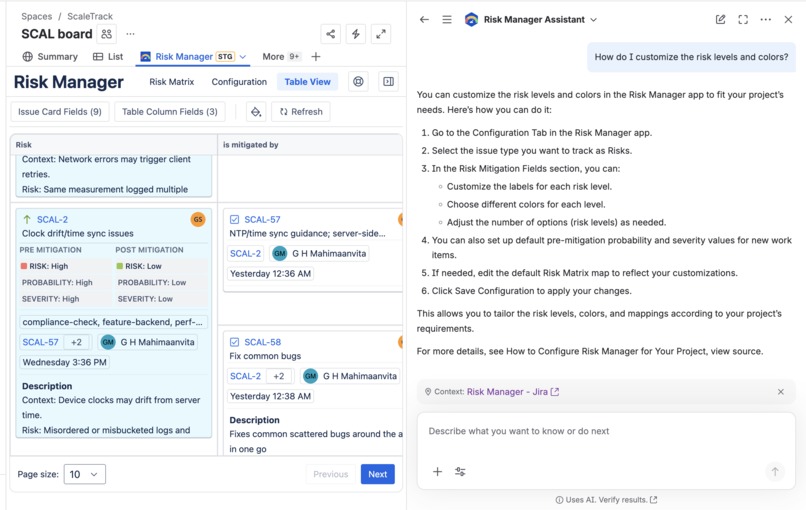
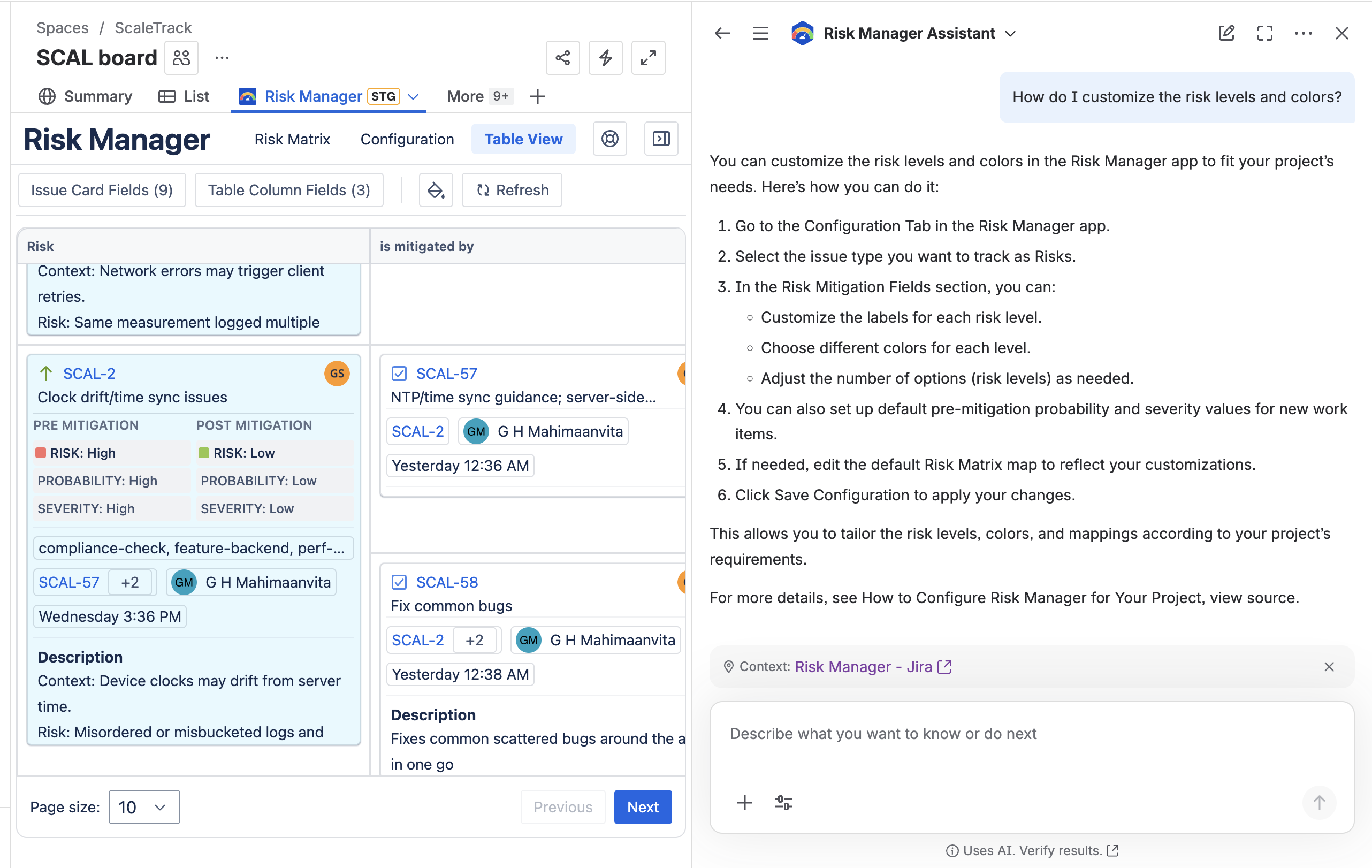
Risk Manager Rovo assistant
-
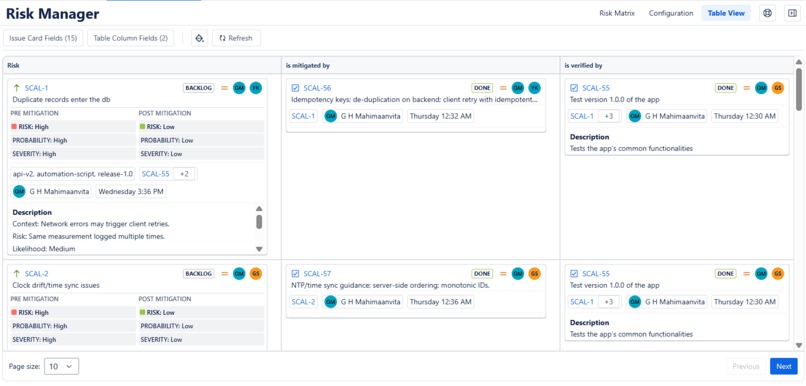
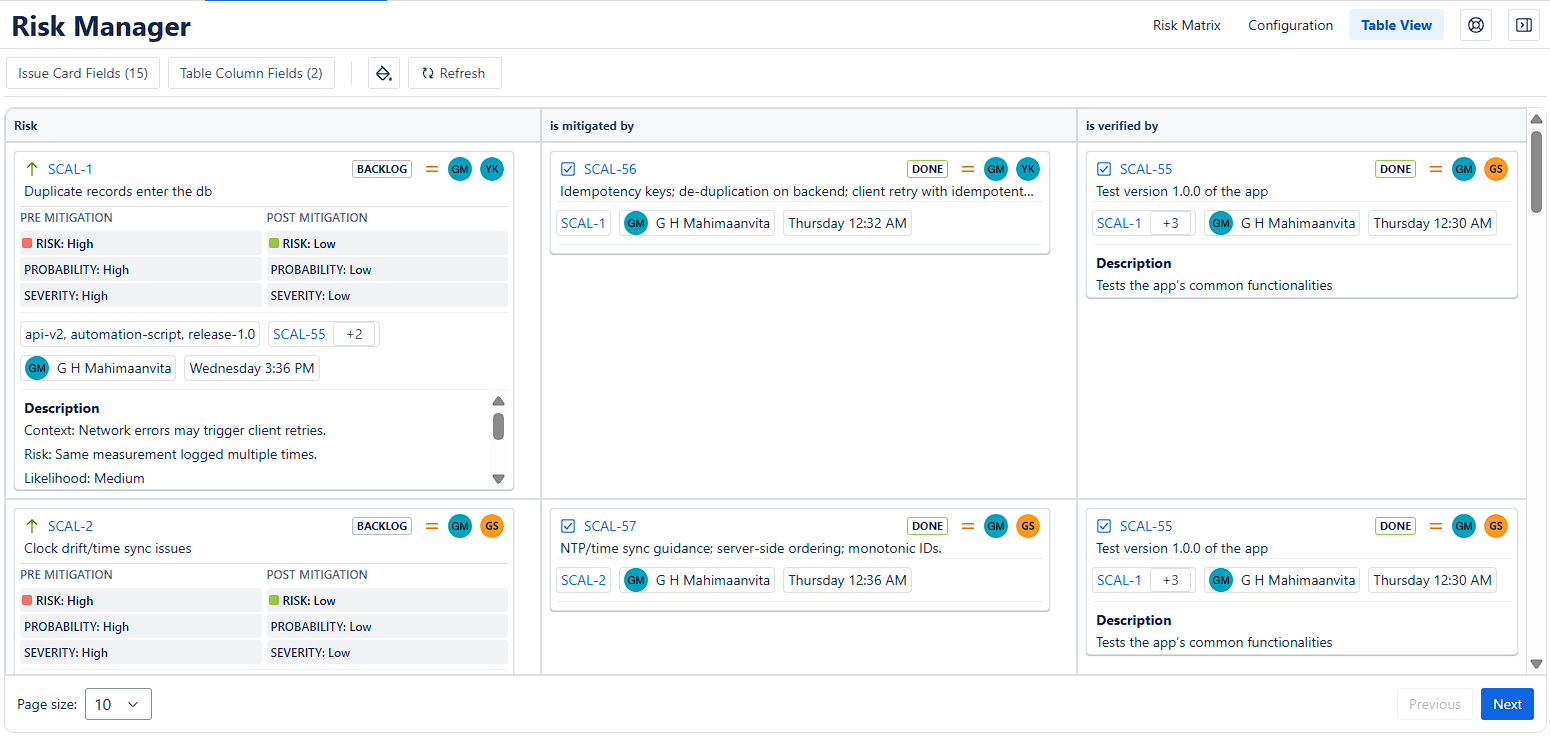
Risk Manager Table View
-
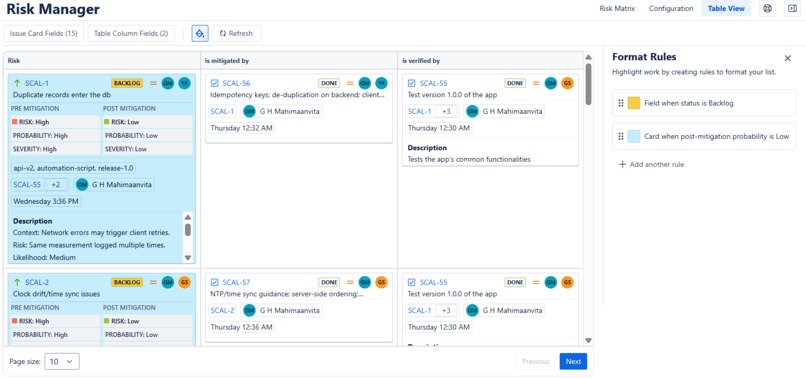
Table View with Format Rules

Inspiration
One of our clients, a big fan of the much loved Links Explorer by Optimizory expressed the need for an integrated way to identify, evaluate, and track risks within Jira. Traditional risk assessment workflows required manual setup and repetitive work leading to inconsistencies and lost visibility. This request sparked the idea of building a fast, reliable Jira add-on with an intuitive UI that blends into Jira that allows teams to assess risk where their work already lives.
What it does
Risk Manager lets you make informed decisions on your project based on the risk each issue poses. You can manage your risks with a fast and familiar user Interface that blends into Jira.
Get a color-coded summary of your project – Deep dive as you want
Use the Risk Matrix to get a color-coded, categorized summary of your risks. Dive deeper into any set of issues you want.
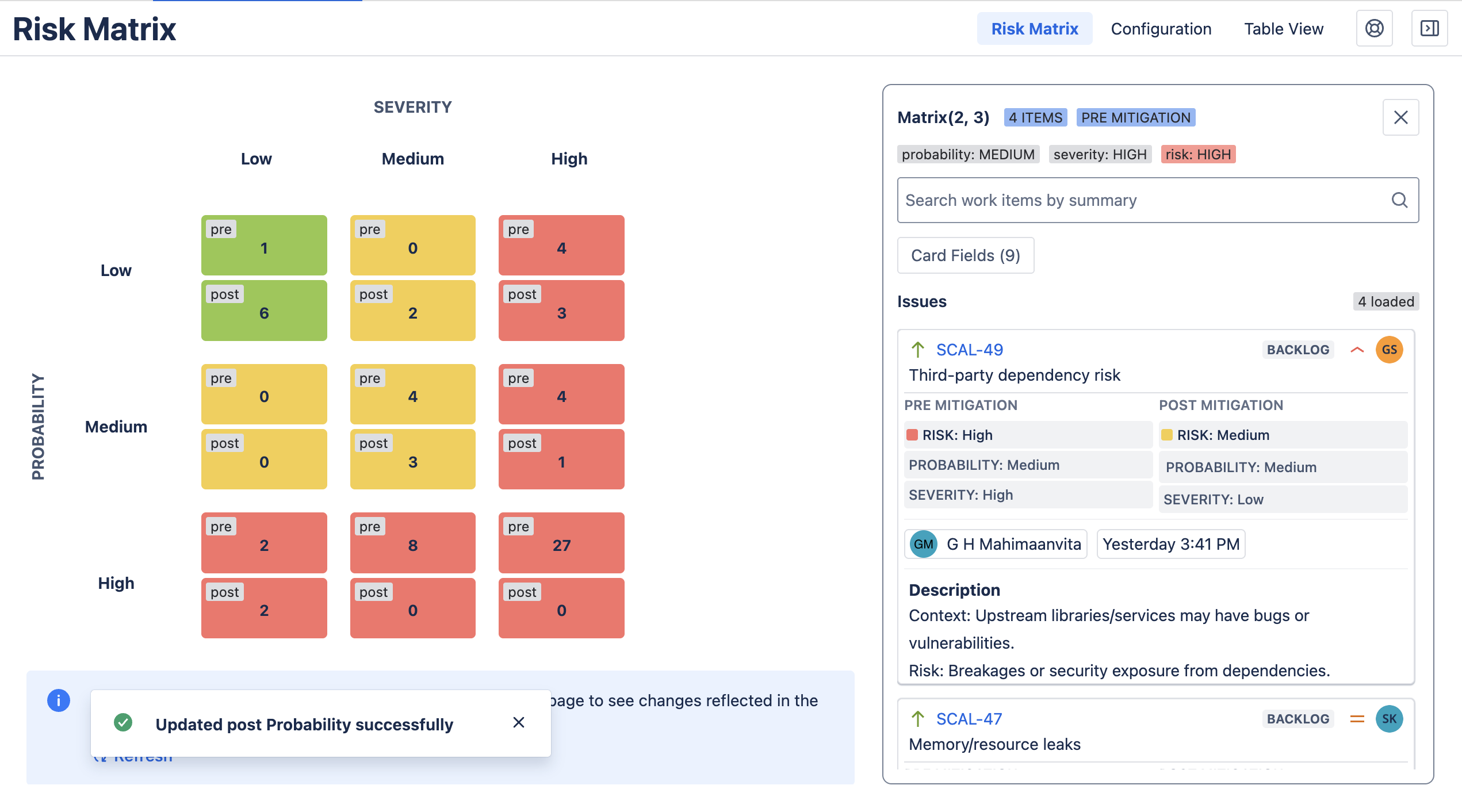
Auto-calculate Risks
Risk Manager automatically calculates your risk levels based on their severity and probability of occurrence, all within the app.
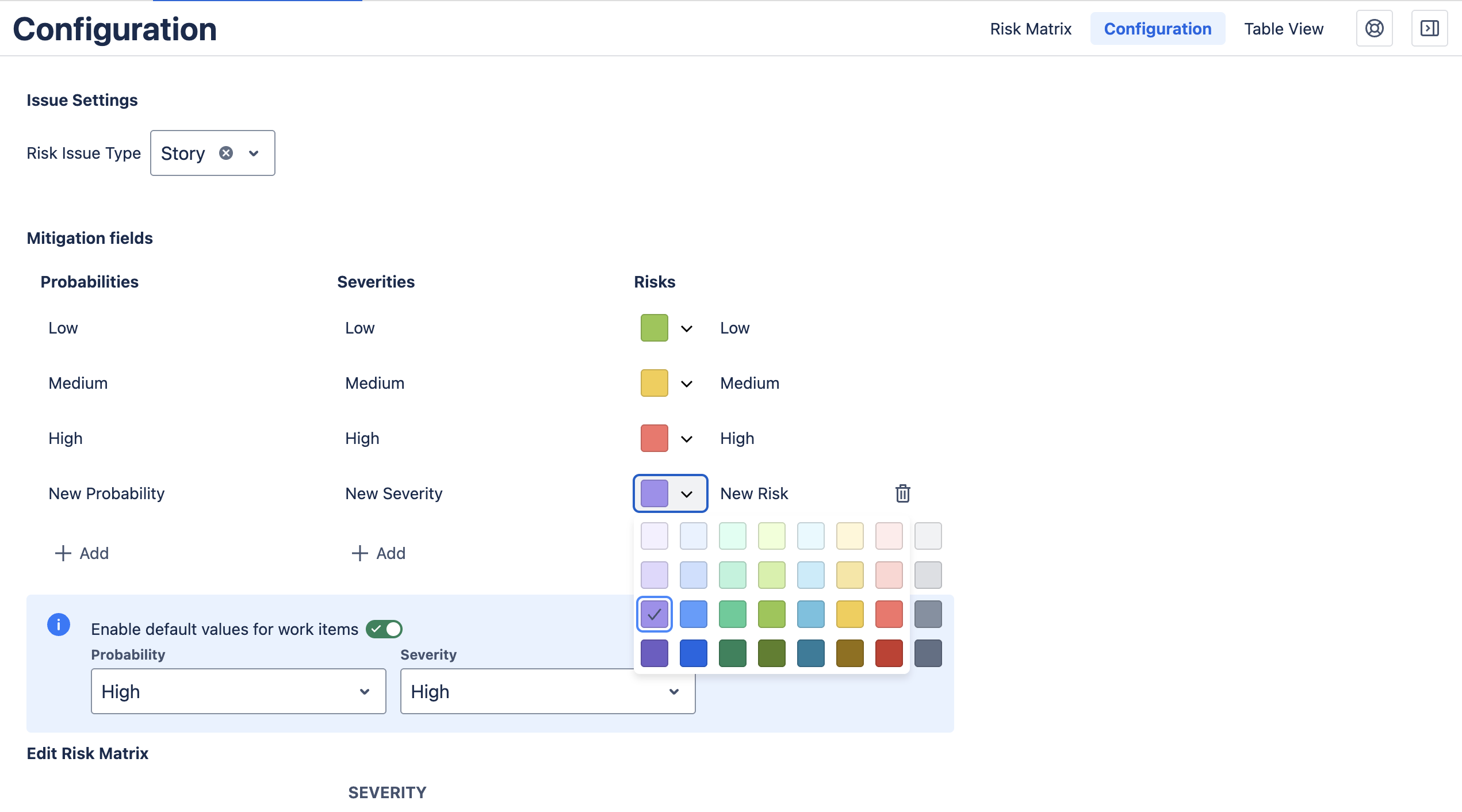
Customize Risks and related fields
You can customize the –
- number of risk levels
- colors & labels
- mappings
of Risks and related fields based on the requirements of your project.
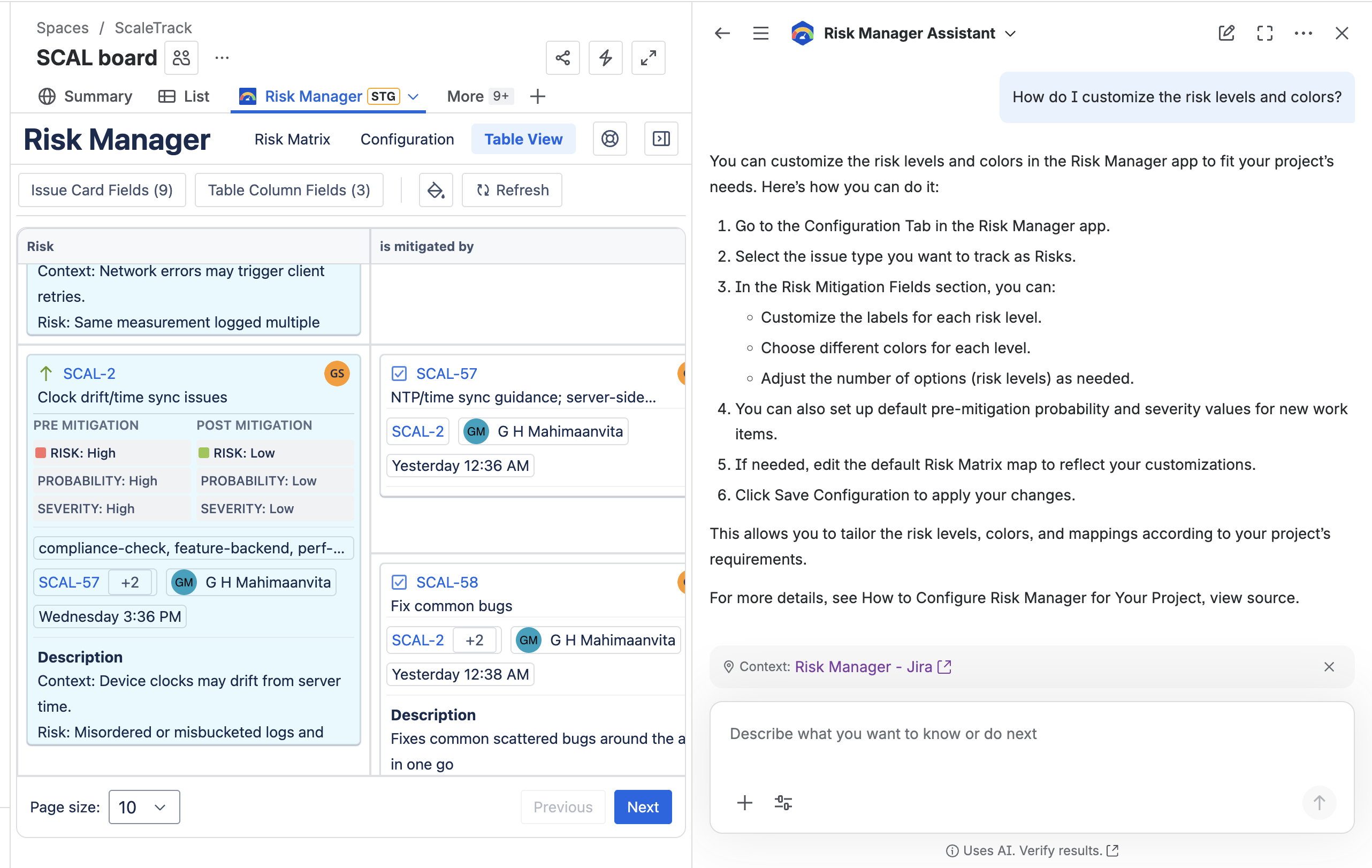
Rovo Assistant
Use the Risk Manager Assistant to get guidance on how to use Risk Manager
No external Storage
Risk Manager does not use external storage. All data is stored and managed within Jira.
Getting Started
Follow these steps to configure Risk Manager for your project
Choose a company managed project
Go to the Project board page.
Choose the Risk Manager Project Page. You will see three tabs: Configuration, Risk Matrix and Table View.
Go to the Configuration Tab.
Select the issue type you want to track as Risks.
Configure the Risk Mitigation Fields
You can customize labels, colors, and the number of options for each field. Set it up the way that makes the most sense for your project.
Enable default pre-mitigation probability and severity values if you like. When you set this up, all future work items you create in the project will have these values set by default.
Edit the default Risk Matrix map if you need.
Click on Save Configuration.
Now, all of your risks would be shown up in the Risk Matrix view and Table View
How we built it
Risk Manager is built entirely on Jira Cloud, using:
- Typescript and React JS
- The Forge platform by Atlassian
- Atlaskit UI Library by Atlassian
- Atlassian Jira Cloud Rest API
- Tanstack Virtual for virtual lists
- i18next for multi-language support and other related tools and technologies.
No external databases used — everything runs inside Jira’s infrastructure.
We built this app with the help of Rovo dev – Atlassian’s AI Coding Agent, that increased our speed and efficiency immensely.
We paid extra attention to the Atlassian Design system tokens for colors, font sizes, spacings, shadows and researched the appropriate uses of various icons provided by Atlaskit as we included them in our app, so that our app gives a smooth user experience.
Challenges we ran into
Managing global vs. project-level consistency
Global fields needed to remain stable while each project received its own context for probability and severity options. This was a challenge that took a lot of research to finally set up.Ensuring safe user modifications
- We had to rebuild our internal logic several times to support user customization of probability and severity fields without breaking the app.
- We found potentially accidental destructive changes and restricted them.
No option to manage Contexts on team-managed projects
We ensured that field contexts are correctly generated for every Classic style project without relying on manual admin actions. However, enabling context management in Team-managed projects is not possible in Jira. We have yet to find a solution to make Risk Manager available for this style of projects.API Response inconsistencies
Testing our app was a little challenging as issues were sometimes not shown by the search issues Jira REST API endpoints. We reached out to the community in the forum and discussed the issue.
Accomplishments that we're proud of.
Storing data within Jira and setting up automatic defaults –
We did a lot of research to make sure that our app can run entirely in Jira, without using external systems. We have successfully set up the required fields within Jira and enabled an option to set default values for new issues when they are created.Intuitive User Experience
- We took the time to design our app well before we started the development of the app. We designed various iterations of the app, discussed extensively, trying to figure out the placement and order of various modules.
- We walked through various user journeys and ensured that our app provides a good user experience each time.
- We meticulously added informative banners, flags, labels, tooltips at required places to increase clarity.
- We added multiple smaller features like handy Refresh buttons, option to edit fields within the app, formatting options and many such features so that users have a comfortable experience.
Good scalability
Our team has paid extra attention to scalability as users typically have large projects with a huge number of issues within. After trying out multiple approaches we were able to create a reliable app that does not make the users wait too long to see their issues or updates.Enabling pre-mitigation and post-mitigation workflows within issues.
Supporting dynamic option management without breaking underlying logic.
What we learned
- Deep insights into how Jira custom fields and contexts behave at scale.
- The importance of safe data modelling when giving users partial control (option CRUD allowed, destructive actions restricted).
- How to build a robust integration layer using Forge + React.
- Designing features around real-world risk management workflows.
- Balancing flexibility with constraints to prevent misconfiguration.
- Creating reusable components for consistent data access across views.
What's next for Risk Manager
- Rovo Agent
We are actively improving our Rovo Agent to add these features –
- Summarizing risk details
- Suggesting mitigation steps
- Automatically identifying high-risk patterns
- Auto-formatting the Table view based on user requirements
New risk visualization views
We are designing new risk visualizations alongside the risk matrix and table to offer users multiple views for better risk management.Export to Markdown and CSV
Users would be able to export their risk tables and matrices to Markdown or CSV for reporting.New app modules at additional locations –
- The Global level
Users will be able to quickly switch through projects while staying at global level. - Issue Details Panel
Users can manage the risk of a single issue from the issue page. We are very excited to start work on this! - Jira Dashboard
Users would be able to access Risk Management features in their Jira Dashboard
- The Global level
These enhancements will make Risk Manager even more powerful and user-friendly.
Built With
- forge
- forge-storage
- javascript
- jira
- react
- rest-api
- trigger-forge
- typescript


Log in or sign up for Devpost to join the conversation.