-
-
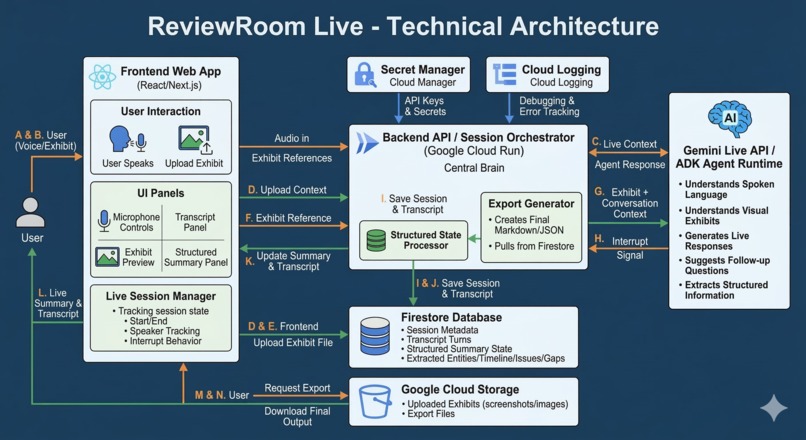
ReviewRoom_TechnicalArchitecture
-
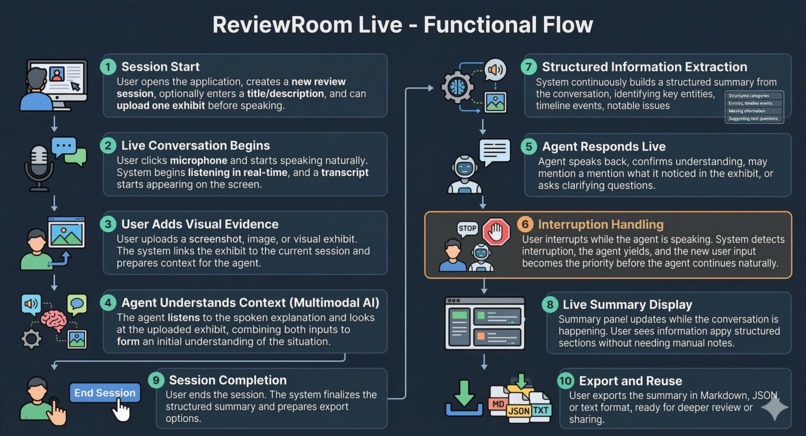
ReviewRoom_FunctionalFlow
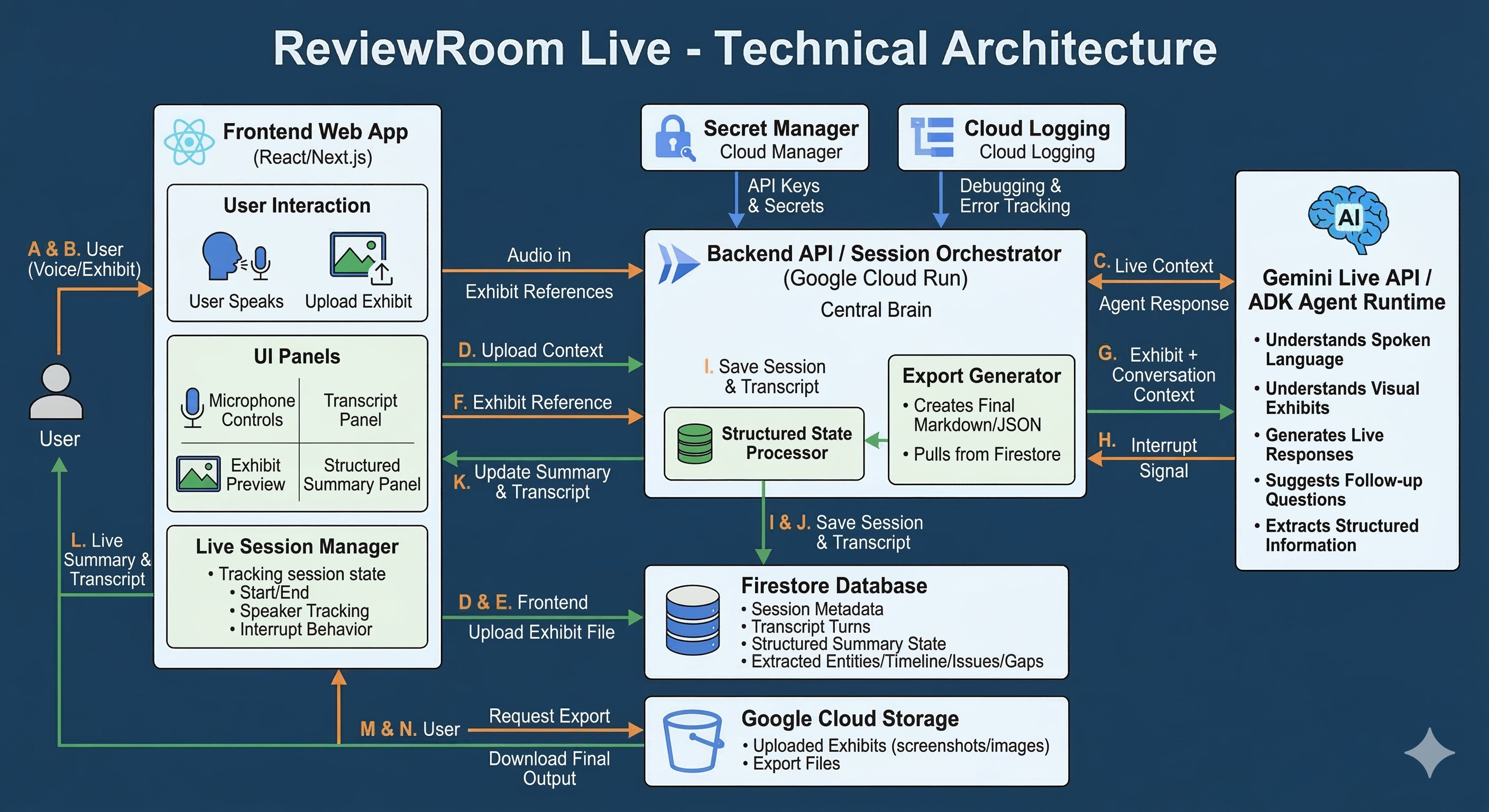
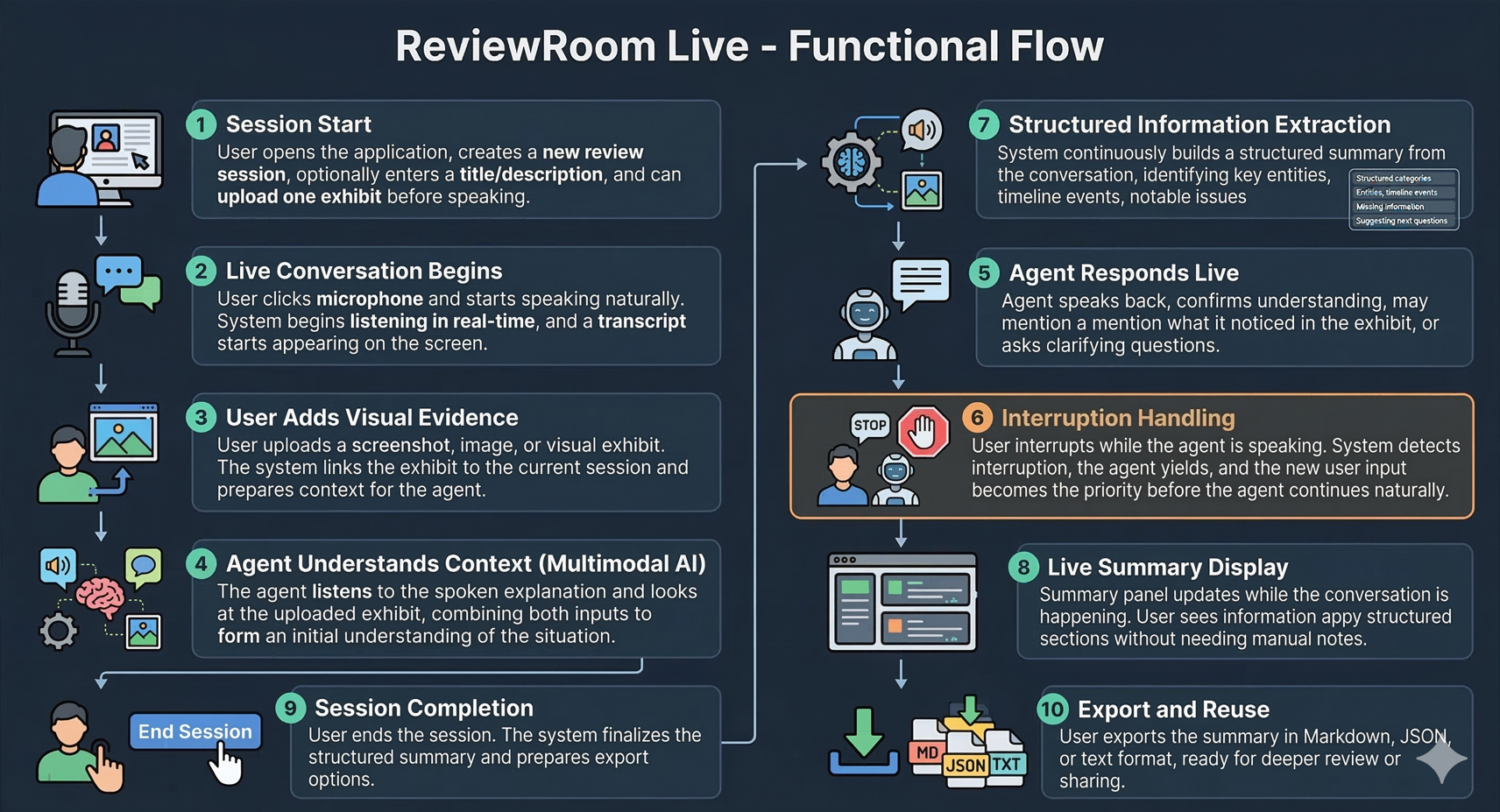
ReviewRoom Live — Build Story
Inspiration
I wanted to build something that felt useful in the first minute, not just impressive in a demo.
A lot of important professional work begins in a messy way. Someone explains a situation verbally. A screenshot gets shared. A document appears without context. Notes are incomplete. The reviewer has to listen, inspect, ask questions, and organize everything at once. That early stage is slow, mentally heavy, and easy to get wrong.
That friction is what inspired ReviewRoom Live.
I wanted to create a real-time multimodal assistant that could do three things well:
- listen naturally,
- look at visual evidence,
- turn the conversation into structured understanding.
The goal was not to build a chatbot with a microphone. The goal was to build something that feels like a live review companion.
Why I Built This Project
I am interested in systems that do more than generate text. I care about agents that can perceive, reason, and act inside real workflows.
This project gave me the chance to explore that idea in a practical way.
Instead of building another static AI interface, I wanted to build a product where:
- the user can speak naturally,
- the agent can be interrupted,
- the agent can understand uploaded visuals,
- the output becomes structured and useful immediately.
That combination felt much closer to how real professional work actually happens.
What I Built
I built ReviewRoom Live, a real-time multimodal review assistant for document-heavy professional workflows.
The product allows a user to:
- start a live session,
- speak naturally into the browser,
- upload an exhibit such as a screenshot or image,
- receive a live response from the agent,
- interrupt the agent during the conversation,
- watch a structured summary update in real time.
At the end of the session, the user leaves with a review-ready output that includes:
- a situation summary,
- key entities,
- a timeline,
- notable issues,
- missing information,
- suggested next questions.
How I Built It
I designed the product as a small but complete end-to-end system.
Frontend
I used a web interface to make the experience feel immediate and simple. The frontend handles:
- microphone interaction,
- transcript display,
- exhibit upload,
- live summary rendering,
- export actions.
The main UX goal was clarity. I wanted the user to always understand:
- who is speaking,
- what the system is processing,
- what has already been extracted.
Backend
I used a backend orchestration layer hosted on Google Cloud to manage the session lifecycle.
The backend is responsible for:
- creating and managing sessions,
- receiving live user input,
- forwarding context to the live agent runtime,
- saving transcript and structured state,
- returning updates to the frontend.
Live Agent Layer
The core of the experience is the live agent layer powered by Gemini Live API / ADK-style architecture.
This layer handles:
- speech understanding,
- visual understanding of uploaded exhibits,
- follow-up question generation,
- live response generation,
- interruption-aware conversational flow.
State and Storage
I also added a structured state layer so that the system does not just chat — it organizes.
That state captures:
- summary,
- entities,
- timeline,
- issues,
- gaps,
- follow-up questions.
Session data and outputs are stored in cloud services so the experience is persistent and exportable.
Product Decisions I Made
I made a few important product choices early:
1. Keep the project generic
I intentionally framed the project as a general review assistant rather than tying it to one narrow market. That made the concept more reusable and safer to share publicly.
2. Prioritize live behavior over feature count
I focused on what makes the product feel alive:
- real-time interaction,
- visual grounding,
- interruption handling,
- structured outputs.
I did not try to build a giant platform.
3. Build for usefulness, not novelty
I wanted the output to look like something a professional could actually use after a session, not just a flashy transcript.
Challenges I Faced
Challenge 1: Making it feel truly live
The biggest challenge was avoiding the “voice wrapper around a chatbot” trap.
A real live agent needs to feel responsive, grounded, and interruptible. That means the product has to do more than wait for full turns and then respond slowly. It has to maintain flow.
Challenge 2: Balancing speech, vision, and structure
It is one thing to process voice. It is another to process an uploaded exhibit. It is harder still to combine both into one clean structured summary.
The challenge was not just model capability. It was orchestration.
I had to think carefully about:
- what happens in real time,
- what gets saved,
- when structured extraction happens,
- how to keep the UI understandable.
Challenge 3: Keeping the UI simple
There is a temptation to over-design these systems. I had to resist that.
The interface needed to show:
- transcript,
- exhibit,
- summary,
- session state,
without overwhelming the user.
Challenge 4: Public-build constraints
Because the project needed to be shared publicly, I had to be thoughtful about what to reveal and what to keep generic.
That forced me to separate:
- the public-facing product shell,
- from deeper domain-specific ideas that belong in future private development.
Challenge 5: Building a credible demo under time pressure
Hackathon work has a brutal constraint: the product does not just need to work; it needs to be understandable immediately.
That meant I had to think not only like a builder, but also like a presenter:
- What will the user see first?
- What moment creates trust?
- What proves this is multimodal?
- What proves this is useful?
What I Learned
This project reinforced something important for me:
The most compelling AI products are not just smart. They are structured.
Users do not simply want answers. They want help turning messy inputs into clearer decisions.
I also learned that multimodal systems become much more valuable when they are tied to a workflow outcome. In this case, the outcome is not “conversation.” The outcome is a review-ready summary.
What I Am Proud Of
I am proud that this project is not just a technical demo.
It represents a product belief I care deeply about:
AI should help people move from ambiguity to structure faster.
ReviewRoom Live is a small version of that idea, but it is a real one: a system that can listen, see, ask, organize, and hand back something useful.
Closing
I built ReviewRoom Live because I believe the future of AI is not passive chat. It is active workflow intelligence.
This project is my exploration of that future in a simple, focused form: a live assistant that helps professionals turn explanation and evidence into structured understanding.
Built With
- and-keep-the-stack-minimal-by-avoiding-extra-databases
- and-summary-state-in-firestore
- audio
- cloud-logging
- deploy-the-app-on-google-cloud-run
- entities
- express.js
- extra-auth-layers
- fastify
- firestore
- gemini-live-api
- google-agent-development-kit-(adk)
- google-cloud
- google-cloud-run
- issues
- keep-secrets-in-secret-manager
- monitor-errors-with-cloud-logging
- next.js
- node.js
- node.js-with-a-light-express-or-fastify-backend-for-session-orchestration
- react
- save-sessions
- secret-manager
- store-uploaded-screenshots-and-exports-in-google-cloud-storage
- timeline-items
- transcripts
- typescript
- use-gemini-live-api-as-the-core-real-time-voice-and-vision-agent-interface-and-adk-only-if-you-want-cleaner-agent-orchestration
- use-standard-web-audio-apis-in-the-browser-for-microphone-and-playback
- web
- with-react-+-next.js-for-the-web-app-frontend



Log in or sign up for Devpost to join the conversation.