-
-
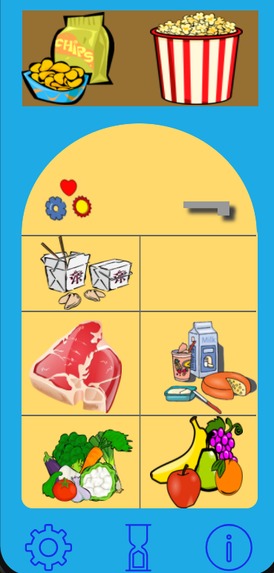
Main screen
-
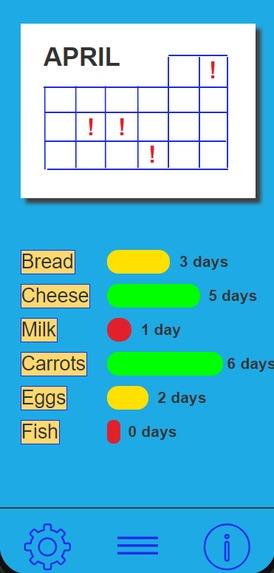
Tracker screen
-
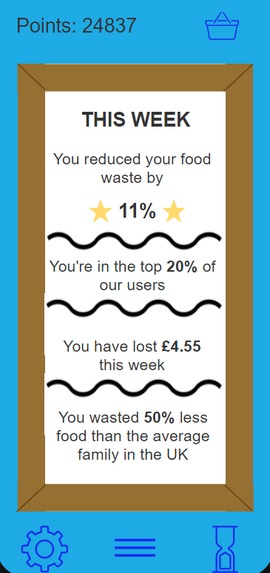
Stats screen
Inspiration
A study carried out by the European Commission (2018), estimates that up to 10% of the 88 million tonnes of food waste generated annually in the EU are linked to date marking. Reference
We have seen this first-hand in our own homes, having to throw out food because the use-by dates slipped our minds or because we misinterpreted the date on the packaging. In our busy lives, it can be difficult to remember when each item in our fridge goes out of date.
RedUse-by addresses the question of “How can we keep track of the use-by dates in our fridge, with minimal effort from us?”
The inspiration for our solution comes from technology that we already use: supermarket loyalty cards.
What it does
RedUse-by keeps track of the use-by dates of all the products in the user’s fridge and notifies them when a product is close to going out of date. This helps the user reduce their food waste linked to date marking.
We realised that inputting every item in the user’s fridge is extremely inefficient and, for most users, it would be a deal breaker as they simply don’t have the time or don’t want to put in the effort to log every item manually.
For this reason, we came up with a solution which would bring RedUse-by into the daily lives of our users. Our solution doesn’t require any extra effort or time from our users; all they need to do is scan a QR code at checkout during their weekly grocery shop.
The technology behind this already exists, it just hasn’t been used for this purpose. Barcodes found on the packaging of any product the user purchases already hold all the information RedUse-by needs. In a supermarket, when items are scanned at checkout, the system logs all the information about the items already: the price, the weight, the manufacturer and the expiry date, amongst other things. This information can be sent straight to the RedUse-by app by allowing the cashier to scan an in-app QR code. Additionally, we recognised that it’s easy to forget this detail at a busy check out so a similar QR code can be printed at the bottom of the receipt. Then, the user can scan the QR code on the receipt to transfer the data about the items into the app.
This system bypasses the need to input each food item into the app manually. However, there is also an option to manually input items as we understand that some of our users may shop at unaffiliated stores or independent farmers’ markets. This also allows users to input items like home-baked goods and leftovers that they may also want to keep track of.
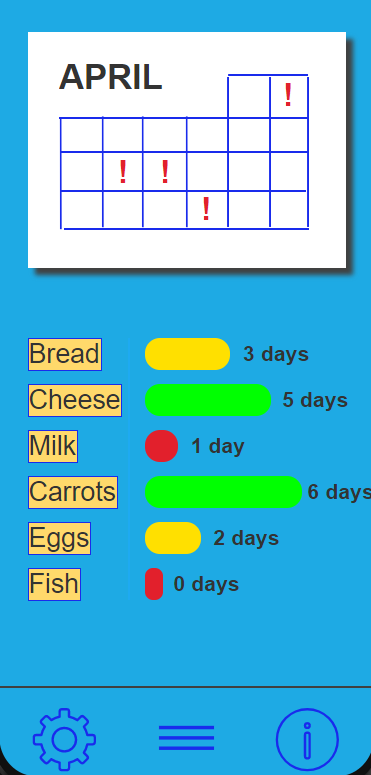
When the app has all the information it needs, the user can view their items on the “Tracker” screen. Here, the app shows a calendar marked with dates on which various items are going out of date as well as a colour-coded bar meter which shows how many days are left for the user to consume their food. This is also the screen where the user will press on the food item of their choice and press the appropriate button, “Used” or “Thrown out”, to discard the item.
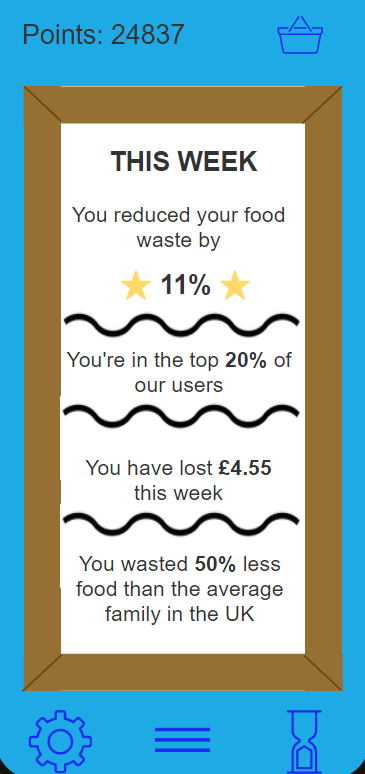
All this information is recorded and used to calculate the user’s weekly “Stats”. On the “Stats” screen, the user can find out how much they’ve improved in relation to previous weeks, how well they’re doing in comparison to our user base and the average UK family and how much money they have “Thrown out” that week.
The information about the food items is also used to calculate the number of points earned by the user. For example, locally sourced and plant-based items are worth the most points. Through this, RedUse-by promotes more sustainable eating habits. The points can be redeemed in the app for “magnets” to decorate the fridge door as well as upgrades to the fridge e.g., different colours and styles of fridge.
How we built it
We began by coming up with a solid concept for the app. Once we decided on the features we’d like the app to have, we began sketching out the various screens and detailing how they were interconnected.
To create the prototype, we used the “Just in Mind “prototyping tool. We used this by replicating the screens from the sketches digitally and adding clickable buttons which allowed navigation between the screens.
To create our demo video, we used the Wideo animation tool and edited the video using Splice.
Challenges we ran into
One of the things we struggled with was coming up with a way to input the data into the app. Once we realised it was inefficient to do it manually, we started brainstorming various solutions.
One of the initial ideas we had was to add QR codes with the necessary information onto the products’ packaging at the manufacturer or retail stages. This would, of course, be costly and require the retailer or manufacturer to put in more work so that the consumer wouldn’t have to. Moreover, this would still require the user to scan each product individually.
This was before we realised that barcodes already hold all the information the app needs! After this lightbulb moment, the concept for RedUse-by was born.
Accomplishments that we're proud of
Since this was our first hackathon, we weren’t sure what to expect. We’re proud of the way we stood up to the challenge with little preparation and no experience, organising this project through video calls spanning different time zones.
We’re also proud of how well the prototype conveys the goal of RedUse-by and how clearly our animated demo video explains the workings of the initiative beyond the app.
What we learned
One of the most valuable things we’ve learned through this Hackathon was the process of how an app is developed. None of us have worked on a project like this before so it was interesting to go through the beginning stages of bringing our ideas to life. This also includes learning how to use tools we haven’t heard of before and technology that we haven’t explored.
We also learned a lot about statistics surrounding food waste and the shopping habits of different families, which all contributed to how we developed RedUse-by.
What's next for RedUse-by
The next step is developing RedUse-by into a fully functioning app based on our prototype. This involves the back-end development as well as the front-end design. There are also some additional features that we didn’t get a chance to implement such as “Colourblind mode” which would change the colours of the red-yellow-green bars on the Tracker screen into patterned bars instead.
After this, we’d like to conduct user testing to collect feedback on the app from our target users. This data would be then used to test the app on a local scale, working with a small number of stores, to collect further information on how well the initiative works. Hopefully, all this initial testing would allow us to pitch the initiative to supermarkets so RedUse-by can achieve its full potential on a national scale.
One of our big ambitions for RedUse-by, once it’s well established, is partnering with other services which match our goals so that we can expand the user experience. For example, partnering with Olio would allow RedUse-by to redirect the users to Olio when they have a lot of items that are close to their use-by date. Similarly, partnering with an app like SuperCook would allow RedUse-by to share the items in the user’s fridge with SuperCook which would then suggest recipes based on the items the user already has.
Built With
- justinmind
- wideo

Log in or sign up for Devpost to join the conversation.