-
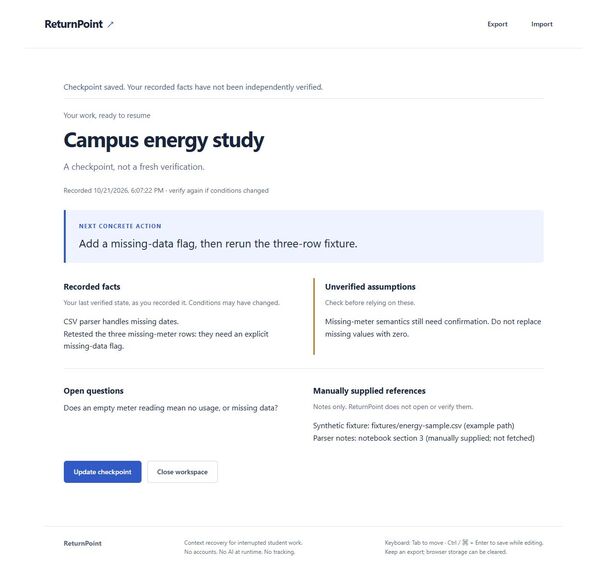
Actual desktop app: synthetic checkpoint separates recorded facts, unverified assumptions and the next action.
-
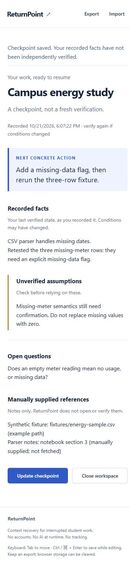
Actual mobile-width app: the same synthetic checkpoint in a single-column resume view.
Inspiration
Returning to a student project after an interruption involves more than remembering a task. You need to remember what you actually checked, what you only assumed, and the next small action. ReturnPoint explores that context-recovery problem without adding another task-management system. Its usefulness is a product hypothesis, not a measured outcome from a student study.
What it does
ReturnPoint keeps one local checkpoint: project name, recorded facts, next concrete action, unverified assumptions, open questions and manually supplied references. The resume view puts the next action first and keeps assumptions visibly separate from recorded facts. A checkpoint is an account of past work, not a fresh verification.
Unsaved edits have separate recovery drafts. Cooperating tabs use a Web Lock and revision check so a stale tab cannot silently overwrite a newer save. Export preserves the current editor snapshot, including incomplete work as a recovery draft. JSON imports are reviewed before an explicit save; cancellation leaves the checkpoint unchanged. References are inert text, never automatically opened or verified.
Try the working demo
Download the runnable ZIP from the v1.0.2 release, extract it, and run node server.mjs with Node.js 22 or newer. Open http://127.0.0.1:4173/ in a current browser supporting Web Locks. No package installation, account or hosted service is required. Use the same address, port and browser profile when returning to your saved work.
- Choose the synthetic example, save it, then close the workspace and resume it.
- Notice that the missing-meter assumption is still unverified. Returning to work has not magically confirmed it.
- Update the next action to add a missing-data flag and rerun the three-row fixture. Save with the button or Ctrl/Command+Enter.
- Export the checkpoint, copy its Backup JSON into Import, inspect the preview, then cancel or explicitly save.
- For the conflict demonstration, open the app in two tabs, save an update in one, and try saving the older copy in the other. Keep the older edits by exporting them, then load the latest checkpoint and reconcile manually.
The repository includes a fuller WALKTHROUGH and actual desktop/mobile screenshots. All demonstration content is synthetic. This is a downloadable local demo, not a hosted web service or a video.
How it was built
This is an original implementation created on October 21, 2026 during Taskforge's event window. It uses HTML, CSS, JavaScript and the Node.js standard library, with native localStorage, Web Locks and Blob APIs. There are no third-party runtime dependencies. The loopback-only server serves a fixed set of app files and has no write endpoint or outbound service integration. A restrictive content security policy blocks outbound connections.
Codex assisted with scope, design, implementation, tests and documentation. Image generation was used for a design concept, not as a claim of a running interface. The gallery images are actual application screenshots. There is no AI model, telemetry or account system at runtime. Source is MIT licensed.
Challenges and what we learned
The difficult part was preserving honest state through failures, not adding more fields. Saving a note must not imply its claims were verified. Reopening must not replace the recorded timestamp. A stale tab, an interrupted write or damaged browser storage must not quietly become a successful save. Recovery therefore needs its own data model, explicit conflict messages and a portable backup path.
The test suite has 15 passing tests covering save/reopen, stale and simultaneous saves, draft recovery, storage failures, malformed and oversized imports, Unicode/escaped exports and fixed-route HTTP serving. Syntax checks, build and packaged HTTP smoke checks passed. Browser checks covered keyboard saving, saved-tab close/reopen, recovery, two-tab conflict, JSON copy/paste round-trip and a narrow mobile layout without horizontal overflow.
Accessibility and honest limits
Semantic controls, visible labels and status messages, keyboard operation, a responsive single-column mobile view and no required motion aim to reduce friction. Reduced-motion CSS is included. We have not completed screen-reader testing, Firefox/Safari testing, OS reduced-motion emulation or a real student user study, so this is not an accessibility certification.
Browser storage can be cleared, unavailable or full. Keep exports outside the browser. There is one active checkpoint, no cloud sync, no automatic merge, no version archive and no in-app draft deletion/reset. References and recorded facts are not independently checked. The browser's downloaded Blob file has not been independently verified; the readable Backup JSON and copy/paste import flow were tested. Storage-failure tests inject failures into the core rather than reproduce every browser policy condition.
What's next
Test whether students can resume interrupted work more accurately with this focused checkpoint than with ordinary notes. Validate keyboard and screen-reader flows with users, improve recovery-draft management, and only add capabilities that those observations justify.

Log in or sign up for Devpost to join the conversation.