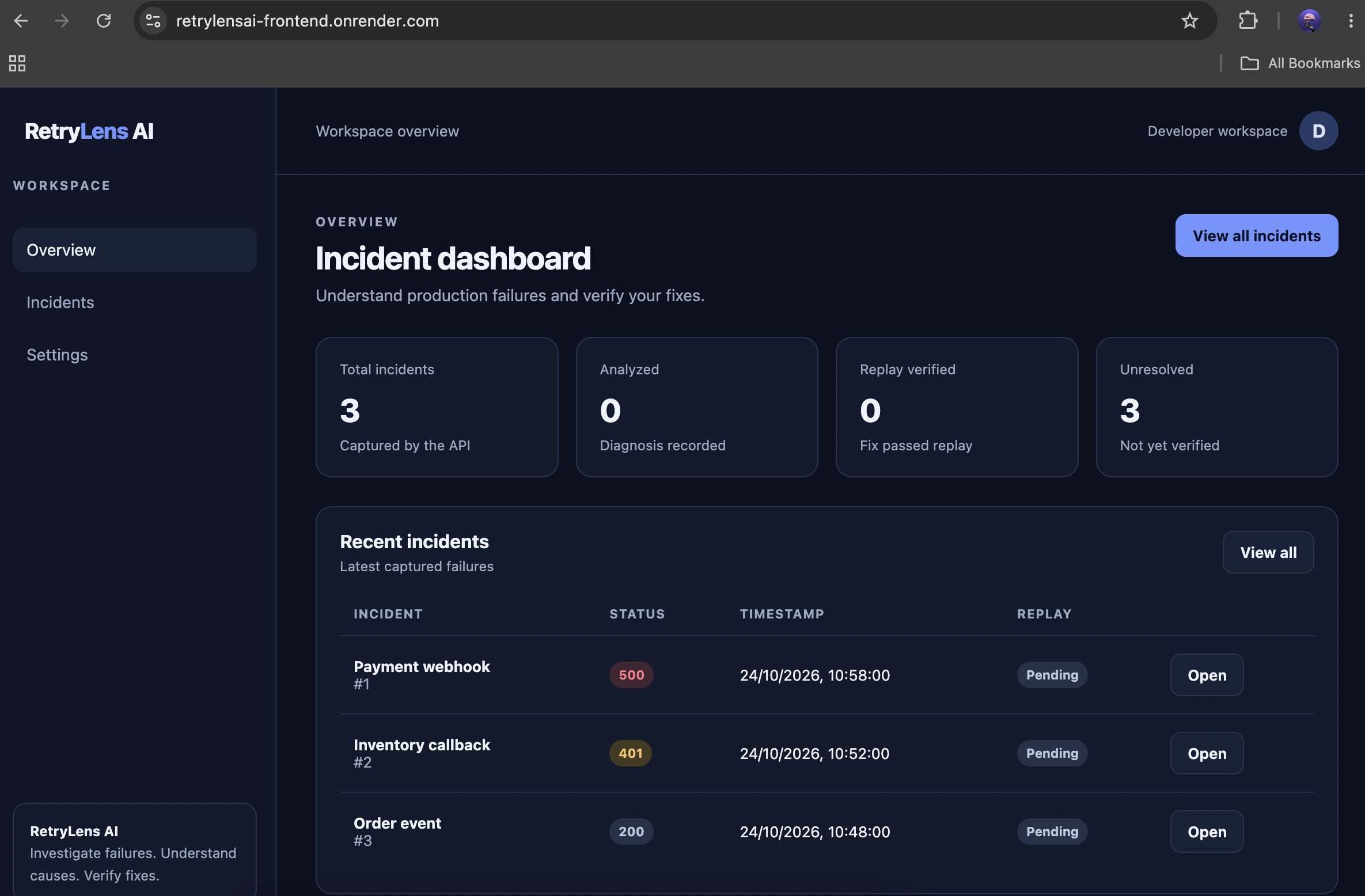
RetryLens AI: AI-Powered Incident Diagnosis and Replay
Inspiration
Every developer knows how frustrating it can be when an API suddenly fails. A webhook returns a 500 error, an authentication token expires, or a duplicate event creates unexpected records. Developers often have to search through logs, inspect request payloads, reproduce the failure, and manually determine what went wrong.
I wanted to build a tool that makes this process faster, more structured, and easier to understand.
That idea inspired RetryLens AI, a platform designed to help developers investigate API incidents, understand their likely root causes, and replay failed scenarios to evaluate potential fixes. Instead of treating an error as just another log entry, RetryLens AI turns it into something developers can investigate, learn from, and test.
What It Does
RetryLens AI provides a central place to explore API incidents and investigate their behavior.
- Incident monitoring: Displays incident details, including HTTP status codes, request metadata, headers, payloads, response bodies, and execution logs.
- AI-powered diagnosis: Analyzes incident evidence to produce a structured explanation of the likely cause of a failure.
- Incident replay: Replays selected scenarios in broken or fixed modes to compare their behavior.
- Verification: Records replay results, assertions, and execution logs to help developers evaluate whether a proposed fix addresses the scenario.
- Incident history: Stores incidents, diagnoses, and replay runs in PostgreSQL so developers can revisit previous investigations.
The goal is to shorten the distance between discovering an error and understanding how to address it.
How I Built It
I built RetryLens AI as a full-stack application, combining a backend API, a database, AI-powered analysis, and a web interface.
Backend
I used NestJS and TypeScript to build a modular REST API. The incidents module handles incident retrieval, diagnosis requests, and replay operations. Separate analysis and replay services keep these responsibilities organized.
Database
I used PostgreSQL with Prisma ORM to model and persist incidents, diagnoses, and replay runs. Each incident can have associated diagnosis records and replay history, making it possible to track investigations over time.
AI-Powered Diagnosis
The analysis component examines the available incident evidence, including request metadata, payloads, response bodies, status codes, and logs. It generates a structured diagnosis intended to help developers understand what may have caused the failure.
Replay and Verification
I designed a replay workflow that evaluates incidents in different modes, including broken and fixed scenarios. The system records whether a replay passed, its assertions, and its execution log. This provides a way to compare expected behavior with observed behavior rather than relying entirely on a textual explanation.
Caching and Rate Limiting
I integrated Redis to cache diagnosis results and limit repeated analysis requests. This helps reduce unnecessary analysis work and provides a basic control against excessive requests.
Frontend and Deployment
The web interface is designed to provide an incident dashboard, detailed incident views, diagnosis results, replay controls, and execution logs. I deployed the backend using Render and connected it to a hosted PostgreSQL database.
Challenges I Faced
One of the biggest challenges was connecting the different parts of the system into a consistent workflow.
1. Designing the incident data model
An incident is more than an HTTP status code. It may include nested JSON payloads, request headers, logs, diagnoses, and multiple replay attempts. I had to model these relationships while keeping the data useful for both the backend and frontend.
2. Handling database and application types
Working with TypeScript, Prisma, JSON fields, and database-generated IDs required careful attention to type compatibility. I also had to distinguish between demonstration data stored in code and incident records persisted in the database.
3. Making diagnosis useful
An AI-generated explanation is not enough on its own. The diagnosis needs to be grounded in the evidence provided and presented in a form developers can inspect. This motivated the use of structured diagnosis results and evidence-checking metadata.
4. Designing meaningful replay behavior
A replay should provide more than another response. It needs to record assertions and execution logs so the outcome can be inspected. Distinguishing a simulated replay from a real production retry is also important for preventing unintended side effects.
5. Deployment and integration
Deploying the backend introduced practical challenges around environment variables, database configuration, Prisma client generation, TypeScript module compatibility, and ensuring the frontend communicates with the deployed API correctly.
These challenges helped me appreciate that building a reliable developer tool involves much more than implementing individual features. Data consistency, observability, safe execution, and deployment configuration all matter.
What I Learned
Building RetryLens AI strengthened my understanding of backend architecture, database modeling, API design, caching, and the integration of AI into developer workflows.
I learned to think about AI as one component in a larger engineering system, rather than as a replacement for debugging fundamentals. Useful diagnosis depends on the quality of the evidence, while useful verification depends on being able to inspect what happened during a replay.
I also learned the importance of separating mock data from persistent application data and of making deployment configuration consistent across development and production environments.
Most importantly, I learned to approach debugging as a workflow: collect evidence, form a hypothesis, test a scenario, inspect the result, and iterate.
RetryLens AI started with a simple question: What if developers could move from an API failure to a testable explanation of that failure in one workflow?
By bringing incident evidence, AI-assisted diagnosis, and replay verification together, I aim to make debugging more systematic and less time-consuming.
This project is an important step in exploring how AI can help developers not only understand failures, but also investigate and test possible solutions.
Built With
- debugging
- nest
- observe
- postgresql
- prisma
- redis

Log in or sign up for Devpost to join the conversation.