🛍️ Retail People Counter
A real-time people counting system for retail stores, gyms, and events using YOLOv8 and OpenCV. This project detects people entering and leaving from video footage and displays accurate entry/exit flow with clear visualizations.



🎯 Features
- 🎬 Real-time People Detection: Uses YOLOv8 Large model for accurate person detection
- 📊 Flexible Line-Based Counting: Horizontal or vertical line orientation for any movement direction
- 📈 Net Flow Analysis: Shows honest flow metrics instead of misleading occupancy counts
- 🎥 Multiple Input Sources: Support for video files, webcam, and live footage
- 🔧 Optimized Performance: Fine-tuned confidence thresholds and tracking parameters
- 💾 Export Capability: Save processed video with counting overlays
- ✅ Automatic Setup: Downloads required YOLO models automatically
- 🎛️ Command Line Interface: Comprehensive argument system for full control
📊 What It Actually Measures
Important: This system tracks Entry/Exit Flow, not absolute occupancy:
- ✅ Accurate: "12 people entered, 11 people left during this period"
- ✅ Honest: "Net flow: +1 person increase"
- ❌ Not claiming: "There are exactly X people in the area"
This is perfect for understanding traffic patterns, peak hours, and directional flow!
🛠️ Installation
Prerequisites
- Python 3.8 or higher
- pip package manager
Quick Setup
Clone the repository
git clone https://github.com/ghaly-jd/retail-people-counter.git
cd retail-people-counter
Create virtual environment
python3 -m venv venv
source venv/bin/activate  # On Windows: venv\Scripts\activate
Install dependencies
pip install -r requirements.txtTest setup (optional)
python test_setup.py
🚀 Usage
Quick Start Examples
Process a video file (default settings):
python main.py --video path/to/your/video.mp4
Use webcam:
python main.py --webcam
Save output video with overlays:
python main.py --video input.mp4 --output counted_output.mp4
Line Orientation Selection
For vertical movement (people going up/down) - DEFAULT:
python main.py --video input.mp4 --line horizontal
For horizontal movement (people going left/right):
python main.py --video input.mp4 --line vertical
Optimal Configuration (Recommended)
For best results with the current optimized settings:
python main.py --video your_video.mp4 --model yolov8l.pt --confidence 0.3 --line horizontal --output demo_output.mp4
Advanced Examples
High accuracy for crowded areas:
python main.py --video busy_mall.mp4 --model yolov8x.pt --confidence 0.4 --line horizontal
Fast processing for real-time:
python main.py --webcam --model yolov8n.pt --confidence 0.2
Custom confidence tuning:
python main.py --video test.mp4 --confidence 0.5 --line vertical --output results.mp4
📋 Complete Command Reference
python main.py [OPTIONS]
Required Arguments (Choose One)
| Argument | Type | Description | Example |
|---|---|---|---|
--video |
str |
Path to input video file | --video /path/to/video.mp4 |
--webcam |
flag |
Use webcam as input source | --webcam |
--download-sample |
flag |
Download sample video for testing | --download-sample |
Optional Arguments
| Argument | Type | Default | Description | Example |
|---|---|---|---|---|
--output |
str |
None |
Path to save output video with overlays | --output result.mp4 |
--model |
str |
yolov8l.pt |
YOLOv8 model path (n/s/m/l/x) | --model yolov8x.pt |
--confidence |
float |
0.3 |
Detection confidence threshold (0.0-1.0) | --confidence 0.4 |
--line |
str |
horizontal |
Line orientation (horizontal/vertical) | --line vertical |
--help |
flag |
- | Show help message and exit | --help |
Model Options Explained
| Model | Size | Speed | Accuracy | Recommended For |
|---|---|---|---|---|
yolov8n.pt |
Nano | ⚡⚡⚡ Fastest | ⭐⭐ Good | Real-time/webcam |
yolov8s.pt |
Small | ⚡⚡ Fast | ⭐⭐⭐ Better | Balanced performance |
yolov8m.pt |
Medium | ⚡ Moderate | ⭐⭐⭐⭐ Great | Good balance |
yolov8l.pt |
Large | 🐌 Slower | ⭐⭐⭐⭐⭐ Excellent | Recommended |
yolov8x.pt |
Extra Large | 🐌🐌 Slowest | ⭐⭐⭐⭐⭐ Best | Maximum accuracy |
Confidence Threshold Guide
| Value | Behavior | Best For |
|---|---|---|
0.1-0.2 |
Very sensitive, may detect false positives | Sparse areas, distant objects |
0.3 |
Optimal balance ✅ | Most scenarios |
0.4-0.5 |
Conservative, fewer false positives | Crowded areas, high precision needs |
0.6+ |
Very strict, may miss some people | Clean footage, minimal noise |
Line Orientation Decision Guide
| People Movement | Use Line | Example Scenarios |
|---|---|---|
| Up/Down (Vertical) | --line horizontal |
Escalators, stairs, doorways |
| Left/Right (Horizontal) | --line vertical |
Hallways, corridors, side entrances |
📈 How It Works
1. Optimized People Detection
- Uses YOLOv8 Large model (
yolov8l.pt) for high accuracy - Confidence threshold of 0.3 balances detection vs false positives
- Automatic model download on first run
2. Adaptive Line-Based Counting
- Horizontal line (default): positioned at 1/3 of frame height for vertical movement
- Vertical line (option): positioned at 1/3 of frame width for horizontal movement
- Automatic orientation: Choose based on your camera angle and people movement
- Smart direction detection: Entries and exits based on crossing direction
3. Entry/Exit Flow Tracking
- Tracks net flow across the monitoring line
- Shows honest metrics: entries, exits, and net change
- No false claims about absolute occupancy
4. Enhanced Visualization
- Real-time flow display with clear metrics
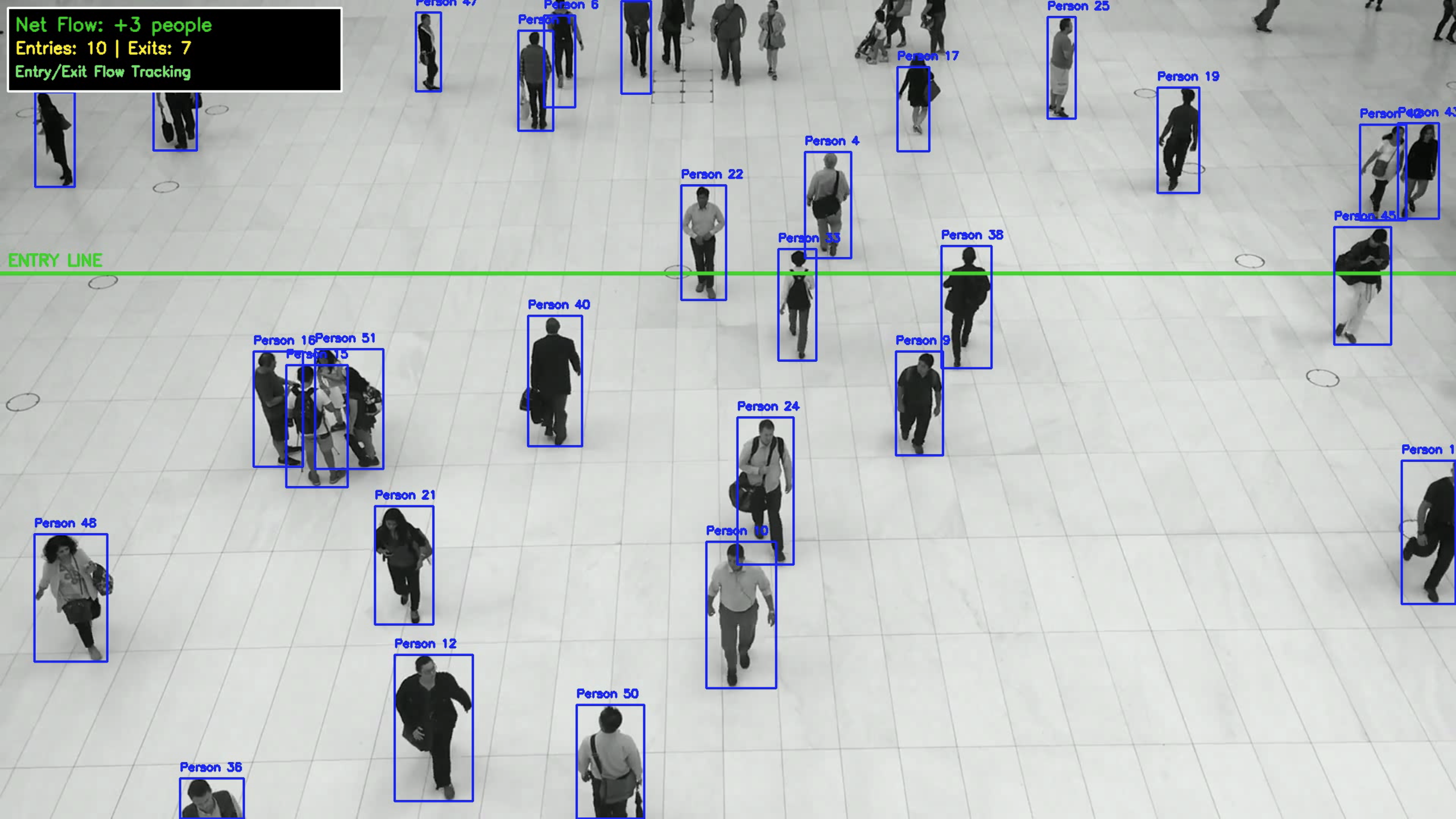
- Entry line visualization with orientation labeling
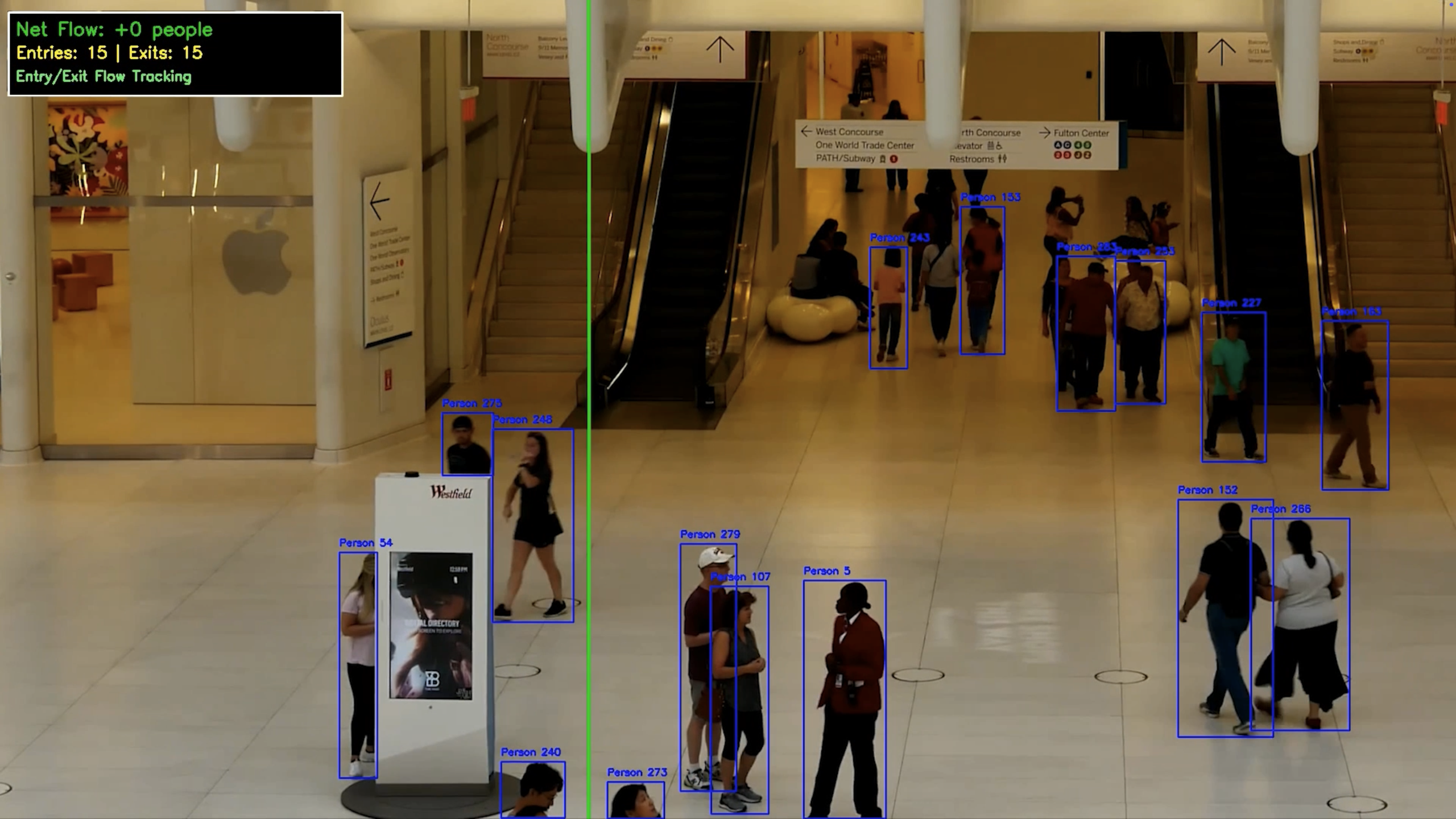
- Bounding boxes around detected people
- Live statistics: net flow, entries, exits
📊 Example Output
Console Output - Vertical Movement
🎯 Line orientation: horizontal (vertical movement)
Video Info: 1920x1080, 25 FPS, 341 frames
📍 Horizontal entry line set at y=360 (for vertical movement)
Progress: 26.4% - Current Count: 3
Progress: 52.8% - Current Count: 2
Progress: 79.2% - Current Count: 1

==================================================
FINAL STATISTICS - ENTRY/EXIT FLOW
==================================================
Total Entries: 12
Total Exits: 11
Net Flow: +1 people
Frames Processed: 341
Note: Net flow shows change during video period only
==================================================
Console Output - Horizontal Movement
🎯 Line orientation: vertical (horizontal movement)
Video Info: 3840x2160, 23 FPS, 2067 frames
📍 Vertical entry line set at x=1280 (for horizontal movement)
Progress: 50.8% - Current Count: 9
Progress: 75.5% - Current Count: 12
Progress: 98.7% - Current Count: 14

==================================================
FINAL STATISTICS - ENTRY/EXIT FLOW
==================================================
Total Entries: 20
Total Exits: 16
Net Flow: +4 people
Frames Processed: 2067
Note: Net flow shows change during video period only
==================================================
Visual Display Elements
- Net Flow: +X people (main metric in green)
- Entries: X | Exits: X (detailed breakdown in cyan)
- Entry/Exit Flow Tracking (system description in light green)
- Entry line visualization (red line with orientation label)
- Person bounding boxes (blue rectangles with "Person" labels)
🎯 Performance Tips
For Better Accuracy
- Good lighting: Works best with clear, well-lit footage
- Camera angle: Overhead or angled views work better than straight-on
- Stable camera: Minimize camera shake for better tracking
- Clear line-of-sight: Avoid obstructions in the counting area
For Different Scenarios
- Crowded areas: Use
--confidence 0.4to reduce false positives - Sparse areas: Use
--confidence 0.2to catch distant people - Real-time processing: Use
--model yolov8n.ptfor speed - Maximum accuracy: Use
--model yolov8x.pt(slower but most accurate) - 4K videos: Consider resizing video files for faster processing
Troubleshooting
| Issue | Solution |
|---|---|
| Too many false positives | Increase --confidence (0.4-0.5) |
| Missing people detections | Decrease --confidence (0.2-0.3) |
| Slow processing | Use smaller model (yolov8n.pt or yolov8s.pt) |
| Wrong count direction | Switch --line orientation |
| Video won't open | Check file path and video codec |
🔧 Configuration
Line Position Adjustment
To modify the entry line position, edit the set_entry_line method in main.py:
def set_entry_line(self, video_width, video_height):
    if self.line_orientation == "horizontal":
        y = video_height // 2  # Center line instead of 1/3
        self.entry_line = {
            'start': (0, y),
            'end': (video_width, y),
            'coordinate': y,
            'type': 'horizontal'
        }
    else:
        x = video_width // 4  # Quarter line instead of 1/3
        self.entry_line = {
            'start': (x, 0),
            'end': (x, video_height),
            'coordinate': x,
            'type': 'vertical'
        }
Movement Direction Logic
Horizontal Line (Vertical Movement):
- Entry: Top → Bottom (y-coordinate increases)
- Exit: Bottom → Top (y-coordinate decreases)
Vertical Line (Horizontal Movement):
- Entry: Left → Right (x-coordinate increases)
- Exit: Right → Left (x-coordinate decreases)
🧪 Testing
Run the setup test to verify installation:
python test_setup.py
This will:
- ✅ Check all dependencies
- ✅ Download YOLOv8 model if needed
- ✅ Verify OpenCV and Ultralytics installation
📁 Project Structure
retail-people-counter/
├── main.py                 # Main application (optimized)
├── test_setup.py           # Setup verification script
├── create_demo_video.py    # Demo video creation utility
├── requirements.txt        # Python dependencies
├── README.md              # This comprehensive guide
├── .gitignore             # Git exclusions
├── clips/                 # Your input video files (not tracked)
└── venv/                  # Virtual environment (not tracked)
🤝 Contributing
- Fork the repository
- Create your feature branch (
git checkout -b feature/AmazingFeature) - Commit your changes (
git commit -m 'Add some AmazingFeature') - Push to the branch (
git push origin feature/AmazingFeature) - Open a Pull Request
📄 License
This project is licensed under the MIT License.
🙏 Acknowledgments
- Ultralytics for the excellent YOLOv8 implementation
- OpenCV community for computer vision tools
- COCO dataset for training the person detection model
🔗 Links
Built with ❤️ for retail analytics and accurate people flow tracking
Ready for LinkedIn, GitHub, and production deployment! 🚀
Built With
- python
- yolov8

Log in or sign up for Devpost to join the conversation.