-
-
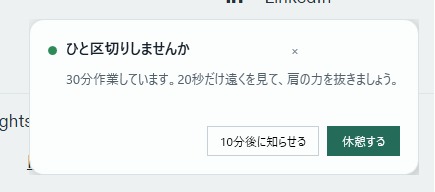
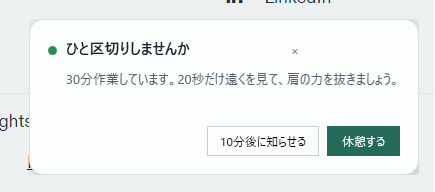
A quiet, non-blocking break reminder that appears without interrupting the user's work.
-
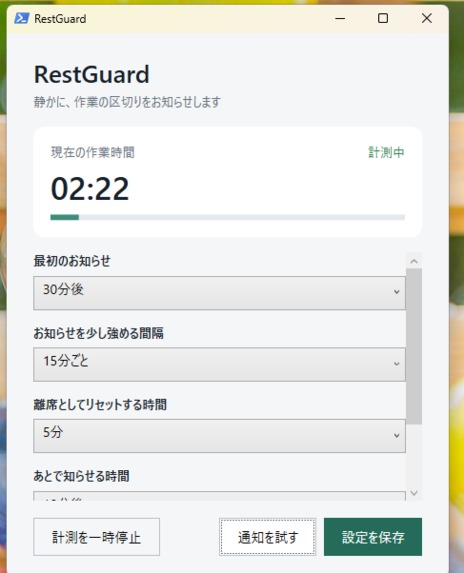
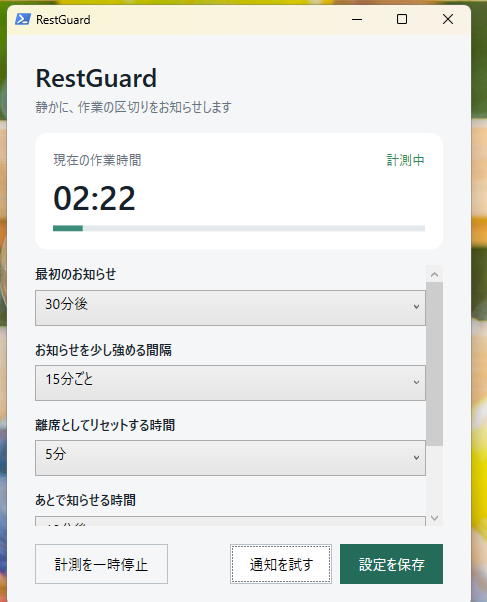
RestGuard settings with the active work-session timer and customizable reminder intervals.
spiration
I experience neurodivergent traits, especially a tendency to hyperfocus. When I become absorbed in work at my computer, I can lose track of time, tire easily, and sometimes forget to take breaks even when my body needs one.
Building RestGuard has already changed my relationship with breaks. Designing the reminder made me more conscious of the need to pause, which has made it easier to step away voluntarily. And when I still forget, RestGuard gives me a gentle way to remember without making me feel punished or abruptly breaking my concentration.
This personal experience also revealed a broader design problem. Deep work has a hidden failure mode: when concentration is going well, people stop noticing their bodies and continue for too long. Existing break timers often interrupt at the wrong moment or become repetitive alarms that users immediately disable. I wanted a reminder that respects focus while still making accumulated strain visible.
What it does
RestGuard is a lightweight Windows tray application that measures active keyboard and mouse time rather than simply counting from launch. Short idle periods pause the timer, and a real five-minute break resets it automatically. At 30, 45, and 60 minutes, RestGuard presents progressively stronger—but still quiet—reminders. Users can take a break, snooze the reminder, pause tracking, customize intervals, or launch the app at sign-in.
The app never reads keystrokes, screen content, window titles, or application names. All settings and state remain local.
How we built it
We built RestGuard with GPT-5.6 in Codex during OpenAI Build Week. The maker supplied the product insight and made the core UX and privacy decisions. Codex translated those constraints into a portable WPF application using PowerShell, the Windows .NET Framework, GetLastInputInfo, a dispatcher-based state machine, a custom reminder window, and a system-tray interface.
Codex also helped adapt the architecture when the target computer did not have the .NET SDK, debugged the reminder and snooze state transitions, verified that the resident process launched successfully, and prepared reproducible testing instructions. The final application needs no installer, account, API key, or internet connection.
Challenges we ran into
The main challenge was distinguishing genuine work from elapsed time without collecting invasive data. We solved this with session-local Windows idle information. Another challenge was delivering a notice that is visible but not stressful. We used staged color and wording, no sound by default, and a small lower-right reminder instead of a blocking modal.
The development machine also lacked the .NET SDK. Rather than requiring a large toolchain installation, we used the WPF and .NET Framework components already included in Windows, producing a portable judge-friendly build.
Accomplishments that we're proud of
- A complete, coherent tray-first product rather than a timer proof of concept
- Privacy-preserving active-time measurement
- Progressive reminders with break and snooze actions
- Zero-install Windows execution
- Recovery from sleep and long gaps without inflating work time
- A dedicated instant-demo control for evaluation
What we learned
The most important design lesson was that a wellbeing tool should not compete for attention. The most useful reminder is not necessarily louder; it is better timed, easy to understand, and gives the user agency. Codex was most effective when the human constraints were explicit and testable.
What's next
Next steps include complete English localization, signed Windows packaging, accessibility review, optional notification-style personalization, and a privacy-preserving daily reflection that helps users discover when they most often work beyond their intended limit.

Log in or sign up for Devpost to join the conversation.