-
-

RESQ — Rescue food. Save money. Waste less.
-

Our Project Story
What inspired us
We were inspired by a simple observation: perfectly usable food can become waste simply because it was not sold before the end of the day.
At the same time, customers are constantly looking for affordable food.
We wanted to explore whether technology could connect these two problems in a simple way — helping businesses recover some value from surplus food while giving customers an easy way to rescue it at a lower price.
That idea became RESQ — Rescue food. Save money. Waste less.
What we built
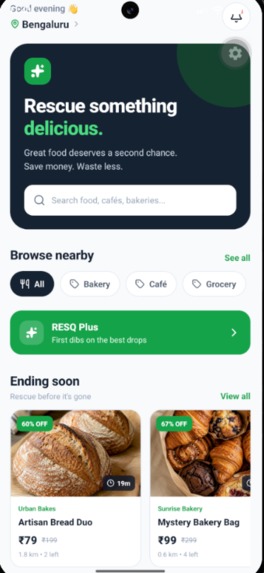
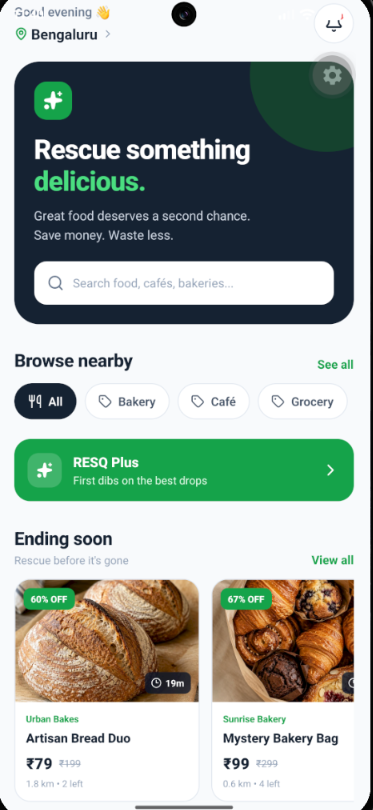
We built a mobile-first prototype that turns surplus food into time-sensitive rescue opportunities.
A customer can open RESQ, browse available food, see the original price and discounted rescue price, check the pickup window, and reserve a food item.
The experience continues through checkout and confirmation, where the user receives a pickup code.
We also designed an RESQ Plus experience for customers who want additional convenience and earlier access to new surplus drops. It includes concepts such as First Dibs, Smart Drop Alerts, Advanced Filters, Smart Auto-Reserve, and Advanced Impact Analytics.
The app also includes an Orders experience so users can track their active and completed rescues.
How we built it
We built the mobile experience using React Native, Expo, Expo Router, and TypeScript.
We focused heavily on the user experience because food rescue is time-sensitive. A user should be able to understand what is available, how much they can save, and when they need to collect it without navigating through complicated screens.
We created realistic food listings, pickup windows, pricing, discounts, reservation flows, confirmation screens, orders, and a premium experience.
Our development process was highly iterative. We tested the application on an Android emulator, fixed navigation and build issues, refined the screens, and continuously tested the complete customer journey.
What we learned
One of our biggest lessons was that building an app is much more than writing code.
We learned about:
- Mobile application architecture
- React Native and Expo
- Navigation and multi-screen application flows
- Designing for a real user journey
- Git and GitHub collaboration
- Android development and native builds
- Subscription product design
- Rapid prototyping under a deadline
- Turning a problem statement into a usable product
We also learned the importance of testing the complete flow rather than assuming individual screens will work together.
Challenges we faced
One of our biggest challenges was getting the Android development environment working correctly.
We had to deal with dependency compatibility, native Android builds, Gradle configuration, emulator testing, and navigation issues.
We also encountered a runtime issue while experimenting with the RevenueCat native SDK. The application initially displayed a white screen because of a native module compatibility problem. Instead of continuing to add features blindly, we isolated the problem, removed the unstable dependency from the current build, cleared the Metro cache, rebuilt the application, and restored a stable working prototype.
Another challenge was time.
We were building the project under a very tight hackathon deadline, which forced us to prioritize the most important user experience instead of trying to build every possible backend feature.
That taught us an important

Log in or sign up for Devpost to join the conversation.