-
-
Landing Page
-
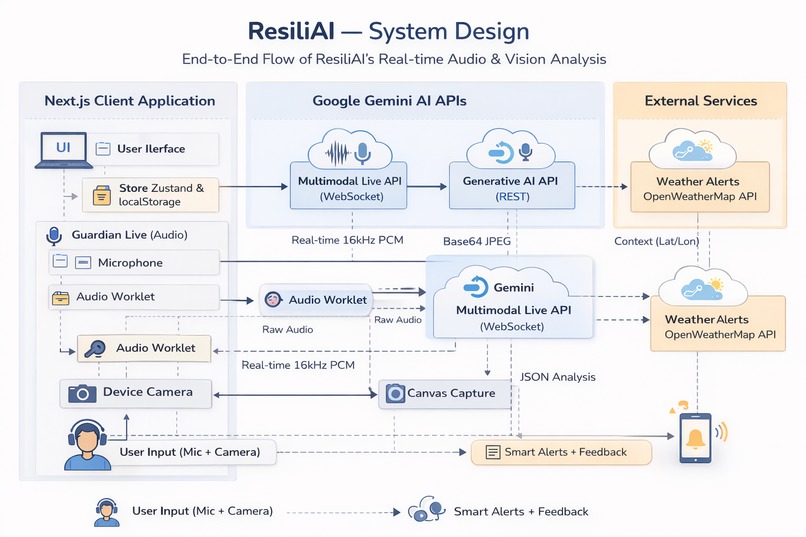
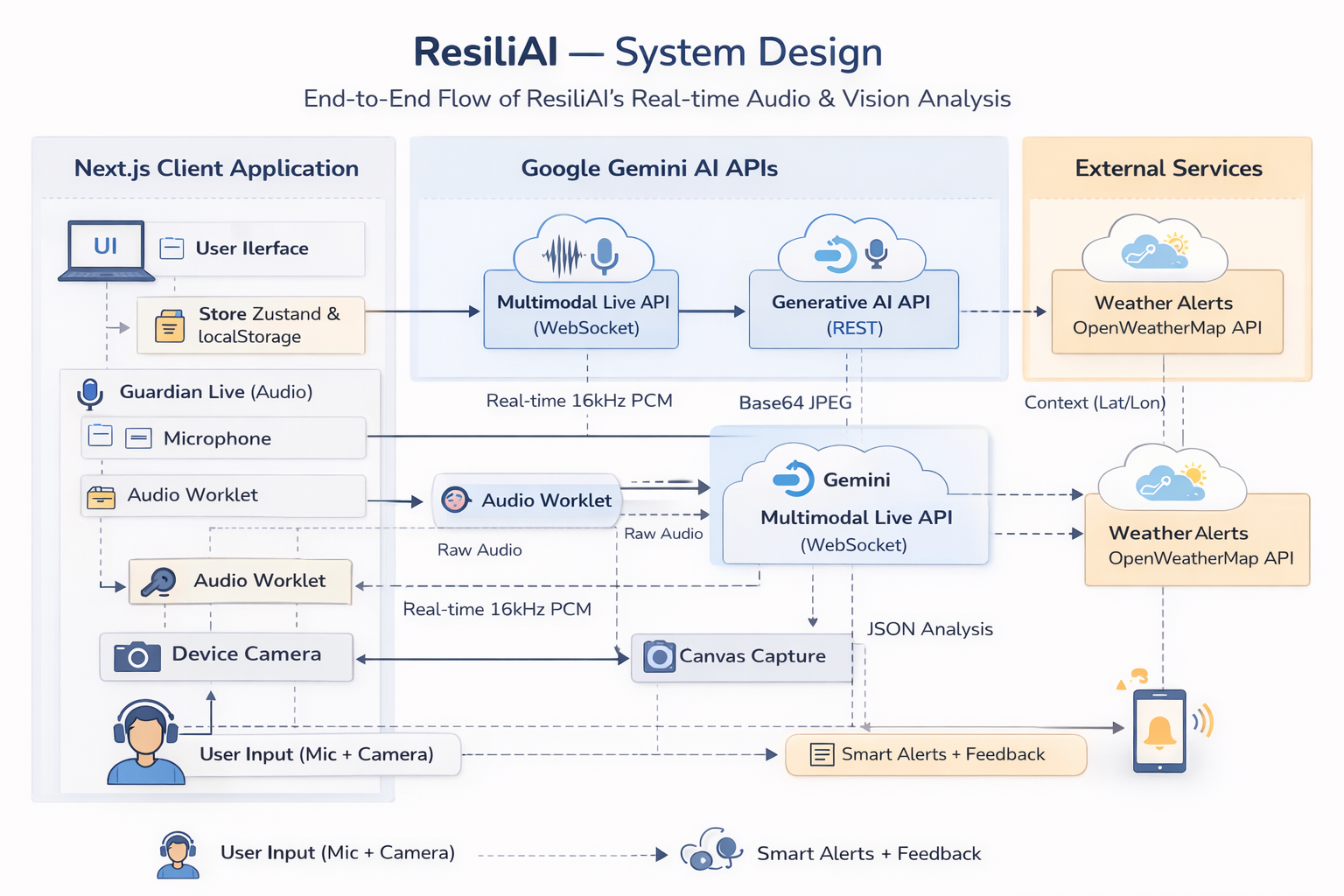
Technical Workflow
ResiliAi - Autonomous AI Agent for Natural Disaster Mitigation
"Disasters don't wait. Neither should you."
Inspiration
The spark for ResiliAi came from a sobering realization: 80% of disaster deaths occur in the first 72 hoursbefore organized relief arrives. During those critical moments, most people freeze. They scramble for flashlights, forget where they stored water, or worst of all, panic and make dangerous decisions. I was inspired to leverage the advanced reasoning and multimodal capabilities of Gemini 3.0 to build an intelligence system that doesn't just provide generic advice. For example:
- Static Checklists: Useful for planning, useless when your hands are shaking, and the power is out.
- Generic Advice: "Know your evacuation route" is meaningless if the AI doesn't know you live in a 5th-floor apartment with an elderly parent and two cats.
I envisioned an AI that knows your home, understands your vulnerabilities, and can literally talk you through the worst night of your life. An intelligence that transitions seamlessly from daily "Blue Sky" preparedness to real-time "Event Mode" crisis response.
The central question became:
What if every home had a Guardian, an AI that prepares you when skies are clear and guides you when they turn grey?
What it does
ResiliAi is an AI-powered disaster preparedness and response application designed to transform how individuals and families prepare for and survive emergencies. ResiliAi is an active survival intelligence that lives on your device, auditing your home for hazards, training you through gamified simulations, and speaking to you with a calm, reasoning voice when panic sets in.
The application leverages Google's Gemini 3 API across multiple modalities: Vision for real-time hazard detection, Text for personalized action plans, and Live Audio streaming for hands-free crisis guidance. It's built as a Progressive Web App (PWA), ensuring it works offline when infrastructure fails exactly when you need it most.
How We Built It
Architecture Overview
┌─────────────────────────────────────────────────────────────┐
│                    VERCEL (Edge Deployment)                 │
└──────────────────────────┬──────────────────────────────────┘
                           │
┌──────────────────────────▼──────────────────────────────────┐
│                    FRONTEND (PWA)                           │
│   Next.js 14 (App Router) + TypeScript                      │
│   Tailwind CSS + Framer Motion + shadcn/ui                  │
│   next-pwa (Service Worker for Offline)                     │
└──────────────────────────┬──────────────────────────────────┘
                           │
┌──────────────────────────▼──────────────────────────────────┐
│                    AI LAYER                                 │
│   @google/generative-ai (Gemini Vision + Text)              │
│   @google/genai (Gemini Live Multimodal Streaming)          │
│   Web Audio API + MediaRecorder (Voice I/O)                 │
└──────────────────────────┬──────────────────────────────────┘
                           │
┌──────────────────────────▼──────────────────────────────────┐
│                    DATA LAYER                               │
│   Zustand (Global State + LocalStorage Persistence)         │
│   Dexie.js (IndexedDB for Offline Data)                     │
│   OpenWeatherMap API (Real-time Alert Triggers)             │
└─────────────────────────────────────────────────────────────┘
Technology Stack
| Layer | Technology | Purpose |
|---|---|---|
| Framework | Next.js 14 (App Router) | Server/client components, API routes |
| Language | TypeScript | Type safety across the codebase |
| Styling | Tailwind CSS + shadcn/ui | Rapid component development |
| Animation | Framer Motion | Smooth transitions, gesture support |
| AI (Vision/Text) | @google/generative-ai |
Gemini Pro for reasoning tasks |
| AI (Live Audio) | @google/genai |
WebSocket streaming for real-time voice |
| State | Zustand | Lightweight, persistent global store |
| Offline DB | Dexie.js | IndexedDB wrapper for crisis data |
| PWA | next-pwa | Service worker, installability |
| Testing | Vitest + Testing Library | Unit and integration tests |
| Deployment | Vercel | Auto-deploy, Edge CDN |
Core Features Implemented
1. "Sentinel" Home Audit (Gemini Vision)
Users point their camera at any room, and Gemini Vision analyzes the image to identify:
- Hazards: Unanchored furniture, blocked exits, fire risks
- Assets: First aid kits, water supplies, flashlights
- Result: A personalized "Fortification Plan" with prioritized tasks
// Simplified Vision Analysis Flow
const analyzeRoom = async (imageBase64: string) => {
  const model = genAI.getGenerativeModel({ model: 'gemini-3-pro-vision' });
  const result = await model.generateContent([
    { text: systemPrompt },
    { inlineData: { mimeType: 'image/jpeg', data: imageBase64 } }
  ]);
  return parseHazardsAndAssets(result.response.text());
};
2. "Guardian" Live Voice (Gemini Live Audio)
The flagship feature, a real-time voice companion that activates during emergencies:
- Bidirectional Audio Streaming via WebSocket
- Context-Aware Guidance based on user profile (pets, elderly, mobility)
- Emotional Regulation with a calm, reassuring tone -Monitors alerts in background (Service Worker) -Notifies/speaks ** to the user on critical alerts -Personalized** emergency guidance via Gemini Live API
The GuardianLiveService class manages:
- WebSocket connection to Gemini Live API
- AudioContext for playback at 24kHz PCM
- MediaRecorder for microphone capture
- Audio queue management for smooth streaming
3. "Drill Sergeant" Simulations
Gamified training scenarios using the user's actual home profile:
- "It's 2 AM. Flood sirens are blaring. Battery is 12%. What do you do?"
- Earn Resilience Points for correct decisions
- AI-generated scenarios adapt to local weather patterns
4. Blue Sky / Grey Sky / Event Mode Lifecycle
The app transitions through states based on weather data:
| Mode | Trigger | UI Behavior |
|---|---|---|
| Blue Sky | Clear weather | Daily missions, training |
| Grey Sky | Weather alert detected | Pre-emptive action plan |
| Event Mode | Active disaster | High-contrast, offline-ready, voice guidance |
Challenges We Faced
1. WebSocket Audio State Management
The Gemini Live API streams audio as Base64 PCM chunks over WebSocket. Our initial implementation suffered from:
- Audio chunks arriving out of order
- Connection drops when backgrounded on mobile
- Memory leaks from unreleased AudioBufferSourceNodes
Solution: Implemented a dedicated GuardianLiveService class with:
- FIFO audio queue with proper cleanup
- Reconnection logic with exponential backoff
- Explicit
disconnect()method to release all resources
// Proper cleanup to prevent memory leaks
disconnect(): void {
  if (this.mediaRecorder) this.mediaRecorder.stop();
  if (this.session) this.session.close();
  if (this.audioContext) this.audioContext.close();
  this.audioQueue = [];
  this.isPlaying = false;
}
2. Offline-First PWA Architecture
"Offline mode" can't be an afterthought for a disaster app it's the primary use case. We faced:
- Service worker caching conflicts with Next.js dynamic routes
- IndexedDB storage limits on iOS Safari
- State hydration errors when transitioning online↔offline
Solution:
- Used Dexie.js for structured offline storage
- Zustand's
persistmiddleware with LocalStorage fallback - Pre-cached critical assets via
next-pwaconfiguration
3. Camera Permissions on iOS Safari
iOS Safari has stricter permission handling than Chrome. The Vision Audit feature failed silently because:
getUserMedia()requires HTTPS (Vercel ✓)- Must be triggered by user gesture (added explicit button)
- Permission state can't be pre-queried
Solution: Wrapped camera access in try/catch with user-friendly fallback UI explaining permission requirements.
4. Gemini Vision Response Parsing
Gemini returns hazard analysis as natural language, but we needed structured data for UI rendering. Initial regex-based parsing was brittle.
Solution: Used Zod schema validation with a structured prompt:
const HazardSchema = z.object({
  type: z.enum(['earthquake', 'fire', 'flood', 'general']),
  severity: z.enum(['low', 'medium', 'high', 'critical']),
  item: z.string(),
  recommendation: z.string()
});
5. Dark Mode Consistency
The app supports system, light, and dark themes via Zustand-persisted preference. Challenge was ensuring all 15+ pages/components respected the theme:
- Some components used hardcoded colors
- Tailwind's
dark:variants weren't applied consistently
Solution: Established a strict color token system and used className audits to ensure dark: variants were present on all interactive elements.
Accomplishments That We're Proud Of
Fully Functional Real-Time Voice AI
We achieved bidirectional audio streaming with Gemini Live—a technically demanding feature that most hackathon projects skip. Users can have a natural conversation with the Guardian voice companion, complete with interruption handling and emotional tone adaptation.
True Offline Capability
This isn't "offline with caveats." Critical emergency data, action plans, and the core UI work without any network connection. The app degrades gracefully, prioritizing life-saving functionality.
Production-Quality PWA
ResiliAi installs like a native app, launches instantly, and passes all Lighthouse PWA audits. The install flow works seamlessly on both Android and iOS.
Vision-Based Hazard Detection
The Sentinel feature genuinely identifies hazards from camera input—unanchored furniture, blocked exits, fire risks—and generates actionable recommendations. It's not a demo mock; it's real Gemini Vision.
Cohesive Design System
Dark mode, light mode, and system preference detection work flawlessly across 15+ pages. The UI is designed for stress scenarios: high contrast, large buttons, minimal text.
Complete User Journey
From onboarding quiz to daily missions to crisis response to recovery—the entire "Blue Sky to Grey Sky to Event Mode" lifecycle is implemented and functional.
What We Learned
1. Multimodal AI Changes the Game
Text-only AI feels like talking to a search engine. Combining Vision + Audio + Text creates something that feels alive. Users don't read instructions during a crisis—they need to hear them.
2. PWAs Are Production-Ready
Modern PWAs with service workers, IndexedDB, and Web APIs (Camera, Audio, Geolocation) rival native apps. The install-to-home-screen flow is seamless on both Android and iOS.
3. State Management Matters More Offline
When you can't round-trip to a server, local state becomes your source of truth. Zustand's lightweight persistence was perfect for this use case.
4. Design for Stress, Not Comfort
Emergency UIs need:
- High contrast (legible in smoke/darkness)
- Large tap targets (shaking hands)
- Voice-first interaction (hands may be occupied)
- Minimal cognitive load (panic impairs reading comprehension)
5. Real-Time Audio is Hard
WebSocket + Web Audio API + MediaRecorder + State Management = many failure modes. But when it works, bidirectional voice AI is magical.
What's Next for ResiliAi
ResiliAi is more than a demo; it's a foundation for community resilience:
Ecosystem & Accessibility
- Community Mesh Networking: When cell towers fail, use device-to-device communication (WebRTC, Bluetooth) to share safety status with neighbors.
- Integration with Smart Home: Auto-detect hazards via connected cameras, control smart locks/lights during evacuations.
- Municipal Partnerships: Provide anonymized, aggregated preparedness data to cities for disaster planning.
- Accessibility First: Screen reader support, multi-language guidance, ASL video guides.
Verified Trust Circles
In a disaster, trust is the most critical currency. Future versions will implement:
- Identity Verification: Users must verify their ID to participate in the Mesh Network.
- Circle of Trust: Unverified users can see where resources are but cannot contact providers directly.
- Preventing Fraud: Ensures that "Sarah with extra water" is a real, verified neighbor, not a bad actor.
ResiliAi Premium Tier
- Offline Maps Download: Cache entire regions for navigation without internet.
- Family Satellite Sync: Integration with satellite-enabled devices (like Pixel 9/iPhone 15) for off-grid family tracking.
- Priority AI Processing: Faster response times during peak network congestion.
Conclusion
Building ResiliAi taught us that the best technology is invisible in the moment of need. When the power goes out and panic sets in, you don't want to troubleshoot an app; you want a calm voice that knows your home, knows your risks, and knows exactly what to do next.
That's what ResiliAi aims to be: A Guardian that prepares you when skies are clear and guides you when they turn grey.
Project Links
- Live Demo: resiliai.site
- Repository: github.com/OnTrak-Tech/ResiliAi
Acknowledgments
- Google Gemini Team — For the incredible multimodal APIs
- OpenWeatherMap — For free-tier alert data
- Vercel — For seamless deployment
- shadcn/ui — For beautiful, accessible components
Built With
- antigravity-ide-for-coding
- deployment-vercel-(edge-network)
- frontend-next.js-14-(app-router)-typescript
- gemini-3-pro-preview-for-image-recognition
- gemini-live-api-for-real-time-audio-streaming
- storage-dexie.js-(indexeddb)-for-robust-offline-data-persistence.
- tailwind-css-framer-motion-(cyberpunk/safety

Log in or sign up for Devpost to join the conversation.