-
-
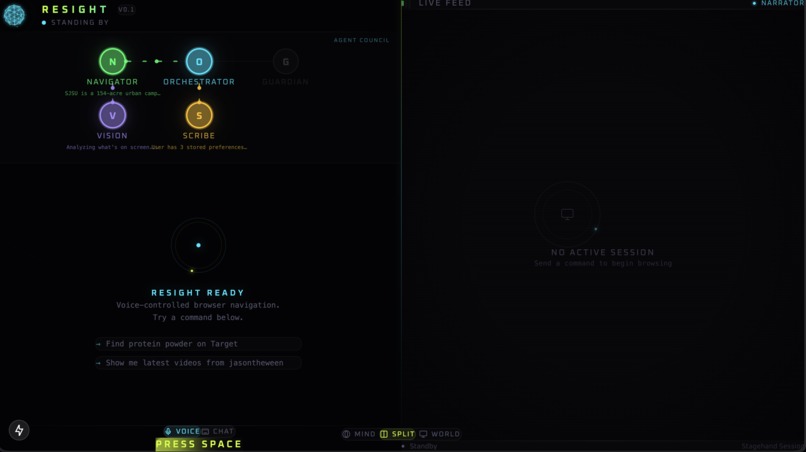
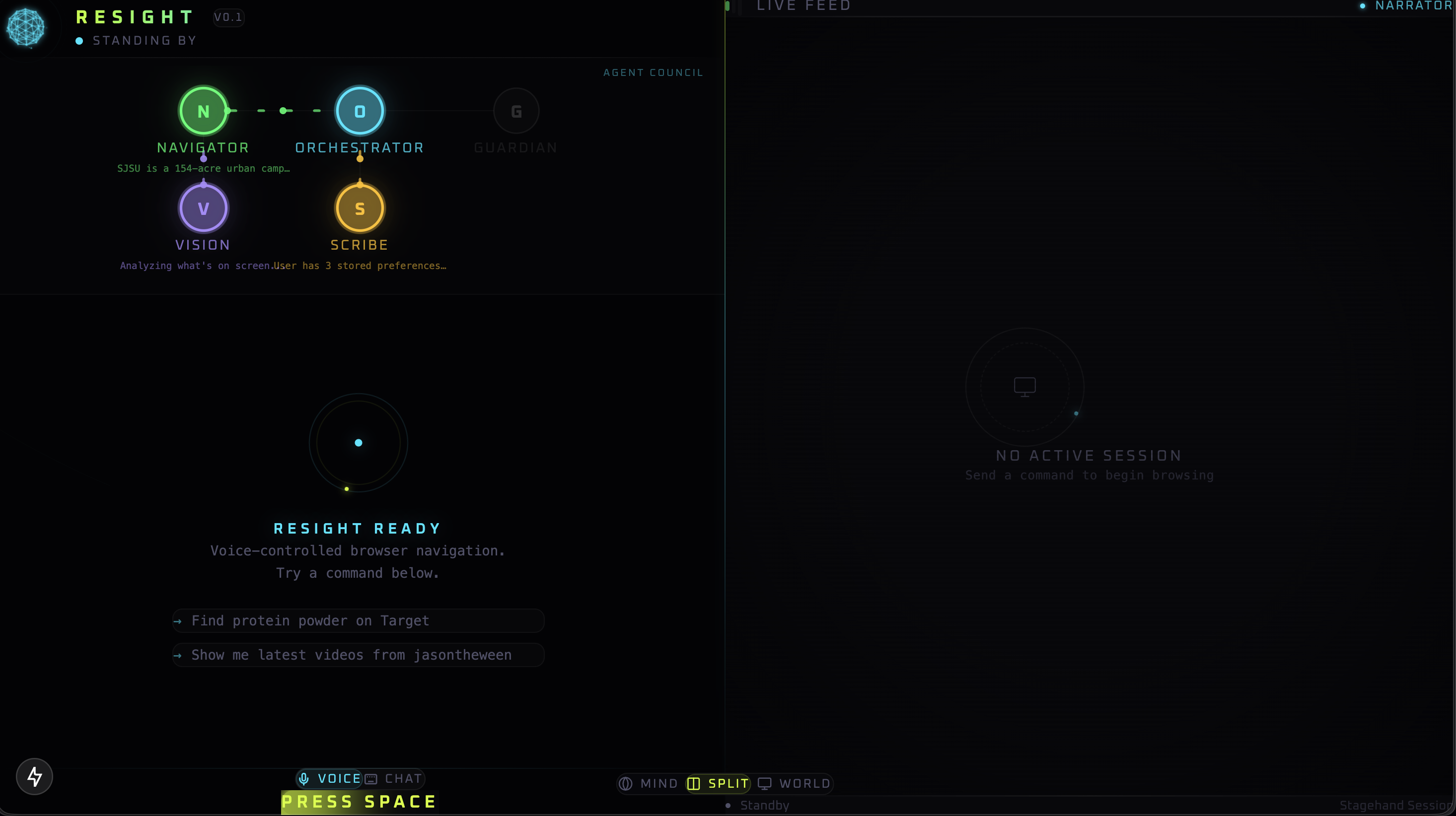
ReSight Landing Page
-
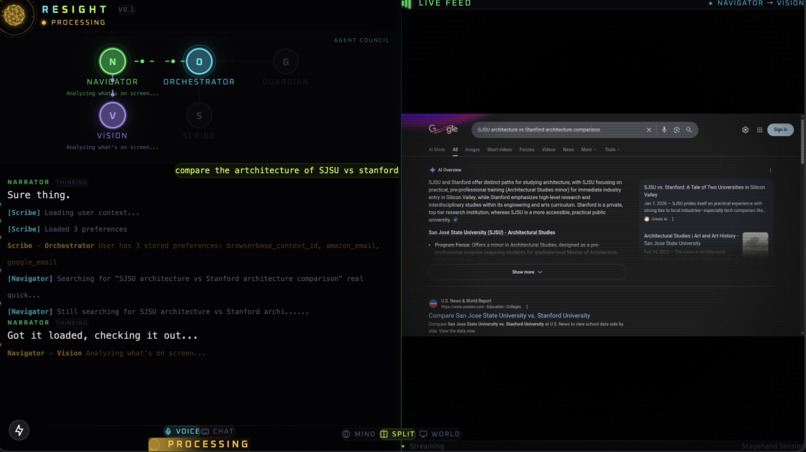
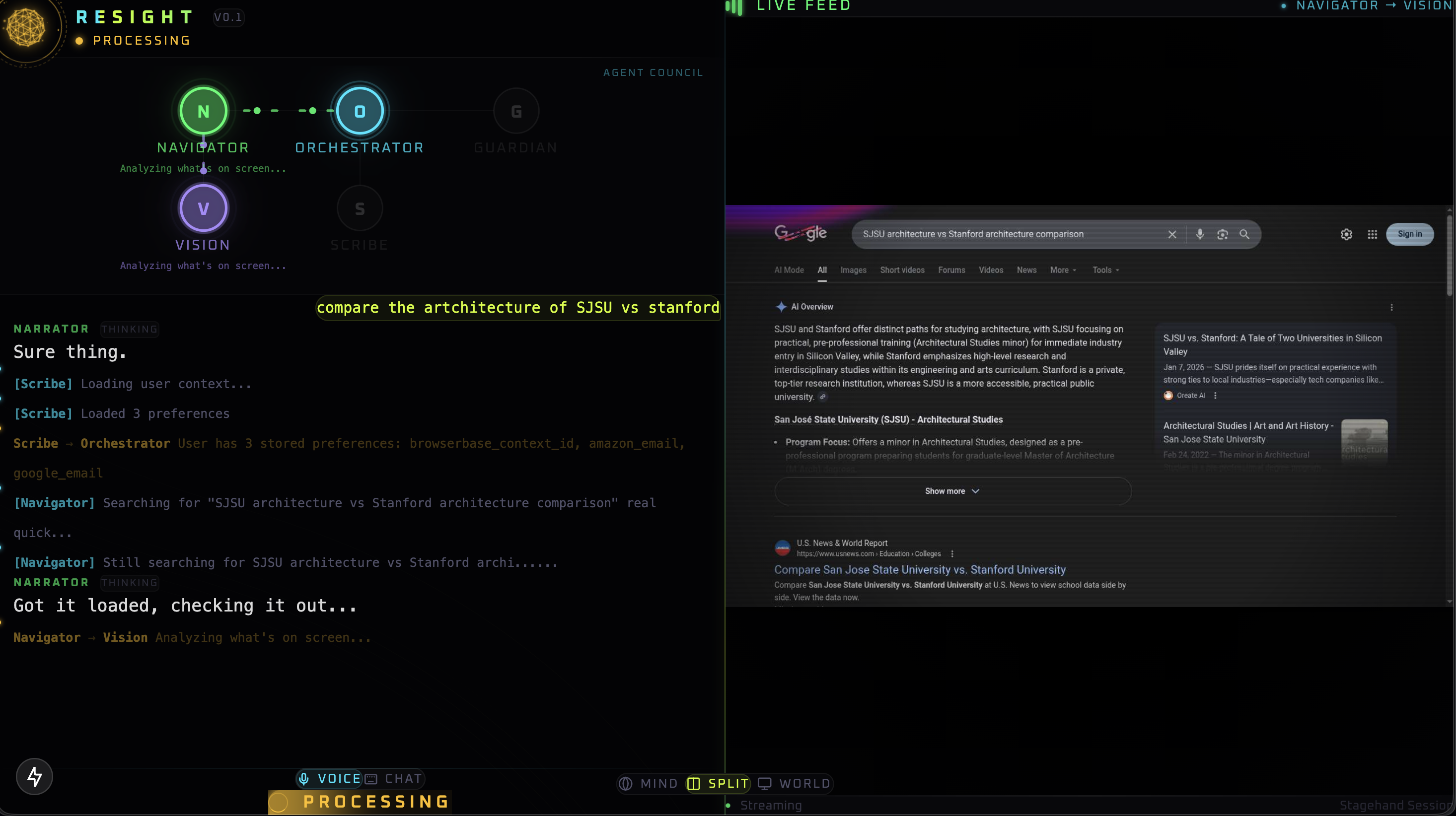
ReSight in action
-
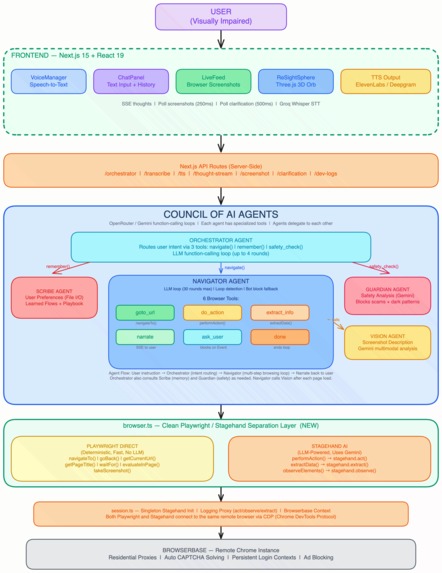
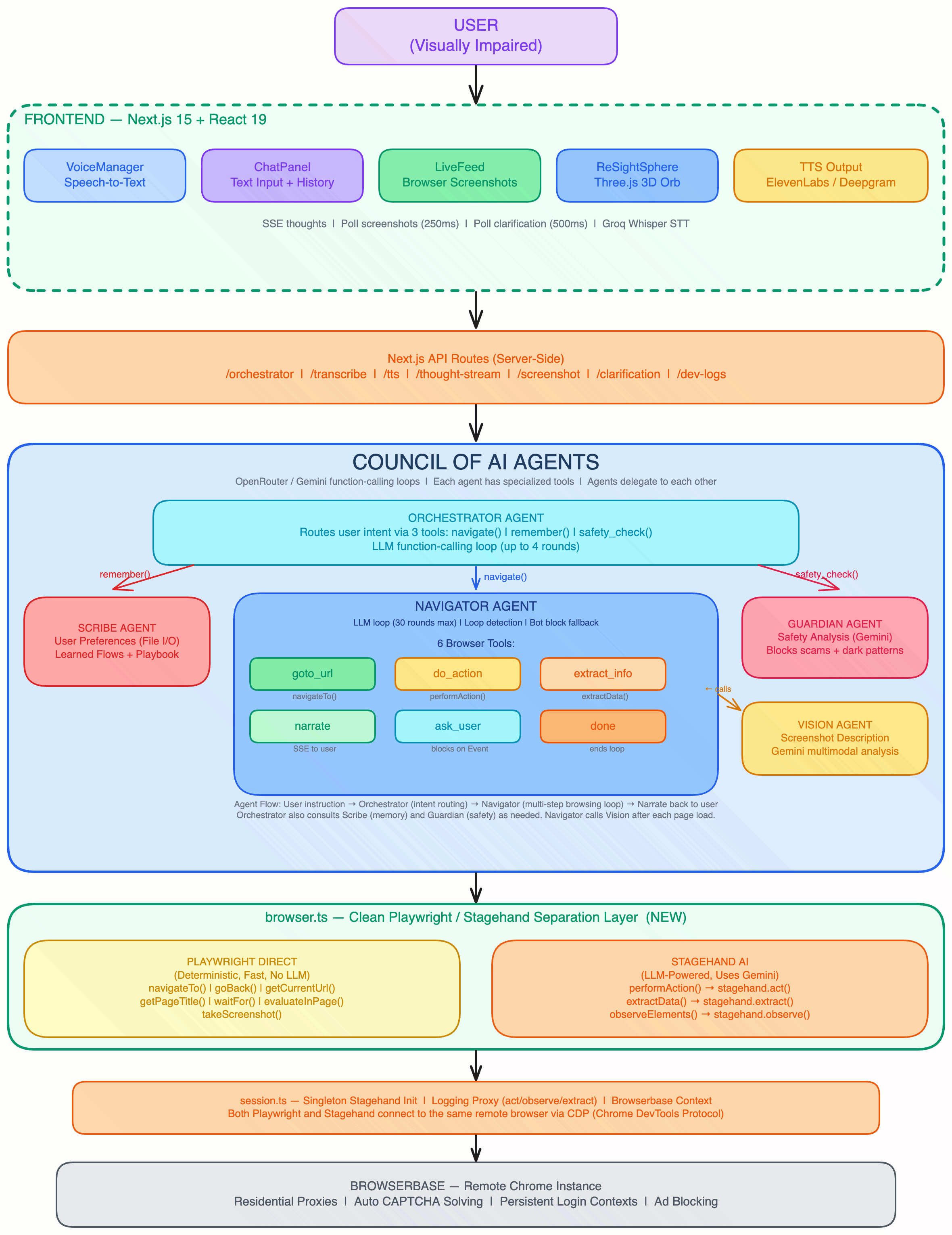
Project Architecture
-
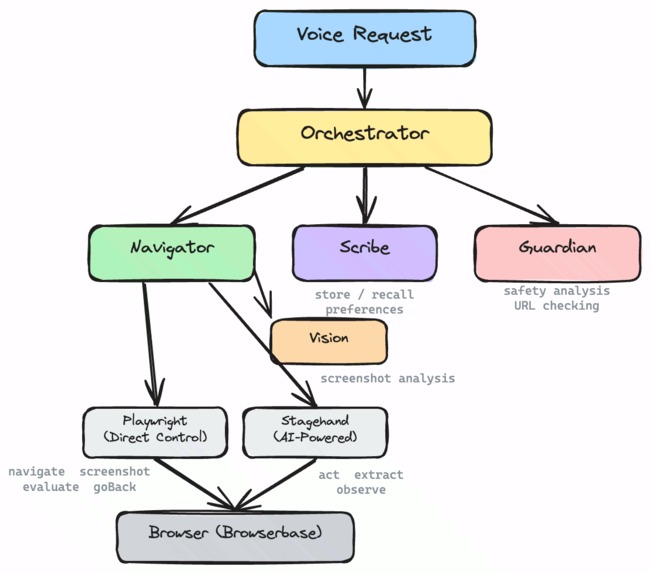
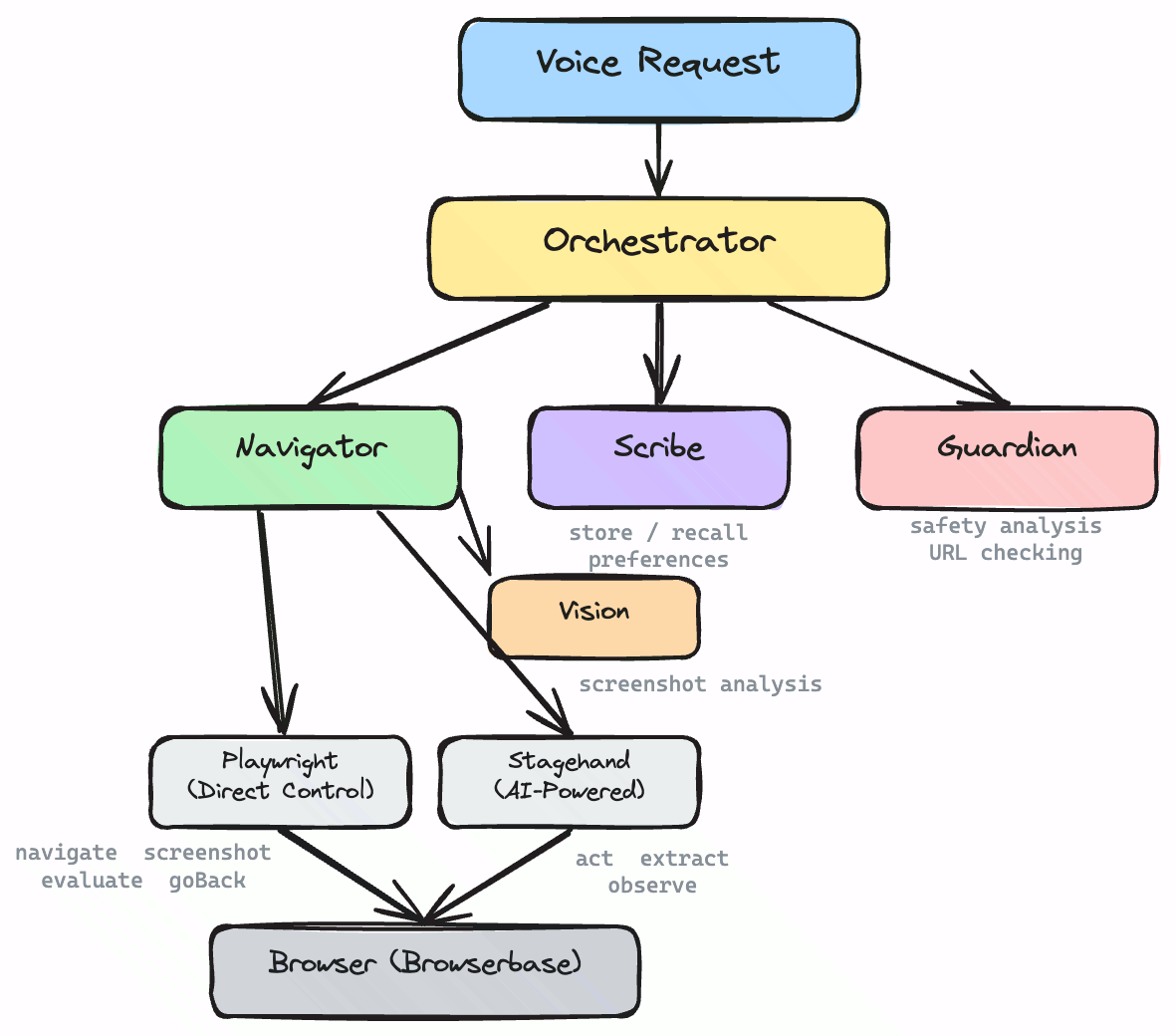
Multi-turn Agents
Inspiration
A few years back, one of us tutored a blind student at San Jose State who wanted to learn web development. Watching him browse made something obvious: for visually impaired users, modern web browsing is often just a shell of the full experience non-visually impaired users have. Instead of viewing vivid UIs, they are forced to rely on linear text-to-speech options that miss context and layout.
With today’s AI and modern web tooling, we believed we could help bridge that gap. ReSight is our attempt to empower visually impaired users to take control of their own browser experience.
What it does
ReSight is a voice-first browsing copilot designed specifically for visually impaired users. It goes beyond simple screen reading to provide true agency.
- Navigation & Tasks: Helps users navigate websites, compare information, and complete multi-step tasks through natural conversation.
- Vision-Based Narration: Uses vision models to explain the actual Page UI, not just the DOM text.
- Memory & Safety: Includes persistent memory and safety support (Guardian) so users can browse with confidence and less friction.
Built for zero-vision use
ReSight is designed to be used entirely without sight.
- Voice & Keyboard Control: Users can start and control browsing with voice + keyboard shortcuts (e.g., press Space to start an instruction).
- Audio Feedback: The system provides spoken progress updates, vision-based page narration, and spoken next-step prompts so users never need to look at the screen.
- Conversational Interaction: Core interactions (searching, navigating, comparing, form guidance) are designed to be completed through audio feedback and conversational control alone.
How is this different than just talking to an LLM? Our goal is not to have AI "do everything for" the user. Our goal is empowerment. ReSight is designed so the user feels like they are actively navigating, deciding, and interacting with the web—with AI as an assistive layer, not a replacement for their agency.
How we built it
We built ReSight as a multi-agent web application utilizing browser automation, screenshot-based vision narration, and conversational voice interaction.
The Agent Architecture (Multiturn + “handoffs”):
Orchestrator: Handles task coordination and delegates instructions. In multiturn mode it also threads the conversation state forward (what you asked, what we just found, what we’re trying next) and can re-issue improved instructions when the user clarifies mid-flight (“no, the other one”, “go back”, “open the comments”).
Navigator: Executes web actions and extracts data. It runs as a step-wise agent loop (act → observe/extract → narrate) and can pause for a user answer (credentials, “pick option A/B”) without losing its place, then continue from the same page state.
Scribe: Manages user memory and preferences. In multiturn interactions, it persists durable context (“prefers concise summaries”, “uses Reddit logged-in context”, “always wants top 3 options”) so later turns don’t re-ask or re-derive basics.
Guardian: Performs safety checks for suspicious flows or content. It acts like a specialist agent that can be invoked mid-task when the Navigator hits dark patterns, suspicious redirects, or risky actions—then hands control back with an allow/block + rationale.
How the agents go back-and-forth (handoffs):
Agent tool-calls as contracts: The Orchestrator calls
navigate(...)(orremember(...),safety_check(...)) and gets structured results back. That makes the “handoff” explicit and repeatable across turns.Multiturn continuation: A user can interrupt or refine at any time (“stop”, “go back”, “open that one”). The Orchestrator cancels in-flight work, keeps the last useful state, and re-delegates—so it feels like a real back-and-forth instead of a one-shot script.
Clarification loop: The Navigator can ask a single targeted question (via an
ask_userbridge), block until the user answers, then resume the same task—no restarting the whole flow.
Powered by Stagehand + Browserbase (why this works):
- Stagehand
act(): Powers intent-driven interactions (click/type/scroll) without relying on brittle selectors. - Stagehand
extract(): Provides structured outputs (sponsors, tracks, prices, hours, form fields) from real pages. - Stagehand
goto(): Enables deterministic fallback routing whenact()fails (navigating by URL instead of repeated clicks). - Stagehand Screenshot Loop: Combined with vision narration, this gives blind users UI context beyond raw DOM text.
- Browserbase: Provides persistent context (keeping logins/cookies active across runs) and solves CAPTCHAs to reduce failures on bot-protected flows.
Challenges we ran into
- Anti-Bot Protections: Dealing with aggressive CAPTCHAs and blocking on popular sites.
- Dynamic Actions: Ensuring action reliability on complex, dynamic websites (SPAs).
- Humanizing the AI: Making the narration feel helpful and human, rather than robotic or overly verbose.
- The Trade-off: Balancing autonomy, safety, and execution speed.
Accomplishments that we're proud of
- Built a working voice-first browser experience centered entirely on accessibility.
- Implemented vision-first narration so users hear what is actually on the screen, not just code.
- Created a practical multi-agent system that handles navigation, memory, and safety simultaneously.
- Kept the interaction conversational while still capable of handling complex, multi-step tasks.
What we learned
- Accessibility Reading Text: Accessibility is not just "read text aloud."
- Agency is Key: Real accessibility means giving users agency, context, and confidence while navigating the web.
- System Design: We learned that multi-agent systems work best when each agent has a clear, strictly defined role to keep the user experience simple.
What's next for ReSight
- Better Stealth: Better CAPTCHA bypassing will enhance browsing capabilities for users (ex. access to yelp.com)
- Suite for the Visually Impaired: We'd like to expand to other tools that will enhance the experiences of the visually impaired in the context of using technology
Built With
- browserbase
- deepgram
- groq
- next.js
- openrouter
- playwright
- stagehand


Log in or sign up for Devpost to join the conversation.