-
-
Residue
-
Desktop
-
iOS
Inspiration
As college students, studying is something we are constantly trying to optimize. We look for the right library spot, the right playlist, the right amount of background noise, the right study group, and the right routine that finally helps our brain lock in.
But most study tools still treat focus like a timer.
They track how long we study, but not how we study best. They do not help us understand whether we focus better in silence, with cafe noise, with brown noise, in a crowded room, or in a quieter space. That process is usually based on guessing, habit, and trial and error.
We built Residue as a by-students, for-students platform that makes studying more personal. Residue helps users understand how their acoustic environment affects their productivity, then uses that information to recommend or generate sound conditions that better support focus.
The idea is simple: students should not have to force themselves into generic productivity systems. Their study tools should learn from them.
What it does
Residue is a personalized acoustic intelligence app for studying.
A user signs in, chooses a study mode such as Focus, Calm, Creative, or Social, and starts a session. During that session, Residue analyzes the sound environment around them and connects it to privacy-preserving productivity signals.
Over time, Residue builds a personal focus profile that can identify patterns like:
- The volume range where the user tends to focus best
- Which frequency profiles correlate with stronger productivity
- Whether the current room is too loud, too quiet, or mismatched for the study goal
- Whether screen inactivity or phone usage may be reducing session quality
- Which soundscapes may help guide the user back toward focus
Instead of only showing a timer or task list, Residue turns study sessions into feedback. It can recommend or play soundscapes like brown noise, pink noise, white noise, rain, cafe ambience, binaural tones, or personalized generated ambient beds.
Residue also includes study buddy matching. Users with saved focus profiles can be compared based on acoustic compatibility, such as preferred volume ranges and frequency curves, so they can find people whose study environments are more likely to work well together.
At its core, Residue turns “I think I study better with background noise” into something measurable, personalized, and actionable.
How we built it
We built Residue as a full-stack focus intelligence system with acoustic analysis, productivity tracking, AI agents, personalized audio overlays, phone distraction tracking, and persistent user profiles.
Frontend
The main application is built with Next.js, React, and Tailwind CSS.
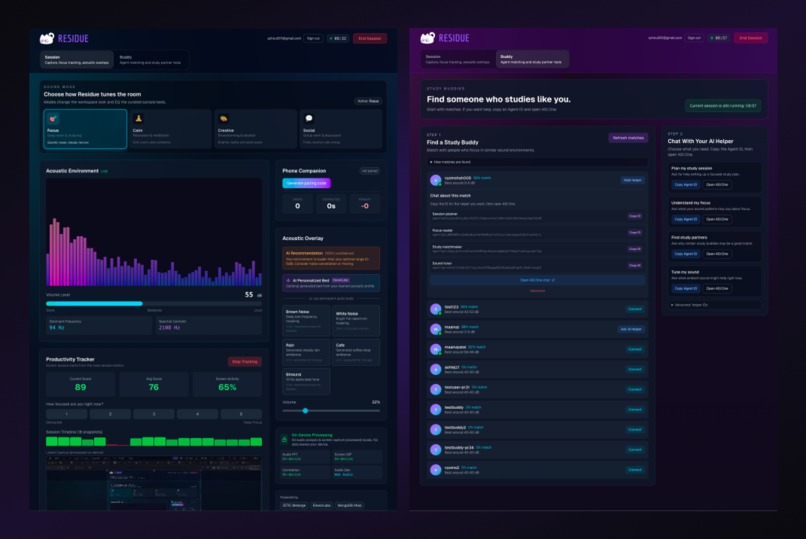
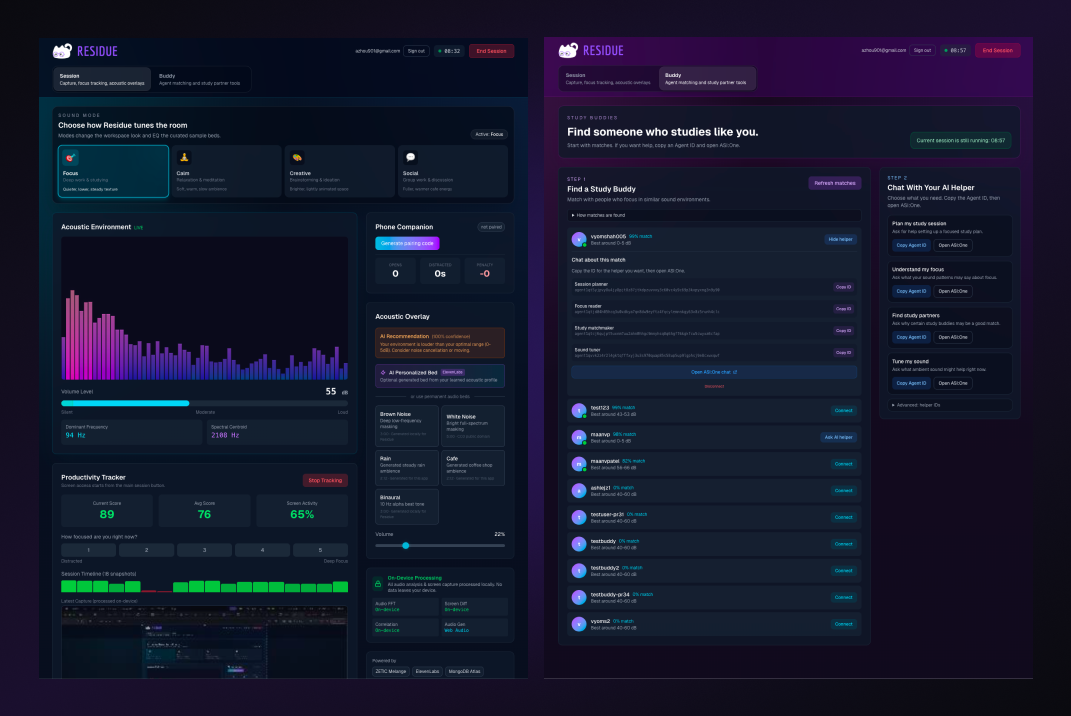
The dashboard lets users:
- Sign in
- Choose a study mode
- Start and stop focus sessions
- View live acoustic data
- Track productivity signals
- Receive acoustic recommendations
- Play or generate sound overlays
- Pair a phone companion
- Explore study buddy matches
- Chat with AI helper agents through ASI:One
We wanted the experience to feel low-friction. The main flow is simple: choose a mode, start a session, and let Residue learn in the background.
Acoustic Analysis
Residue uses the browser Web Audio API to analyze the user’s environment locally. Once microphone access is enabled, the app creates an audio pipeline with an AnalyserNode.
The system computes:
- Approximate loudness in dB
- Raw FFT frequency data
- Seven frequency bands: sub-bass, bass, low-mid, mid, upper-mid, presence, and brilliance
- Dominant frequency
- Spectral centroid
This allows Residue to understand the shape of a sound environment, not just its volume. A silent dorm room, busy cafe, library floor, and group study room can all have different acoustic fingerprints.
Productivity Tracking
Residue includes a privacy-preserving productivity tracker built with the Screen Capture API.
During a session, the app periodically captures a downscaled frame, compares it to the previous frame, and estimates whether screen activity suggests active work. It produces a productivity score from 0–100 and also supports manual self-reporting from 1–5.
This combines passive activity signals with the user’s own judgment, which matters because productivity is not always visible from screen movement alone.
Personal Focus Profile
Residue correlates acoustic snapshots with productivity snapshots.
The live profile engine buckets sound levels, identifies dB ranges associated with stronger productivity, and averages frequency profiles from the user’s best moments. From this, Residue can estimate an optimal acoustic range and generate recommendations like whether the user’s environment is currently too quiet, too loud, or in a good zone.
We also designed a more advanced Bayesian profile model with posterior estimates, confidence intervals, productivity curves, and confounder fields such as time of day, day of week, and task type. This lays the groundwork for longer-term personalization as users complete more sessions.
Audio Overlay System
Residue includes an audio overlay engine that can play and synthesize focus soundscapes directly in the browser.
Supported overlays include:
- Brown noise
- Pink noise
- White noise
- Rain
- Cafe ambience
- Binaural tones
Residue also supports AI-generated ambient beds. The system can convert a user’s learned acoustic profile and current study mode into an ElevenLabs sound effect prompt, generate an MP3, save it, and reuse cached generated beds when appropriate.
AI Agents
Residue uses a multi-agent architecture around perception, correlation, intervention, orchestration, and matching.
The main agent roles are:
- Perception Agent: reasons about whether the user appears focused, distracted, idle, or transitioning
- Correlation Agent: learns relationships between acoustic features and productivity
- Intervention Agent: recommends sound adjustments or ambient beds
- Orchestrator Agent: coordinates the perception, correlation, and intervention workflow
- Matching Agent: compares acoustic profiles to find compatible study partners
The app first attempts to call a Python Fetch.ai uAgents orchestrator. If that service is unavailable, the Next.js API route can fall back to direct server-side ASI1-Mini calls for perception and intervention, keeping the demo usable even when the full agent system is not running.
Study Buddy Matching
Residue’s matching system compares users based on their acoustic focus profiles.
The matching logic uses cosine similarity over EQ-style frequency vectors and can also account for location and active study status. The Python agent implementation supports MongoDB Atlas Vector Search when configured, with a cosine-similarity fallback for development and demo environments.
This means matching is based on more than “likes quiet” or “likes music.” Residue can compare multidimensional acoustic patterns, such as ideal volume range and frequency balance, to find people who may study well in similar environments.
Phone Companion
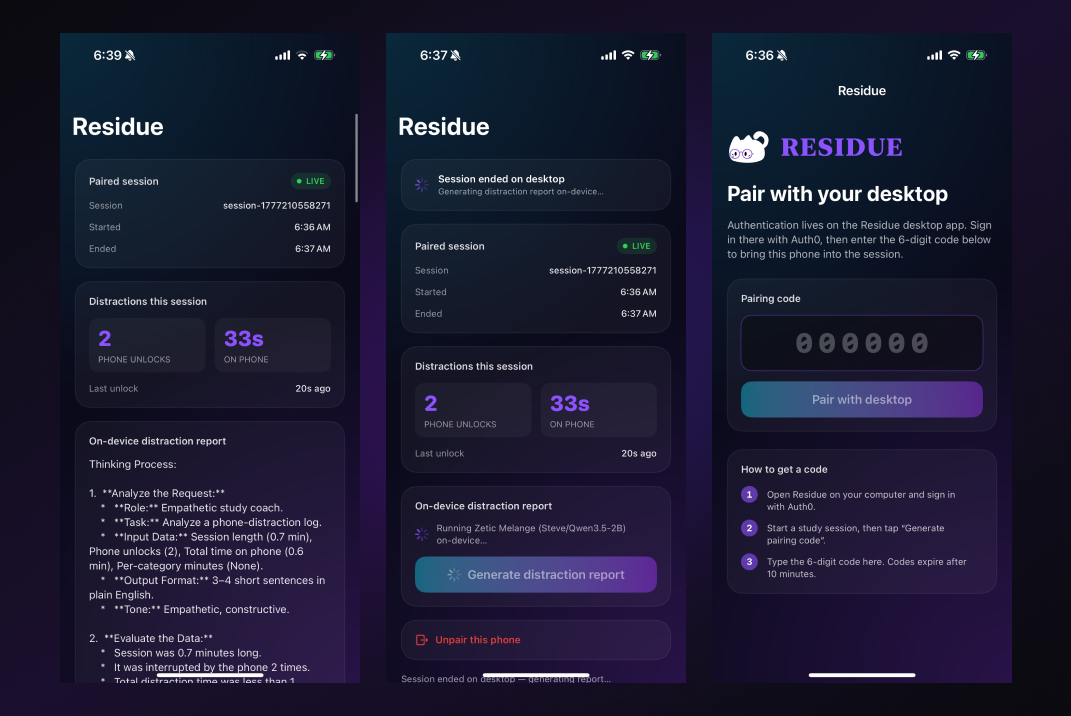
Residue includes a phone companion flow for distraction tracking.
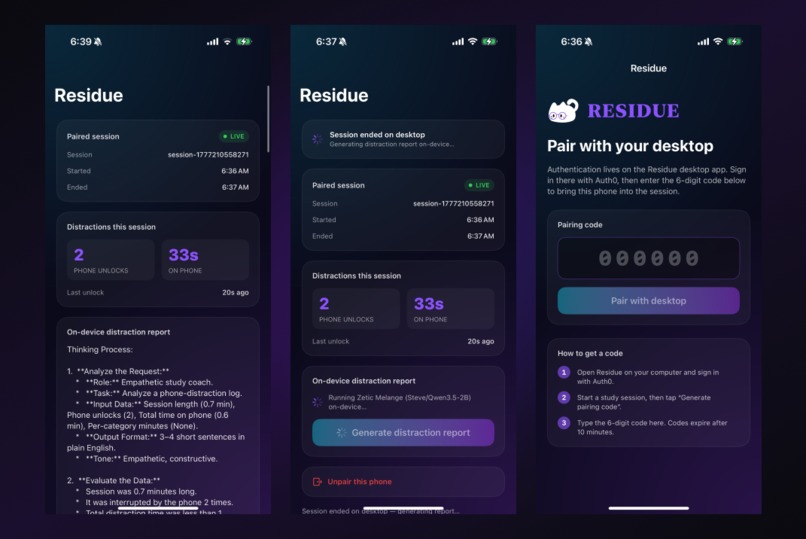
The desktop app can create a pairing code, and the phone app can use that code to connect to the active study session. During a session, the phone can send lifecycle events such as open, close, and heartbeat. The desktop polls phone state, counts unlocks, totals distraction time, and adjusts the productivity score accordingly.
The iOS companion also includes support for on-device distraction reports through ZETIC Melange. When the SDK and key are configured, the report path can use a local Qwen model on device. If the SDK is not linked, the app falls back to a local template so the rest of the companion flow still works cleanly.
Data and Storage
We use MongoDB as the main persistence layer.
Residue stores users, acoustic correlations, profiles, session snapshots, generated beds, agent runs, phone pairings, phone events, and phone reports. Session snapshots can include acoustic features, productivity scores, cognitive states, goal modes, and active sound bed information.
This lets Residue build a longitudinal picture of how a student studies across different environments and sessions.
Privacy
Residue is designed as a feature-extraction system, not a surveillance tool.
Raw microphone audio is analyzed locally in the browser and is not uploaded. Screen capture is processed locally into activity estimates. Keystroke content is not captured. Phone distraction analysis is designed around events and summaries rather than raw app logs.
The product needs enough data to personalize focus, but not enough to invade the user’s privacy.
Challenges we ran into
Our biggest challenge was pivoting mid-hackathon.
For the first part of the hackathon, our team worked on a completely different map-based app. After building and evaluating the idea further, we realized the use case was not as clear or immediately useful as we wanted it to be.
We decided to pivot to Residue because the problem felt much more tangible. As students, we immediately understood the need for a tool that helps us study better, not just longer.
That pivot gave us less time to execute a more technically complex idea. We had to quickly define the product, divide the system into manageable pieces, and build a demo that connected many moving parts: audio analysis, productivity tracking, profile learning, agents, generated soundscapes, database storage, phone tracking, and privacy constraints.
The hardest part was making a complex system feel simple. We did not want Residue to feel like a dashboard full of random metrics. We wanted it to feel like a study companion that quietly learns what helps you focus and turns that into useful recommendations.
Accomplishments we’re proud of
We are proud that Residue solves a simple, relatable problem while bringing together a technically ambitious set of components.
We are especially proud of the personalization layer. Instead of assuming one focus environment works for everyone, Residue learns from each user’s own sessions. That makes the product feel more like a personal study system than a generic productivity app.
We are also proud of the privacy-first design. Since the app works with sensitive signals like microphone input, screen activity, and phone usage, we intentionally focused on derived features rather than raw data. Residue is meant to support students, not monitor them.
Most importantly, we built something we genuinely want to use. As students, we are constantly trying to find better ways to focus. Residue gives that process structure, feedback, and personalization.
What’s next for Residue
Next, we want to turn Residue into a more complete focus platform for students.
Future improvements include:
- More accurate long-term productivity modeling
- Fully wired Bayesian profile updates in the main dashboard flow
- Better personalized soundscape generation
- Stronger study buddy matching based on compatible acoustic profiles
- Location-aware, secure rendezvous suggestions for matched study buddies
- Calendar and exam schedule integrations
- Support for different study contexts, such as solo work, group projects, creative work, and deep reading
- More polished onboarding and clearer privacy controls
Our long-term vision is for Residue to become the layer students use before, during, and after studying. Instead of guessing where and how they focus best, students can build a personal understanding of what actually works for them.
Residue is not another study timer. It is a personalized focus system that learns what your best study environment sounds like.
Built With
- next.js
- react


Log in or sign up for Devpost to join the conversation.