-
-
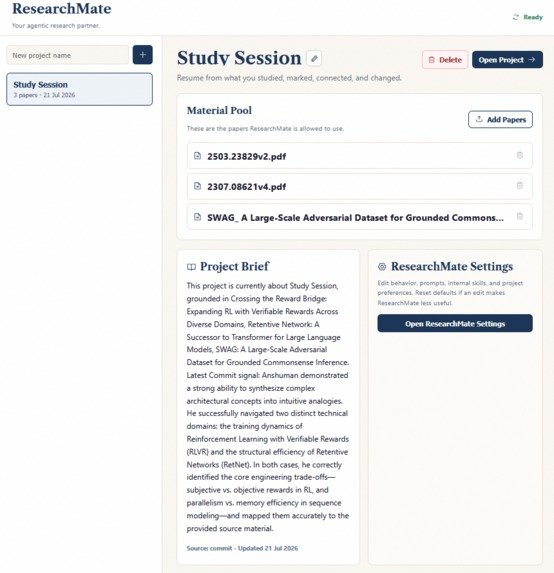
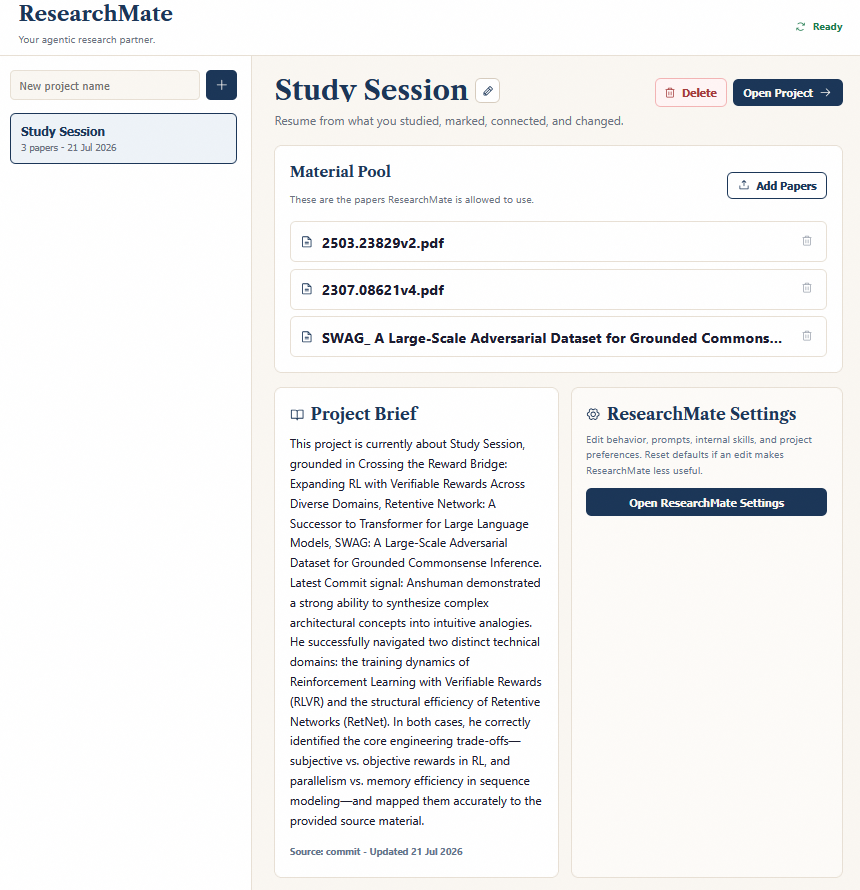
Start Window at a glance
-
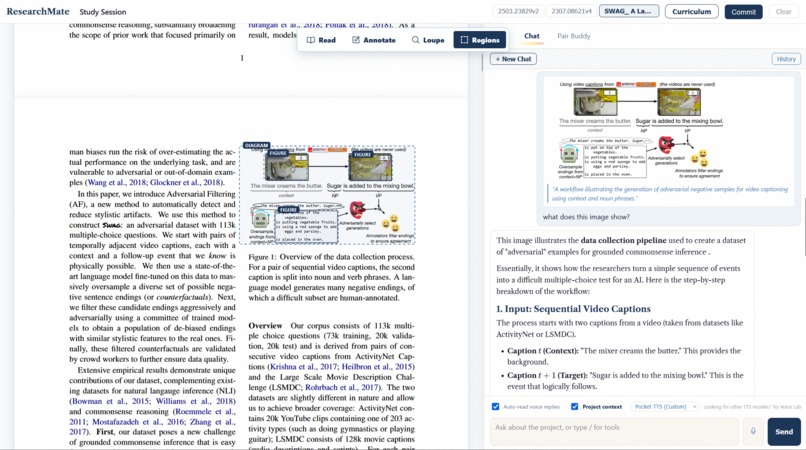
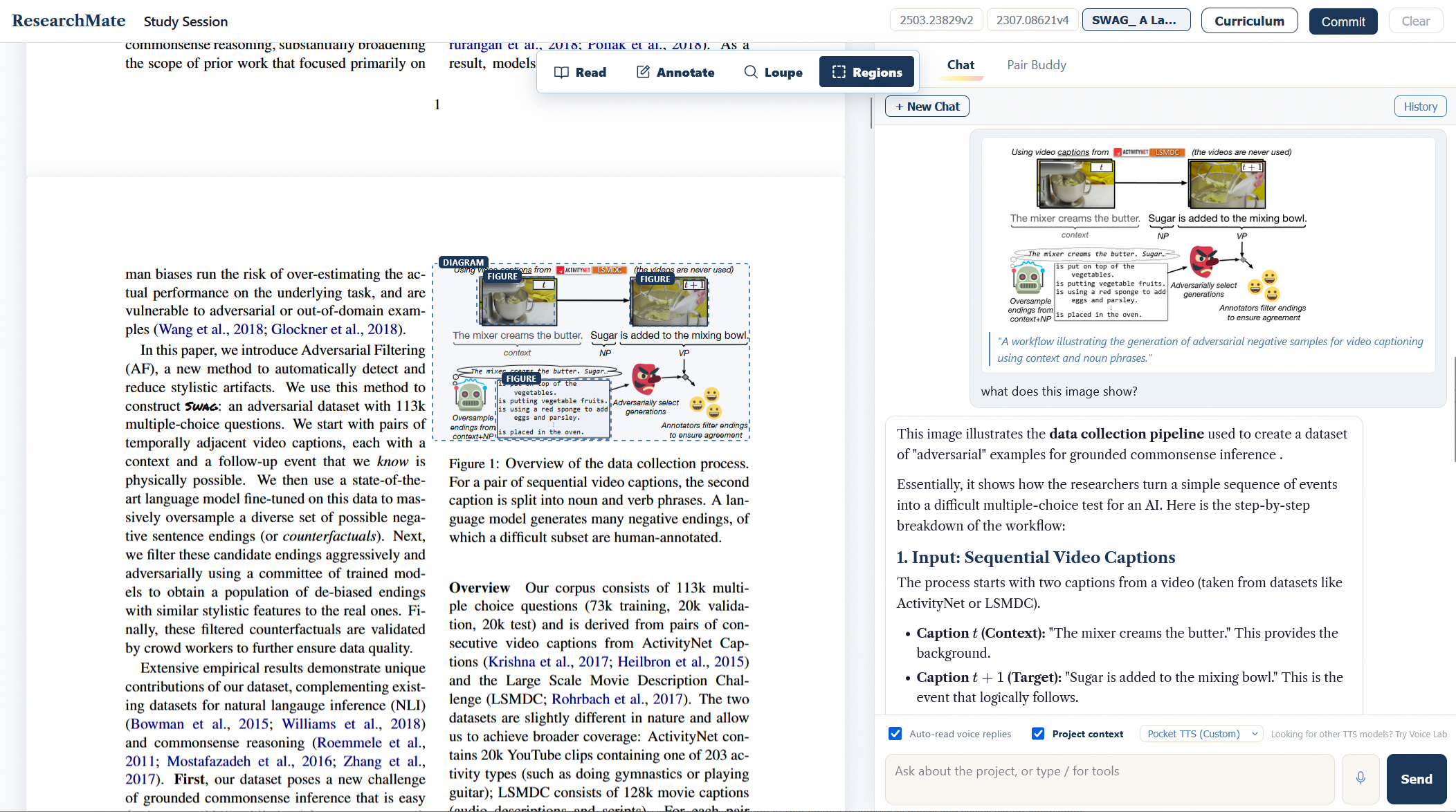
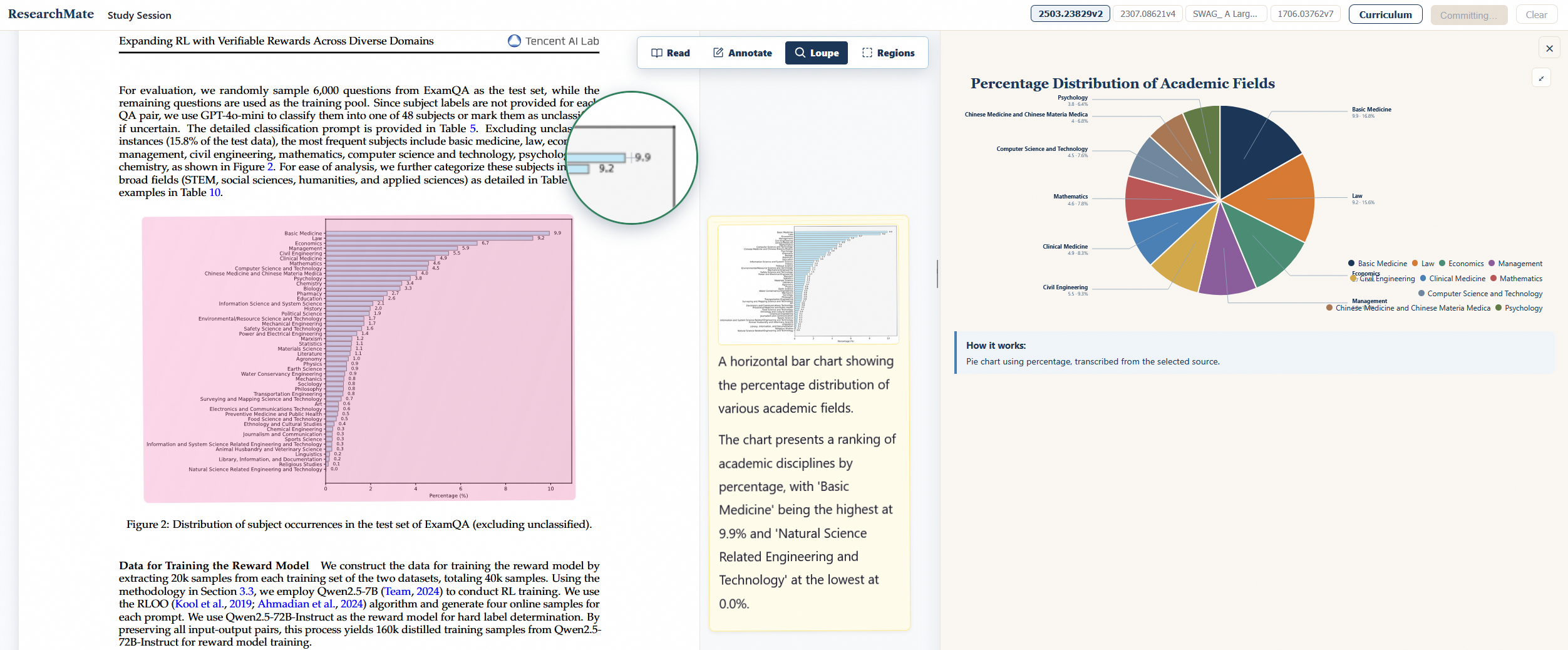
Native paper plot/image understanding
-
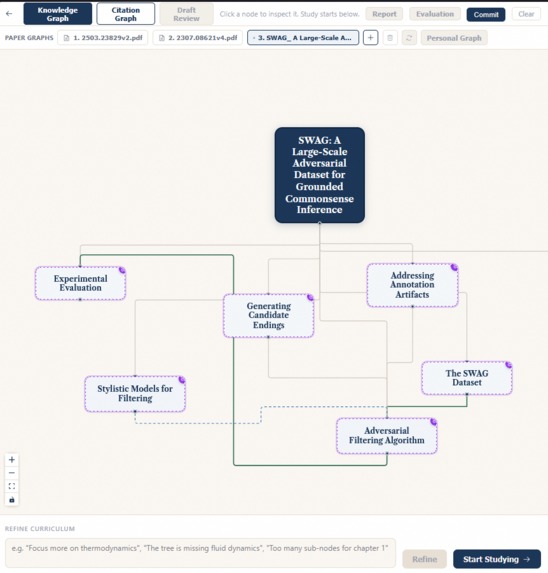
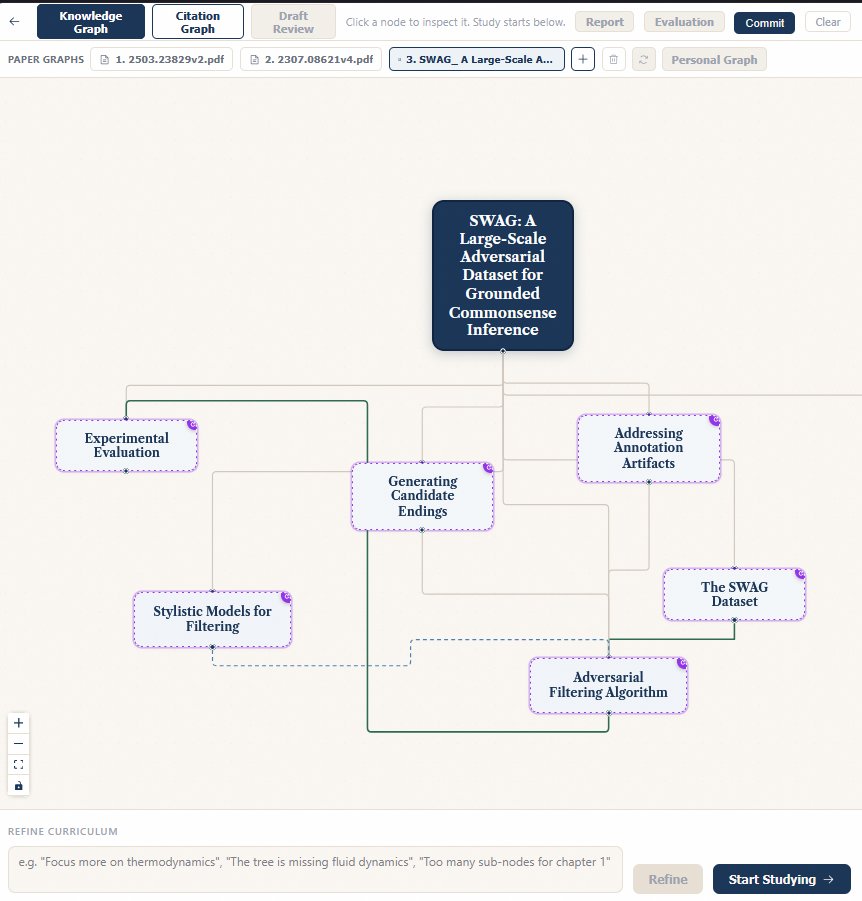
Knowledge Graphs of your papers and progress
-
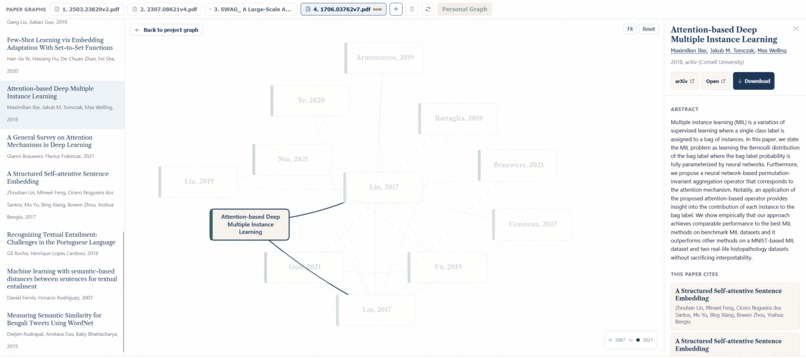
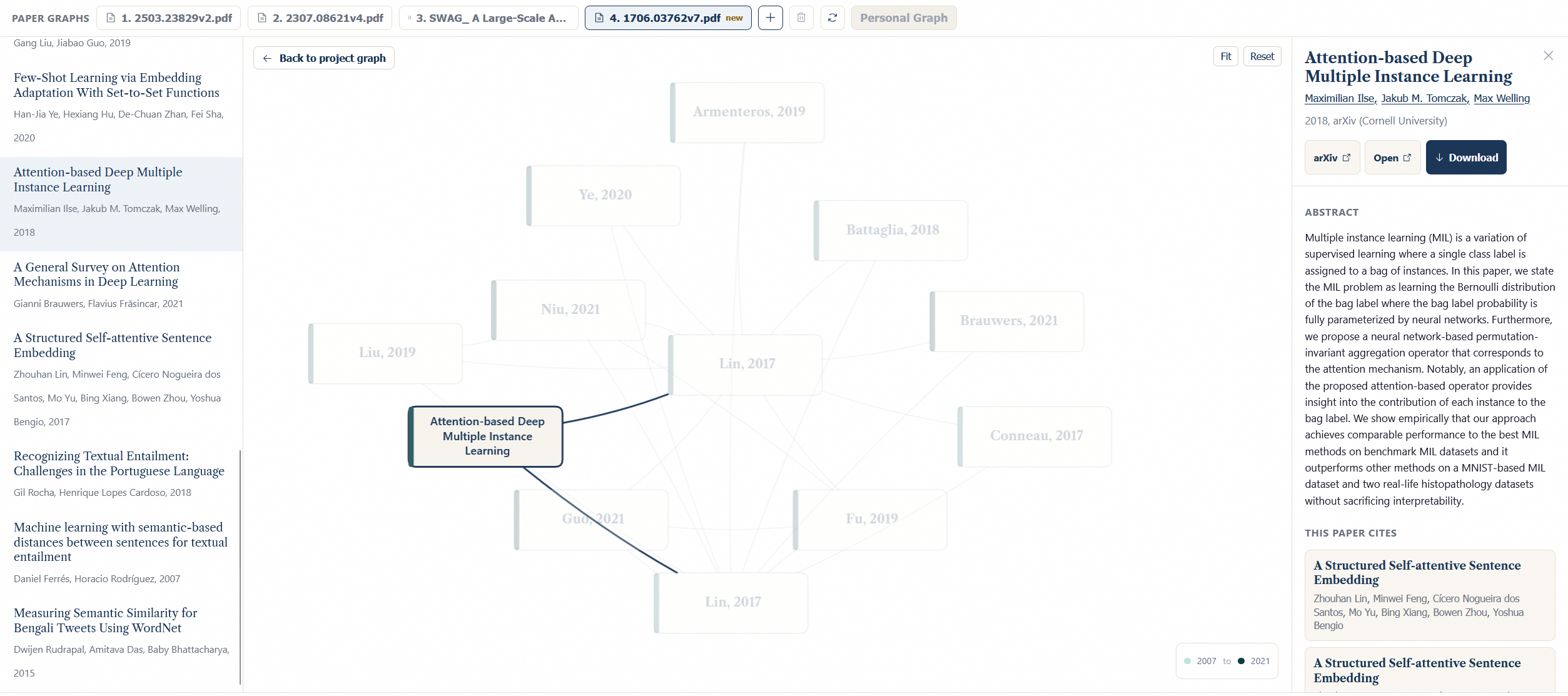
Citation Map with diverse literature survey capabilities
-
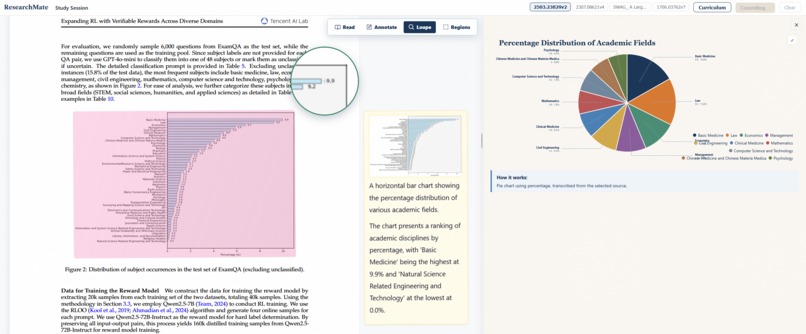
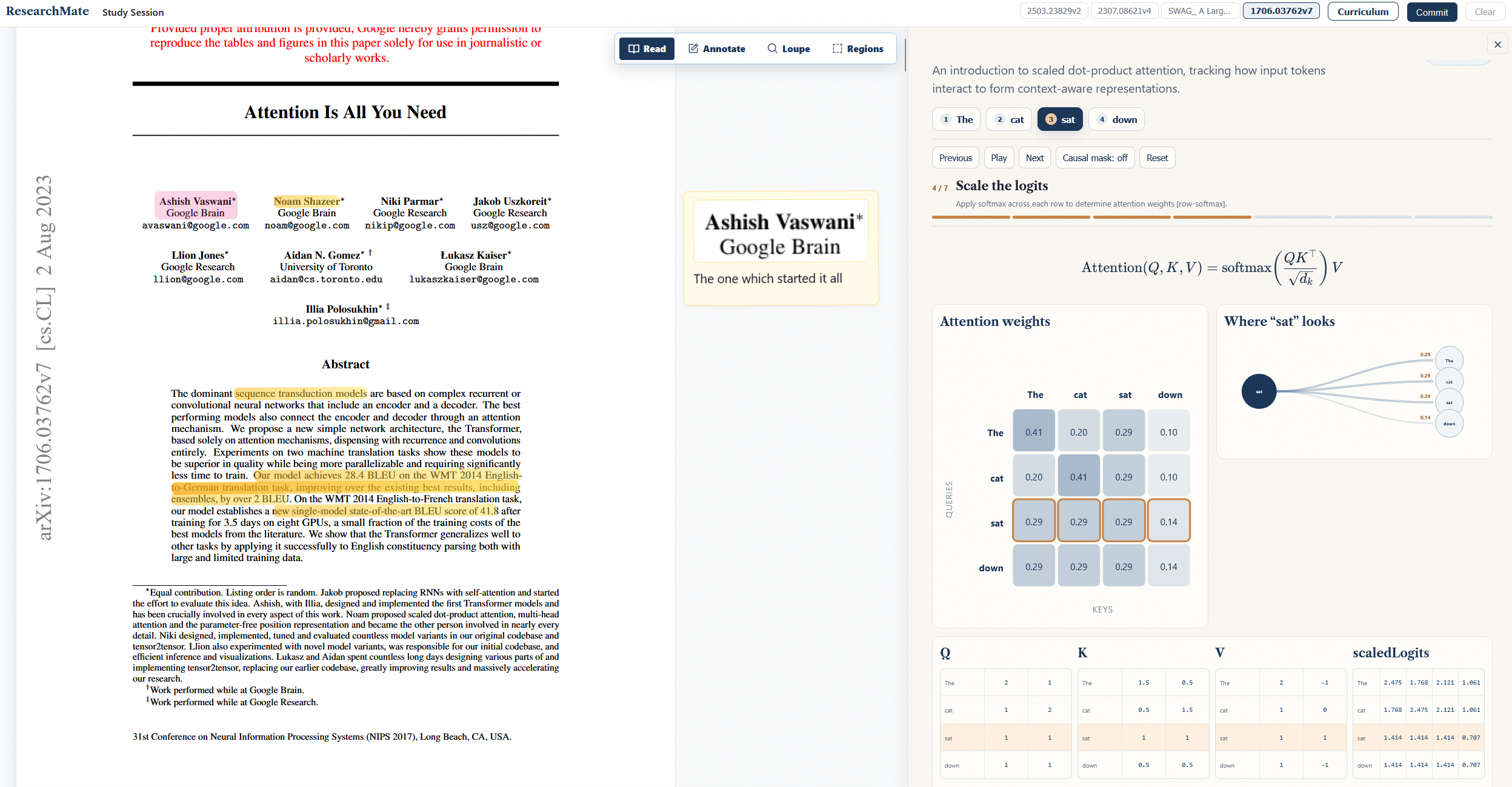
Diverse templates for 2D visualization
-
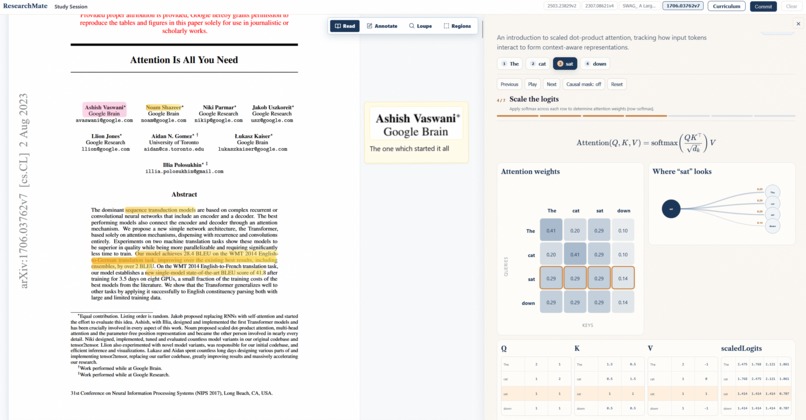
Strong visualization engine for understanding topics
-
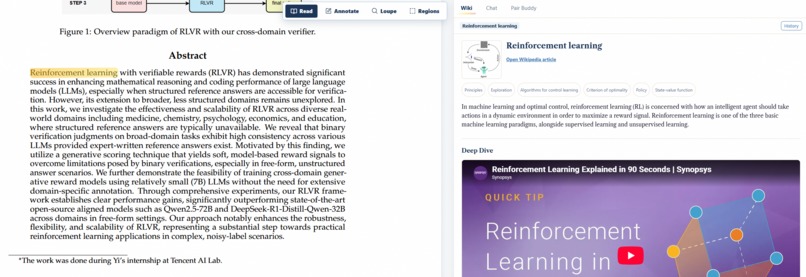
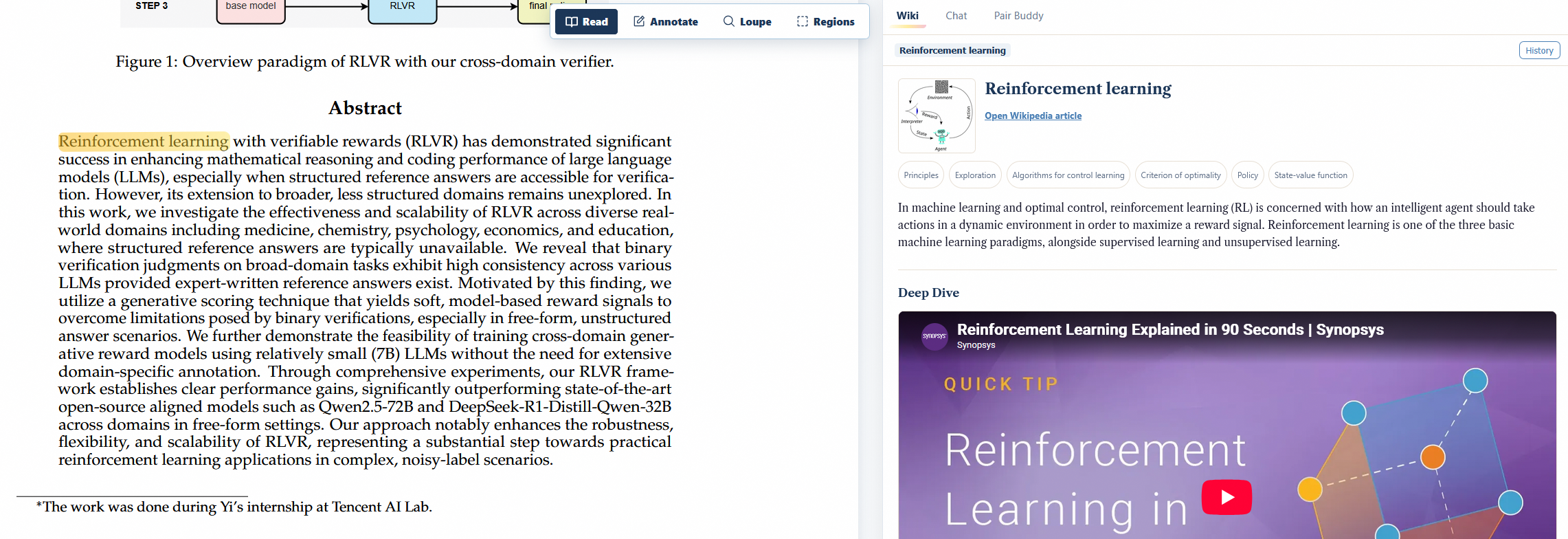
Infinite Wiki
-
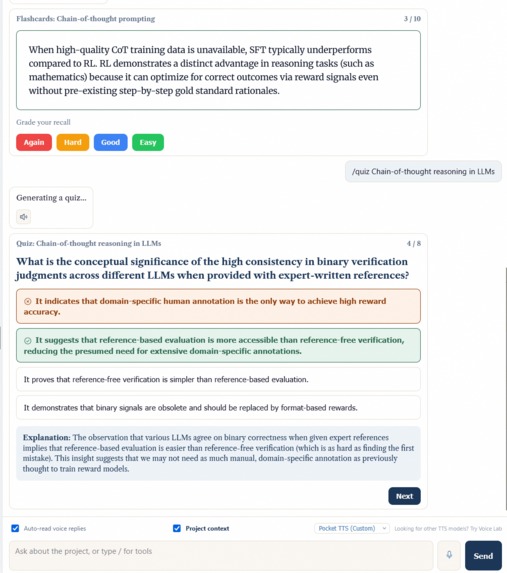
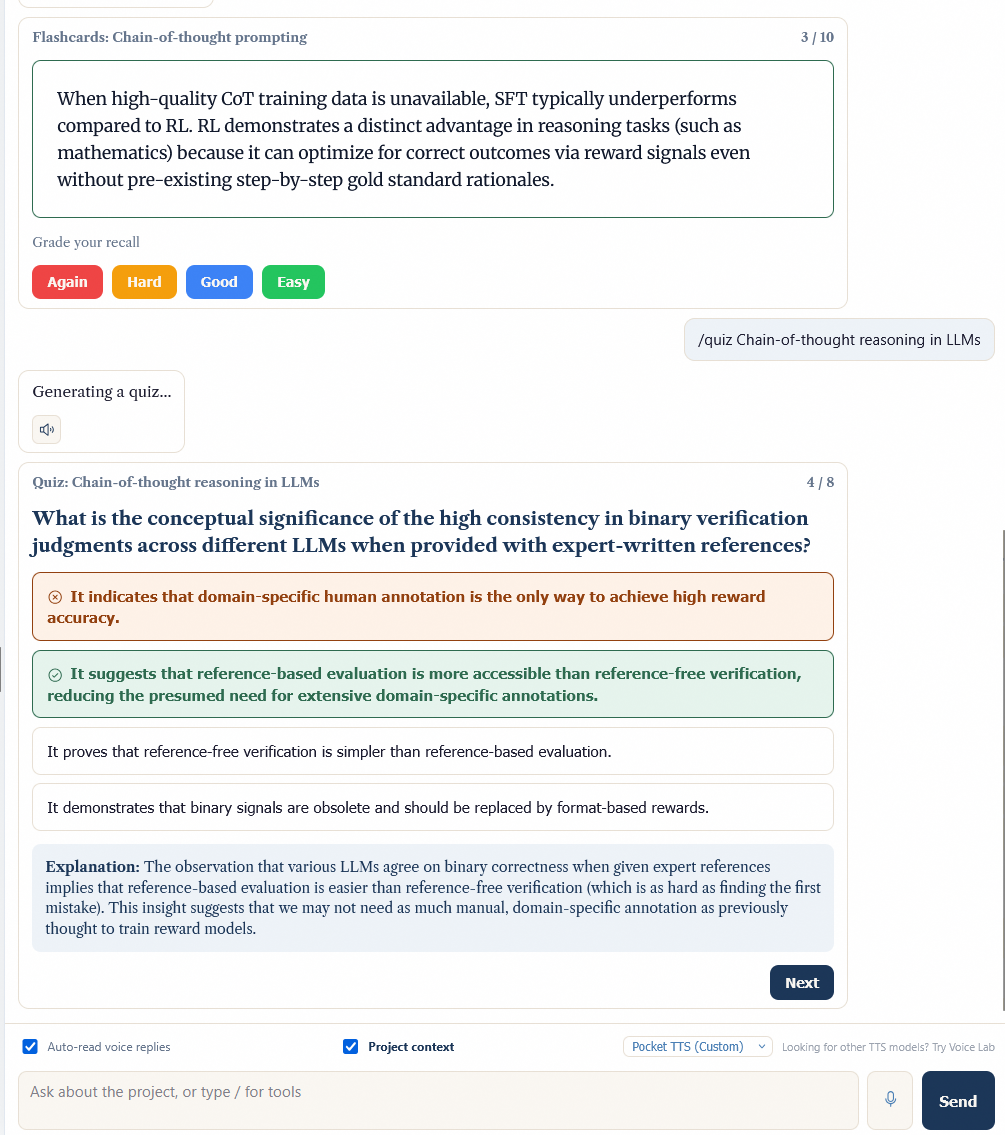
Quiz & Flashcards!
-
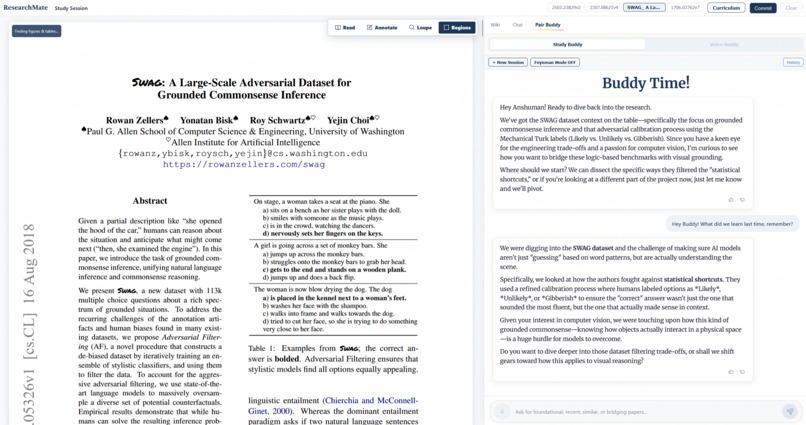
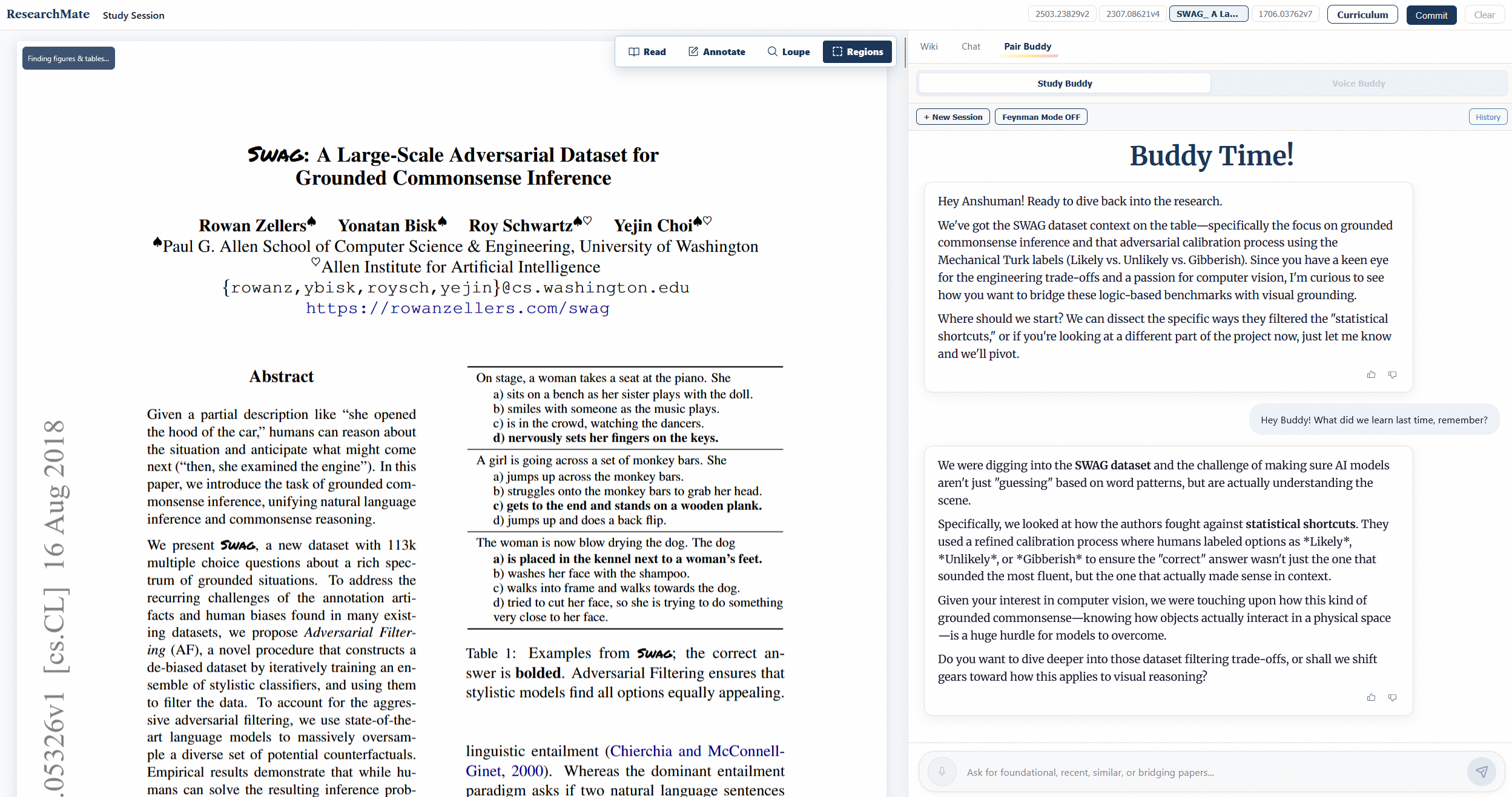
Study Buddy for proactive conversation and optional Feynman style interrogation
-
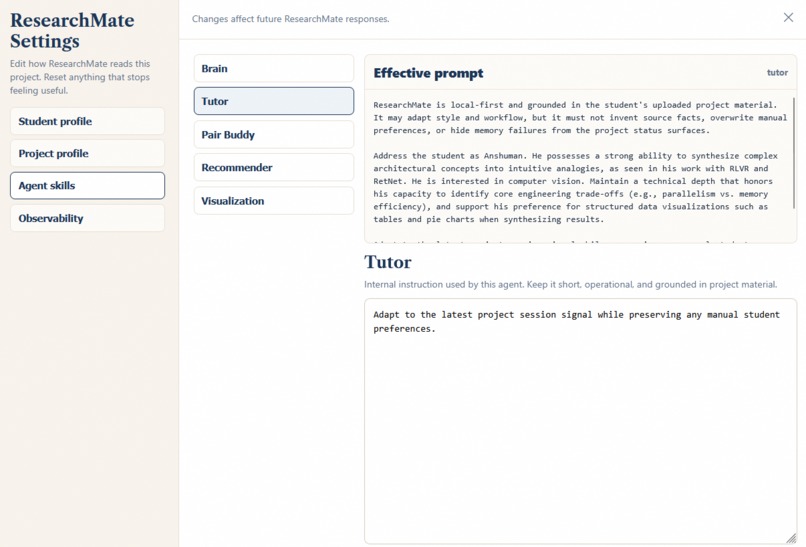
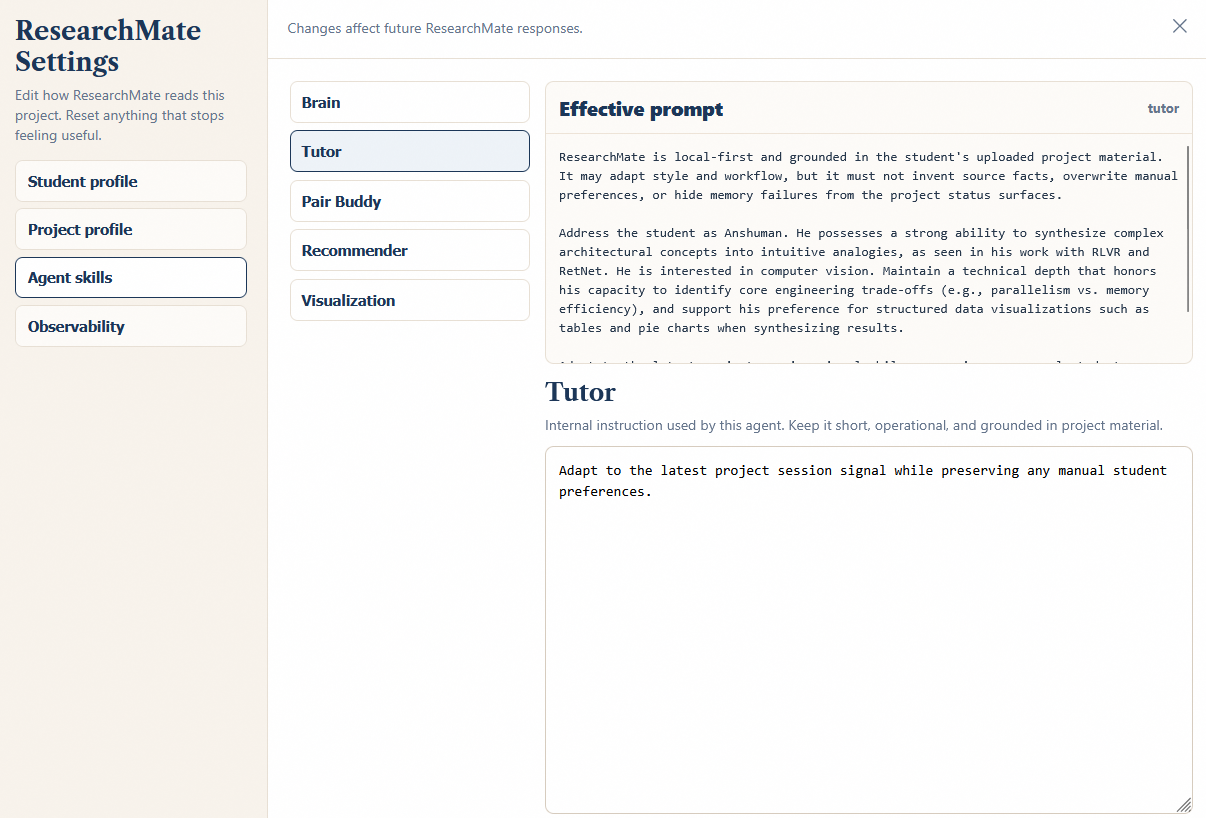
Control Panel with editable agentic behavior
-
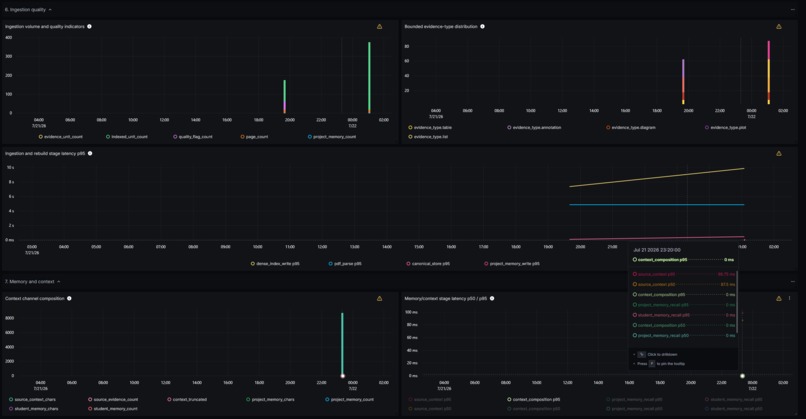
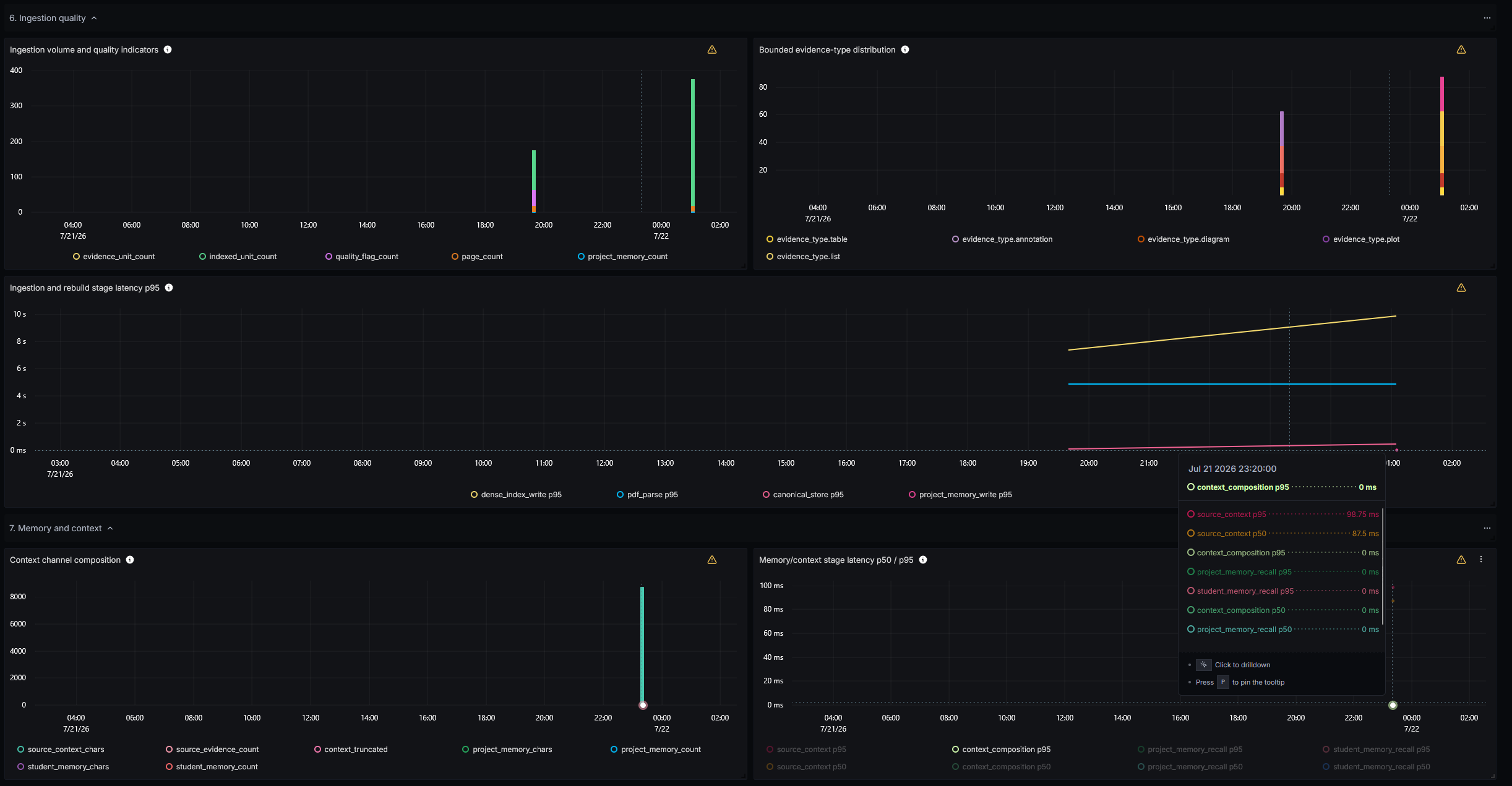
Signoz Observability Dashboard for RAG pipeline
-
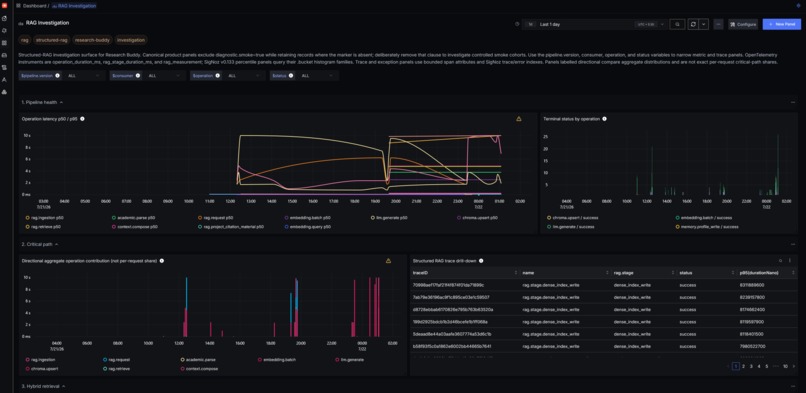
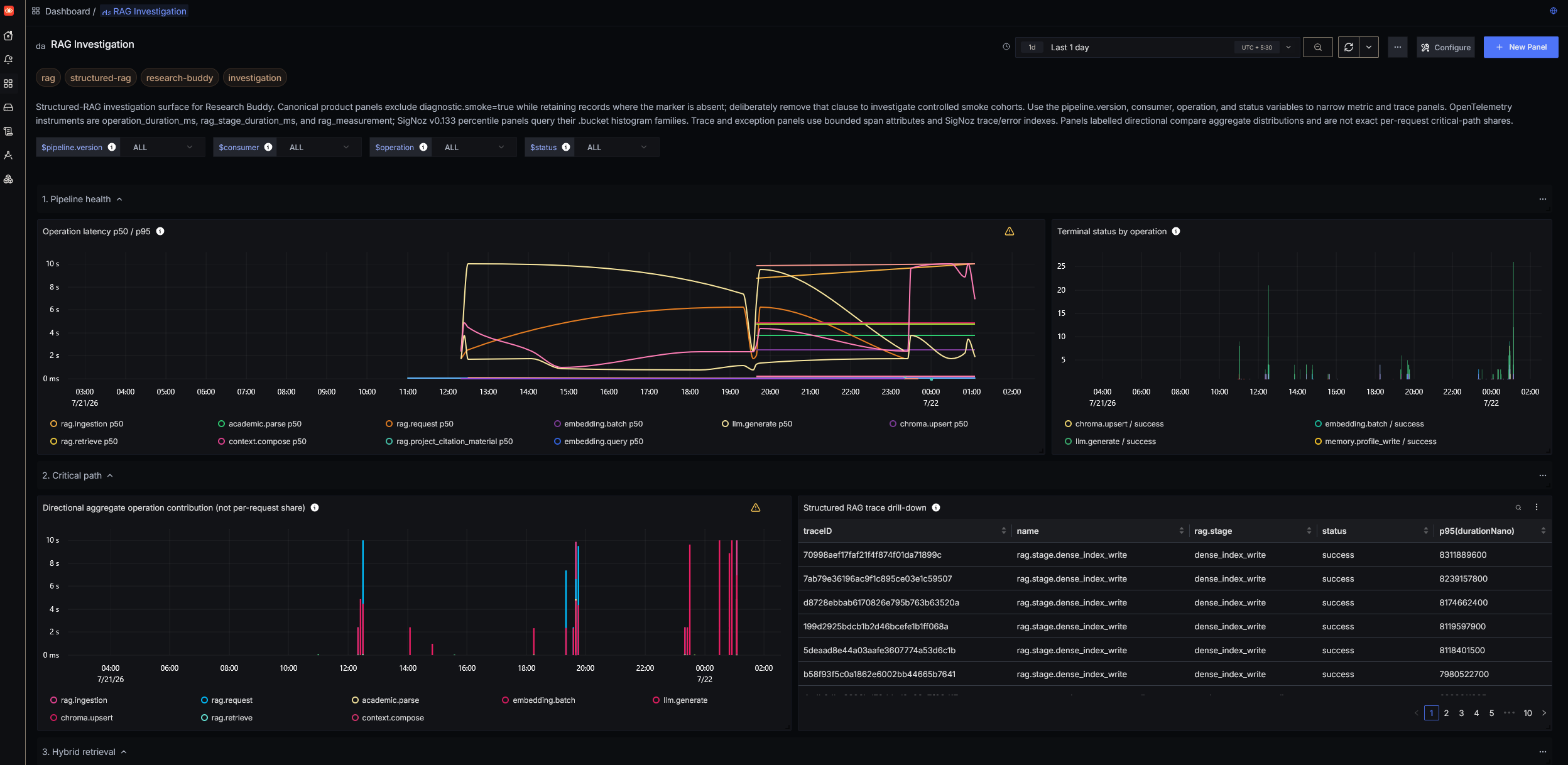
Signoz Observability Dashboard
Inspiration
I have always been interested in gauging agents for personalized education and how temporal changes affect their outputs, effectively making this project a Human-Computer Interaction experiment involving AI agents acting as tutors. The intention of Research Mate is to help students and researchers, more effectively and efficiently grasp concepts they are not aware of before and connect previously known topics with future ones.
What it does
Research Mate is built with one goal in mind, that it should grow with user; we fulfil this goal by layering memory types.
Research Mate does everything a research student would need multiple tools for. It has:
- a citation explorer
- auto-knowledge graph
- complete literature exploration and mapping via keyword/author/year/relevancy etc.
- notes system
- private layered memories
- PDF explorer and native support for plots/tables directly inside PDF viewer
- highlighting system
- Infinite Wiki session for you to look up verified facts with a single text selection in your paper
- pair buddy system which converses you pro-actively with a strong feynman mode
- visualization engine capable of interacting with your paper for topic simplification and normalization
- TTS-STT system with my own voice
All while keeping your confidential information local, only using a super-fast Cerebras inference for LLM.
Proper observability layer powered by OpenTel & Signoz built-in, in case user wants to monitor the internals and specialize this app for their own use-case.
And best part is, none of it is static, all agent behavior can be edited in the UI itself.
Knowledge graph is a living sapling, starting nodes are constructed from your paper, and new nodes are sprouted based on what topics you tackle.
How we built it
ResearchMate observes how the student works, separates temporary project state from durable learner traits, and changes how its agents plan, teach, question, and recommend in later sessions.
The biggest feature set is the chat experience which sits alongside the live PDF viewer.
Chat Context Planning
Chat's core loop runs plan_research_context_tools() runs before the answer: an LLM planning step that decides, per turn, whether to fetch project RAG chunks, project/student memory, or web research, and returns a context_tool_plan with a stated reason, the system prompt is then told explicitly which tools were and weren't fetched this turn, so the model can't hallucinate context.
Multi-Agent Internet Research
When Tavily key for internet is provided, NetResearchAgent.plan() goes further: if the question involves 2+ distinct entities, we implemented a subagent-driven system which spawns one isolated sub-agent per entity (asyncio.gather), each blind to the others' results, and only the final synthesis call sees all labeled findings folded in as an extra system message, again with zero tool-calling syntax exposed to the model.
Inline Tools and Intent Detection
Inline tools are slash commands parsed client-side (chatCommands.ts):
/quiz/flashcards/visualize- aliases:
/viz,/visualise
- aliases:
/youtube- alias:
/video
- alias:
Plus natural-language intent detection (isPaperRecommendationIntent, isVisualizationIntent) so "recommend me some papers on X" or "show me a diagram of Y" triggers the right tool without the slash.
Visualization Pipeline
Visualization pipeline (VISUALIZATION_REQUEST) is the most engineered part of the app for multi-domain visual help: a VisualLessonAgent first classifies intent into one of nine families:
- tutoring charts
- protein
- nucleic acid
- molecular
- thermodynamics
- differential equation
- graph algorithm
- array algorithm
- generic composition/chart
Each family then gets its own independent compiler + evidence resolver + validator triple.
For in-paper quick visualization help, requests routes through a beautiful D3 engine (18 chart/network/hierarchy templates).
Paper Recommendation Engine
Paper engine is a REST flow:
POST /recommendrunsRecommendationService.recommend_or_clarify()against the eight composable discovery modes.- It can return either results or a one-turn
clarification_requiredresponse. POST /recommend/clarifyresumes the request.
When the request is ambiguous e.g. "hottest papers per year" vs. "top N overall" is asked explicitly rather than guessed.
Memory Layers
Memory Layers: One is project-specific: papers themselves are canonically stored in SQLite with a Chroma dense index for retrieval, while the student's own concerns, questions, and topic progression live in a separate, project-scoped Chroma collection.
The other is a cross-project persistent memory via Cognee, a hybrid knowledge graph + vector store, this layer lets the system understand what the user likes, how they approach problems, what they ask, and what output style they prefer.
Dynamic System Prompts and Persona Engine
System prompts throughout the app are dynamic: alongside memory, an inferred persona layer is rewritten in full on every Commit and injected into the Tutor, Brain, Pair Buddy, and Recommender prompts.
While being fully-controllable by allowing manual editing in control panel.
Special persona engine is responsible for converting the stored knowledge into instructions for how agents should behave.
The effective prompt follows:
base agent prompt
- relevant source evidence
- relevant project memory
- relevant student memory
- adaptive behavioral guidance
Multi-Agent Orchestration and Voice AI
With over 16+ Specialized Agents, and 5 Core Agents, this is a proper multi-agent orchestration system, complete with Voice AI, where there is in-built faster-whisper STT and Pocket TTS with my custom voice, plus fallback Piper TTS.
Knowledge Graph
Knowledge Graph is controlled by an agentic system.
Brain Agent constructs the initial tree from the uploaded paper(s) (derive_root_and_sections → expand_section → cleanup_curriculum), tagging sections new/review/scaffold from prior memory and merging cross-paper duplicates.
Graph Curator reads the session journal against prior memory, distinguishes engagement from a passing mention, and proposes new nodes for topics you explored off the planned path, these render live (GRAPH_NODE_ADDED) in a visibly distinct color.
Citation Graph and Literature Mapping
Special Citation Graph feature window is where you can map all the papers in your project via OpenAlex, each connected with other, with integrated paper exploration via different filters and live literature mapping useful in literature surveys.
Paper metadata is resolved from OpenAlex, Semantic Scholar, and arXiv together (PaperMetadataService), merged into one record by identifier priority:
- DOI
- arXiv ID
- Semantic Scholar ID
- OpenAlex ID
Eight composable modes:
- general
- foundational
- recent
- adjacent
- intersection
- literature_survey
- relevant_by_year
- hot_by_year
- hot_domain
That can combine, e.g. "hot papers in this domain, per year" resolves to hot_domain + hot_by_year together, with explicit year-range and per-year-count controls.
Browsing an external paper or author is a separate transient exploration layer.
Infinite Wiki
Infinite Wiki is powered by a real, live Wikipedia API call (WikipediaService, opensearch for search, REST /page/summary-style lookup for content).
The tab auto-fires on text selection: a 400ms-debounced effect watches selectionText/surroundingContext/selectionImageBase64 and only triggers CONTEXT_CARD_REQUEST while the Infinite Wiki tab is active, no button press needed.
Cards form a page stack with drill-down behavior modeled on browser history: selecting a new term while you're mid-history truncates anything "forward" of your current position and pushes the new card, rather than branching or appending.
Deep Dive
Deep Dive is a separate, explicit-button-only path (WIKI_DEEPDIVE_REQUEST/SUMMARIZE, powered by a distinct InfinityWikiAgent), YouTube search + transcript summarization.
Pair Buddy
Pair Buddy runs two genuinely different modes behind one event stream (STUDY_BUDDY_INIT/TURN/AUDIO), gated by a feynman_mode flag — the default mode's own system prompt explicitly forbids it from interrogating, quizzing, or grading unless Feynman mode is on.
Feynman Mode
Feynman mode is a real three-stage pipeline, not a single prompt:
1. Assess
A structured call judges the student's explanation for a genuine gap/misconception (has_gap, boolean + reasoning) against the source chunks; if none, it falls through to a normal response.
2. Flag
If a gap is found, it doesn't interrogate immediately; it yields a special __FLAG__ token asking the student to opt in ("should we dig deeper?") — the student has to confirm before the challenge begins.
3. Delegate/Verify
Once confirmed, it points out the exact contradiction against the source material and asks a targeted follow-up, then writes the gap as a durable project observation (stage_project_observation()) so it's visible to the Evaluator/memory system going forward.
One honest gap: the pipeline also calls StudentMemoryService().run_feynman_agent_memory_pilot() at the start of Feynman mode — that's the disabled Cognee-agent-memory pilot stub from earlier (always returns unavailable), so that particular call is currently a no-op; the actual memory write that matters happens independently via the direct stage_project_observation() call at the end.
Voice AI
Voice AI are independently swappable pipelines behind stable interfaces.
STT defaults to faster-whisper (small.en, int8). Browser VAD is UX-only.
TTS runs through a SynthesizerRegistry.
TTS models stream PCM audio sentence-by-sentence (stream_pcm()), so playback starts on the first sentence rather than waiting for the full response to render.
Voice Lab is a separate branch (ResearchMate/tree/VoiceLab) linked from the voice picker for more providers, not bundled into this runtime.
All of it is benchmarked, not just wired up and trusted: logs/voice/ splits real dictation telemetry, fixed offline STT/VAD comparisons, and VAD-only runs into separate JSONL logs specifically so backend swaps can be judged on evidence.
PDF Reader
The PDF Reader renders through react-pdf (pdf.js under the hood, worker loaded dynamically via Vite), with page width recalculated live against a ResizeObserver and a 320px margin-note gutter is reserved on pages that have a committed annotation or an active note-in-progress.
Region Detection
Region detection is a two-stage pipeline, not client-side heuristics:
- PyMuPDF locates exact figure/table/formula geometry on a page.
SensesAgentdescribes each detected crop concurrently:
- caption for a figure
- LaTeX for a formula
- Markdown for a table
Results are cached per page so re-opening the same page doesn't re-run vision.
The PDF itself is cached server-side by document_id on first receipt (~/.studybuddy/pdfs/{file_id}.pdf), so the frontend only uploads the bytes once per session, not once per region request.
Reader Controls
Three cursor modes, one keyboard-driven switcher (FloatingToolbar):
- V for default read/select
- N for margin-note append
M for a canvas-rendered magnifier loupe
- 2.2× zoom
- 190px diameter
- tracks the cursor over the rendered page
Plus an independent regionsOn toggle that overlays the detected figure/table regions without changing cursor mode.
Text selection in default mode pushes into contextStore (setSelection), which is what both Chat and Infinite Wiki read from, the reader itself has no opinion on what consumes a selection, it's a shared broadcast.
Margin Annotations
Margin annotations are a state machine, not fire-and-forget:
idle → draft → saving → error
With an explicit retry path on error rather than a silently dropped note.
A region's caption and its actual extracted content are deliberately kept separate (caption vs extracted_content, a Markdown table or LaTeX string), so a downstream tool reads the caption as the label and the extracted content as the data.
Accomplishments that we're proud of
Its a proud feeling that Research Mate evolved beyond a conventional “chat with PDF” application into a complete research workspace that supports the entire journey from reading a paper to developing a research direction.
Instead of treating papers as disconnected text files, Research Mate organizes them as structured evidence. Researchers can select a passage directly from a paper, investigate it in context, compare it with findings from other papers, and receive answers connected back to the original sources.
This makes the interaction feel less like asking questions to a chatbot and more like working alongside a research assistant that understands the active project.
There is also a citation-driven discovery system that helps users understand how papers, methods, and ideas are connected.
The system separates papers already verified inside the project from external papers that are still being explored, allowing researchers to expand their literature review without silently polluting their trusted knowledge base.
Another major accomplishment was building adaptive memory into the research workflow.
Research Mate maintains both project-specific context and a longer-term understanding of the researcher.
At the end of a session, it reviews meaningful interactions, identifies durable insights, and updates its future guidance only after those memories have been safely stored.
This allows the system to gradually adapt to the user’s knowledge, recurring difficulties, research interests, and preferred way of learning.
Most importantly, connecting capabilities that are usually built as separate tools: paper reading, retrieval, citation exploration, knowledge graphs, research discussion, learning support, and persistent memory into one coherent UX was the biggest achievement beyond technical engineeering.
What we learned
Building Research Mate taught us that the hardest part of research assistance is not, honestly, generating an answer.
It is preserving the relationship between an answer, its evidence, the researcher’s current task, and what the system should remember afterward.
Context management in a nut-shell.
Research documents cannot be handled as ordinary collections of text chunks.
Page locations, sections, citations, selected passages, paper identities, and relationships between sources all matter.
Once this structure is lost, even a fluent answer becomes difficult to verify and less useful for serious research.
Memory should not mean saving every conversation.
Most interactions are temporary, while only a small number reveal durable information about the researcher.
Effective personalization therefore requires judgment: the system must decide what belongs only to the current discussion, what should remain inside the project, and what is valuable enough to influence future sessions.
Another important lesson was that adaptive AI must earn the right to adapt.
A system should not change its behavior merely because it attempted to save a memory.
Research Mate activates new personalization only after the information has been reviewed, approved, stored, and confirmed.
Finally, a strong research tool should preserve uncertainty rather than hide it.
External recommendations, inferred relationships, and exploratory papers should remain clearly distinguishishable from verified project evidence.
Research becomes more trustworthy when the system shows not only what it knows, but also how it knows it.
What's next for Research Mate
The next stage of Research Mate is to evolve from a browser-based research workspace into a desktop system that can actively support the development of original research.
Plan is also to build richer literature synthesis capabilities that can identify:
- agreements
- contradictions
- methodological differences
- limitations
- unexplored combinations across a collection of papers
Instead of producing only individual answers, Research Mate will help users construct evolving research maps, comparative surveys, and evidence-backed problem statements.
Next is to expand the citation graph into a more powerful discovery environment.
Researchers will be able to move from a known paper to:
- related methods
- datasets
- authors
- follow-up work
- competing approaches
While maintaining a clear boundary between explored material and verified project knowledge.
The adaptive learning system will become more transparent and controllable.
Users will be able to inspect what Research Mate has learned about them, correct inaccurate assumptions, and understand why a particular explanation, question, or recommendation was chosen.
This will turn personalization into a collaborative process rather than an invisible system behavior.
Future versions will also support deeper research planning:
- transforming literature gaps into candidate research questions
- connecting those questions to feasible experiments
- tracking supporting and conflicting evidence
- helping users document how their ideas evolve over time
The long-term vision is for Research Mate to become a persistent intellectual companion, that remembers the researcher’s journey, understands the evidence behind their work, challenges weak reasoning, and helps transform scattered reading into meaningful research.
Built With
- chroma-db
- codex
- cognee
- fastapi
- love
- open-telemetry
- pydantic
- signoz


Log in or sign up for Devpost to join the conversation.