-
-
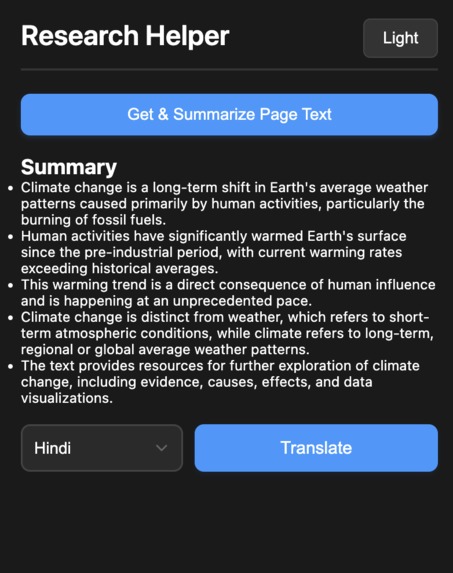
Chrome extension look after generating summary
About the Project
Inspiration
The Research Helper Tool was inspired by the challenges faced by researchers, students, and professionals who often struggle with:
- Time Constraints: Reading through lengthy articles, research papers, or technical documents consumes significant time and effort.
- Language Barriers: Many important resources are not available in a user’s native language, making it difficult to comprehend vital information.
I wanted to create a simple, effective tool to tackle these challenges. The idea was to leverage the power of Chrome’s built-in AI APIs, including Summarization and Translation, to provide users with a fast, privacy-focused solution to make research accessible and efficient.
What I Learned
Throughout this project, I gained valuable insights, including:
- API Integration:
- Understanding and effectively utilizing the Summarization API and Translation API to interact with Chrome’s AI models.
- Learning how to optimize browser-based AI workflows for speed and privacy.
- Browser Extension Development:
- Building Chrome Extensions using modern JavaScript frameworks like React and integrating them seamlessly with the Chrome environment.
- User Experience Design:
- Designing a simple, intuitive interface that prioritizes user needs while maintaining functionality.
- Problem Solving:
- Identifying bottlenecks in summarization and translation workflows and solving challenges related to unstructured content.
How I Built the Project
Tech Stack:
- Frontend: React for building a clean and responsive UI.
- APIs: Chrome's Summarization API and Translation API for AI-powered capabilities.
- Browser Integration: Chrome Extension framework for seamless interaction with web pages.
Core Features:
- Summarization: Extracting key points from any webpage or research document.
- Translation: Translating the summary into multiple languages to enhance accessibility.
- Simple Workflow: Users can click a button to generate summaries and translations instantly.
Process:
- Designed the user interface to ensure it is intuitive and beginner-friendly.
- Used Chrome Extension APIs to fetch content from open tabs and pass it to the built-in AI APIs.
- Optimized the performance to handle large documents efficiently within the browser.
Challenges Faced
Working with Unstructured Data:
- Summarizing content from poorly formatted web pages or PDFs presented difficulties, as the extracted text often lacked coherence.
- I worked around this by refining how text was passed to the Summarization API, ensuring structured input for better results.
Translation Accuracy:
- While the Translation API performed well, some technical terms and domain-specific language weren’t perfectly translated. Adding contextual prompts to the API request improved the translations.
Browser Environment Limitations:
- Executing all tasks within the browser required careful optimization to avoid performance lags, especially for large research documents.
Designing for Accessibility:
- Ensuring the tool was accessible to non-technical users while keeping it feature-rich required several iterations of UI design.
Outcome
The Research Helper Tool provides a fast, reliable, and accessible solution for summarizing and translating content. By leveraging Chrome’s built-in AI, it addresses key challenges faced by researchers and students, making it easier to focus on learning and decision-making without being bogged down by long articles or language barriers.
I’m excited about the impact this tool can have in academic, professional, and personal contexts, and I look forward to exploring additional AI-powered features in future iterations.
Next Steps
- Enhance summarization quality for unstructured content.
- Integrate tone analysis and contextual rewriting to refine translations further.
- Expand support for additional languages and API capabilities.
Built With
- css3
- gemini
- html5
- javascript
- nano
- react
- summarization
- translationapi
- typescript


Log in or sign up for Devpost to join the conversation.