-
-
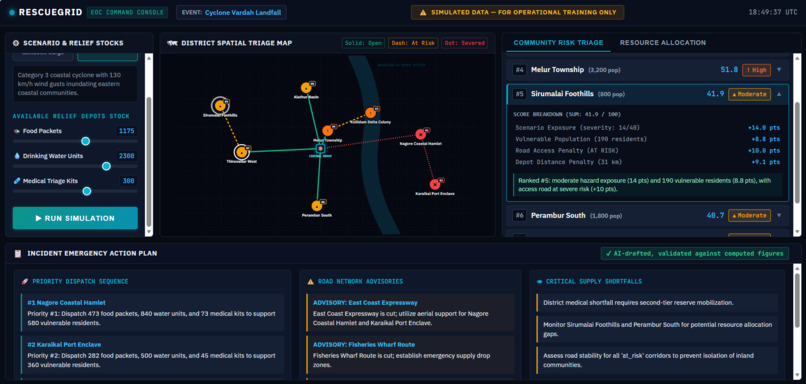
RescueGrid Dashboard
Inspiration
When a flood or cyclone is approaching, a district disaster officer has to decide fast which communities get help first and where limited supplies should go. Today that often means spreadsheets, scattered messages, and manual triage notes, with little time to explain those decisions to leadership or field teams.
I wanted a decision-support tool where the reasoning is visible. Many AI tools give you a confident answer you can't check, and in disaster response an official has to be able to defend every number.
What it does
RescueGrid is a simulated disaster-response dashboard for district disaster management agencies and NGOs.
- The official picks a scenario (River Flood or Cyclone Landfall) for a fictional district and sets the available stock of food packets, drinking water units, and medical kits.
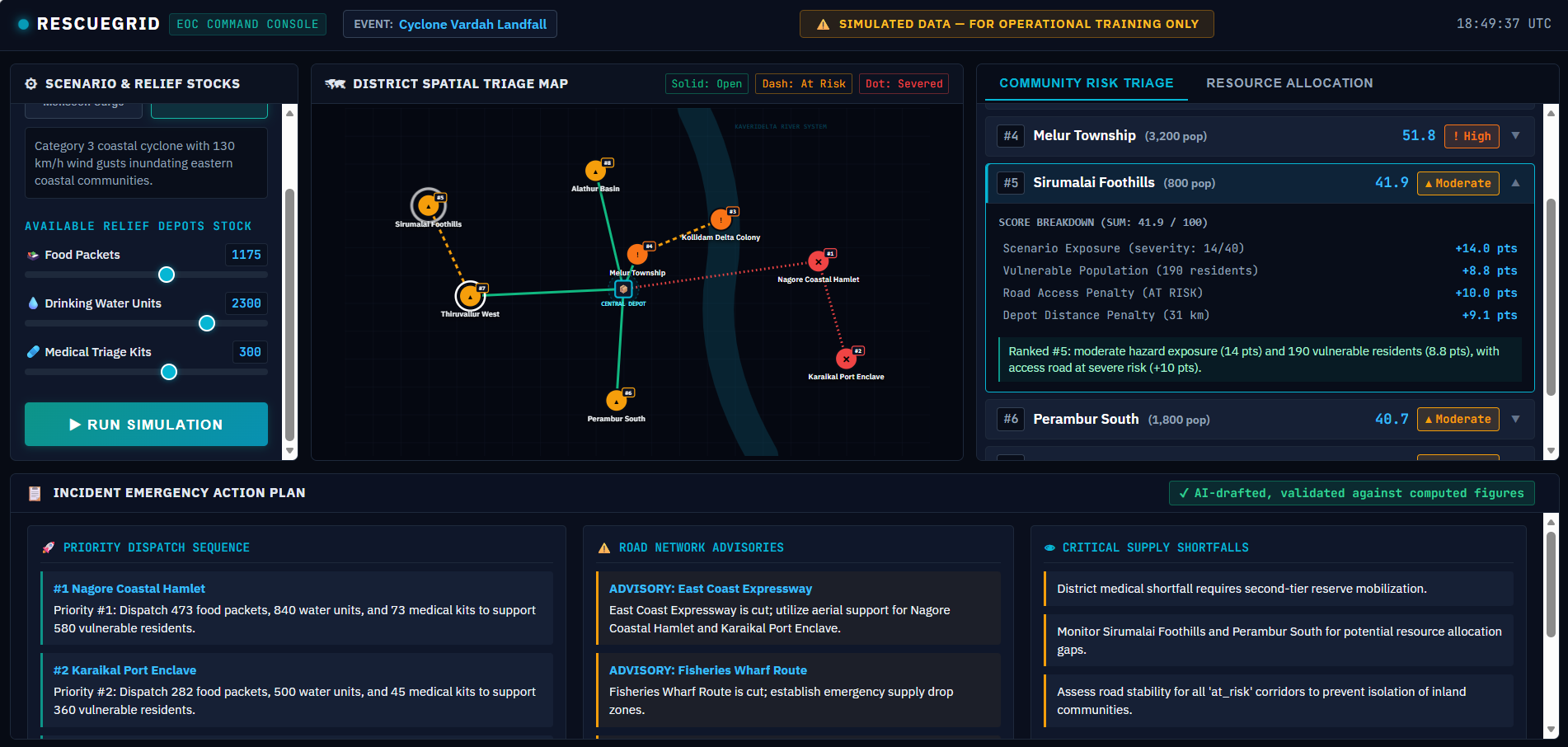
- The app scores all 8 communities and ranks them on an interactive district map, with risk shown by color, icon, and label.
- "Why this ranking?" shows exactly how many points each factor contributed to a community's score.
- Supplies are allocated in priority order. The allocation table shows needed, allocated, and unmet need per community, plus the total shortfall per resource.
- An AI-drafted action plan says what to send where first, which roads to avoid, and what to watch.
Change the scenario or halve the stock, and the map, allocation, and plan all update together.
How we built it
I built RescueGrid from an empty folder with the Devpost Learn Skill Pack in Google Antigravity. The skills interviewed me and produced scope.md, prd.md, and spec.md before any code was written. The app was then built in four verified slices, each saved as a git commit:
- Scoring, allocation, and template-plan engines with unit tests
- The command-console interface and interactive SVG map
- The triage ranking, "Why this ranking?" panel, and allocation and shortfall table
- The AI briefing through a small Node proxy, with validation and fallback
The key design choice is that math is deterministic and the AI only explains. Scoring and allocation are plain rule-based code, and the AI never decides who gets supplies or writes a quantity.
$$\text{Score} = \text{Exposure}{(0\text{–}40)} + \text{Vulnerability}{(0\text{–}30)} + \text{RoadPenalty}{(0,10,20)} + \text{DistancePenalty}{(0\text{–}10)}$$
Ties are broken by vulnerable population, then by name, so the same inputs always give the same ranking.
The AI returns a structured plan with placeholders (like {{c1.food}}) instead of numbers. Before anything is shown, the app checks that the response matches the expected structure, that every referenced community and road exists, that the deployment order follows the computed rank, and that no stray numbers appear. The app then fills in the real figures itself. If the call fails, times out, or fails validation, a template-based plan appears with a clear badge. An unvalidated plan is never shown to the operator.
Stack: vanilla JavaScript ES modules, HTML, CSS, an offline SVG map, and a zero-dependency Node server that keeps the API key off the browser. The AI is the Google Gemini API (free tier).
Challenges we ran into
- Scope. My first idea had four big features. Cutting it to one working loop was the best decision of the build.
- Making the AI trustworthy. My first plan was to scan the AI's text for wrong numbers, but a plan naturally contains numbers like "12 hours", so that check would reject good output. Switching to placeholders made invented quantities structurally impossible.
- Keeping the demo reliable. I used an offline SVG map instead of map tiles, and a template fallback so a network or API failure can't break the demo. When testing the live API under load, we hit HTTP 503 high-demand errors from the default model; we resolved this by migrating to
gemini-3.1-flash-liteand implementing automatic retry backoff in the Node server.
Accomplishments that we're proud of
- A guardrail that works by design: the AI cannot invent quantities, and the app visibly falls back instead of showing an unchecked plan. Adding
?ai=badto the URL demonstrates this on purpose. - Fully auditable scoring, where the factor points on screen always add up to the displayed score.
- A professional emergency-operations-center interface, with color-blind-safe risk indicators that use icons and labels as well as color, and a clear "Simulated Data" banner.
- Unit tests for the scoring, allocation, and validation logic, and a complete set of planning documents in the repository.
- A working end-to-end proof of concept built in an afternoon.
What we learned
- Planning before building keeps an AI agent consistent across a long build, because decisions live in documents instead of chat history.
- Decide early where AI belongs. Here it writes and explains, and deterministic code does everything that must be auditable.
- Constraining the AI's output (structured responses and placeholders) is more reliable than checking free text afterward.
- A polished, small feature set beats a large unfinished one.
What's next for RescueGrid
- Real data feeds, such as IMD forecasts and state flood data
- Multi-district coverage
- PDF export of official action plans
- A custom scenario builder
- Testing with disaster management practitioners to refine the scoring factors and weights
Note: All data is fictional and simulated. RescueGrid is a decision-support prototype for demonstration and training. It supports human officials and does not replace them.

Log in or sign up for Devpost to join the conversation.